
In this Module Exercise you will apply all the concepts you have been learning:
- Use different HTML tags.
- Structure your HTML page with Block Elements.
- Add content to your HTML page with Inline Elements.
- Go to the HTML module exercise repository in Github.
- Click on the button "Clone or download" and a window will appear:
- Click the button "Download as zip"

The starter-code folder contains an index.html file with the main structure already created. We also provide an images folder where you will find all the images you need to acomplish the exercise.
In this exercise, you will clone a Medium article. Medium is a site that contains very interesting articles of several topics, we highly recommend you to follow some of the authors if you have interest in Digital Design, JavaScript, Bitcoins, or Artificial Intelligence.
In this exercise, you will clone the 8 Things Every Person Should Do Before 8 a.m. article. This is a two-part article, where we are going to clone first of all the HTML Structure. In the second part of the exercise, we are going to style this HTML structure.
As you can see, the article is very long. We want you to get focus on the HTML structure, not in the content. In each article section, it's enough to copy-paste three paragraphs of content, not the whole content. For example, in the following section you have to add just the paragraphs in the red box:
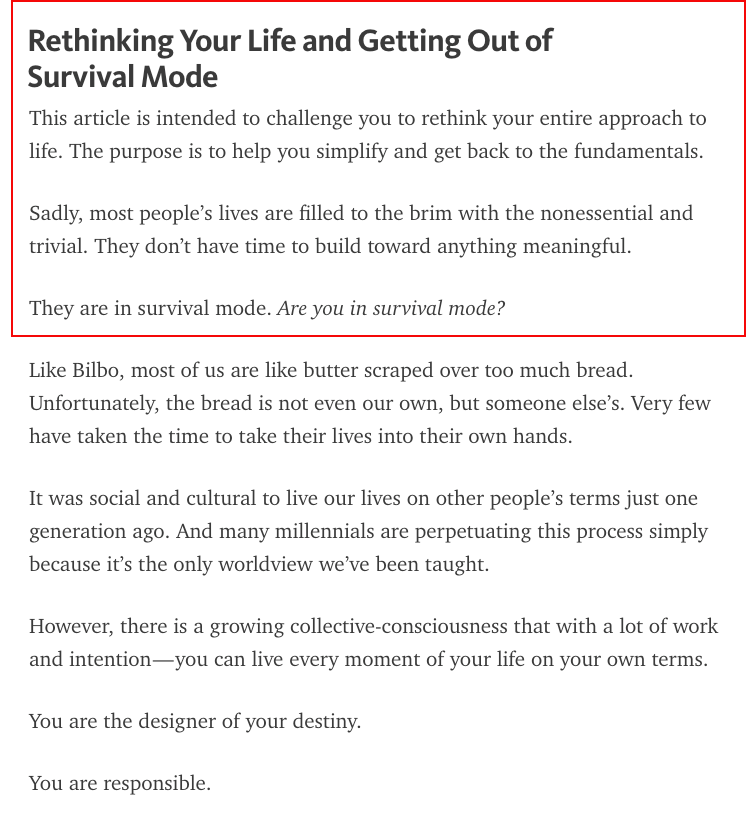
As you can see, you just have to add the section's title and the first three paragraphs. You have also to remember that you just have to add the HTML structure. So, for the image above, the result we want is the following:

As you can see, we don't have any kind of styles here, just HTML and text. The most difficult part of this exercise is try to figure out what you need to structure the article, so in the next part of the exercise you will not find too many problems while styling the article.
Our recommendation is: try to avoid thinking in the composition, just in the text and images. Try to identify the different sections, and add id's to each <div>, <section>, <article>, or <header> block elements to identify this elements. i.e.:

We could try to represent the header of the article as it follows:
<header>
  <a href="https://medium.com/">
    <img src="images/medium-logo.png" alt="Medium">
  </a>

  <a href="https://medium.com/the-mission?source=logo-c46f69768379---b230ea2a6eb8">
    <img src="images/the-mission-logo.png" alt="The Mission">
  </a>

  <a href="#">Follow</a>

  <a href="https://twitter.com/TheMissionT" target="_blank">
    <img src="images/twitter-logo.png" alt="Twitter account">
  </a>

  <a href="https://facebook.com/TheMissionInc" target="_blank">
    <img src="images/facebook-logo.png" alt="Facebook account">
  </a>

  <img src="images/search-logo.png" alt="Search">
  <img src="images/bell-logo.png" alt="Notifications">
  <div id="profile-picture"></div>
</header>
The result of this HTML code will be just plain text and images... but don't worry for that, you are going to style this page later on in another exercise :)
/Happy coding!