An Emacs package for bidirectional incremental sync of Org Mode elements with Todoist using org exactly how you normally would in Emacs Org Mode.
- CRUD1 tasks
- CRUD1 new sections
- CRUD1 new projects
- Refile tasks and sections to other sections and projects
- Collaboration with other users via assigning tasks and notifications.
Commands are automatically detected and batched by diffing the current org-todoist-file with the abstract syntax tree from a snapshot of the previous sync and nodes are updated in place using a single asynchronous request, meaning metadata, such as time tracking information, is retained.
Syncing is done using the Todoist sync API, which sends a single request for both pulling and pushing. Local changes will overwrite remote changes!
(package! org-todoist
  :recipe (:host github
           :repo "lillenne/org-todoist"
           :branch "main"
:files ("org-todoist.el")));; Sync commands and options:
(org-todoist-sync &optional ARG) ;; Perform incremental sync. With ARG, don't open buffer
(org-todoist--reset &optional ARG) ;; Full reset from Todoist. With prefix ARG (C-u):
;; - Single prefix: Don't open buffer
;; - Double prefix (C-u C-u): Delete and recreate file
;; Background sync:
(org-todoist-background-sync) ;; Start background sync at configured interval
(org-todoist-cancel-background-sync) ;; Stop background sync
(org-todoist-toggle-background-sync) ;; Toggle background sync on/offLocal changes will overwrite remote changes!
See the next section to learn the mapping rules for projects, sections, and tasks.
| Org | Todoist |
|---|---|
| Headline | Project, Section, or Task |
| Plain-text under headline | Description |
| Scheduled | Due |
| Deadline | Deadline |
| Effort OR Scheduled | Duration |
| Priority | Priority |
| Todo-state + Todo-keyword | Checked, Deleted |
| Tags (+inherited) | Labels |
| org-archive-tag | Archive projects + sections |
| Responsible UID property | Assignee |
Simply create org headlines! The corresponding Todoist types (projects, subprojects, sections, tasks, and subtasks) will be inferred from the org structure. Sections will be preferred over subprojects unless the TODOIST_TYPE property is set to PROJECT. A new subproject can be created quickly using the interactive function org-todoist-add-subproject. If a TODO item does not fall under a project, it will be assigned to the default section of the Inbox project.
| Level | Todoist Type |
|---|---|
| 1 | Project |
| 2+ | Section or Subproject |
| TODO | Task |
Updating items happens automatically when updating any headline, description, todo-state, todo-keyword4, priority, effort, tag, scheduled time / range, deadline time, or assignee OR when any project, section, or task is moved under another headline. This works with standard org commands (e.g., ~org-refile~).
When the org-todoist-delete-remote-items variable is non-nil, removing items from the org-todoist-file (via deletion or refiling) will cause them to be deleted from Todoist. Additionally, items can be deleted by changing their todo-keyword to the org-todoist-deleted-keyword.
Org tags are mapped directly to Todoist labels and support inherited tags. Note, inherited tags will also be applied directly to the child tasks on next sync.
Projects and sections can be archived in Todoist by applying the org-archive-tag to the headline. Note, you cannot archive the default section and if you do locally on your org document it will not be synced.
org-add-note and currently ([2025-01-12 Sun]) do not support editing or deletion from org mode. Within comments, other users can be notified via the org-todoist-tag-user command, which will prompt for completion of the desired user, send a request to notify them in the comment’s note_add command, and input a special markdown syntax into the comment which will property display as @<User> in the Todoist app. If you prefer to use the org link syntax and have it look funny in the Todoist app, set org-todoist-comment-tag-user-pretty to non-nil.
;; Inserts the special tag from the todoist app that formats to @User
;; & adds the user id to uids_to_notify in the request
(org-todoist-tag-user)

;; non-nil to format in org link syntax instead of markdown for better viewing in org but worse in the Todoist app
(setq org-todoist-comment-tag-user-pretty nil)(org-todoist-assign-task) ;; Prompts for user selection and changes the responsible uid property to the user's id
(org-todoist-unassign-task) ;; Removes the responsible uid property
(org-todoist-show-assignee) ;; Show assignee as an overlay next to the current task
(org-todoist-show-all-assignees) ;; Show assignees for all tasks in the buffer
(org-todoist-my-tasks &optional ARG USER) ;; View an agenda of tasks assigned to USER (defaults to current user)
;; With prefix ARG, include unassigned tasks
(org-todoist-view-user-tasks USER) ;; View tasks assigned to a specific user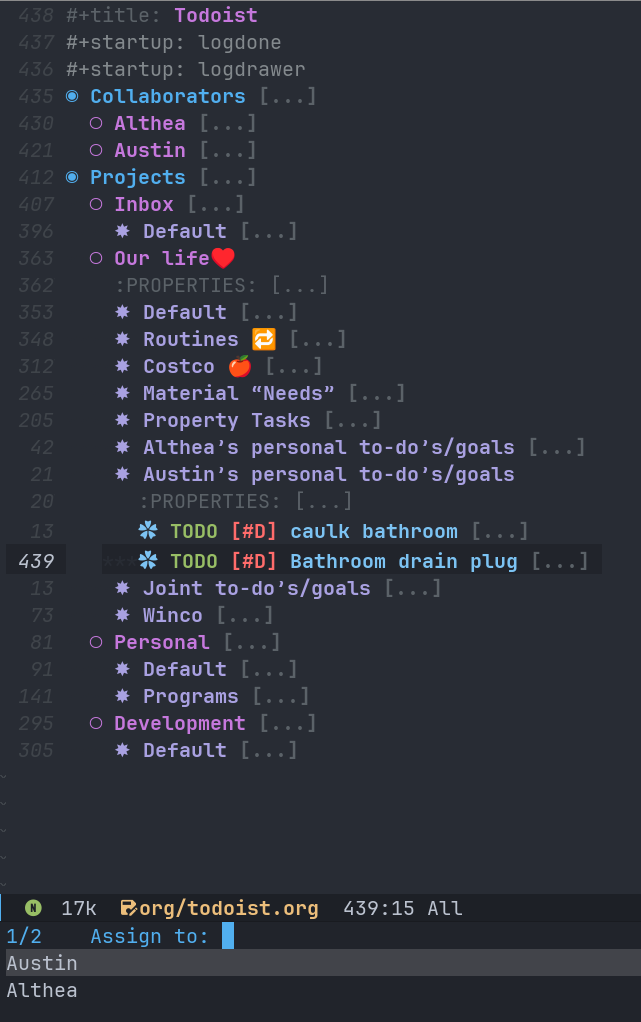
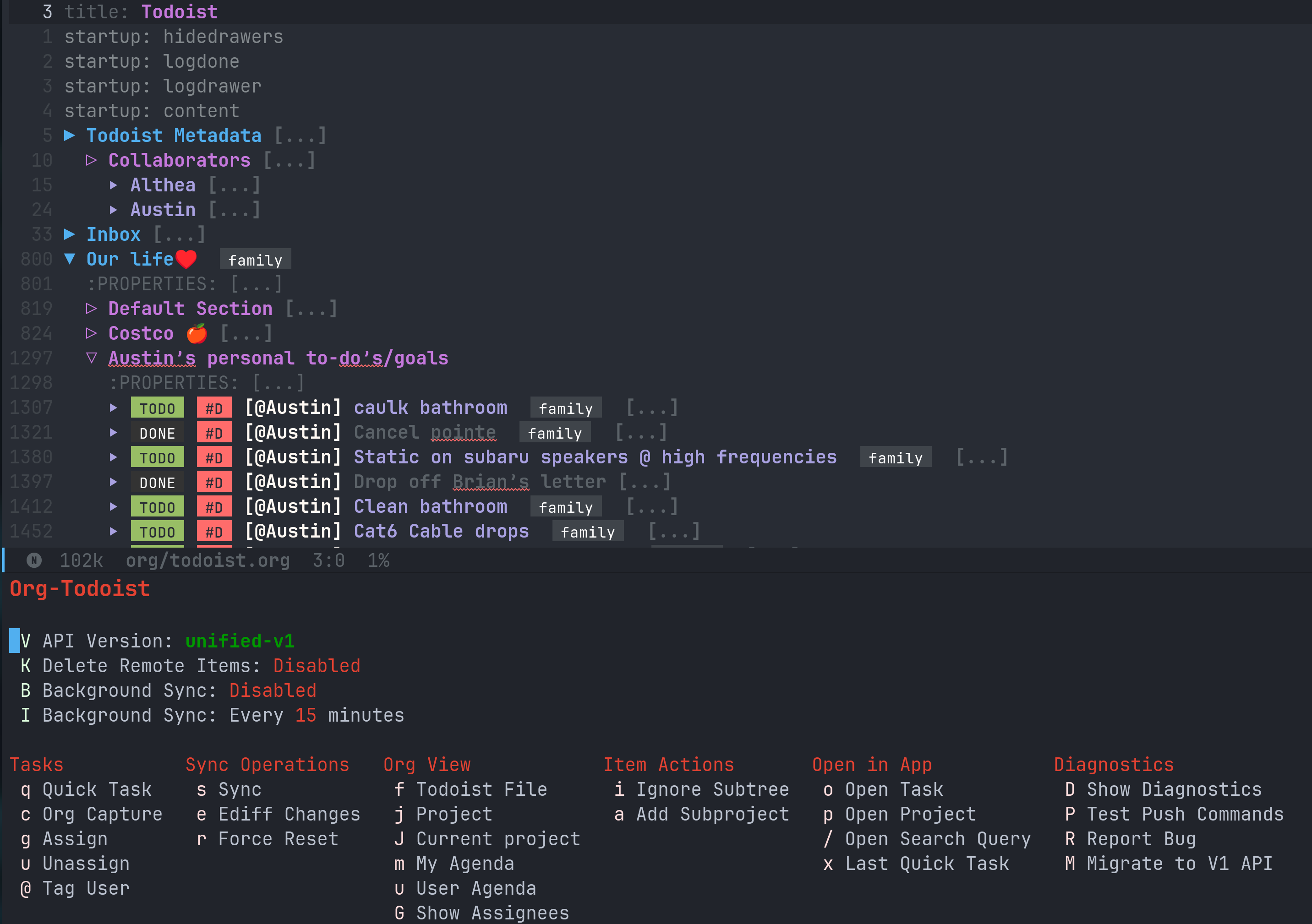
org-todoist provides an interactive transient menu interface that can be accessed via:
(org-todoist-dispatch)This menu provides easy access to all org-todoist commands and displays the current status of features like background sync and remote deletion.
(org-todoist-goto) ;; Jump to the org-todoist file
(org-todoist-jump-to-project) ;; Select and jump to a project
(org-todoist-jump-to-current-project) ;; Jump to project matching current projectile project(org-todoist-xdg-open) ;; Open current task in Todoist app
(org-todoist-xdg-open-project) ;; Open selected project in Todoist app
(org-todoist-xdg-open-search-query QUERY) ;; Open search results in Todoist app
(org-todoist-xdg-open-quickadd) ;; Open Todoist quick add panel
(org-todoist-open-last-quick-task-in-app) ;; Open the last quick-added taskOpening relies on browse-url-xdg-open.
If you’d like to keep other notes or TODOs alongside your projects and not have them synced to Todoist, you can mark a subtree as ignored by setting the TODOIST_TYPE property to IGNORED using M-x org-todoist-ignore-subtree. Any org element descendent from an ignored node will not have its changes pushed to Todoist.
Captures will automatically sync by default via the org-capture-finalize-hook. If you would like to change this behavior, run (remove-hook 'org-capture-after-finalize-hook #'org-todoist--sync-after-capture).
Captures can be run from the transient interface with default capture templates via (org-todoist-capture-task). Alternatively, one can add their own templates like in the sample below:
Sample capture templates:
(nconc org-capture-templates
       `(("s" "Todoist")
         ;; Capture a TODO directly to the inbox
         ("sq" "Inbox" entry (file+olp ,(org-todoist-file) "Inbox" ,org-todoist--default-section-name) "* TODO %?")
         ("si" "Inbox" entry (file+olp ,(org-todoist-file) "Inbox" ,org-todoist--default-section-name) "* TODO %? %^G %^{EFFORT}p \nSCHEDULED: %^t")
         ;; Capture to a specific project, section, and parent task, creating them if needed.
         ;; Also prompts for tags, effort, task assignment, scheduled, and deadline times
         ;; Projects are determined by projectile if possible, otherwise via an interactive prompt
         ("ss" "Select Project" entry (function org-todoist-find-project-and-section) "* TODO %^{What is the task} %^G %^{EFFORT}p %(org-todoist-assign-task) %(progn (org-schedule nil) nil) %(progn (org-deadline nil) nil)\n%?")
         ;; Capture a note to an ignored subtree
("sn" "Project Notes" entry (function org-todoist-project-notes) "* %?")))[X] = Implemented
[-] = WIP or implemented with caveats
[ ] = Not currently supported
- [-] Essential task items
- [-] Recurring tasks2
- [X] Quick add
- [-] Comments
- [-] Item comments
- [X] Add and pull (plain-text only)
- [ ] Sort by time added
- [ ] Update
- [ ] Delete
- [-] Notify other users
- [ ] Project comments
- [ ] Add
- [ ] Update
- [ ] Delete
- [ ] Notify other users
- [-] Item comments
- Once a task has been permanently deleted in Todoist, changing the TODO state in org will be reset back to
org-todoist-deleted-keywordon next sync. Todoist does not support reviving permanently deleted tasks. - Comments on subtasks are added to both the root task and the subtask on Todoist, which is reflected here.
- The org element API does not properly parse property drawers if anything besides is put above them (e.g. adding your description above the property drawer), so don’t do that!
NOTE: To match Todoist’s 4 priority structure, this package sets the user’s org-priority-highest org-priority-lowest and org-priority-default values.
Org Todoist requires a Todoist API token to function.
(setq org-todoist-api-token "<your-token>")Additionally, Todoist markdown lists use 4 spaces vs the default 2 spaces for org plain lists. This is compenated for by using a file-local variable in the org-todoist-file header to set org-list-indent-offset to 2 (2 base + 2 offset = Todoist’s 4). However, this means that when accessing the file for the first time, you will be prompted to allow “potentially unsafe” file-local variables. You must accept this or manually set the value otherwise this may cause sync errors.
The following commands are automatically available after installation (no require needed):
;; Sync commands
(org-todoist-sync &optional ARG) ;; Sync with Todoist. With ARG, don't open buffer after sync
(org-todoist-background-sync) ;; Start background sync at configured interval
(org-todoist-cancel-background-sync) ;; Stop background sync
(org-todoist-toggle-background-sync) ;; Toggle background sync on/off
(org-todoist-ediff-snapshot) ;; Compare current file with last synced state
(org-todoist-toggle-remote-deletion) ;; Toggle deletion of remote items

;; Task management
(org-todoist-assign-task)
(org-todoist-unassign-task)
(org-todoist-ignore-subtree)
(org-todoist-add-subproject)

;; Capture integration
(org-todoist-project-notes)
(org-todoist-find-project-and-section)

;; Diagnostics
(org-todoist-diagnose)
(org-todoist-report-bug)- Migrate your current
org-todoist-fileto conform to the new format viaorg-todoist-migrate-to-v1 - Opt in to using the new unified API v1 after migration setting the
org-todoist-api-versionvariable to'unified-v1
org-todoist-p1- Priority character for Todoist P1 (default: ?A)org-todoist-p2- Priority character for Todoist P2 (default: ?B)org-todoist-p3- Priority character for Todoist P3 (default: ?C)org-todoist-p4- Priority character for Todoist P4 (default: ?D)org-todoist-priority-default- Default priority for new tasks (default: ?D)org-todoist-user-headline- Heading title for collaborators section (default: “Collaborators”)org-todoist-metadata-headline- Heading title for metadata section (default: “Todoist Metadata”)org-todoist-tz- Timezone for date conversions (default: system timezone)org-todoist-lang- Language for natural date strings (default: “en”)org-todoist-my-id- Your Todoist user ID (auto-detected if name matches)org-todoist-use-v1-api- Use newer Todoist API v1 (default: nil)
org-todoist-show-n-levels- Fold level after sync:- nil = Don’t change folds
- 2 = Show projects
- 3 = Show sections
- 4 = Show root tasks
- 5 = Show root tasks + 1 level of subtasks
- ‘no-fold = Expand everything
- ‘todo-tree = Show todo tree (default: nil)
org-todoist-comment-tag-user-pretty- Format user mentions as org links instead of markdown (default: nil)
org-todoist-delete-remote-items- Delete items removed from org file (default: nil)org-todoist-duration-as-timestamp- Use timestamp ranges instead of EFFORT property for duration (default: nil)org-todoist-file- Todoist org filename (default: “todoist.org”)org-todoist-use-auto-reminder- Use default reminders for new tasks (default: t)org-todoist-infer-project-for-capture- Use projectile project for capture templates (default: t)org-todoist-extract-deleted- Remove deleted items from org file (default: nil)org-todoist-storage-dir- Storage directory for sync data (default: ~/.cache/org-todoist)org-todoist-command-batch-size- Maximum number of commands to send in a single sync request (default: 75)
The Todoist API has a limit of 100 commands per request. When syncing large changes, org-todoist automatically batches commands into smaller chunks to avoid hitting this limit. The batch size can be configured via org-todoist-command-batch-size (defaults to 75 due to API 503 errors at 100 during development).
org-todoist-todo-keyword- Active tasks (default: “TODO”)org-todoist-done-keyword- Completed tasks (default: “DONE”)org-todoist-deleted-keyword- Deleted tasks (default: “CANCELED”)
For troubleshooting errors, you can use the following variables and methods:
org-todoist-diagnose- Shows a pretty org-mode view of the information beloworg-todoist-report-bug- Copy the diagnostics view as GitHub flavored markdown and open the url to create a new issue.org-todoist-log-last-request- Set to non-nil to log the last outgoing request to theorg-todoist--last-requestvariableorg-todoist-log-last-response- Set to non-nil to log the last response json to theorg-todoist-sync-dirand alist toorg-todoist--last-response. Anyorg-todoist--push-test- Returns the detected diff commands.org-todoist-ediff-snapshotto see changes since the last snapshot in ediff
My wife uses Todoist and will never use Emacs.
Also: Org mode is an excellent planning and note-taking tool, but struggles in a few areas:
- Collaboration with others
- Mobile app features / availability (shoutout to Orgzly for their great android app)
- Sync between devices (I personally use Syncthing which works well, but will often have conflicts when adding from the widget)
Todoist fills these gaps and, more importantly, (again) my wife uses it.
There is currently another great integration for org-mode and todoist, but it takes a fundamentally different approach (stateless on-demand regeneration using many requests with the REST API vs stateful syncing with batched request to the sync API that can be used to track time or queried by Orgzly on mobile and buffer creation with org.el vs org-element-api).
Feel free to submit an issue or feature request! For issues, please use the inbuilt org-todoist-report-bug function. When submitting issues please see the troubleshooting section and attach the response json (or at least the error information). I’ll do my best to address issues timely and evaluate feature additions. I work full time and have two very young boys, so if there is a feature you want to add please feel free to submit a PR yourself!
My personal test API call data is included in the repo to show the API return format and help my own development but is protected with sops. If you need data for any reason, please use your own.
To test interacting with the Todoist API using curl with your own data, you can use the following commands. Note, Todoist has many great examples using curl in their API documentation.
curl https://api.todoist.com/api/v1/sync \
    -H "Authorization: Bearer <token> " \
    -d sync_token='sSK9OCkrXyWsUjMU0g6iuS05TwAKhmceWSiL7FCho_p2SRb23dpApCsv9u_P2jyidIDJqjE94dzOeB-1JnipI5wJRl01N8ZdaeTBdMUbxvWZavpF' \
    -d resource_types='["all"]'
curl https://api.todoist.com/api/v1/sync \
-H "Authorization: Bearer <token>" \
-d commands='[
{
"type": "item_complete",
"uuid": "a74bfb5c-5f1d-4d14-baea-b7415446a871",
"args": {
"id": "<task-id>"
}
}]'Things that I am not currently planning to implement (myself! you are welcome to!) due to time restrictions or it not being important to my workflow:
- File attachments
- Filters (use org agenda for this)
- Location notifications
- Updating or deleting comments
- Markdown support
- Activity log
- View options
- Templates (use org capture templates for this)
This package is not associated with, created by, or endorsed by Doist or Org
This is my first major elisp project, so I am almost certainly missing some best practices and useful tools. If you have any knowledge to share or want to contribute, please reach out, create an issue, or open a PR!
1 CRUD: create, read, update, delete.
2 Recurring tasks only support a subset of Todoist scheduling features. e.g. Todoists “every mon, fri” is not easily recreatable using org mode. These tasks should still be pulled down correctly from Todoist on next sync.
3 Assignee is a Todoist-only idea, but is supported via the Collaboration commands.
4 Changing todo-keywords only triggers an update if the todo-state changes or the keyword is the org-todoist-deleted-keyword.