This document is based on the information from this github page (https://github.com/toriato/stable-diffusion-webui-wd14-tagger#mrsmilingwolfs-model-aka-waifu-diffusion-14-tagger).
Using onnx for inference is recommended. Please install onnx with the following command:
pip install onnx==1.15.0 onnxruntime-gpu==1.17.1 The model weights will be automatically downloaded from Hugging Face.
Run the script to perform tagging.
python finetune/tag_images_by_wd14_tagger.py --onnx --repo_id <model repo id> --batch_size <batch size> <training data folder>For example, if using the repository SmilingWolf/wd-swinv2-tagger-v3 with a batch size of 4, and the training data is located in the parent folder train_data, it would be:
python tag_images_by_wd14_tagger.py --onnx --repo_id SmilingWolf/wd-swinv2-tagger-v3 --batch_size 4 ..\train_dataOn the first run, the model files will be automatically downloaded to the wd14_tagger_model folder (the folder can be changed with an option).
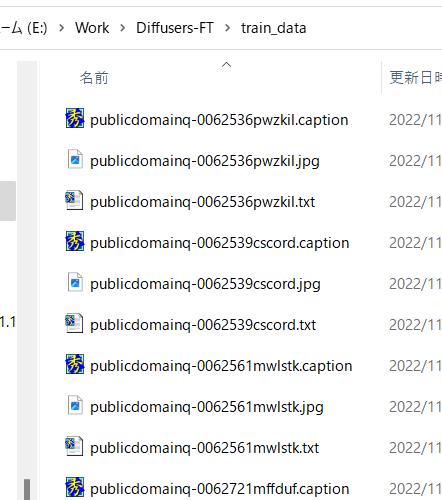
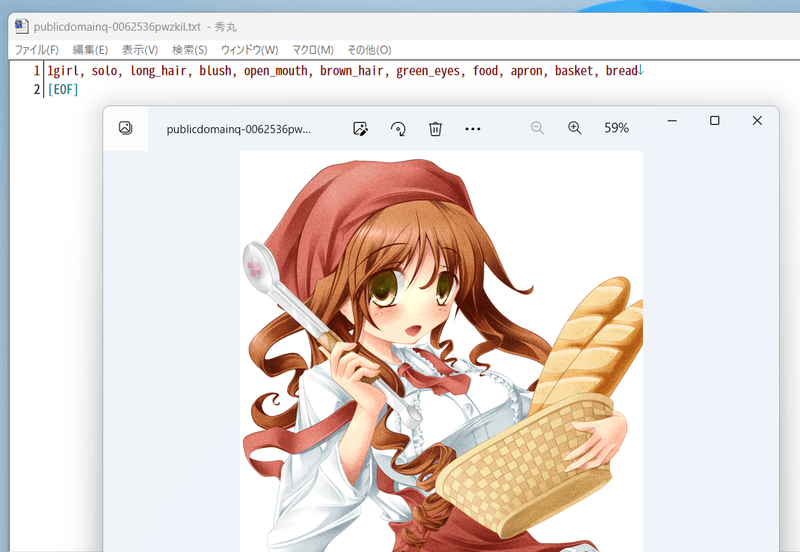
Tag files will be created in the same directory as the training data images, with the same filename and a .txt extension.
To output in the Animagine XL 3.1 format, it would be as follows (enter on a single line in practice):
python tag_images_by_wd14_tagger.py --onnx --repo_id SmilingWolf/wd-swinv2-tagger-v3
    --batch_size 4  --remove_underscore --undesired_tags "PUT,YOUR,UNDESIRED,TAGS" --recursive
    --use_rating_tags_as_last_tag --character_tags_first --character_tag_expand
    --always_first_tags "1girl,1boy"  ..\train_data
SmilingWolf's V2 and V3 models are available for use. Specify them in the format like SmilingWolf/wd-vit-tagger-v3. The default when omitted is SmilingWolf/wd-v1-4-convnext-tagger-v2.
--onnx: Use ONNX for inference. If not specified, TensorFlow will be used. If using TensorFlow, please install TensorFlow separately.--batch_size: Number of images to process at once. Default is 1. Adjust according to VRAM capacity.--caption_extension: File extension for caption files. Default is.txt.--max_data_loader_n_workers: Maximum number of workers for DataLoader. Specifying a value of 1 or more will use DataLoader to speed up image loading. If unspecified, DataLoader will not be used.--thresh: Confidence threshold for outputting tags. Default is 0.35. Lowering the value will assign more tags but accuracy will decrease.--general_threshold: Confidence threshold for general tags. If omitted, same as--thresh.--character_threshold: Confidence threshold for character tags. If omitted, same as--thresh.--recursive: If specified, subfolders within the specified folder will also be processed recursively.--append_tags: Append tags to existing tag files.--frequency_tags: Output tag frequencies.--debug: Debug mode. Outputs debug information if specified.
--model_dir: Folder to save model files. Default iswd14_tagger_model.--force_download: Re-download model files if specified.
--remove_underscore: Remove underscores from output tags.--undesired_tags: Specify tags not to output. Multiple tags can be specified, separated by commas. For example,black eyes,black hair.--use_rating_tags: Output rating tags at the beginning of the tags.--use_rating_tags_as_last_tag: Add rating tags at the end of the tags.--character_tags_first: Output character tags first.--character_tag_expand: Expand character tag series names. For example, split the tagchara_name_(series)intochara_name, series.--always_first_tags: Specify tags to always output first when a certain tag appears in an image. Multiple tags can be specified, separated by commas. For example,1girl,1boy.--caption_separator: Separate tags with this string in the output file. Default is,.--tag_replacement: Perform tag replacement. Specify in the formattag1,tag2;tag3,tag4. If using,and;, escape them with\.
For example, specifyaira tsubase,aira tsubase (uniform)(when you want to train a specific costume),aira tsubase,aira tsubase\, heir of shadows(when the series name is not included in the tag).
When using tag_replacement, it is applied after character_tag_expand.
When specifying remove_underscore, specify undesired_tags, always_first_tags, and tag_replacement without including underscores.
When specifying caption_separator, separate undesired_tags and always_first_tags with caption_separator. Always separate tag_replacement with ,.