The Memento Design Pattern allows you to save historical states of an object and restore the object back from the historical states. As your application is progressing, you may want to save checkpoints in your application and restore back to those checkpoints later. An example are the checkpoints saved in a video game where the user is allowed to go back to the stages that they have already conquered. Another example are the undo operations in a word processing application.
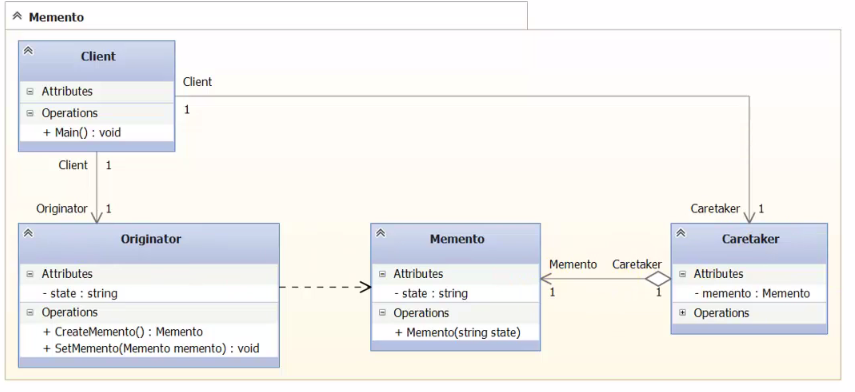
Let’s look at the UML of the memento pattern first, then we will look at some code to see how it works. Below is the UMLof the Memento Design Pattern:

-
The state variable contains information that represents the state of the Originator object. This is the variable that we save and restore.
-
The CreateMemento method is used to save the state of the Originator. It creates a Memento object by saving the state variable into the Memento object and return it. This is for recording the state of the Originator.
-
The SetMemento method restores the Originator by accepting a Memento object, unpackage it, and sets its state variable using the state variable from the Memento. This is for restoring the state of the Originator using the information that was previously saved in the Memento.
- The Memento class stores the historical information of the Originator. The information is stored in its state variable.
- The Caretaker class manages the list of Memento. This is the class for the client code to access.
- The key to the Memento Design Pattern is that the client code will never access the Memento object, all of the interactions are done through the Caretaker class. The client code does not need to be concerned about how the states are stored and retrieved.
namespace Man_and_Robot
{
    internal class Man
    {
        public string Clothes { get; internal set; }

        public Backpack Undress()
        {
            return new Backpack(Clothes);
        }

        public void Dress(Backpack backpack)
        {
            Clothes = backpack.Contents;
        }
    }

    internal class Robot
    {
        public Backpack Backpack { get; internal set; }
    }

    public class Backpack
    {
        public Backpack(string contents)
        {
            Contents = contents;
        }

        public string Contents { get; internal set; }
    }
}

//Main


static void Main(string[] args)
{
    var Van = new Man();                  // it's me ))

    var armRobot = new Robot();           //this is my robot

    Van.Clothes = "Short,Sneakers,Jeans"; //I dress it up
    armRobot.Backpack = Van.Undress();
    Console.WriteLine(Van.Clothes);
    Van.Clothes = "Sporting short";       //I dress it up
    Console.WriteLine(Van.Clothes);
    Van.Dress(armRobot.Backpack);
}
This code you can view her