In this example, the client connects to the server by a
WebSocket. They then follow a
silly protocol: if the client sends "Hello?", the server responds with
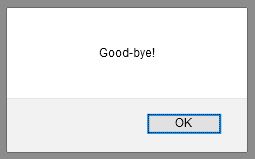
"Good-bye!". The client displays the message in an alert box:
let home =
  <html>
  <body>
    <script>

    var socket = new WebSocket("ws://" + window.location.host + "/websocket");

    socket.onopen = function () {
      socket.send("Hello?");
    };

    socket.onmessage = function (e) {
      alert(e.data);
    };

    </script>
  </body>
  </html>

let () =
  Dream.run
  @@ Dream.logger
  @@ Dream.router [

    Dream.get "/"
      (fun _ ->
        Dream.html home);

    Dream.get "/websocket"
      (fun _ ->
        Dream.websocket (fun websocket ->
          match%lwt Dream.receive websocket with
          | Some "Hello?" ->
            Dream.send websocket "Good-bye!"
          | _ ->
            Dream.close_websocket websocket));

  ]
$ cd example/k-websocket
$ opam install --deps-only --yes .
$ dune exec --root . ./websocket.exeVisit http://localhost:8080 to get the whole exchange started!
If you are running under HTTPS, be sure to use wss:// for the protocol scheme,
rather than ws://, on the client.
You don't have to call
Dream.close_websocket
when you are done with the WebSocket.
Dream.websocket calls it
automatically when your callback's promise resolves or is rejected with an
exception. This example calls Dream.close_websocket in one branch just
because there is nothing else to do.
See WebSockets in the API docs.
Last step:
l-httpsenables HTTPS.
See also:
w-chatis a simple WebSocket-based chat application.w-live-reloaduses WebSockets to implement live reloading.w-graphql-subscriptiondoes not show a WebSocket directly, but shows GraphQL subscriptions, which are implemented over WebSockets.