

A zero-dependency networking solution for building modern and secure iOS applications.






Multi-Environment setup 🔸 Model deserialization with Codables 🔸 Choose the response type you want: Codable, UIImage, Data or String 🔸 UIKit/SwiftUI helpers for downloading remote images 🔸 Routers 🔸 Transformers (convert rest models to domain models) 🔸 Error handling 🔸 Mock responses 🔸 Certificate pinning 🔸 Flexible configuration 🔸 Middlewares 🔸 File/Data Upload/Download 🔸 Pretty printed debug information
- Installation
- Demo Application
- Usage
- Queue Hooks
- Error Handling
- Image Helpers
- Middlewares
- Debug Logging
You can install TermiNetwork with one of the following ways...
Add the following line to your Podfile and run pod install in your terminal:
pod 'TermiNetwork', '~> 1.0.0'Add the following line to your Carthage and run carthage update in your terminal:
github "billp/TermiNetwork" ~> 1.0.0Go to File > Swift Packages > Add Package Dependency and add the following URL :
https://github.com/billp/TermiNetwork
To see all the features of TermiNetwork in action, download the source code and run the TermiNetworkExamples scheme.
Let's say you have the following Codable model:
struct Todo: Codable {
   let id: Int
   let title: String
}
To construct a request which adds a new todo using a REST API, do the following:
let params = ["title": "Go shopping."]
let headers = ["x-auth": "abcdef1234"]

Request(method: .post,
        url: "https://myweb.com/api/todos",
        headers: headers,
        params: params).start(responseType: Todo.self,
                              onSuccess: { todo in
    print(todo)
}) { (error, data) in
    print(error)
}One of the following supported HTTP methods:
.get, .head, .post, .put, .delete, .connect, .options, .trace or .patch
One of the following supported response types
JSON.self, Codable.self (subclasses), UIImage.self, Data.self or String.self
A callback that returns an object of the given type (specified in responseType parameter).
a callback that returns a Error and optionally the response Data.
The following example uses a custom queue that specifies the maxConcurrentOperationCount (how many requests run in parallel) and a configuration object. To see the full list of available configuration properties, take a look at Configuration properties in documentation.
let configuration = Configuration(
    cachePolicy: .useProtocolCachePolicy,
    timeoutInterval: 30,
    requestBodyType: .JSON
)

let params = ["title": "Go shopping."]
let headers = ["x-auth": "abcdef1234"]

Request(method: .post,
        url: "https://myweb.com/todos",
        headers: headers,
        params: params,
        configuration: configuration).start(queue: myQueue,
                                            responseType: String.self,
                                            onSuccess: { response in
    print(response)
}) { (error, data) in
    print(error)
}
The request above uses a custom queue myQueue with a failure mode of value .continue (default), which means that the queue continues its execution if a request fails.
The complete and recommended usage of TermiNetwork library consists of creating your environments and define your own routers.
Create a swift class that implements the EnvironmentProtocol and define your environments. See bellow for an example:
enum Env: EnvironmentProtocol {
    case localhost
    case dev
    case production

    func configure() -> Environment {
        let configuration = Configuration(cachePolicy: .useProtocolCachePolicy,
                                          timeoutInterval: 30,
                                          requestBodyType: .JSON)
        switch self {
        case .localhost:
            return Environment(scheme: .https,
                               host: "localhost",
                               port: 8080,
                               configuration: configuration)
        case .dev:
            return Environment(scheme: .https,
                               host: "mydevserver.com",
                               suffix: .path(["v1"]),
                               configuration: configuration)
        case .production:
            return Environment(scheme: .http,
                               host: "myprodserver.com",
                               suffix: .path(["v1"]),
                               configuration: configuration)
        }
    }
}
Optionally you can pass a configuration object to make all requests inherit the given configuration settings.
The following code creates a TodosRoute enumeration with all the required routes in order to create the requests later.
enum TodosRoute: RouteProtocol {
    // Define your routes
    case list
    case show(id: Int)
    case add(title: String)
    case remove(id: Int)
    case setCompleted(id: Int, completed: Bool)

    // Set method, path, params, headers for each route
    func configure() -> RouteConfiguration {
        let configuration = Configuration(requestBodyType: .JSON,
                                          headers: ["x-auth": "abcdef1234"])

        switch self {
        case .list:
            return RouteConfiguration(method: .get,
                                      path: .path(["todos"]), // GET /todos
                                      configuration: configuration)
        case .show(let id):
            return RouteConfiguration(method: .get,
                                      path: .path(["todo", String(id)]), // GET /todos/[id]
                                      configuration: configuration)
        case .add(let title):
            return RouteConfiguration(method: .post,
                                      path: .path(["todos"]), // POST /todos
                                      params: ["title": title],
                                      configuration: configuration)
        case .remove(let id):
            return RouteConfiguration(method: .delete,
                                      path: .path(["todo", String(id)]), // DELETE /todo/[id]
                                      configuration: configuration)
        case .setCompleted(let id, let completed):
            return RouteConfiguration(method: .patch,
                                      path: .path(["todo", String(id)]), // PATCH /todo/[id]
                                      params: ["completed": completed],
                                      configuration: configuration)
        }
    }
}
You can optionally pass a configuration object to specify settings for each route.
Use Router instance by specializing it with TodosRoute to create and execute the request:
Router<TodosRoute>().request(for: .add(title: "Go shopping!"))
    .start(responseType: Todo.self,
           onSuccess: { todo in
    // do something with todo
}) { (error, data) in
    // show error
}You can define closures that run before and/or after a request execution in a queue. The following hooks are available:
Queue.shared.beforeAllRequestsCallback = {
    // e.g. show progress loader
}

Queue.shared.afterAllRequestsCallback = { completedWithError in
    // e.g. hide progress loader
}

Queue.shared.beforeEachRequestCallback = { request in
    // do something with request
}

Queue.shared.afterEachRequestCallback = { request, data, urlResponse, error
    // do something with request, data, urlResponse, error
}
For more information take a look at Queue in documentation.
TermiNetwork provides its own error types (Error) for all the possible cases. Those errors are typically returned by onFailure callbacks from requests. You can use the localizedDescription property to get a localized error message.
To see all the available cases, please visit at Error in documentation.
Router<TodosRoute>().request(for: .add(title: "Go shopping!"))
            .start(responseType: Todo.self,
   onSuccess: { todo in
    // do something with todo
   },
   onFailure: { (error, data) in
    switch error {
    case .notSuccess(let statusCode):
        debugPrint("Status code " + String(statusCode))
        break
    case .networkError(let error):
        debugPrint("Network error: " + error.localizedDescription)
        break
    case .cancelled(let error):
        debugPrint("Request cancelled with error: " + error.localizedDescription)
        break
    default:
        debugPrint("Error: " + error.localizedDescription)
    }
})TermiNetwork allows you to define your own global error handlers, which means you can have a catch-all error closure to do the handling. To create a global error handler you have to create a class that implements the ErrorHandlerProtocol.
class GlobalNetworkErrorHandler: ErrorHandlerProtocol {
    func requestFailed(withResponse response: Data?, error: Error, request: Request) {
        if case .networkError(let error) = error {
	        /// Do something with the network error
        }
    }

    func shouldHandleRequestFailure(withResponse response: Data?, error: Error, request: Request) -> Bool {
        return true
    }

    // Add default initializer
    required init() { }
}
Then you have to pass them to your configuration object:
let configuration = Configuration()
configuration.errorHandlers = [GlobalNetworkErrorHandler.self]TermiNetwork provides two different helpers for setting remote images:
- Example with URL
var body: some View {
	TermiNetwork.Image(withURL: "https://example.com/path/to/image.png",
	                   defaultImage: UIImage(named: "DefaultThumbImage"))
}- Example with Request
var body: some View {
	TermiNetwork.Image(withRequest: Router<CityRoute>().request(for: .image(city: city)),
                       defaultImage: UIImage(named: "DefaultThumbImage"))
}- Example with URL
let imageView = UIImageView() // or NSImageView (macOS), or WKInterfaceImage (watchOS)
imageView.tn_setRemoteImage(url: sampleImageURL,
                            defaultImage: UIImage(named: "DefaultThumbImage"),
                            preprocessImage: { image in
    // Optionally pre-process image and return the new image.
    return image
}, onFinish: { image, error in
    // Optionally handle response
})- Example with Request and Route
let imageView = UIImageView() // or NSImageView (macOS), or WKInterfaceImage (watchOS)
imageView.tn_setRemoteImage(request: Router<CityRoute>().request(for: .thumb(withID: "3125")),
                            defaultImage: UIImage(named: "DefaultThumbImage"),
                            preprocessImage: { image in
    // Optionally pre-process image and return the new image.
    return image
}, onFinish: { image, error in
    // Optionally handle response
})With Middlewares you are able to modify headers, params and response before they reach the success callback/failure callbacks. You can create your own middleware by implementing the RequestMiddlewareProtocol. Please see CryptoMiddleware.swift for an example middleware implementation.
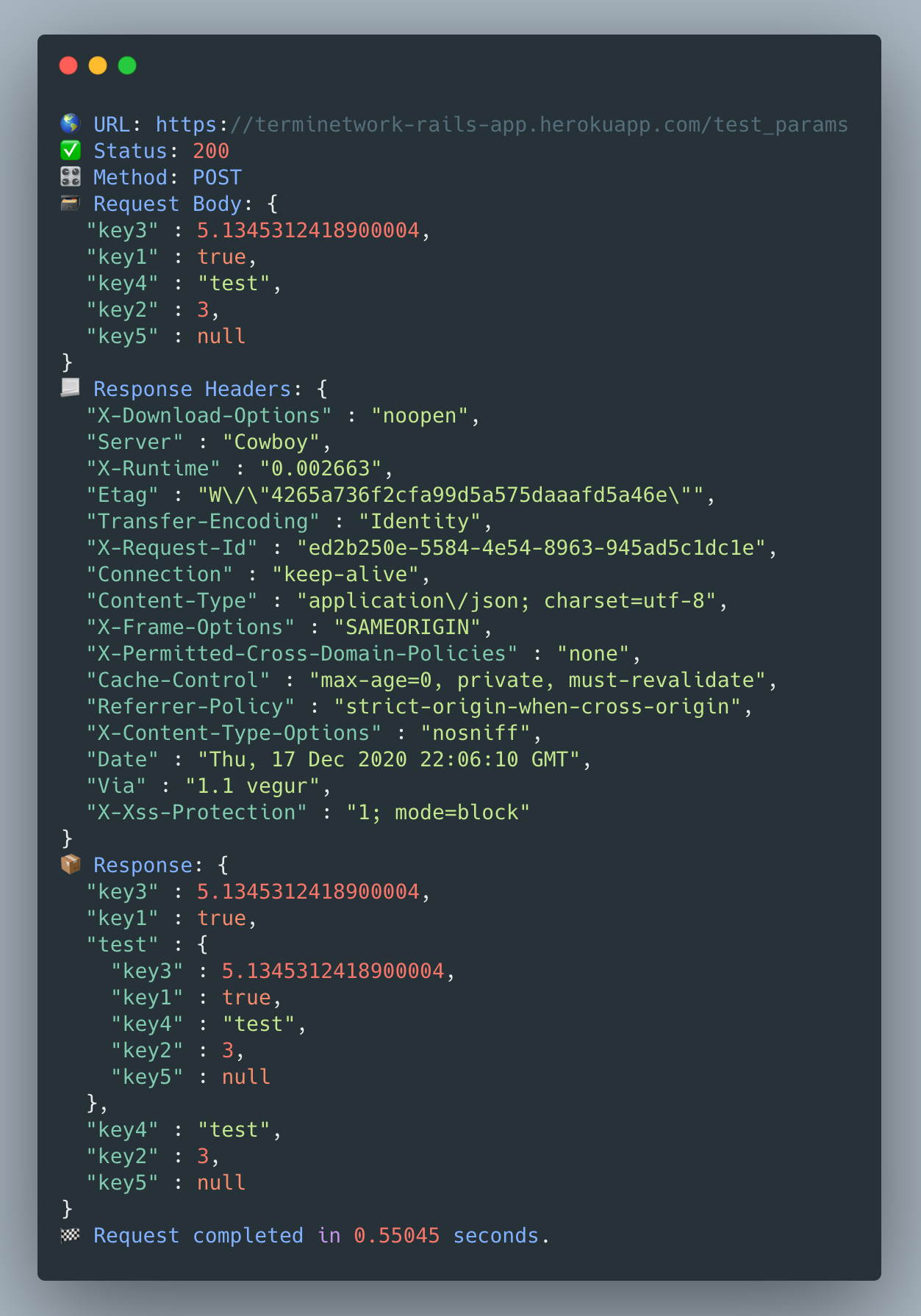
You can enable the debug logging by setting the verbose to true in your configuration
let configuration = Configuration()
configuration.verbose = true
And you will see a beautiful pretty-printed debug output in debug window.
To run the tests open the Xcode Project > TermiNetwork scheme, select Product -> Test or simply press ⌘U on keyboard.
Alex Athanasiadis, alexanderathan@gmail.com
TermiNetwork is available under the MIT license. See the LICENSE file for more info.