


Create agents for WhatsApp using Azure Functions.
var builder = FunctionsApplication.CreateBuilder(args);
builder.ConfigureFunctionsWebApplication();

builder.Services.AddWhatsApp<MyWhatsAppHandler>();

builder.Build().Run();
Instead of providing an IWhatsAppHandler implementation, you can also
register an inline handler using minimal API style:
builder.Services.AddWhatsApp(message =>
{
    // MessageType: Content | Error | Interactive | Status
    Console.WriteLine($"Got message type {message.Type}");
    switch (message)
    {
        case ContentMessage content:
            // ContentType = Text | Contact | Document | Image | Audio | Video | Location | Unknown (raw JSON)
            Console.WriteLine($"Got content type {content.Content.Type}");
            break;
        case ErrorMessage error:
            Console.WriteLine($"Error: {error.Error.Message} ({error.Error.Code})");
            break;
        case InteractiveMessage interactive:
            Console.WriteLine($"Interactive: {interactive.Button.Title} ({interactive.Button.Id})");
            break;
        case StatusMessage status:
            Console.WriteLine($"Status: {status.Status}");
            break;
    }
    return Task.CompletedTask;
});
If the handler needs additional services, they can be provided directly
as generic parameters of the UseWhatsApp method, such as:
builder.Services.AddWhatsApp<IWhatsAppClient, ILogger<Program>>(async (client, logger, message) =>
{
    logger.LogInformation($"Got message type {message.Type}");
    // Reply to an incoming content message, for example.
    if (message is ContentMessage content)
        await client.ReplyAsync(message, $"☑️ Got your {content.Content.Type}");
}
You can also specify the parameter types in the delegate itself and avoid the generic parameters:
builder.Services.AddWhatsApp(async (IWhatsAppClient client, ILogger<Program> logger, Message message) =>The provided IWhatsAppClient provides a very thin abstraction allowing you to send
arbitrary payloads to WhatsApp for Business:
public interface IWhatsAppClient
{
    /// Payloads from https://developers.facebook.com/docs/whatsapp/cloud-api/reference/messages
    Task SendAync(string from, object payload);
}
Extensions methods for this interface take care of simplifying usage for some common scenarios, such as reacting to a message and replying with plain text:
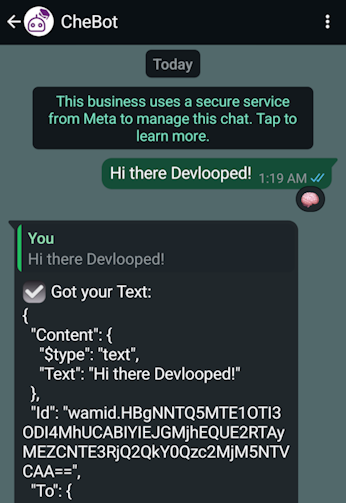
if (message is ContentMessage content)
{
    await client.ReactAsync(message, "🧠");
    // simulate some hard work at hand, like doing some LLM-stuff :)
    await Task.Delay(2000);
    var json = JsonSerializer.Serialize(content, options);
    await client.ReplyAsync(message, $"☑️ Got your {content.Content.Type}:\r\n{json}");
}
The above code would render as follows in WhatsApp:
You need to register an app in the Meta App Dashboard.
The app must then be configured to use the WhatsApp Business API, and the webhook and
verification token (an arbitrary value) must be set up in the app settings under WhatsApp.
The webhook URL is /whatsapp under your Azure Functions app.
Make sure you subscribe the webhook to the messages field, with API version v22.0 or later.
Configuration on the Azure Functions side is done via the
ASP.NET options pattern
and the MetaOptions type. When you call UseWhatsApp, the options will be bound by
default to the Meta section in the configuration. You can also configure it programmatically
as follows:
builder.Services.Configure<MetaOptions>(options =>
{
    options.VerifyToken = "my-webhook-1234";
    options.Numbers["12345678"] = "asff=";
});
Via configuration:
{
  "Meta": {
    "VerifyToken": "my-webhook-1234",
    "Numbers": {
      "12345678": "asff="
    }
  }
}
The Numbers dictionary is a map of WhatsApp phone identifiers and the
corresponding access token for it. To get a permanent access token for
use, you'd need to create a system user
with full control permissions to the WhatsApp Business API (app).
IWhatsAppHandler instances can be layered to form a pipeline of components, each
contributing unique capabilities. These components may originate from Devlooped.WhatsApp,
external NuGet libraries, or custom implementations. This mechanism enables flexible
enhancement of the WhatsApp handler's functionality to suit specific requirements.
Below is an example that wraps a WhatsApp handler with logging and OpenTelemetry tracing:
var builder = FunctionsApplication.CreateBuilder(args);
builder.ConfigureFunctionsWebApplication();

builder.Services.AddWhatsApp<MyWhatsAppHandler>()
    .UseOpenTelemetry(builder.Environment.ApplicationName)
    .UseLogging();

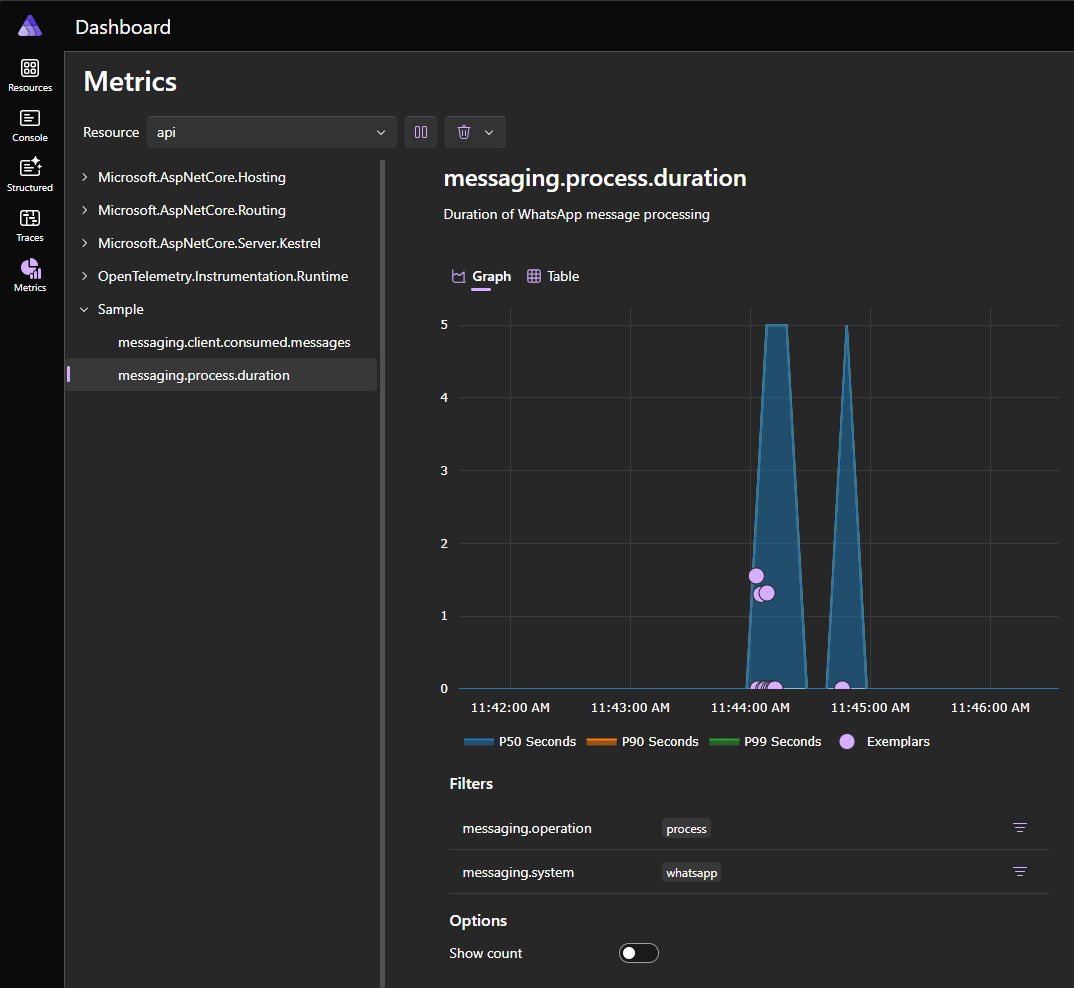
builder.Build().Run();The configurable built-in support for OpenTelemetry shown above allows tracking of key metrics such as message processing time and the number of messages processed.
This is a rendering of the telemetry data in Aspire in the sample app provided in this repository:
In order to quickly and efficiently process incoming messages, the library uses Azure Storage Queues to queue incoming messages from WhatsApp, which provides a reliable and scalable way to handle incoming messages. It also uses Azure Table Storage to detect duplicate messages and avoid processing the same message multiple times.
If QueueServiceClient and TableServiceClient are registered in the DI container
before invoking UseWhatsApp, the library will automatically use them. Otherwise,
it will register both services using the AzureWebJobsStorage connection string,
therefore sharing storage with the Azure Functions runtime.
We offer this project under a dual licensing model, tailored to the needs of commercial distributors and open-source projects.
For open-source projects and free software developers:
If you develop free software (FOSS) and want to leverage this project, the open-source version under AGPLv3 is ideal. If you use a FOSS license other than AGPLv3, Devlooped offers an exception, allowing usage without requiring the entire derivative work to fall under AGPLv3, under certain conditions.
See AGPLv3 and Universal FOSS Exception.
For OEMs, ISVs, VARs, and other commercial users:
If you use this project and distribute or host commercial software without sharing the code under AGPLv3, you must obtain a commercial license from Devlooped. Alternatively, you can sponsor on GitHub Sponsors at the AGPLv3 tier or above per developer, which grants you a commercial license for the duration of the sponsorship. You can sponsor through each individual developer's account or through your GitHub organization.