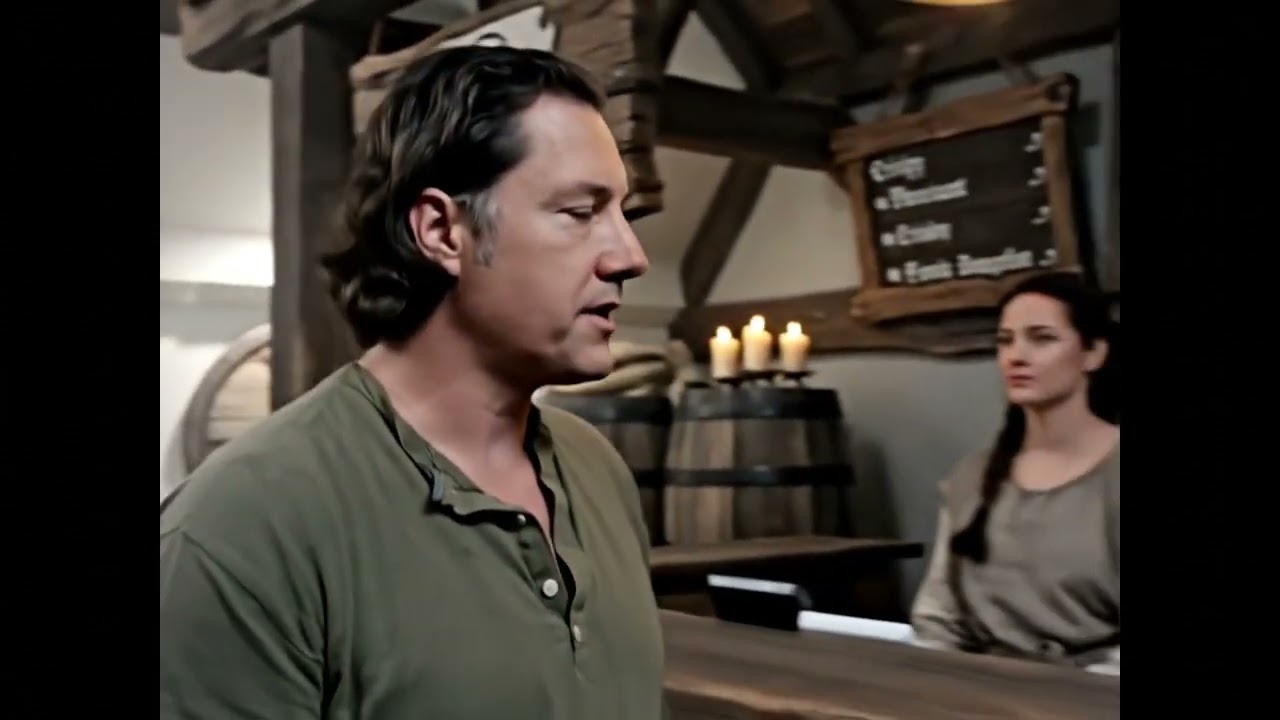
A person orders crispy pheasant from a medieval tavern, generated entirely with AI using their face and voice.
Cameo is an end-to-end AI video generation pipeline that creates personalized videos using your face and voice. Inspired by the celebrity video platform Cameo, this project combines cutting-edge AI technologies to generate custom videos in any scenario you can imagine.
- 📸 Capture Your Face - Take 3 photos (left, center, right angles) using your webcam
- 🎤 Record Your Voice - Record a 10-second voice sample
- ✨ Generate Magic - Enter a prompt describing any scenario
- 🎬 Get Your Video - Receive a fully generated video with your face and cloned voice in ~70 seconds
- Face Detection: MediaPipe Face Mesh (468 landmark points)
- Video Generation: Google Veo 3 (
veo-3.0-generate-001) - Voice Cloning: ElevenLabs Instant Voice Cloning (IVC)
- Speech Synthesis: ElevenLabs Speech-to-Speech API
- Frontend: Next.js 15, React, TypeScript, Tailwind CSS
- Audio Processing: FFmpeg
✅ Browser-based face capture with real-time head pose detection
✅ Automatic aspect ratio detection (landscape/portrait)
✅ 10-second voice cloning with high-quality reproduction
✅ Complex scene generation (medieval taverns, space stations, etc.)
✅ Perfect audio-video synchronization
✅ ~70 second total generation time
✅ Character consistency across different scenarios
- Node.js 18+ and npm
- FFmpeg installed on your system
- Google GenAI API key (Get one here)
- ElevenLabs API key (Get one here)
-
Clone the repository
cd /path/to/your/projects
git clone <your-repo-url>
cd cameo
-
Install dependencies
npm install
-
Install FFmpeg (if not already installed)
# macOS
brew install ffmpeg

# Ubuntu/Debian
sudo apt-get install ffmpeg

# Windows
# Download from https://ffmpeg.org/download.html
-
Configure environment variables
Create a
.env.localfile in thecameo/directory:GOOGLE_GENAI_API_KEY=your_google_api_key_here ELEVENLABS_API_KEY=your_elevenlabs_api_key_here
-
Start the development server
npm run dev
-
Open your browser
Navigate to http://localhost:3000
- Allow camera access when prompted
- Position your face in the frame
- The app will automatically capture 3 angles:
- Left: Turn your head left (~15° yaw)
- Center: Look straight at the camera
- Right: Turn your head right (~15° yaw)
- Each capture requires 2.5 seconds of stability
- You can recapture any angle by returning to that position
- Allow microphone access when prompted
- Click the red microphone button to start recording
- Speak naturally for up to 10 seconds
- The recording will auto-stop after 10 seconds
- Preview your recording and re-record if needed
- Enter a creative prompt describing the scenario
- Include dialogue in your prompt for best results
- Example prompts:
I push open the heavy wooden doors of a medieval tavern and order crispy pheasant with honeyed parsnips, speaking enthusiastically to the tavern keeper. I'm a astronaut on a space station, looking out at Earth through a window, and I say: "The view from up here never gets old!" I'm a news anchor at a desk, saying: "Breaking news! Scientists have discovered pizza grows on trees!" - Click "Generate My Video"
- Wait ~70 seconds for the magic to happen
- Download your personalized video!
User Input (3 photos + audio + prompt)
    ↓
Voice Training (ElevenLabs IVC) → voiceId
    ↓
Video Generation (Veo 3) → 8-second video with native audio
    ↓
Audio Extraction (FFmpeg) → audio.mp3
    ↓
Audio Replacement (Speech-to-Speech) → cloned_audio.mp3
    ↓
Video Recombination (FFmpeg) → final_video.mp4
    ↓
Final Video with Your Face & Cloned Voice ✨
- Voice Training: ~5-10 seconds
- Veo 3 Generation: ~60-65 seconds
- Audio Swap: ~3 seconds
- Total: ~70 seconds per video
POST /api/generate-video- Unified video generation pipelinePOST /api/train-voice- Voice cloning (standalone testing)POST /api/swap-audio- Audio replacement (standalone testing)POST /api/save-test-data- Save captures for debuggingGET /api/verify-test-data- Verify saved test data
cameo/
├── src/
│   ├── app/
│   │   ├── api/                    # API routes
│   │   │   ├── generate-video/     # Main video generation endpoint
│   │   │   ├── train-voice/        # Voice cloning endpoint
│   │   │   └── swap-audio/         # Audio replacement endpoint
│   │   ├── page.tsx                # Main app page (3-step workflow)
│   │   └── layout.tsx              # Root layout
│   ├── components/
│   │   ├── FaceCapture.tsx         # Face capture UI
│   │   └── VoiceRecording.tsx      # Voice recording UI
│   ├── hooks/
│   │   ├── useFaceDetection.ts     # MediaPipe face detection logic
│   │   └── useVoiceRecording.ts    # Audio recording logic
│   └── lib/
│       ├── mediapipe.ts            # MediaPipe initialization
│       └── video-pipeline.ts       # FFmpeg & ElevenLabs helpers
├── test-data/                      # Saved test captures
├── tmp/                            # Temporary files during generation
├── assets/                         # Demo videos & documentation
├── NOTES.md                        # Comprehensive development notes
└── README.md                       # This file
- Ensure you're using HTTPS or localhost (camera API requires secure context)
- Check browser permissions (allow camera access)
- Try a different browser (Chrome/Edge recommended)
- Check browser permissions (allow microphone access)
- Ensure you're using HTTPS or localhost
- Safari may have compatibility issues - use Chrome/Edge
- Verify API keys are correct in
.env.local - Check API quota hasn't been exceeded
- Review console logs for specific error messages
- Try again during off-peak hours (Veo 3 can be slow during high demand)
- Verify FFmpeg is installed:
ffmpeg -version - Ensure FFmpeg is in your PATH
- Check disk space in
tmp/directory
- Ensure good lighting and clear face visibility
- Hold position steady for full 2.5 seconds
- Adjust yaw angle thresholds if needed (current: ±15°)
Per video:
- ElevenLabs Voice Training: ~10 credits ($0.10)
- ElevenLabs Speech-to-Speech: ~5-10 credits ($0.05-0.10)
- Google Veo 3 Generation: Variable (check pricing)
Estimated total: $1.50-6.00 per video
For comprehensive development notes, implementation details, and troubleshooting history, see NOTES.md.
Key topics covered:
- Initial setup and MediaPipe SSR issues
- Auto-capture state machine implementation
- Voice recording with 10-second limit
- Unified video generation pipeline
- File handle race condition fixes
- Dynamic aspect ratio detection
- End-to-end testing with medieval KFC demo
- Real-time progress updates via Server-Sent Events
- Voice library (save and reuse trained voices)
- Multiple video generation from same capture session
- AI-generated scripts from face photos (Gemini Vision)
- Faster model testing (
veo-3.0-fast-generate-001) - Webhook support for async processing
- Video gallery and project management
- Social sharing features
MIT License - See LICENSE file for details
Built with:
Ready to create your own AI videos? Start the server and let your imagination run wild! 🎬✨