
A native macOS application for monitoring Claude Code usage via Prometheus telemetry data.
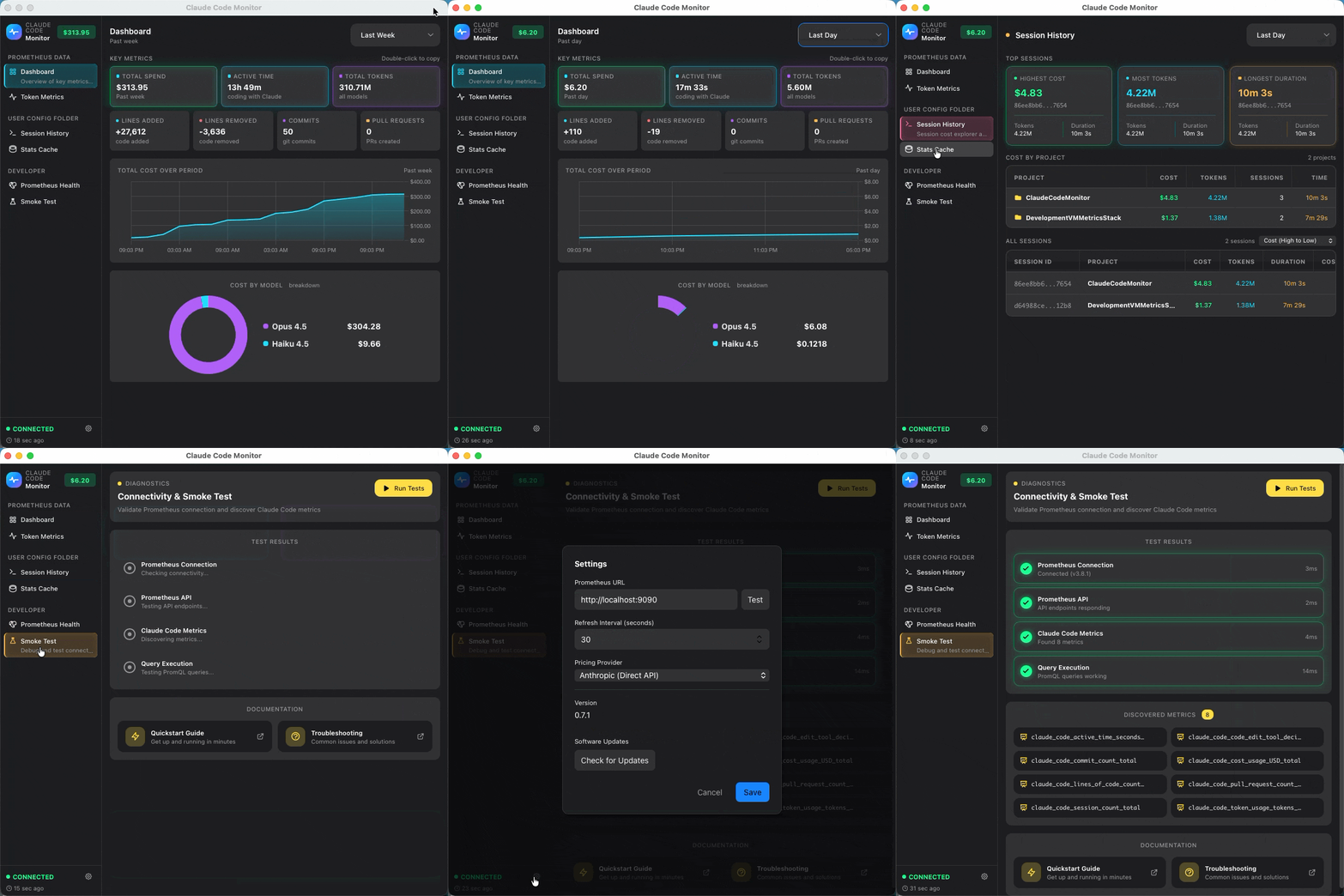
- Summary Dashboard: Real-time KPIs with cost rate and model breakdown charts
- Performance Dashboard: Token metrics by model and type (input/output/cache)
- Historical Dashboard: View metrics over custom time ranges with independent time selector
- KPI Cards: Tokens, Cost, Active Time, Sessions, Lines Added/Removed, Commits, PRs
- Charts: Token rate, cost rate, model breakdown (using Apple Charts)
- Menu Bar Mode: Quick glance at current metrics without opening the full app
- Smoke Test: Validate Prometheus connectivity and discover available metrics
- Settings: Configurable Prometheus URL, refresh intervals, and filters
git clone https://github.com/cragr/ClaudeCodeMonitor.git
cd ClaudeCodeMonitorStart the OpenTelemetry Collector and Prometheus using Podman (or Docker):
podman compose up -dOr with Docker:
docker compose up -dThis starts:
- OpenTelemetry Collector (ports 4317/gRPC, 4318/HTTP, 8889/metrics)
- Prometheus (port 9090)
Add the following to your shell profile:
For Zsh (~/.zshrc):
echo '# Claude Code Telemetry
export CLAUDE_CODE_ENABLE_TELEMETRY=1
export OTEL_METRICS_EXPORTER=otlp
export OTEL_EXPORTER_OTLP_PROTOCOL=grpc
export OTEL_EXPORTER_OTLP_ENDPOINT=http://localhost:4317' >> ~/.zshrc
For Bash (~/.bashrc):
echo '# Claude Code Telemetry
export CLAUDE_CODE_ENABLE_TELEMETRY=1
export OTEL_METRICS_EXPORTER=otlp
export OTEL_EXPORTER_OTLP_PROTOCOL=grpc
export OTEL_EXPORTER_OTLP_ENDPOINT=http://localhost:4317' >> ~/.bashrc# For Zsh
source ~/.zshrc
# For Bash
source ~/.bashrcecho $CLAUDE_CODE_ENABLE_TELEMETRY # should output: 1
echo $OTEL_METRICS_EXPORTER # should output: otlp
echo $OTEL_EXPORTER_OTLP_PROTOCOL # should output: grpc
echo $OTEL_EXPORTER_OTLP_ENDPOINT # should output: http://localhost:4317Run Claude Code to start generating metrics:
claudeUse Claude Code normally - metrics will be automatically sent to the monitoring stack.
-
Download the latest
ClaudeCodeMonitor.dmgfrom the Releases page -
Open and drag
ClaudeCodeMonitor.appto your Applications folder -
Launch the app from Applications
The app will connect to Prometheus and display your Claude Code usage metrics.
- Open the app
- Go to "Smoke Test" tab in the sidebar
- Click "Run Tests"
- All tests should pass (green checkmarks)
If metrics aren't showing:
- Ensure the monitoring stack is running:
podman compose ps - Check Prometheus targets: http://localhost:9090/targets
- Use Claude Code to generate some metrics
- Wait a few minutes for metrics to be scraped
- Shows KPIs for the selected time range (15m, 1h, 12h, 1d, 1w, 2w, 1mo)
- Auto-refreshes based on configured interval
- Displays cost rate over time and cost breakdown by model
- Shows tokens, cost, active time, sessions, lines of code, commits, PRs
- Token usage time series with breakdown by model and type
- Token types: input, output, cacheRead, cacheCreation
- Detailed token metrics with charts
- Independent time selector from global toolbar
- Usage overview with stats equivalent to
claude /statscommand - Usage trends charts and productivity metrics
- Click the chart icon in the menu bar for quick stats
- Shows tokens, cost, and active time at a glance
- Click "Open Dashboard" for full app
- General: Default time range, refresh interval, menu bar options
- Connection: Prometheus URL, connection test
- Filters: Filter by terminal type, model, or app version
| Metric | Description |
|---|---|
claude_code.session.count |
Number of CLI sessions |
claude_code.token.usage |
Total tokens used |
claude_code.cost.usage |
Cost in USD |
claude_code.active_time.total |
Active coding time (seconds) |
claude_code.lines_of_code.count |
Lines added/removed |
claude_code.commit.count |
Git commits created |
claude_code.pull_request.count |
PRs created |
claude_code.code_edit_tool.decision |
Code edit decisions |
session.id- Session identifieruser.account_uuid- User account UUIDorganization.id- Organization IDterminal.type- Terminal type (iTerm, Terminal, etc.)app.version- Claude Code versionmodel- Claude model used
- Check if Prometheus is running:
podman compose ps - Verify Prometheus URL in Settings (default: http://localhost:9090)
- Test connection in Settings → Connection → Test Connection
- Ensure telemetry is enabled:
echo $CLAUDE_CODE_ENABLE_TELEMETRY - Check OTel settings:
echo $OTEL_METRICS_EXPORTER          # should be: otlp
echo $OTEL_EXPORTER_OTLP_PROTOCOL    # should be: grpc
echo $OTEL_EXPORTER_OTLP_ENDPOINT    # should be: http://localhost:4317
- Use Claude Code to generate some metrics
- Check Prometheus has the target: http://localhost:9090/targets
- Query Prometheus directly: http://localhost:9090/graph
- Try:
{__name__=~"claude.*"}
- Try:
For information on building from source, running tests, and distributing the app, see BUILD.md.
MIT