




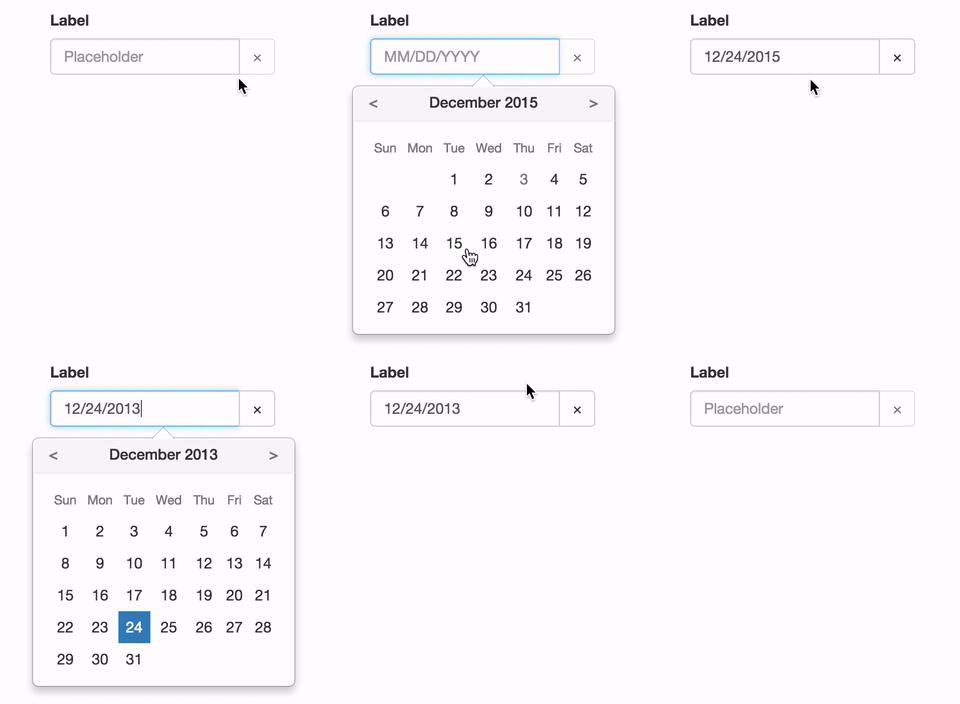
See the demo at pushtell.github.io/react-bootstrap-date-picker.
Please ★ on GitHub!
react-bootstrap-date-picker is compatible with React 0.14.x and 0.15.x.
npm install react-bootstrap-date-pickervar DatePicker = require("react-bootstrap-date-picker");
var App = React.createClass({
getInitialState: function(){
var value = new Date().getISOString();
return {
value: value
}
},
handleChange: function(value) {
// value is an ISO String.
this.setState({
value: value
});
},
render: function(){
return <FormGroup>
<ControlLabel>Label</ControlLabel>
<DatePicker value={this.state.value} onChange={this.handleChange} />
<HelpBlock>Help</HelpBlock>
</FormGroup>;
}
});DatePicker component. Renders as a React-Bootstrap InputGroup.
InputGroup properties are passed through to the input group.
- Properties:
value- ISO date string representing the current value.- Optional
- Type:
string - Example:
"2016-05-19T16:00:00.000Z"
onChange- Focus callback function.- Optional
- Type:
function - Callback Arguments:
value- ISO date string representing the selected value.- Type:
String - Example:
"2016-05-19T16:00:00.000Z"
- Type:
onFocus- Focus callback function.- Optional
- Type:
function - Callback Arguments:
event- Focus event.- Type:
Event
- Type:
onBlur- Blur callback function.- Optional
- Type:
function - Callback Arguments:
event- Blur event.- Type:
Event
- Type:
dateFormat- Date format. Any combination of DD, MM, YYYY and separator.- Optional
- Type:
string - Examples:
"MM/DD/YYYY","YYYY/MM/DD","MM-DD-YYYY", or"DD MM YYYY"
clearButtonElement- Character or component to use for the clear button.- Optional
- Type:
stringorReactClass - Example:
"×"
previousButtonElement- Character or component to use for the calendar's previous button.- Optional
- Type:
stringorReactClass - Example:
"<"
nextButtonElement- Character or component to use for the calendar's next button.- Optional
- Type:
stringorReactClass - Example:
">"
cellPadding- CSS padding value for calendar date cells.- Optional
- Type:
string - Example:
"2px"
dayLabels- Array of day names to use in the calendar. Starting on Sunday.- Optional
- Type:
array - Example:
['Sun', 'Mon', 'Tue', 'Wed', 'Thu', 'Fri', 'Sat']
monthLabels- Array of month names to use in the calendar.- Optional
- Type:
array - Example:
['January', 'February', 'March', 'April', 'May', 'June', 'July', 'August', 'September', 'October', 'November', 'December']
calendarPlacement- Overlay placement for the popover calendar.- Optional
- Type:
string - Example:
"top"
Karma tests are performed on Browserstack in the following browsers:
- IE 9, Windows 7
- IE 10, Windows 7
- IE 11, Windows 7
- Opera (latest version), Windows 7
- Firefox (latest version), Windows 7
- Chrome (latest version), Windows 7
- Safari (latest version), OSX Yosemite
- Mobile Safari (latest version), iPhone 6, iOS 8.3
Please let us know if a different configuration should be included here.
Locally:
npm test
On Browserstack:
BROWSERSTACK_USERNAME=YOUR_USERNAME BROWSERSTACK_ACCESS_KEY=YOUR_ACCESS_KEY npm test