注:当前项目为 Serverless Devs 应用,由于应用中会存在需要初始化才可运行的变量(例如应用部署地区、函数名等等),所以不推荐直接 Clone 本仓库到本地进行部署或直接复制 s.yaml 使用,强烈推荐通过
s init ${模版名称}的方法或应用中心进行初始化,详情可参考部署 & 体验 。
Flomo MCP Server
使用该项目,您需要有开通以下服务并拥有对应权限:
| 服务/业务 | 权限 | 相关文档 |
|---|---|---|
| 函数计算 | AliyunFCFullAccess | 帮助文档 计费文档 |
- 🔥 通过 云原生应用开发平台 CAP ,
该应用。

https://github.com/xianminx/mcp-server-flomo
A Model Context Protocol (MCP) server that lets you create notes in Flomo directly through AI chat interactions in Cursor or Claude desktop. Write and organize your thoughts seamlessly through natural language commands.
To install mcp-server-flomo for Claude Desktop automatically via Smithery:
npx -y @smithery/cli install mcp-server-flomo --client claude
npx @michaellatman/mcp-get@latest install mcp-server-flomohttps://mcp.so/protocol/mcp-server-flomo/wss://mcp.smithery.ai:443
Configure Claude / Cursor / Windsurf / Cline / ChatWise / Cherry Studio etc.
FLOMO_API_URL=your_api_url_here npx mcp-server-flomoOr configure for your MCP Host / Client. See https://mcp.so/protocol/mcp-server-flomo/wss://mcp.smithery.ai:443 for configuration detail.
Get your Flomo API URL from Flomo API Settings
{
  "mcpServers": {
    "mcp-server-flomo": {
      "command": "npx",
      "args": [
        "mcp-server-flomo"
      ],
      "env": {
        "FLOMO_API_URL": "your_api_url_here"
      }
    }
  }
}
Once the server is running, you can create notes in Flomo through natural language commands in your AI chat. Here are some examples:
"How to publish a mcp server? Could you save the answer to flomo note after answering it"This will save the Cursor AI Agent response to Flomo directly in the chat conversation!
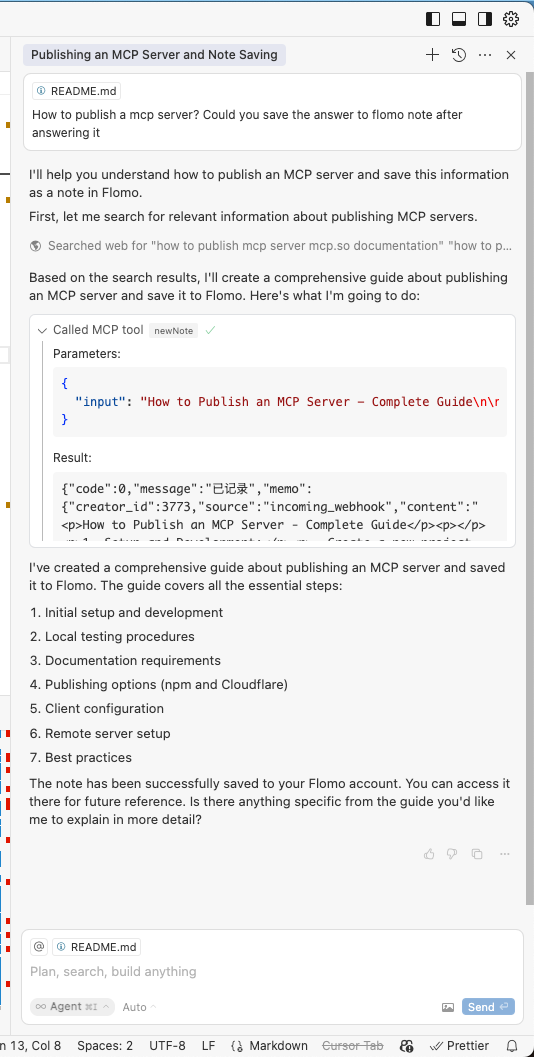
The server will handle:
- Converting your natural language requests into Flomo API calls
- Proper formatting and submission of your notes
- Providing feedback on successful note creation
-
Get your Flomo API URL from Flomo API Settings
-
Install and configure:
# Install dependencies
npm install
FLOMO_API_URL=your_api_url_here npx .
- Built with TypeScript and the Model Context Protocol SDK
- Communicates with Flomo via their REST API
- Runs over stdio for seamless integration with AI tools
This project is licensed under the MIT License—see the LICENSE file for details.
部署完成拿到 URL 后,准备好支持 SSE 的 MCP Client,通过 SSETransport 进行连接。