


Flecs is a Fast and Lightweight ECS (Entity Component System). Flecs packs as much punch as possible into a small library with a tiny C99 API and zero dependencies. Here are some of the things it can do:
- Process entites on multiple threads with a lock-free, zero-overhead staging architecture
- Organize components & systems in reusable, library-friendly modules
- Report runtime statistics on memory usage, performance and more
- Run systems every frame, periodically, on demand or on change events
Additionally, flecs has a flexible engine that lets you do many things, like:
- Share components across entities with prefabs
- Use expressive system expressions with AND, OR, NOT and optional operators
- Create hierarchies, indexes and DAGs with container entities
- Add/remove components and create/delete entities whenever, wherever
- Add components to ANYTHING. Entities? Check. Systems? Check. Components? N.. wait. Check!
Check out the examples and documentation to learn more.
Oh, and we have dashboards!
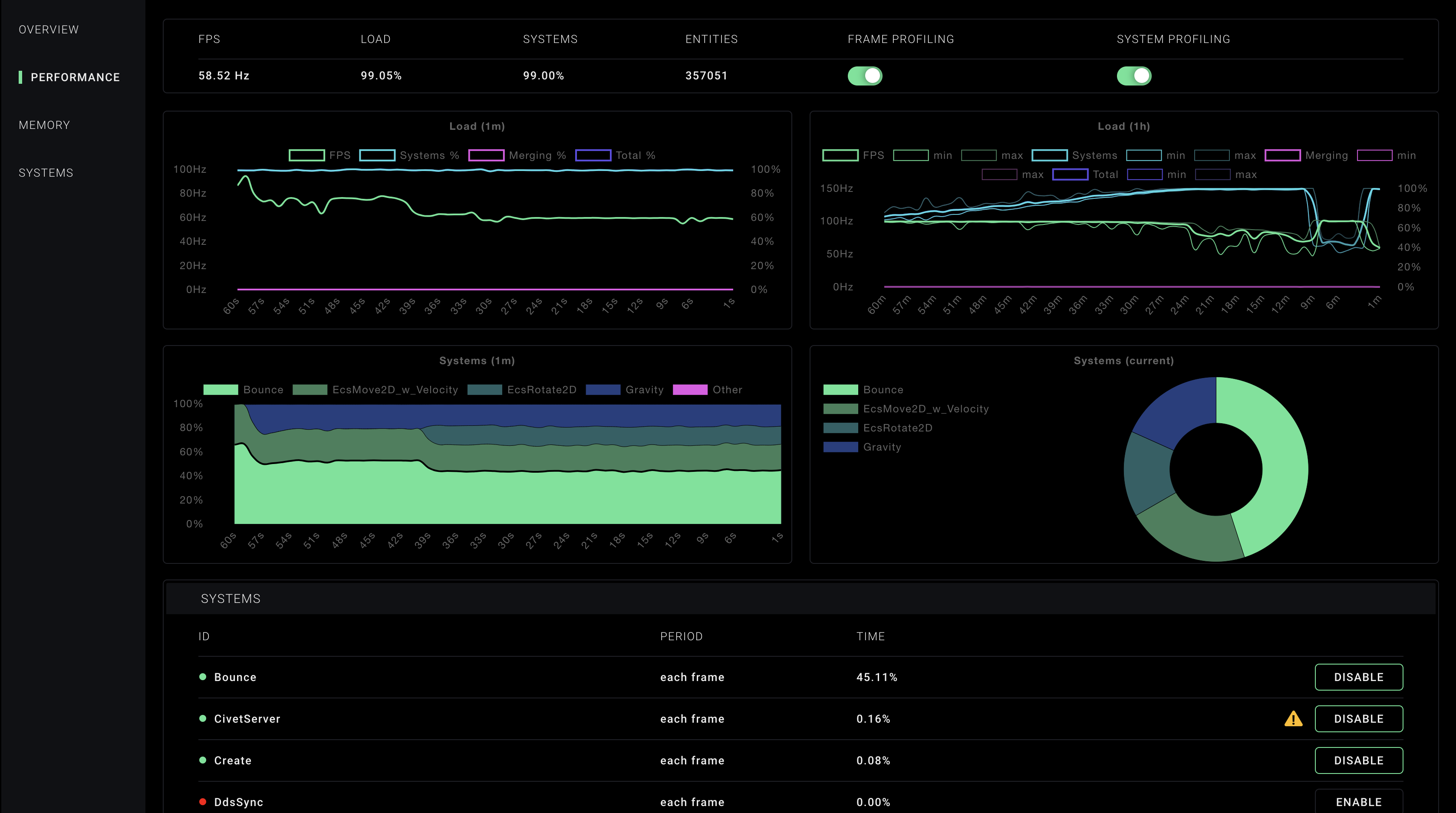
See here for how to create an application with the dashboard.
Click here to view the Flecs manual.
You can build flecs with either Bake or CMake. If you just want to build the flecs shared library, CMake wil get you there. If you want to use flecs modules, you'll need Bake (for now).
git clone https://github.com/SanderMertens/flecs
cd flecs
mkdir build
cd build
cmake ..
make
git clone https://github.com/SanderMertens/bake
make -C bake/build-$(uname)
bake/bake setup
bake clone https://github.com/SanderMertens/flecs
Note that bake may ask for your password to install a single shell script to /usr/local. It is highly recommended you do this, as it makes everything much easier, but if you'd rather not, make sure to follow the instructions in the bake setup to setup the environment before calling bake!
To create a new flecs application, first create a new project:
bake new my_app -t flecs
You now have a project which contains a simple flecs application! To run the project, do:
bake run my_app
To create an application that uses the flecs web dashboard, first install the admin and civetweb modules:
bake clone SanderMertens/flecs-systems-admin
bake clone SanderMertens/flecs-systems-civetweb
Currently this is only possible out of the box with bake. Future versions may also support modules with CMake.
After cloning the packages, create a new project like so:
bake new my_app -t flecs
This creates a new flecs application. To now run your application with the dashboard, run it like this:
bake run my_app -a --admin 9090
This runs the application, and passes --admin 9090 as its arguments. You can now navigate to http://localhost:9090 to see the dashboard. Any systems that you add to your application will now show up in the dashboard, and can be turned on/off.
Basic rendering and user input.
An nbody simulation that uses flecs multithreading.
A simple application demonstrating collision detection with flecs.
An implementation of pong in flecs.
A simple application that demonstrates entity hierarchies
ECS performance benchmark that tests various operations and iterations.
Flecs has a growing ecosystem of modules. The following modules are currently available:
| Module | Description |
|---|---|
| flecs.components.transform | Components for positioning, rotating and scaling entities |
| flecs.components.physics | Components for moving entities |
| flecs.components.graphics | Components for describing a drawing canvas and camera |
| flecs.components.geometry | Components for describing geometry |
| flecs.components.input | Components for describing keyboard and mouse input |
| flecs.components.http | Components for describing an HTTP server with endpoints |
| flecs.systems.transform | Compute transformation matrices from transform components |
| flecs.systems.physics | Simple 2D physics engine with limited 3D features |
| flecs.systems.civetweb | A civetweb-based implementation of components-http |
| flecs.systems.admin | A web-based dashboard for monitoring flecs performance |
| flecs.systems.sdl2 | An SDL2-based renderer |
| flecs.math | Matrix and vector math functions |
| flecs.util | Utility functions and datastructures |
The following code shows a simple flecs application:
typedef struct Position {
    float x;
    float y;
} Position;

typedef int32_t Speed;

void Move(ecs_rows_t *rows) {
    Position *p = ecs_column(rows, Position, 1);
    Speed *s = ecs_column(rows, Speed, 2);

    for (int i = 0; i < rows->count; i ++) {
        p[i].x += s[i] * rows->delta_time;
        p[i].y += s[i] * rows->delta_time;
    }
}

int main(int argc, char *argv[]) {
    ecs_world_t *world = ecs_init();

    /* Register components and systems */
    ECS_COMPONENT(world, Position);
    ECS_COMPONENT(world, Speed);
    ECS_SYSTEM(world, Move, EcsOnUpdate, Position, Speed);
    ECS_ENTITY(world, MyEntity, Position, Speed);

    /* Limit application to 60 FPS */
    ecs_set_target_fps(world, 60);

    /* Progress world in main loop (invokes Move system) */
    while (ecs_progress(world, 0));

    return ecs_fini(world);
}This section describes the high-level concepts used in flecs, and how they are represented in the API. Rather than providing an exhaustive overview of the API behavior, this section is intended as an introduction to the different API features of flecs.
A world is a container in which entities, components and systems can be stored and evaluated. An application can create any number of worlds. Data between worlds is not shared. If the application wants to share data between worlds, this has to be done manually. A world in ECS can be created with the ecs_init function:
ecs_world_t *world = ecs_init();An entity is an integer that uniquely identifies an "object" in a system. An entity may have 0..n components, and each component can be added only once. Entities can be created in flecs with the ecs_new function:
ecs_entity_t e = ecs_new(world, 0);Components are datatypes that can be added to an entity. Any C datatype can be registered as a component within flecs. To register a component, you can use the ECS_COMPONENT macro, which wraps around the ecs_new_component function:
typedef struct Point {
   int x;
   int y;
} Point;

ECS_COMPONENT(world, Point);
After this macro, you are able to add the Point component using ecs_add:
ecs_add(world, e, Point);Additionally, the component can be added and initialized with the ecs_set function:
ecs_set(world, e, Point, {.x = 10, .y = 20});Flecs components are stored internally as entities, which is why handles to components are of the ecs_entity_t type.
A system is logic (a function) that is executed for every entity that has a set of components that match a system's interest. In flecs, systems specify their interest, and when they should run. To define a system, you can use the ECS_SYSTEM macro, which wraps around the ecs_new_system function:
ECS_SYSTEM(world, LogPoints, EcsOnUpdate, Point);In this statement, LogPoints refers to a C function that will be associated with the system. EcsOnUpdate identifies the stage in which the system is executed. The Point identifies the component interest expression. The system is implemented as a regular C function, like this:
void LogPoints(ecs_rows_t *rows) {
    Point *p = ecs_column(rows, Point, 1);
    for (int i = 0; i < rows->count; i ++) {
        printf("Log point (%d, %d)\n", p[i].x, p[i].y);
    }
}
Systems can be enabled / disabled. By default a system is enabled. To enable or disable a system, you can use the ecs_enable function:
ecs_enable(world, LogPoints, false);Entities in flecs may have an optional string-based identifier. An identifier can be added to an entity by setting the EcsId component, like this:
ecs_set(world, e, EcsId, {"MyEntity"});After a string identifier is added, the entity can be looked up like this:
ecs_entity_t e = ecs_lookup(world, "MyEntity");Additionally, applications can define entities with the ECS_ENTITY macro, which automatically adds EcsId and initializes it with the provided name:
ECS_ENTITY(world, MyEntity, Point);Components, systems, tasks, families and prefabs automatically register the EcsId component when they are created, and can thus be looked up with ecs_lookup.
A task is a system that has no interest expression. Tasks are run once every frame. Tasks are defined the same way as normal systems, but instead of an interest expression, you specify 0:
ECS_SYSTEM(world, MyTask, EcsOnUpdate, 0);A type identifies a collection of 1..n entities. In flecs, components and systems are assigned unique identifiers from the same pool as entities, and therefore a type may contain identifiers to entities, components and systems. Typical usecases for types are:
- Group components so that they can be added to an entity with a single
ecs_addcall - Group systems so that they can be enabled or disabled with a single
ecs_enablecall
To define a type, you can use the ECS_TYPE macro, which wraps the ecs_new_type function:
ECS_TYPE(world, Circle, EcsCircle, EcsPosition2D);This defines a type called Circle that contains EcsCircle and EcsPosition2D. After this macro, you can use the Circle type with functions like ecs_add and ecs_remove:
ecs_add(world, e, Circle);A feature is a type that contains solely out of systems. To create features, use the ECS_TYPE macro or ecs_new_type function. This can be used to enable/disable multiple systems with a single API call, like so:
ECS_TYPE(world, MyFeature, SystemA, SystemB);

ecs_enable(World, MyFeature, true);
A useful property of features (types) is that they can be nested, like so:
ECS_TYPE(world, MyNestedFeatureA, SystemA, SystemB);
ECS_TYPE(world, MyNestedFeatureB, SystemC);
ECS_TYPE(world, MyFeature, MyNestedFeatureA, MyNestedFeatureB);

ecs_enable(World, MyFeature, true);A tag is a component that does not contain any data. Internally it is represented as a component with data-size 0. Tags can be useful for subdividing entities into categories, without adding any data. A tag can be defined with the ECS_TAG macro:
ECS_TAG(world, MyTag);The macro will define the MyTag_h variable, which an application can then use as a regular component, like with the ecs_add function:
ecs_add(world, e, MyTag_h);A container is an entity that can contain other entities. There are several methods to add a child entity to a container entity. The easiest way is with the ecs_new_child function:
ecs_entity_t parent = ecs_new(world, 0);
ecs_entity_t child = ecs_new_child(world, parent, 0);
Alternatively, you can add an entity to a container entity after its creation using ecs_adopt:
ecs_entity_t parent = ecs_new(world, 0);
ecs_entity_t child = ecs_new(world, 0);
ecs_adopt(world, child, parent);
With the ecs_contains function you can check whether an entity contains another entity:
if (ecs_contains(world, parent, child) {
    printf("entity %u is a child of %u\n", child, parent);
}
Systems can request components from containers. If a system requests component EcsPosition2D from a container, but an entity does not have a container, or the container does not have EcsPosition2D, the system will not match the entity. This system definition shows an example of how a system can access container components:
ECS_SYSTEM(world, MySystem, EcsOnUpdate, CONTAINER.Foo, Bar);Prefabs are a special kind of entity that enable applications to reuse components values across entities. To create a prefab, you can use the ECS_PREFAB macro, or ecs_new_prefab function:
ECS_PREFAB(world, CirclePrefab, EcsCircle, EcsPosition2D);This defines a prefab with the EcsCircle and EcsPosition2D components. We can now add this prefab to regular entities:
ecs_entity_t e1 = ecs_new(world, CirclePrefab);
ecs_entity_t e2 = ecs_new(world, CirclePrefab);
This will make the EcsCircle and EcsPosition2D components available on entities e1 and e2, similar to a family. In contrast to types, component values of EcsCircle and EcsPosition2D are now shared between entities, and stored only once in memory. Since a prefab can be used as a regular entity, we can change the value of a prefab component with the ecs_set function:
ecs_set(world, CirclePrefab, EcsCircle, {.radius = 10});This will change the value of EcsCircle across all entities that have the prefab. Entities can override component values from a prefab, by either adding or setting a component on themselves, using ecs_add or ecs_set. When a component is added using ecs_add, it will be initialized with the component value of the prefab.
Modules are used to group entities / components / systems. They can be imported with the ECS_IMPORT macro:
ECS_IMPORT(world, EcsComponentsTransform, 0);This will invoke the EcsComponentsTransform function, which will define the entities / components / systems. Furthermore, the macro will declare the variables to the entity / component / system handles to the local scope, so that they can be accessed by the code.
In large code bases modules can be used to organize code and limit exposure of internal systems to other parts of the code. Modules may be implemented in separate shared libraries, or within the same project. The only requirements for using the ECS_IMPORT macro is that the name of the module (EcsComponentsTransform) can be resolved as a C function with the right type. For an example on how to implement modules, see the implementation of one of the flecs modules (see above).
Modules can be imported multiple times without causing side effects.