This project is a full-stack C++ chat application practice, including QT interface programming for the PC side, designing an asynchronous server with asio, setting up an HTTP gateway with the Beast networking library, building a verification service with Node.js, and using grpc for communication between services, with asio for communication between the server and client. It also includes user information entry and other features. The project achieves cross-platform design, initially developing the server on Windows and later considering migration to other platforms.
A brief structural design is shown in the following diagram.
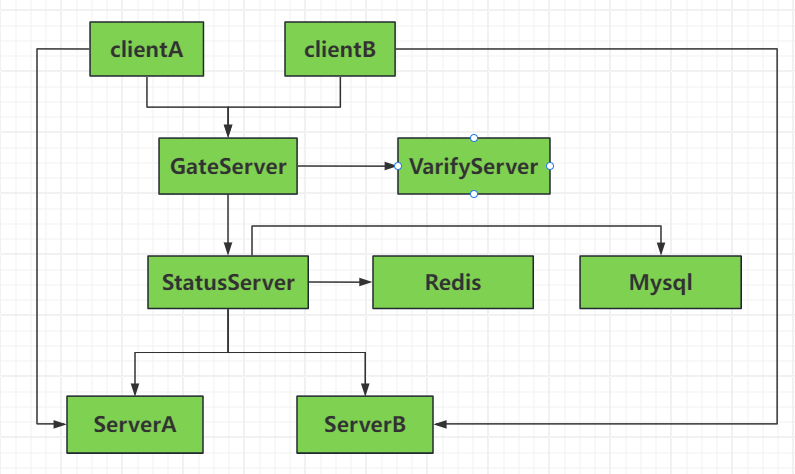
2.When a user registers, the registration request is sent to GateServer. GateServer calls VerifyServer to validate the registration and sends a verification code to the client. The client uses this verification code to register with GateServer.
3.StatusServer, ServerA, and ServerB can directly access Redis and MySQL services.
- Async HTTP gateway (Boost.Asio + Beast)
- Verification code request endpoint:
POST /get_varifycode(and aliasPOST /get_verifycode) - User registration endpoint:
POST /register - User login endpoint:
POST /login - Realtime chat endpoint (WebSocket):
GET /wsupgrade - In-memory user store + verification-code expiry handling (3 minutes)
- gRPC service
GetVarifyCode - Sends email verification code (Node.js + nodemailer)
- Returns
email,error, andcode
- Register UI:
- request verification code
- submit registration
- input validation and user feedback
- Login UI:
- submit login request
- success/failure feedback
- C++ WebSocket terminal client for realtime chat testing
- Supports:
- sending chat messages
/nick your_namenickname command/quitto exit
Request:
{
  "email": "user@example.com"
}
Response:
{
  "error": 0,
  "email": "user@example.com",
  "code": "123456"
}Request:
{
  "user": "alice",
  "email": "user@example.com",
  "password": "secret123",
  "code": "123456"
}Request:
{
  "user": "alice",
  "password": "secret123"
}- Connect to
ws://<gate-host>:<gate-port>/ws - Messages are broadcast to all connected clients
cd client/console
cmake -S . -B build
cmake --build build -j
./build/chat_cli 127.0.0.1 8080 /ws