Inspired by warrensbox/terraform-switcher

The tfswitch command line tool lets you switch between different versions of terraform.
If you do not have a particular version of terraform installed, tfswitch will download the version you desire.
The installation is minimal and easy.
Once installed, simply select the version you require from the dropdown and start using terraform.
tfswitch is available for MacOS and Linux based operating systems (Windows experemetal).
Installation for MacOS/Linux is the easiest with Homebrew. If you do not have homebrew installed, click here.
brew install versus/tap/tfswitchnpm i @versusdev/terraform-switcherInstallation for other linux operation systems.
curl -L https://raw.githubusercontent.com/versus/terraform-switcher/release/install.sh | bashsnap install snapcraft --classic
snap install multipass
snapcraft
snap install tfswitch_*.snap --devmode --dangerous
tfswitch -v
multipass stop snapcraft-tfswitch && multipass delete snapcraft-tfswitch && multipass purge
Alternatively, you can get releases or install the binary from source here
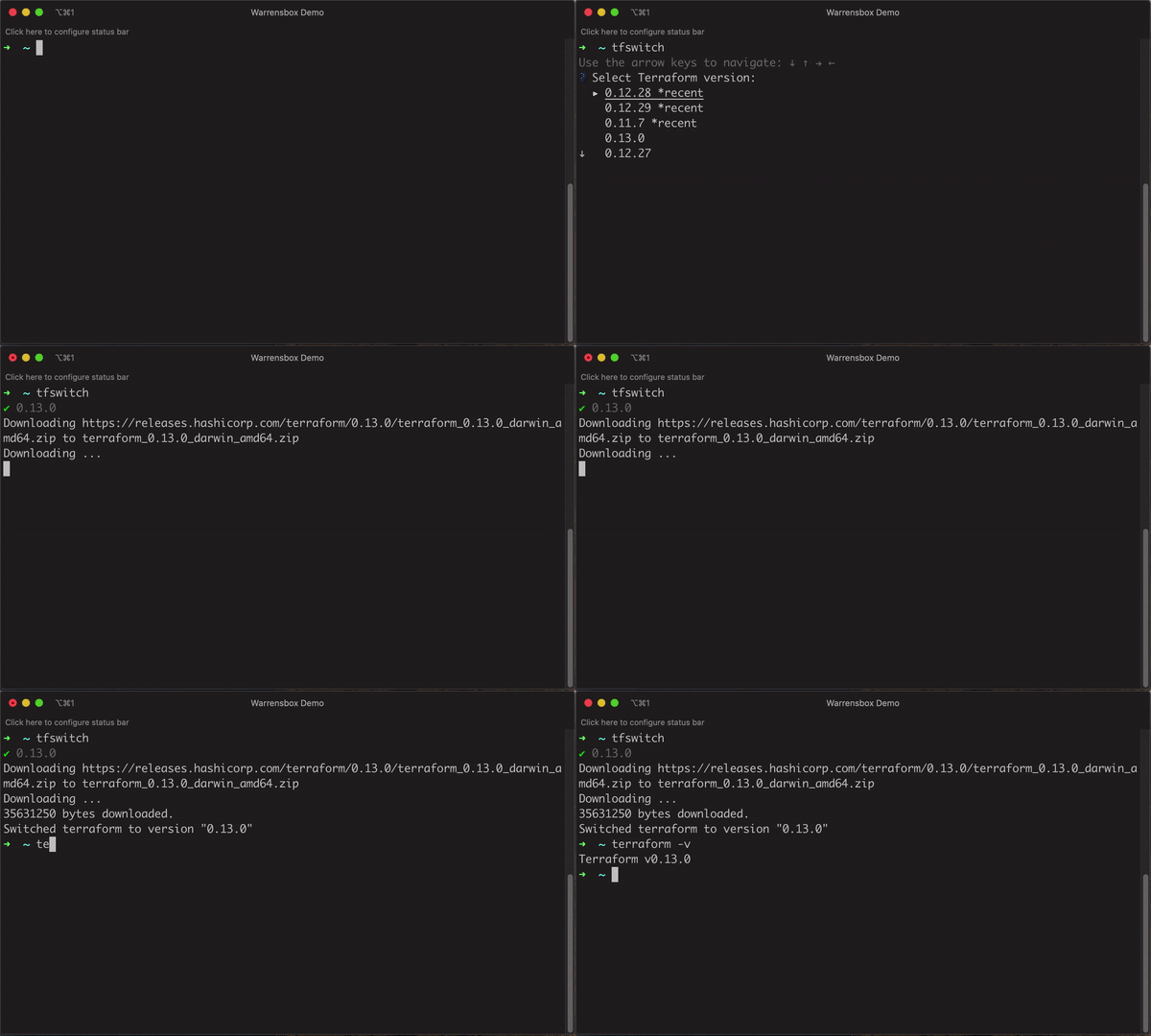
- You can switch between different versions of terraform by typing the command
tfswitchon your terminal. - Select the version of terraform you require by using the up and down arrow.
- Hit Enter to select the desired version.
The most recently selected versions are presented at the top of the dropdown.
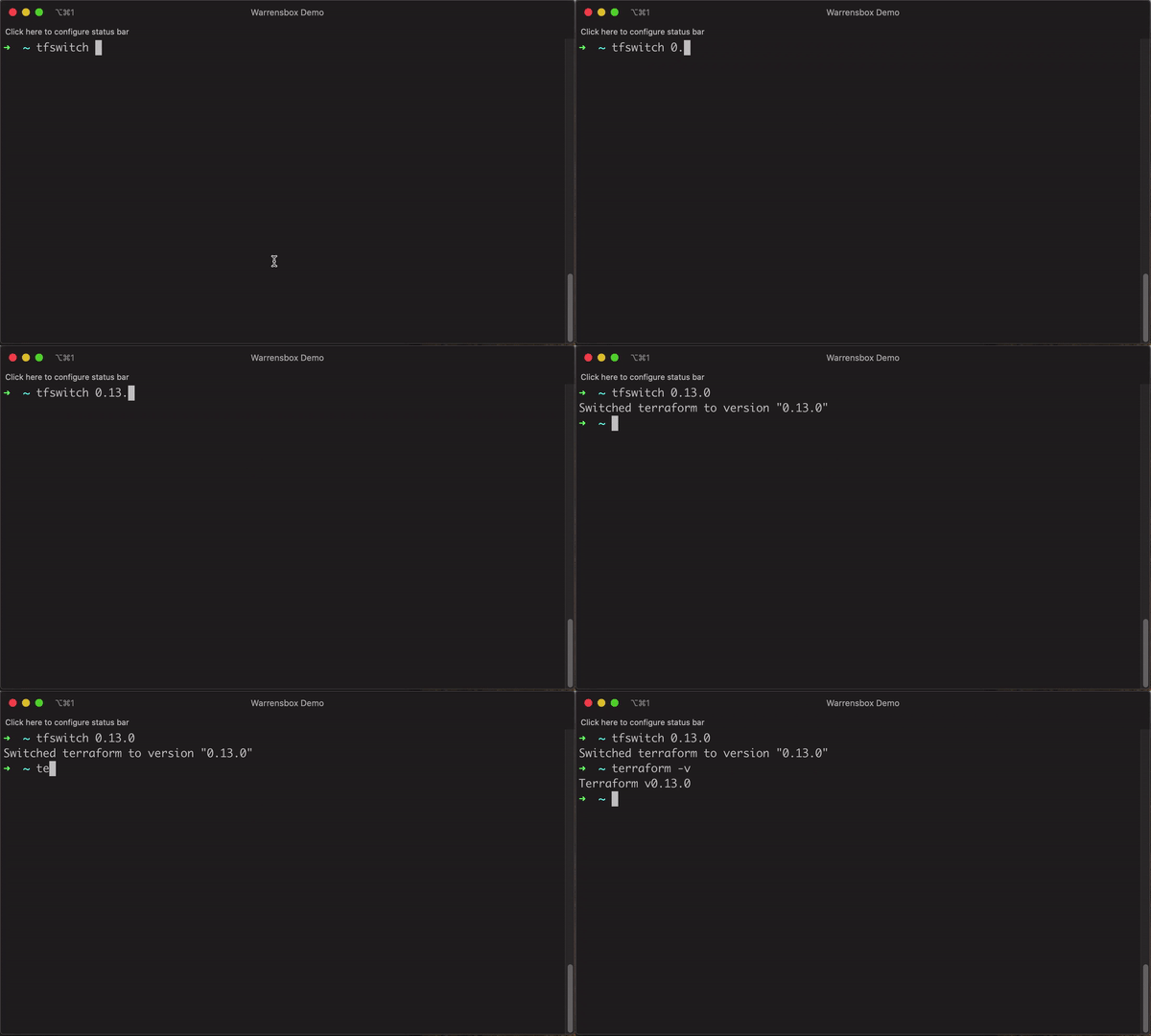
- You can also supply the desired version as an argument on the command line.
- For example,
tfswitch 0.10.5for version 0.10.5 of terraform. - Hit Enter to switch.
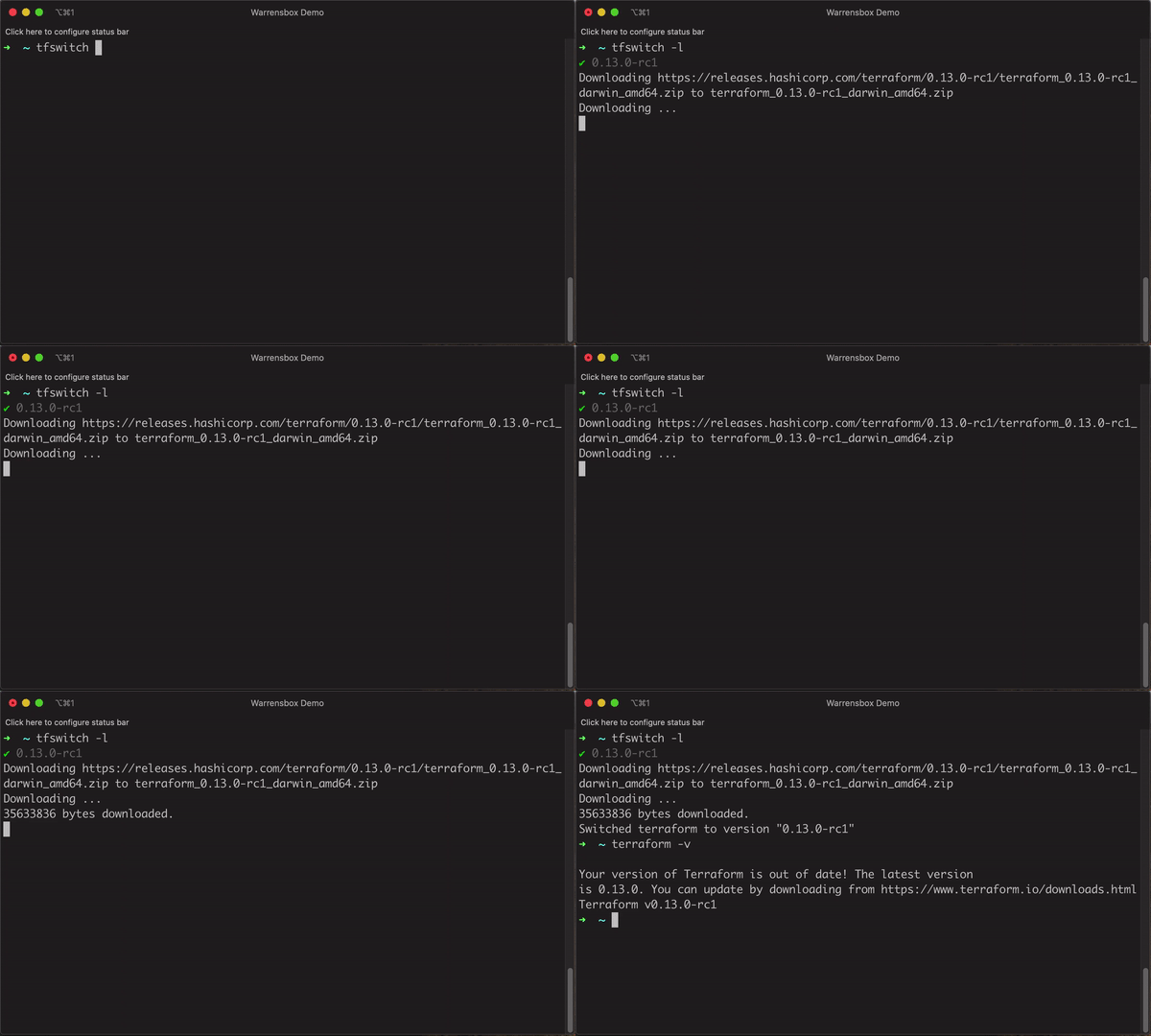
- Display all versions including beta, alpha and release candidates(rc).
- For example,
tfswitch -lortfswitch --list-allto see all versions. - Hit Enter to select the desired version.
- Install the latest stable version only.
- Run
tfswitch -uortfswitch --latest. - Hit Enter to install.
- Install the latest implicit stable version.
- Ex:
tfswitch 0.13downloads 0.13.6 (latest) version. - Hit Enter to install.
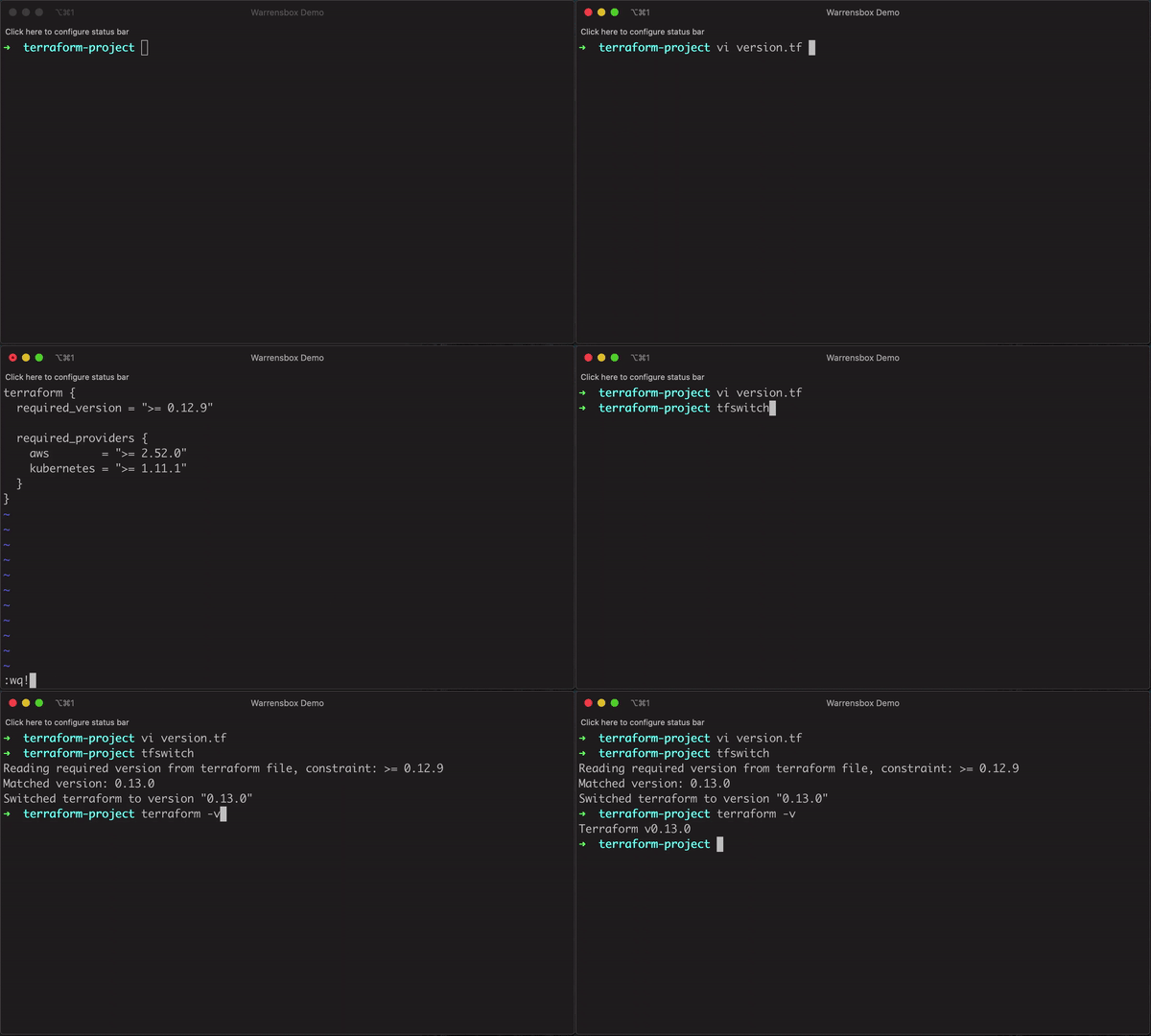
If a .tf file with the terraform constrain is included in the current directory, it should automatically download or switch to that terraform version. For example, the following should automatically switch terraform to the lastest version:
terraform {
  required_version = ">= 0.12.9"

  required_providers {
    aws        = ">= 2.52.0"
    kubernetes = ">= 1.11.1"
  }
}
This is similiar to using a .tfswitchrc file, but you can specify a custom binary path for your terraform installation
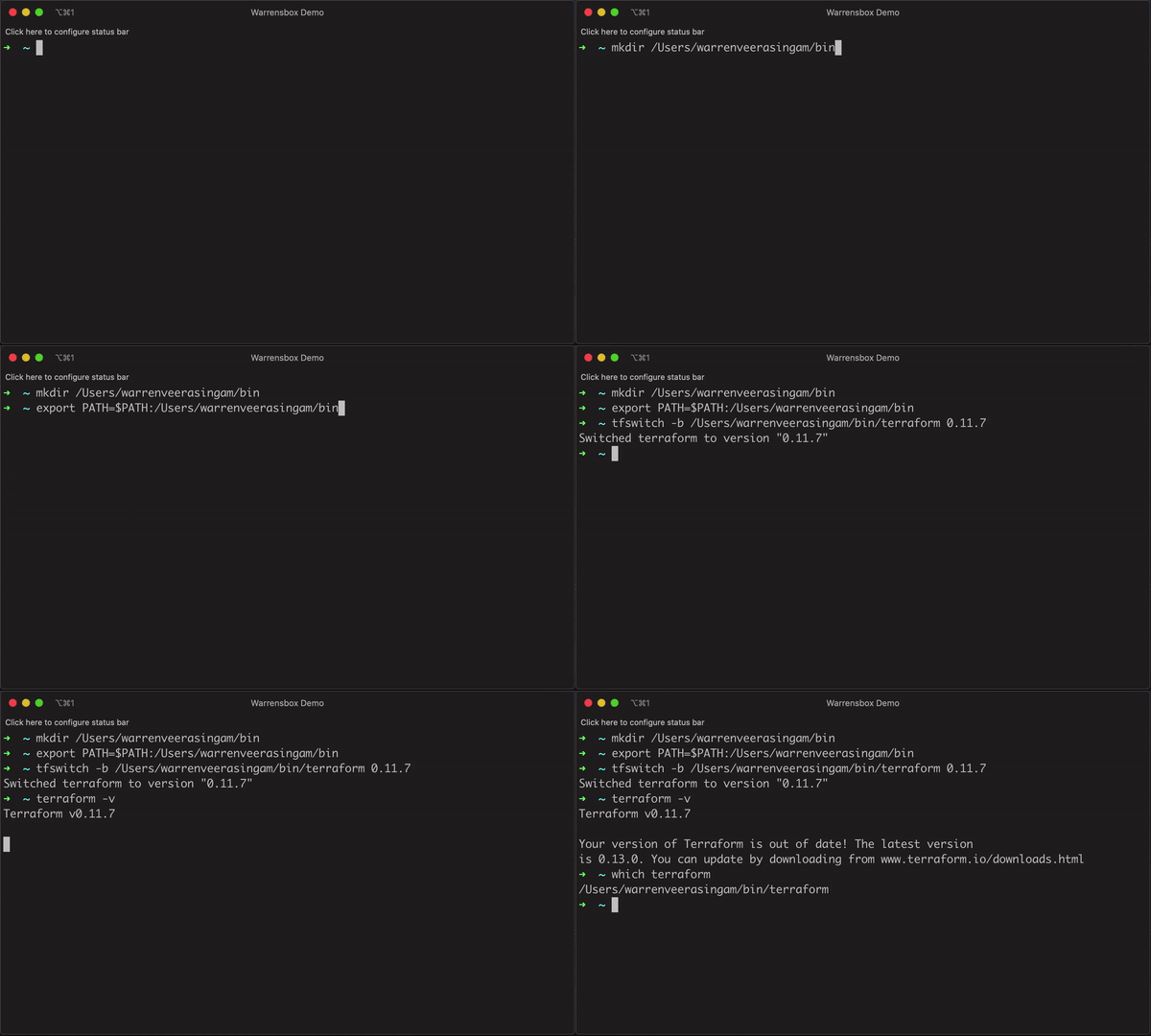
- Create a custom binary path. Ex:
mkdir /Users/warrenveerasingam/bin(replace warrenveerasingam with your username) - Add the path to your PATH. Ex:
export PATH=$PATH:/Users/warrenveerasingam/bin(add this to your bash profile or zsh profile) - Pass -b or --bin parameter with your custom path to install terraform. Ex:
tfswitch -b /Users/warrenveerasingam/bin/terraform 0.10.8 - Optionally, you can create a
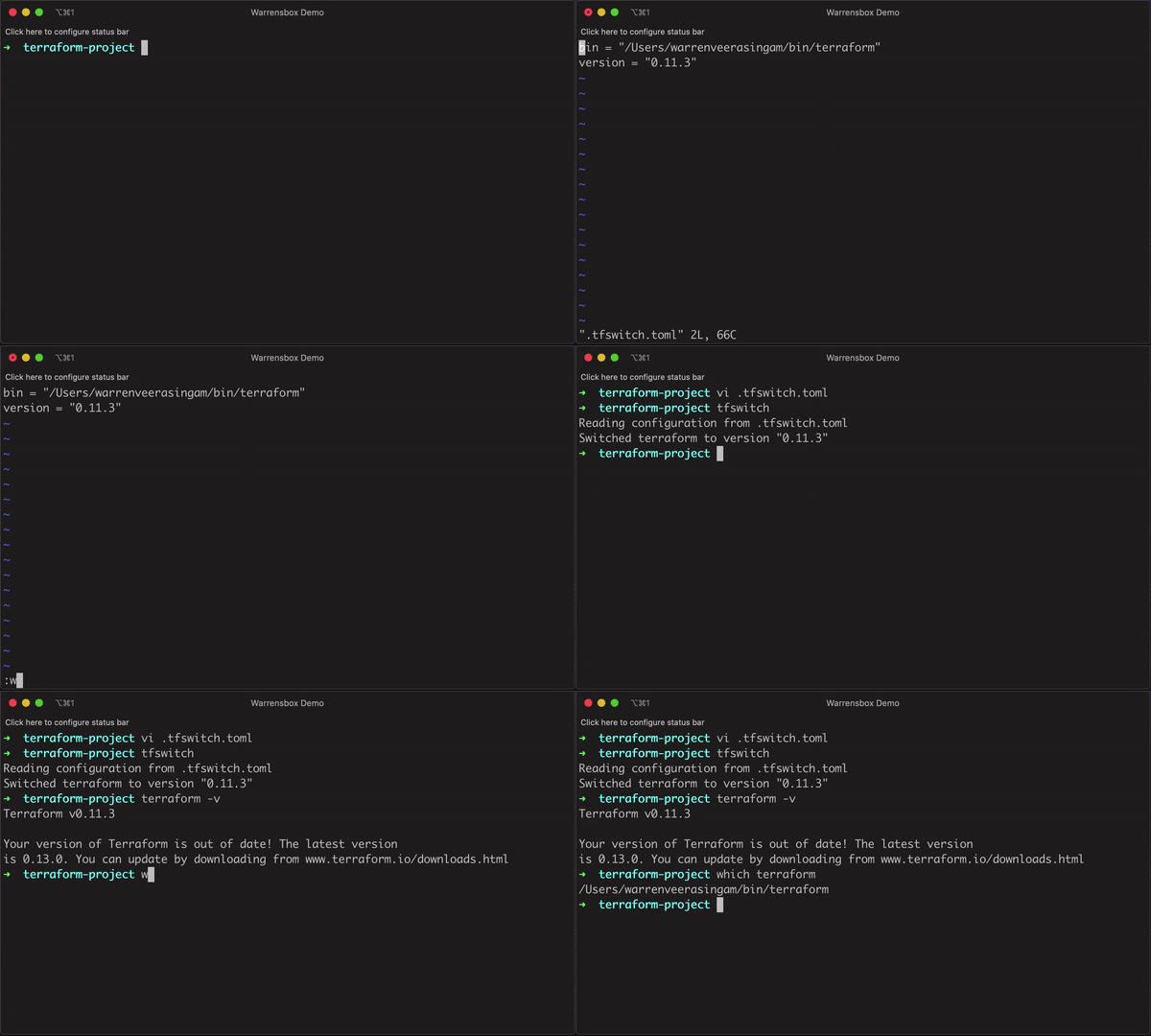
.tfswitch.tomlfile in your home directory for global settings. - Your
.tfswitch.tomlfile should look like this:
bin = "/Users/versus/bin/terraform"
version = "0.11.3"- Run
tfswitchand it should automatically install the required terraform version in the specified binary path
Alternatively, you can generate .tfswitch.toml in current directory just use tfswitch --init or tfswitch --init 0.13.2
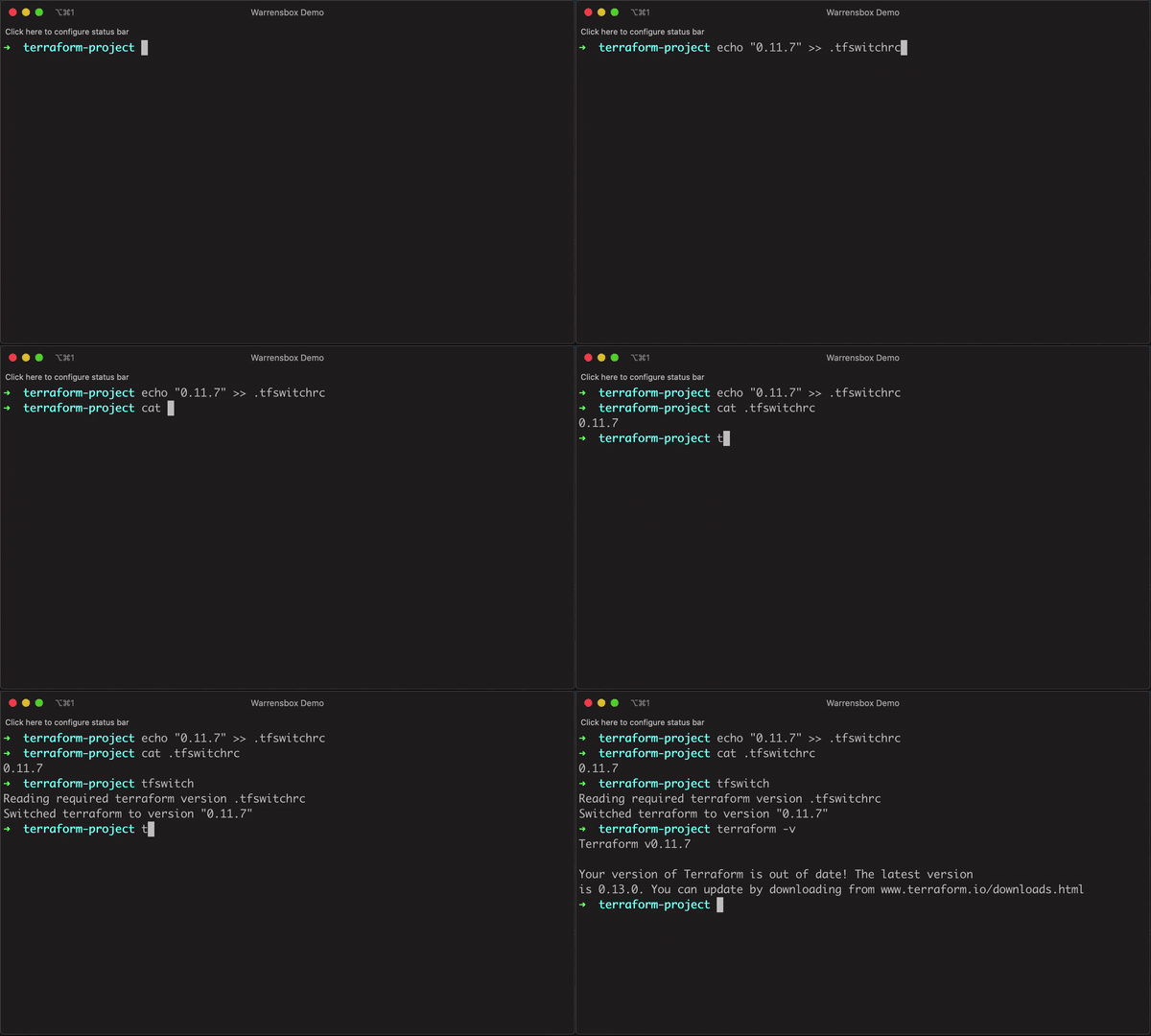
- Create a
.tfswitchrcfile containing the desired version - For example,
echo "0.10.5" >> .tfswitchrcfor version 0.10.5 of terraform - Run the command
tfswitchin the same directory as your.tfswitchrc
- Create a
TFSWITCH_PATHenvironment variable with your custom path to install terraform Ex:export TFSWITCH_PATH=/Users/versus/bin/terraform - Run the command
tfswitch
- Create a
TFSWITCH_PATHenvironment variable with your custom path to install terraform Ex:export TFSWITCH_VERSION=0.13.5 - Run the command
tfswitch
Instead of a .tfswitchrc file, a .terraform-version file may be used for compatibility with tfenv and other tools which use it
If a terragrunt.hcl file with the terraform constrain is included in the current directory, it should automatically download or switch to that terraform version. For example, the following should automatically switch terraform to the lastest version:
terragrunt_version_constraint = ">= 0.26, < 0.27"
terraform_version_constraint  = ">= 0.13, < 0.14"
...
Automatically switch with bash
Add the following to the end of your ~/.bashrc file:
(Use either .tfswitchrc or .tfswitch.toml or .terraform-version)
cdtfswitch(){
  builtin cd "$@";
  cdir=$PWD;
  if [ -e "$cdir/.tfswitchrc" ]; then
    tfswitch
  fi
}
alias cd='cdtfswitch'
Automatically switch with zsh
Add the following to the end of your ~/.zshrc file:
load-tfswitch() {
  local tfswitchrc_path=".tfswitchrc"

  if [ -f "$tfswitchrc_path" ]; then
    tfswitch
  fi
}
add-zsh-hook chpwd load-tfswitch
load-tfswitch
NOTE: if you see an error like this:
command not found: add-zsh-hook, then you might be on an older version of zsh (see below), or you simply need to loadadd-zsh-hookby adding this to your.zshrc:autoload -U add-zsh-hook
older version of zsh
cd(){
  builtin cd "$@";
  cdir=$PWD;
  if [ -e "$cdir/.tfswitchrc" ]; then
    tfswitch
  fi
}
#!/bin/bash

echo "Installing tfswitch locally"
wget https://raw.githubusercontent.com/versus/terraform-switcher/release/install.sh
chmod 755 install.sh
./install.sh -b bin-directory

./bin-directory/tfswitch
If you have limited permission, try:
#!/bin/bash

echo "Installing tfswitch locally"
wget https://raw.githubusercontent.com/versus/terraform-switcher/release/install.sh
chmod 755 install.sh
./install.sh -b bin-directory

CUSTOMBIN=`pwd`/bin             #set custom bin path
mkdir $CUSTOMBIN                #create custom bin path
export PATH=$PATH:$CUSTOMBIN    #Add custom bin path to PATH environment

./bin-directory/tfswitch -b $CUSTOMBIN/terraform 0.11.7

terraform -v                    #testing version
Example config yaml
version: 2
jobs:
  build:
    docker:
      - image: ubuntu

    working_directory: /go/src/github.com/versus/terraform-switcher

    steps:
      - checkout
      - run:
          command: |
            set +e
            apt-get update
            apt-get install -y wget
            rm -rf /var/lib/apt/lists/*

            echo "Installing tfswitch locally"

            wget https://raw.githubusercontent.com/versus/terraform-switcher/release/install.sh
            chmod 755 install.sh
            ./install.sh -b bin-directory

            CUSTOMBIN=`pwd`/bin             #set custom bin path
            mkdir $CUSTOMBIN                #create custom bin path
            export PATH=$PATH:$CUSTOMBIN    #Add custom bin path to PATH environment

            ./bin-directory/tfswitch -b $CUSTOMBIN/terraform 0.11.7

terraform -v #testing version-
no-symlink (n) Makes tfswitch detect and install a version only, without creating a permanent symlink to it. This allows tfswitch to be used as a helper when dynamically switching Terraform versions in environments where multiple tasks run with different versions in parallel, such as CI/CD agents.
-
quiet (q) Makes tfswitch switch to a version if it's detected or specified as an argument, but prevents it from prompting the user for input if none is found or provided. This makes tfswitch more automation friendly.
An agent host is scheduled to run multiple Terraform Plan/Apply tasks simultaneously from different repositories, which each contain different Terraform configurations, using different versions of Terraform.
With a regular symlink approach, they would have to be queued and run synchronously, as a version switch would have to be made between each run.
However, if the terraform binary (or symlink) is replaced with a script (example below) that catches the arguments sent to terraform, performs a tfswitch using both the no-symlink and quiet flags, then catches the output from tfswitch and uses the desired binary to run the specific task, this can be done dynamically with each run, in parallel.
This utilizes tfswitch's brilliant ability to detect and install the required version, while allowing concurrency.
Example PoC script
#!/bin/bash

TF_DEFAULT_VERSION=0.13.2
TF_BIN_LOCATION=~/.terraform.versions

TF_SWITCH=`tfswitch-test -nq`
TF_DETECTED_VERSION=`echo "$TF_SWITCH" | awk -F '\"|\"' '{print $2}' | grep "\S"`

echo "$TF_SWITCH"

if [ "$TF_DETECTED_VERSION" == "" ]; then
    TF_DETECTED_VERSION=$TF_DEFAULT_VERSION
fi

TF_BIN="$TF_BIN_LOCATION/terraform_$TF_DETECTED_VERSION"

echo "Using version: $TF_DETECTED_VERSION"
echo ""

$TF_BIN "$@"
Suggestions and improvements are welcome.
-Sindre(c) https://github.com/sindrel
Please open issues here: New Issue