[GB 13.7] Gutenberg 13.7 Site Editor route fixes #25281
Conversation


|
Caution: This PR has changes that must be merged to WordPress.com |
 github-actions
bot
added
[Plugin] Jetpack
github-actions
bot
added
[Plugin] Jetpack

|
Thank you for your PR! When contributing to Jetpack, we have a few suggestions that can help us test and review your patch:
This comment will be updated as you work on your PR and make changes. If you think that some of those checks are not needed for your PR, please explain why you think so. Thanks for cooperation 🤖 The e2e test report can be found here. Please note that it can take a few minutes after the e2e tests checks are complete for the report to be available. Once your PR is ready for review, check one last time that all required checks (other than "Required review") appearing at the bottom of this PR are passing or skipped. Jetpack plugin:
|
github-actions
bot
added
the
[Status] Needs Author Reply
 fullofcaffeine
changed the title
fullofcaffeine
changed the title
site-editor.php route in the admin bar
fullofcaffeine
force-pushed
the
add/calypsoify-support-for-site-editor-in-gb-13.7
branch
from
423f9e2 to
3f6abdf
Compare

|
I'm not quite sure how to test all of the changes here, so let me know when there are testing instructions available. I can confirm that the changes in
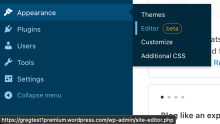
Sandboxing a Simple site with this change that's also running Gutenberg edge, the url correctly shows as |

I'm not either :/ (apart from the menu href change you mention, that is). I'd expect E2E or unit-tests to cover them? I haven't had the chance to try to test them yet (currently fixing core tests in D84588-code). I think it's worth asking the Jetpack Crew (👋🏻 ) for insights here before going any further. I'll mark this with the "Needs Review" flag. |
fullofcaffeine
force-pushed
the
add/calypsoify-support-for-site-editor-in-gb-13.7
branch
2 times, most recently
from
c88ec29 to
9a95950
Compare
fullofcaffeine
force-pushed
the
add/calypsoify-support-for-site-editor-in-gb-13.7
branch
from
4fbc60c to
a085f31
Compare
 sdixon194
removed
[Status] Needs Author Reply
sdixon194
removed
[Status] Needs Author Reply

In terms of just the menu changes on WoA sites, I've been able to test Appearance -> Editor menu href changes by using the Beta tester plugin. Under 'Search for a Jetpack Feature Branch' input 25281 and then click Activate. By testing, I just mean that on an WoA site I can see the URLs correctly showing In terms of other ways to test this I'm not too sure (though I'm aware the existing tests are all passing for this PR). Seeing the comments on this post - p9dueE-5tE-p2 - I'm wondering if this is something @anomiex might have more insight on? |
|
Hi @coder-karen, thanks!
Yeah, we also tested that part, thanks for double-checking, though!
Yep! I'd love some advice on how to go about testing those! Thanks! |

|
I don't have any insight on how to test the actual things, but I can suggest which environments to test in:
|
|
@anomiex I tested the Site Editor href fix in the following scenarios:
I'll take a look a the others. |
fullofcaffeine
force-pushed
the
add/calypsoify-support-for-site-editor-in-gb-13.7
branch
from
a085f31 to
421d0d6
Compare

There was a problem hiding this comment.
Do you think we should try to get the preference from the old route if the one for site-editor-php is null (I don't know what is the actual return value returned when it can't find a persisted preferred view, though, would have to look)?
I think that if we don't, users will lose their preference here, if it was set 🤔

There was a problem hiding this comment.
That makes sense to me 👍
There was a problem hiding this comment.
Do you know how to set this preference for the site editor? 🤔 cc @Addison-Stavlo

There was a problem hiding this comment.
I did a little searching trying to understand this. The "preferred view" comes from the preferred-view query parameter in the url. The only place I can see that we set that in the UI is in the View panel at the top right of some Calypso/wp-admin screens.
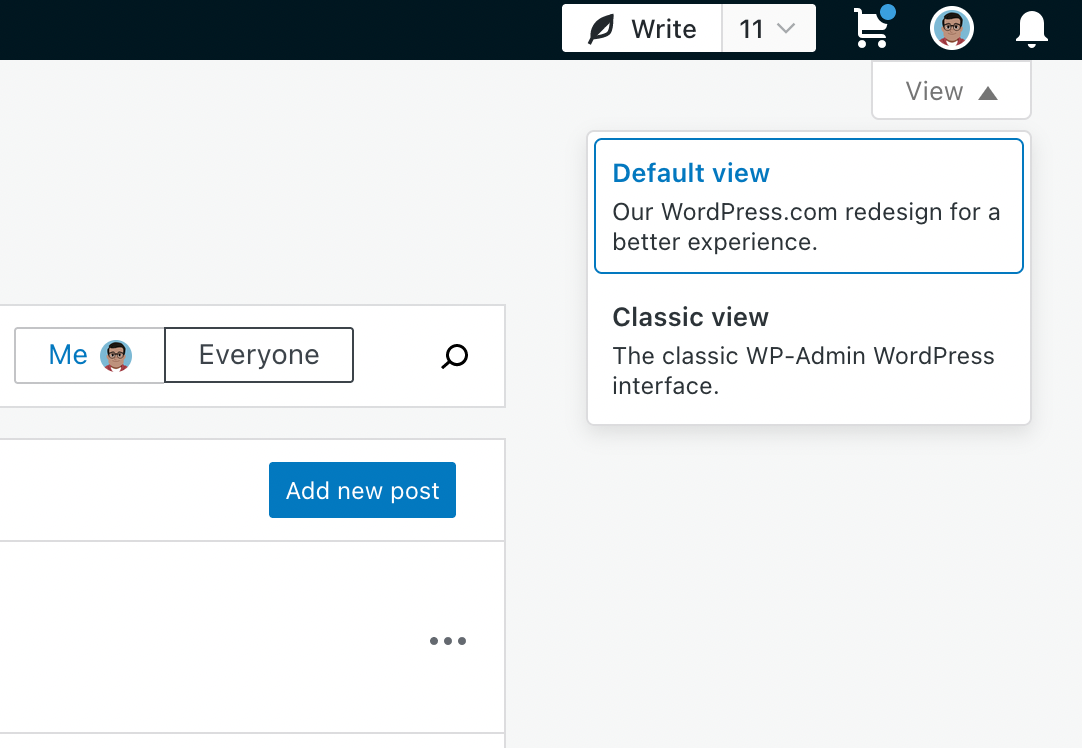
I'm not seeing a way the preferred view would get set specifically for the Site editor, other than manually appending the query parameter to the wp-admin url. If that's correct, I don't think we need to worry about persisting the preference.
There was a problem hiding this comment.
I miss-typed that last comment! Edited, it now reads: "I don't think we need to worry about persisting the preference."
There was a problem hiding this comment.
Hey @creativecoder, thanks for diving into this! Yeah, I was having a chat with @jeyip about the very same thing and we reached the same conclusion. It seems that we can assume the Site Editor has always been set to load inside the Gutenframe and that users couldn't change that.
There was a problem hiding this comment.
That being said, I'll leave an additional note that - as reported by you here - the Gutenframe isn't able to load the Site Editor in AT sites at the moment in any case, though.
There was a problem hiding this comment.
I think we'll need to keep checking for the old page here if we want this condition to keep working with Gutenberg 13.6 🤔 the problem is that Gutenberg 13.6 will redirect site-editor.php to the old themes.php?page=gutenberg-edit-site.
There was a problem hiding this comment.
It looks like the existing code handles both Site editor routes, so you can this leave as is?
There was a problem hiding this comment.
@creativecoder Are you sure? Unless I'm missing something, if 13.6 is active, accessing site-editor.php will redirect to themes.php?page=gutenberg-edit-site, so this logic will not apply.
There was a problem hiding this comment.
Ah, I see what you mean, sorry for the misunderstanding! Yeah, the existing logic does handle both, you're right. However, I think the rewritten one is a bit easier to read and understand.
There was a problem hiding this comment.
This one will work fine with 13.6 and 13.7. In envs with 13.6, it will redirect to site-editor.php, which will in turn redirect to themes.php .... If 13.7+ is active instead, it will work as is, as 13.7 uses this route for the Site Editor.
There was a problem hiding this comment.
I'm not sure how to test this change from an integration standpoint, I asked the Jetpack folks here: p1659139972849529-slack-CDLH4C1UZ. However, the change is simple enough that it's feasible to accept it as is.
fullofcaffeine
force-pushed
the
add/calypsoify-support-for-site-editor-in-gb-13.7
branch
from
c0ec1ca to
39d9de4
Compare

…he logic as needed
fullofcaffeine
force-pushed
the
add/calypsoify-support-for-site-editor-in-gb-13.7
branch
from
d2c05c9 to
2d03003
Compare

 coder-karen
added
[Status] Ready to Merge
coder-karen
added
[Status] Ready to Merge
 github-actions
bot
removed
the
[Status] Ready to Merge
github-actions
bot
removed
the
[Status] Ready to Merge
|
Great news! One last step: head over to your WordPress.com diff, D84883-code, and deploy it. Thank you! |

|
r249926-wpcom |


Changes proposed in this Pull Request:
Gutenberg 13.7 deprecates the old
themes.php?page=gutenberg-edit-siteandadmin.php?page=gutenberg-edit-sitein favor of WP core'ssite-editor.php. This PR updates the route in the admin bar so that theupdate_submenuslogic keeps working and replaces the wp-admin variant with the "calipsoified" one, that opens the editor in the Gutenframe. It also keeps the old rule for backward compatibility with GB < 13.7.Other information:
Jetpack product discussion
Does this pull request change what data or activity we track or use?
Testing instructions:
The easiest way is to create a WoA dev site, install the Jetpack Beta Tester plugin in it and use it to install a dev version of the Jetpack plugin from this branch. From there, you can also modify the source-code directly through
sshusingvim.Test that the
Appearance->Editormenu item links to the "Calipsoified" Site EditorWith Gutenberg 13.6
Appearance->Editorlinks to https://wordpress.com/site-editor/myatsite.wpcomstaging.com.Appearance->Editorlinks to https://wordpress.com/site-editor/myatsite.wpcomstaging.com.With Gutenberg 13.7.3
rm -rf /srv/htdocs/wp-content/plugins/gutenbergWithout Gutenberg (WP 6.0)
rm -rf /srv/htdocs/wp-content/plugins/gutenbergIMPORTANT: The "Calipsofied" link will not work in the block editor from WP until Automattic/wp-calypso#65997 is merged. If you try to open it, it will redirect to
themes.phpwhich will finally show a 403 HTTP error page.Without Gutenberg (WP 5.9)
wp core update --version=5.9 --forceto downgrade your box to WordPress 5.9IMPORTANT: The "Calipsofied" link will not work in the block editor from WP until Automattic/wp-calypso#65997 is merged. If you try to open it, it will redirect to
themes.phpwhich will finally show a 403 HTTP error page.Test changes in
projects/plugins/jetpack/class.jetpack-gutenberg.phpWith Gutenberg 13.6
error_log('ping')here. You can do that by editing the file using vim in your WoA dev box:vim /srv/htdocs/wp-content/plugins/jetpack-dev/class.jetpack-gutenberg.phptail -f /tmp/php-errorsWith Gutenberg 13.7.3
rm -rf /srv/htdocs/wp-content/plugins/gutenbergWithout Gutenberg (WP 6.0)
rm -rf /srv/htdocs/wp-content/plugins/gutenbergWithout Gutenberg (WP 5.9)
wp core update --version=5.9 --forceto downgrade your box to WordPress 5.9Test changes in
projects/plugins/jetpack/modules/notes.phperror_log('pong')here and aerror_log('returning')here before the return. You can do that by editing the file using vim in your WoA dev box:vim /srv/htdocs/wp-content/plugins/jetpack-dev/modules/notes.phptail -f /tmp/php-errorsreturningmessage and should not see apongmessage.Without Gutenberg (WP 6.0)
rm -rf /srv/htdocs/wp-content/plugins/gutenbergWithout Gutenberg (WP 5.9)
wp core update --version=5.9 --forceto downgrade your box to WordPress 5.9Test changes in
projects/js-packages/shared-extension-utils/src/plan-utils.jsSee https://github.com/Automattic/jetpack/pull/25281/files#r933693930
Further context
site-editor.phproute wp-calypso#65997theme_pageSite Editor routes to the newsite-editor.phppage WordPress/gutenberg#42643