A tool to help with Yarn localization. Features:
-A sorting system to help you easily find nodes you need to edit, saving you from having to scour spreadsheets with hundreds of entries
-Editing directly withing the Unity Engine, allowing for a less cumbersome workflow
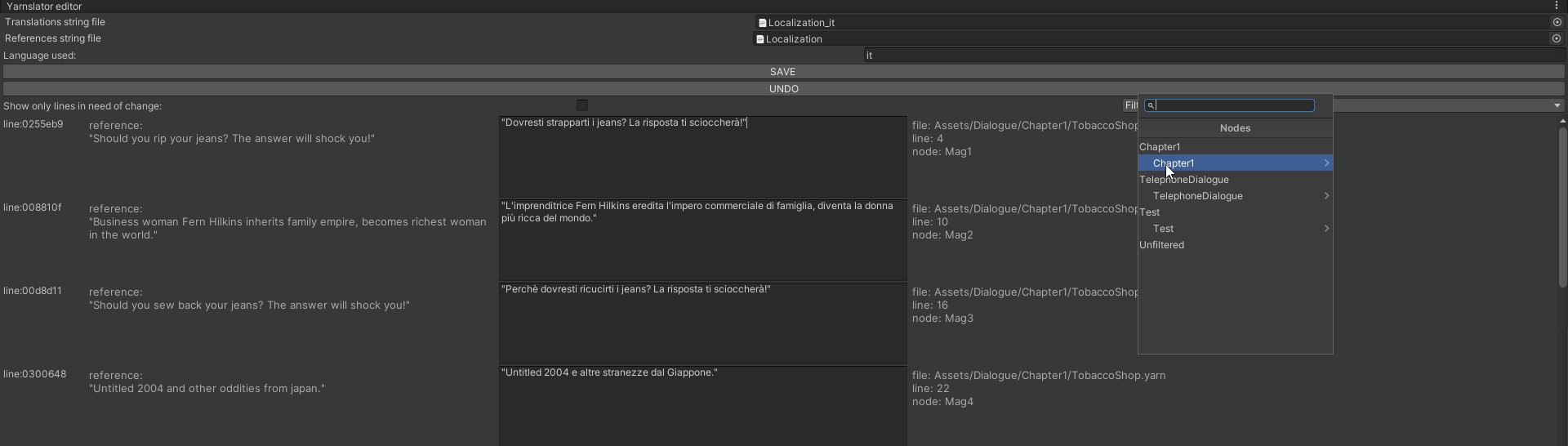
-Copy the repository into the Unity Editor
-Make sure you have Yarn Spinner installed
-Go to your Yarn Spinner project and set up localization csv files (link to the documentation: https://docs.yarnspinner.dev/using-yarnspinner-with-unity/assets-and-localization)
-Go to the toolbar at the top of the screen, and under tools, select "Yarnslator"
-Drag and drop the .csv file for the language you wish to translate to in the "Translations string file"
-(optional) drag and drop a .csv file to use as reference in the "References string file" field
-Write the language code for the language you wish to translate to in the "Language used" field
-(optional) press on filter to filter the lines of dialogue shown down to specific nodes
-(optional) toggle the "Show only lines in need of change" button to only show lines marked by yarn spinner with (NEEDS UPDATE)
-IMPORTANT! REMEMBER TO HIT "SAVE" ONCE YOU FINISH EDITING, OTHERWISE CHANGES WON'T APPLY AND MIGHT GET LOST!