

Give your agents memory that persists, compounds, and decays naturally — in one self-hosted Rust binary.


ذاكرة — Dhākira — Arabic for memory
Every AI agent session starts from zero. Thousands of interactions — zero retained knowledge. You're paying to re-teach your agents the same things, every single conversation.
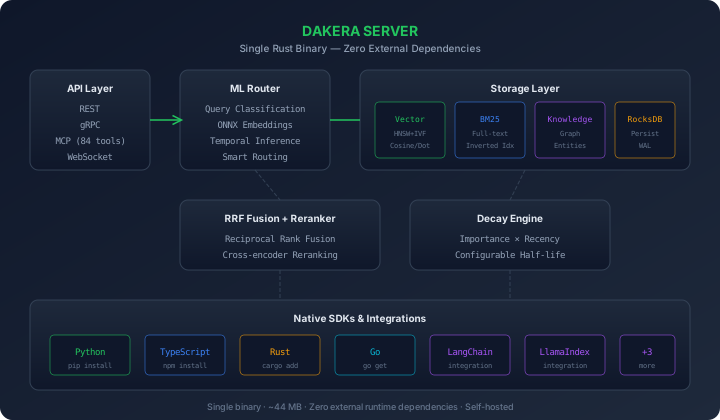
Dakera fixes this permanently. One self-hosted Rust binary gives your agents persistent, compounding memory — backed by hybrid search, knowledge graphs, built-in ML embeddings, and intelligent decay.
- All-in-one: Vector search + BM25 + knowledge graph + sessions + decay — one binary, zero dependencies
- Self-hosted: Your data never leaves your infrastructure. No API calls to external embedding services
- Production-grade: 27.4M inserts/sec, < 10ms p99 query latency, ~44 MB binary
- Framework-native: Drop-in integrations for LangChain, LlamaIndex, CrewAI, AutoGen, and MCP
| Metric | Value |
|---|---|
| LoCoMo recall benchmark | 87.6% overall |
| Category breakdown | Cat1 87.2% · Cat2 86.3% · Cat3 72.0% · Cat4 90.6% |
| p99 query latency | < 10 ms |
| Insert throughput | 27.4M / second |
| Binary size | ~44 MB |
| External runtime deps | 0 |
Benchmarked on the full 1,540-question LoCoMo conversational memory suite (v0.11.55).
| Running separately | Dakera provides |
|---|---|
| Qdrant / Pinecone / Weaviate | HNSW + IVF vector index |
| Elasticsearch / OpenSearch | BM25 full-text search |
| OpenAI / Cohere embeddings | On-device ONNX inference |
| Redis / Postgres memory | Decay-weighted sessions & namespaces |
| Neo4j | Knowledge graph with entity extraction |
Stop managing five services. Deploy one binary.
| Use Case | How Dakera Helps |
|---|---|
| Customer support agents | Remember user preferences, past issues, and context across sessions |
| Coding assistants | Retain project context, decisions, and patterns between sessions |
| Multi-agent workflows | Share knowledge between agents via namespaces and cross-agent recall |
| Personal AI assistants | Build compounding understanding of users over time |
| RAG pipelines | Server-side vector store with built-in embeddings — no external API needed |
docker run -d -p 3300:3300 -e DAKERA_API_KEY=my-key ghcr.io/dakera-ai/dakera:latest
curl http://localhost:3300/health
Python:
pip install dakerafrom dakera import DakeraClient
client = DakeraClient(base_url="http://localhost:3300", api_key="my-key")
client.memories.store(
agent_id="my-agent",
content="User prefers TypeScript over Python",
importance=0.8,
tags=["preference"]
)
memories = client.memories.recall(agent_id="my-agent", query="language preferences")TypeScript:
npm install @dakera-ai/dakeraimport { DakeraClient } from '@dakera-ai/dakera';
const client = new DakeraClient({ baseUrl: 'http://localhost:3300', apiKey: 'my-key' });
await client.memories.store({
agentId: 'my-agent',
content: 'User prefers TypeScript over Python',
importance: 0.8,
tags: ['preference'],
});
const memories = await client.memories.recall({ agentId: 'my-agent', query: 'language preferences' });Add persistent memory to Claude, Cursor, or Windsurf in under a minute:
{
  "mcpServers": {
    "dakera": {
      "command": "dakera-mcp",
      "env": { "DAKERA_API_URL": "http://localhost:3300", "DAKERA_API_KEY": "your-key" }
    }
  }
}
83 tools: Memory CRUD · Vector Operations · Knowledge Graph · Sessions · Namespaces · Decay Engine · AutoPilot · Full-text Index
| Package | Version | Install |
|---|---|---|
| dakera-py |  |
pip install dakera |
| dakera-js |  |
npm install @dakera-ai/dakera |
| dakera-rs |  |
cargo add dakera-client |
| dakera-go |  |
go get github.com/dakera-ai/dakera-go |
| dakera-cli |  |
cargo install dakera-cli |
| dakera-mcp |  |
bundled with server |
| Package | Version | Install |
|---|---|---|
| dakera-langchain |  |
pip install langchain-dakera |
| dakera-llamaindex |  |
pip install llamaindex-dakera |
| dakera-crewai |  |
pip install crewai-dakera |
| dakera-autogen |  |
pip install autogen-dakera |
| dakera-langchain-js |  |
npm install langchain-dakera |
All SDKs and integrations are MIT licensed. The core engine is proprietary.
# Docker
docker run -d -p 3300:3300 -p 3500:3500 \
  -e DAKERA_API_KEY=my-key \
  ghcr.io/dakera-ai/dakera:latest

# Helm (Kubernetes)
helm install dakera oci://ghcr.io/dakera-ai/dakera-helm/dakera \
  --namespace dakera --create-namespace \
  --set dakera.rootApiKey=my-key
→ Full deployment documentation


dakera.ai · Docs · Quickstart · GitHub
Built with Rust · Self-hosted · Zero dependencies · 87.6% LoCoMo recall