Important
As of v0.2.0, this layer is opt-in. Set LOW_LATENCY_LAYER=1 in your environment to enable it globally. Alternatively, this environment variable may be added to per-game Steam launch options to enable it on a case-by-case basis.
A C++23 implicit Vulkan layer that reduces click-to-photon latency by implementing both AMD and NVIDIA's latency reduction technologies.
By providing hardware-agnostic implementations of the VK_NV_low_latency2 and VK_AMD_anti_lag device extensions, this layer brings Reflex and Anti-Lag capabilities to AMD and Intel GPUs. When paired with dxvk-nvapi to forward the relevant calls, it bypasses the need for official driver-level support.
The layer also eliminates a hardware support disparity as considerably more applications support NVIDIA's Reflex than AMD's Anti-Lag.
Benchmarks suggest the layer performs as well as or better than the proprietary Windows implementations on the same hardware. More details and benchmarks are available here.
- CMake: A cross-platform, open-source build system generator.
- Vulkan Headers: Vulkan header files and API registry.
- Vulkan Utility Libraries: Library to share code across various Vulkan repositories.
Clone this repo.
    $ git clone https://github.com/Korthos-Software/low_latency_layer.git
    $ cd low_latency_layer
Create an out-of-tree build directory (creatively we'll use 'build') and install.
⚠️ WARNING: You are likely going to have to install your distro'svulkan-headers,vulkan-utility-libraries, and possibly evencmakepackages before proceeding. If you see an error here their absence is almost certainly the reason.
    $ cmake -B build ./
    $ cd ./build
    $ sudo make install
By default, the layer exposes the VK_AMD_anti_lag device extension. Provided the layer was enabled with LOW_LATENCY_LAYER=1, Linux native applications like Counter-Strike 2 will work out-of-the-box, allowing you to toggle AMD's Anti-Lag in its menus. You can further customize the layer's behavior using the environment variables listed below.
| Variable | Description |
|---|---|
LOW_LATENCY_LAYER |
Expose to enable the layer. |
LOW_LATENCY_LAYER_REFLEX |
Set to 1 to expose VK_NV_low_latency2 instead of VK_AMD_anti_lag. This tells the layer to provide Reflex support instead of Anti-Lag 2, which is provided by default. |
LOW_LATENCY_LAYER_FORCE_DECOUPLED |
Set to 1 to force mitigation of a decoupled simulation and render queue. This is disabled by default - only enabled for Marvel Rivals. Refer to delay_controller.hh for more details. Do not use outside of debugging - this will hurt latency in most applications. |
LOW_LATENCY_LAYER_SPOOF_NVIDIA |
Set to 1 to report the device as an NVIDIA GPU to the application, regardless of actual hardware. Not recommended - prefer DXVK_CONFIG="dxgi.hideAmdGpu = True", as this option is known to break Proton's FSR4 upgrade path. |
DISABLE_LOW_LATENCY_LAYER |
Expose to disable the layer. This takes precedence over the LOW_LATENCY_LAYER enable environment variable. |
When providing Reflex support for Proton-based applications, try LOW_LATENCY_LAYER_REFLEX=1 on its own first. If the Reflex option does not appear in-game, add DXVK_CONFIG="dxgi.hideAmdGpu = True". If this does not expose Reflex you can try PROTON_FORCE_NVAPI=1 and/or LOW_LATENCY_LAYER_SPOOF_NVIDIA=1 - however both are known to break Proton's FSR4 upgrade path (PROTON_FSR4_UPGRADE / PROTON_FSR4_RDNA3_UPGRADE).
Steam launch options example:
LOW_LATENCY_LAYER=1 LOW_LATENCY_LAYER_REFLEX=1 DXVK_CONFIG="dxgi.hideAmdGpu = True" %command%
The 'Boost' mode of Reflex is supported but is functionally identical to 'On' - the layer treats both modes identically.
Benchmarks were conducted under worst-case conditions using high-end AMD hardware. For configurations that create higher GPU load, these latency reductions will be more pronounced. We preferred testing on low resolution and high refresh-rate monitors as they provide less variance and are more likely to reveal correctness issues against proprietary reference implementations.
testing.webm
- GPU: ASUS TUF Radeon RX 7900 XTX (flashed 550W Aqua Extreme BIOS) 1250MHz VRAM watercooled
- CPU: AMD Ryzen 7 9800X3D 102.0MHz eCLK -15 CO 2133MHz FCLK delid watercooled
- Memory: 64GB 2x32GB Hynix A-Die 6000MT/s CL28-36-36-30 GDM:off Nitro:1-2-0 (tuned)
We used Gentoo running KDE Plasma 6.6. Direct scanout was enabled throughout the testing process, verified as KWin’s 'Compositing' watermark disappeared when in fullscreen. Latency was measured using the NVIDIA Reflex Analyzer integrated into the ASUS PG248QP.
 Comments
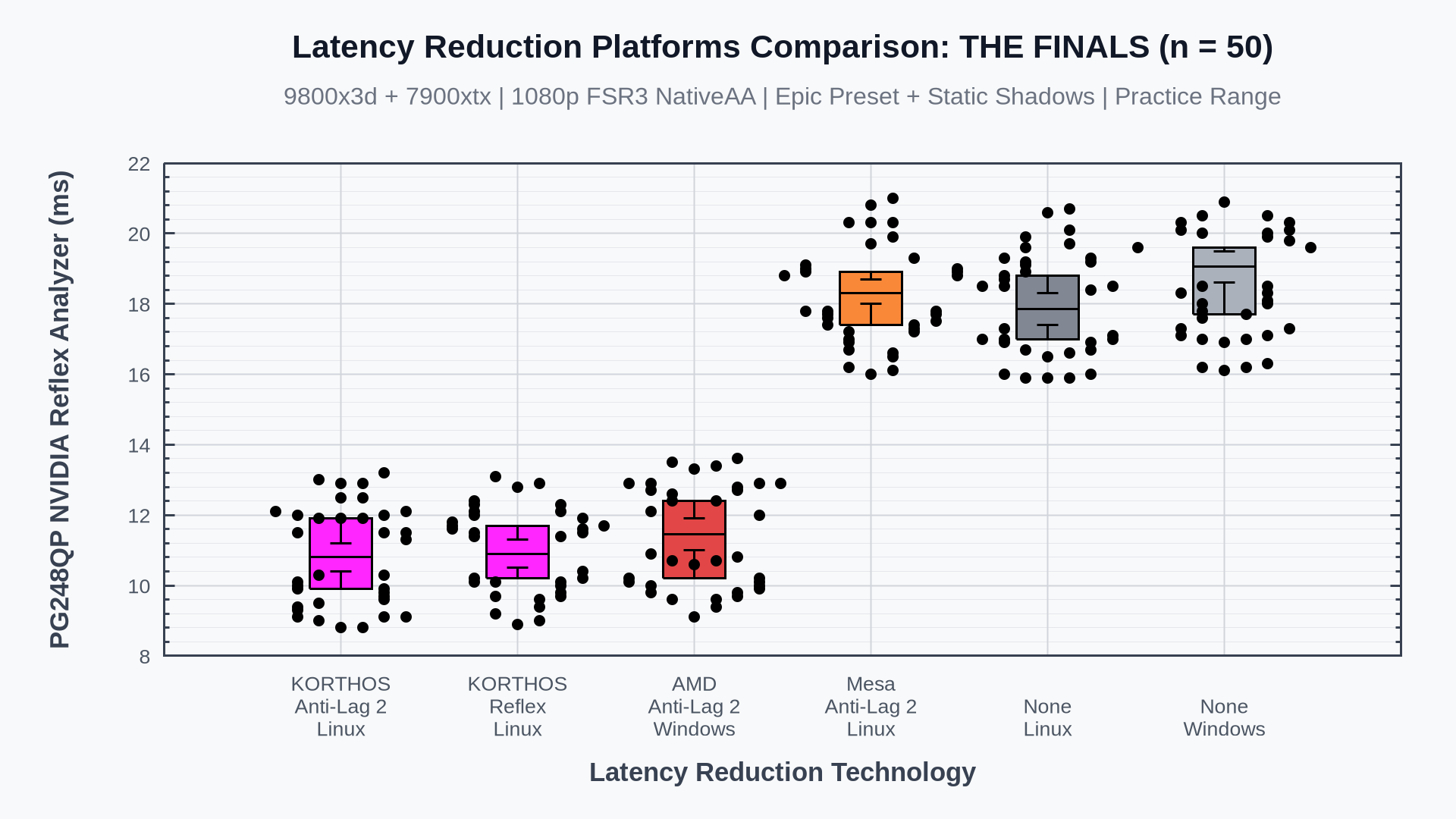
- We included comparisons against AMD's proprietary DX12 implementation of Anti-Lag 2 on Windows. The results suggest latency matches or beats native Windows numbers.
- We can directly compare our implementation of Reflex and Anti-Lag technologies - they appear to perform identically as both are in line with AMD's proprietary reference implementation of Anti-Lag 2.
- Mesa's anti-lag Vulkan layer was also included in testing. It appears to be a no-op in this case as it provides no latency benefit. The data suggests it may even increase latency slightly.
 Comments
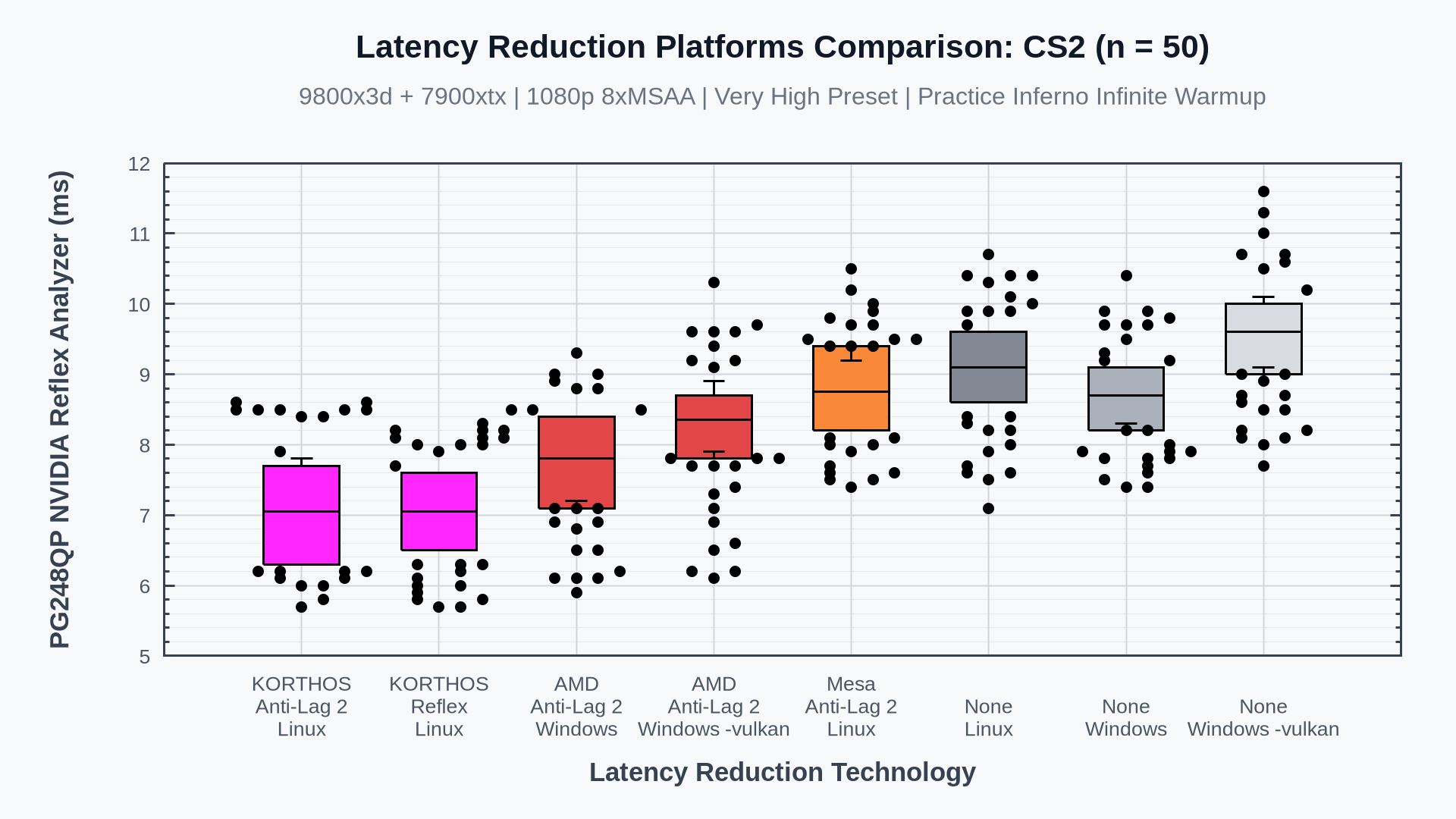
- Unlike THE FINALS, where results were comparable, both technology implementations clearly beat the native Windows numbers in absolute terms.
- Reflex and Anti-Lag 2 again perform identically, consistent with our previous findings.
- CS2's
-vulkanbackend was also tested on Windows. It regresses baseline latency relative to the default backend, and AMD's Anti-Lag 2 does not recover this - it remains slower than Anti-Lag 2 on the default backend. - Mesa's Anti-Lag Vulkan layer again appears to be a no-op, matching our findings from THE FINALS.
 Comments
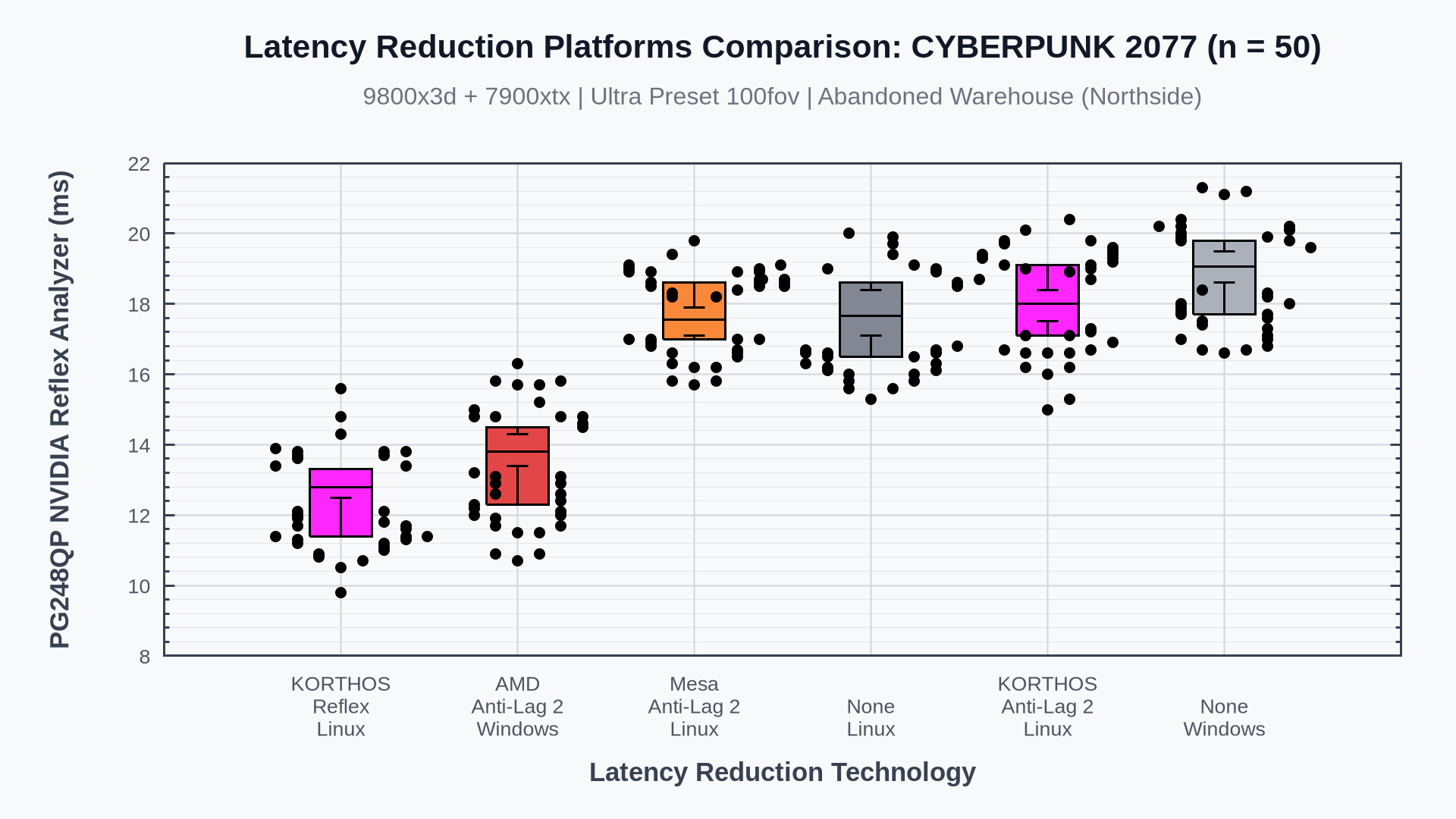
- Cyberpunk is an interesting test case: Anti-Lag 2 on Linux appears broken (suspected cause is an application bug). The layer never observes a call to
AntiLagUpdateAMD, which is required to function. The settings UI also lacks an explicit Anti-Lag 2 toggle. To complicate things further, Anti-Lag 2 is enabled by default on Windows. - On Windows, Anti-Lag 2 can be disabled by holding right ctrl with the debug overlay open (shift+alt+f).
- Despite no Linux Anti-Lag implementation working correctly, our Reflex path still exceeds native Windows Anti-Lag 2 in absolute latency. Naturally, this path should be preferred for this application.
 Comments
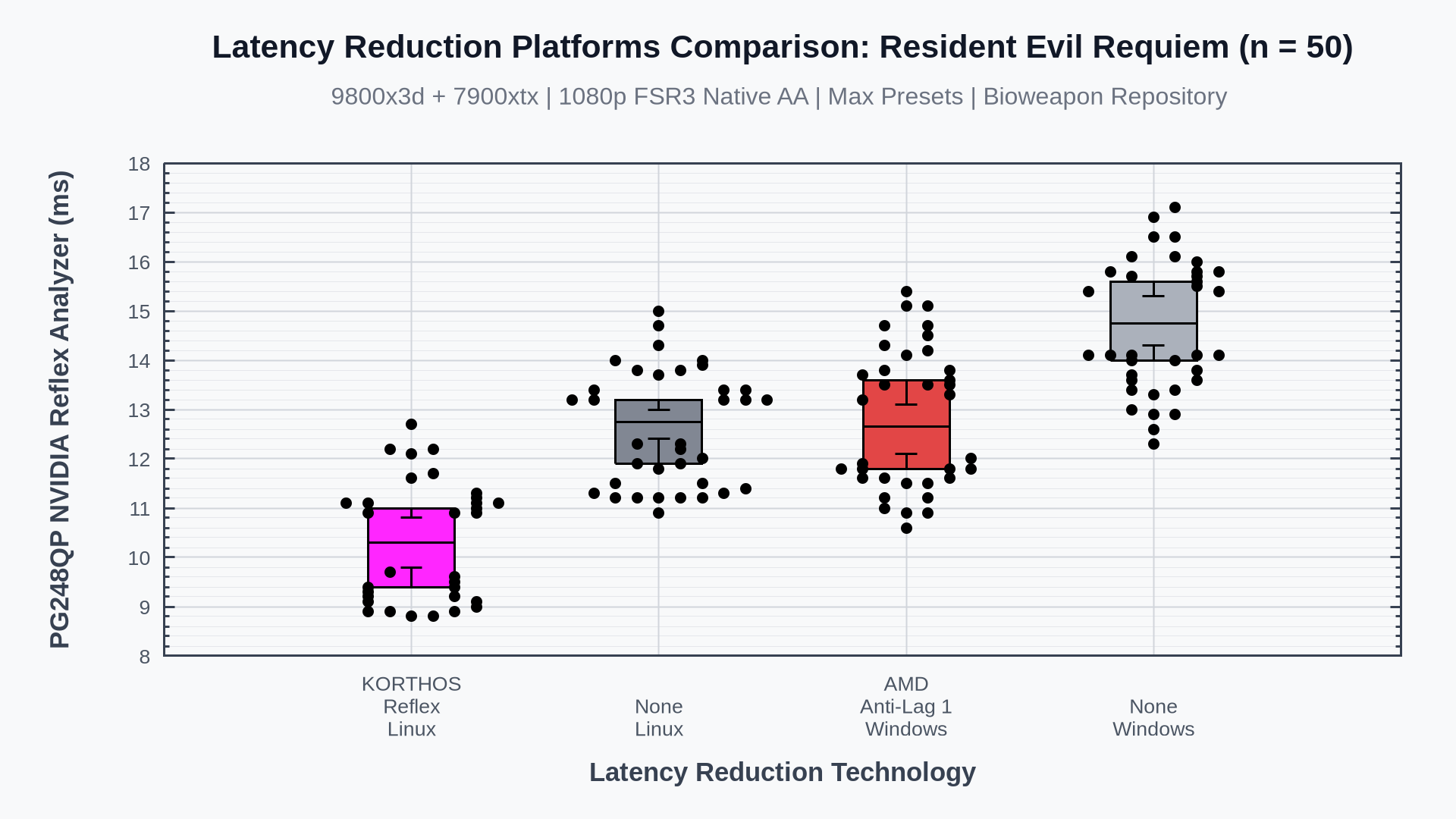
- Resident Evil Requiem doesn't support Anti-Lag 2 but does support Reflex. We compare the closest Windows alternative for AMD users - Anti-Lag 1 - to our 'native' Reflex support.
- Anti-Lag 1 on Windows performed similarly to the native Linux baseline.
- Our Reflex implementation outperformed every other tested method in absolute latency.
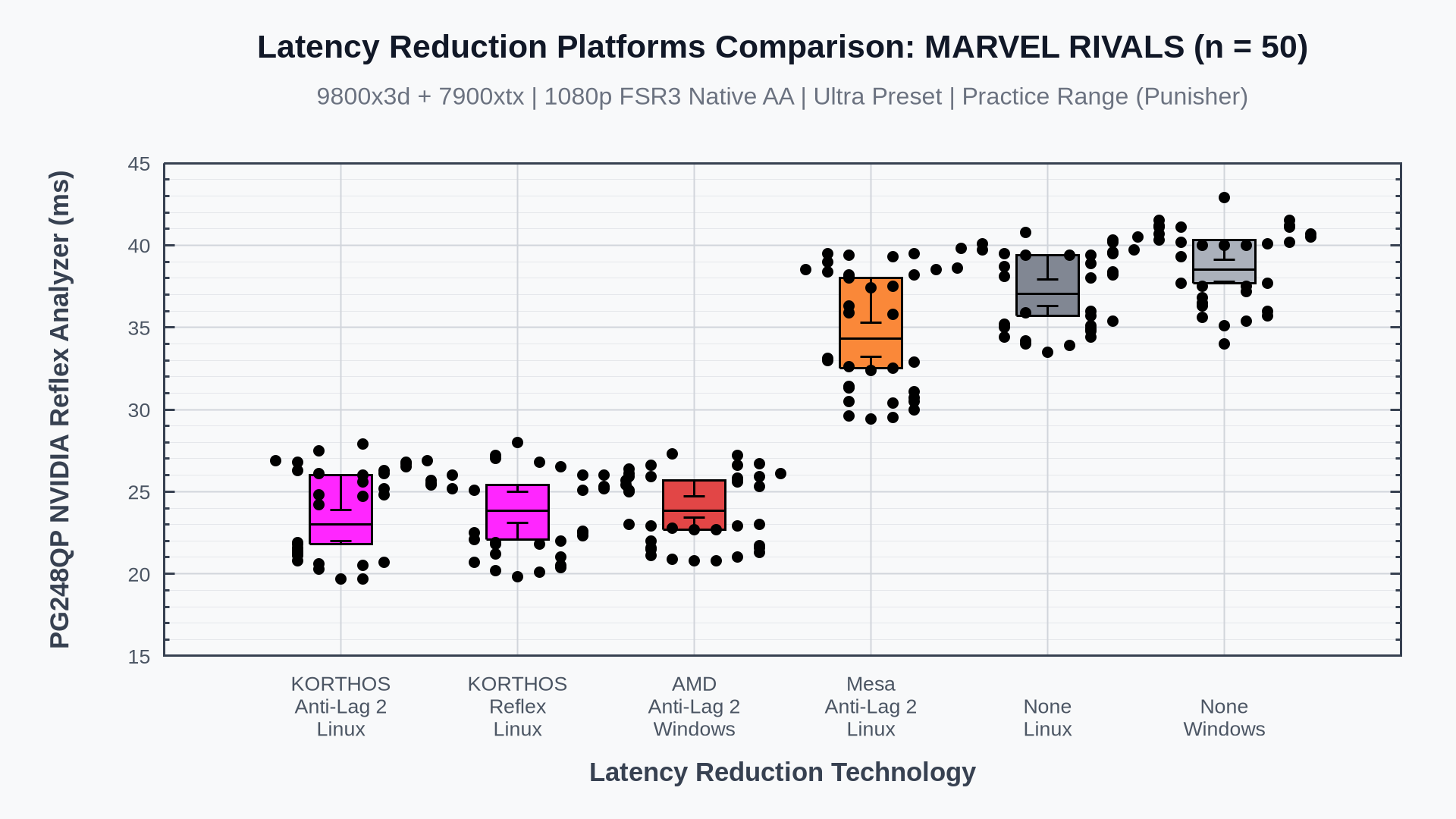 Comments
- Marvel Rivals was a pain point during development. It has a decoupled simulation and render queue and required some careful statistics and additional delays (see
delay_controller.hh) to match the Windows implementation. - I believe that the use of Reflex/Anti-Lag while providing a decoupled simulation and render queue should be considered an application bug. Marvel Rivals would achieve significantly greater latency reductions if the developers tightly coupled their simulation and render pipelines. This would make our statistics-based approach unnecessary. This is likely a single configuration option in UE5.
- This additional delay approach is enabled by default for this application only, but can be forced on with
LOW_LATENCY_LAYER_FORCE_DECOUPLED=1.
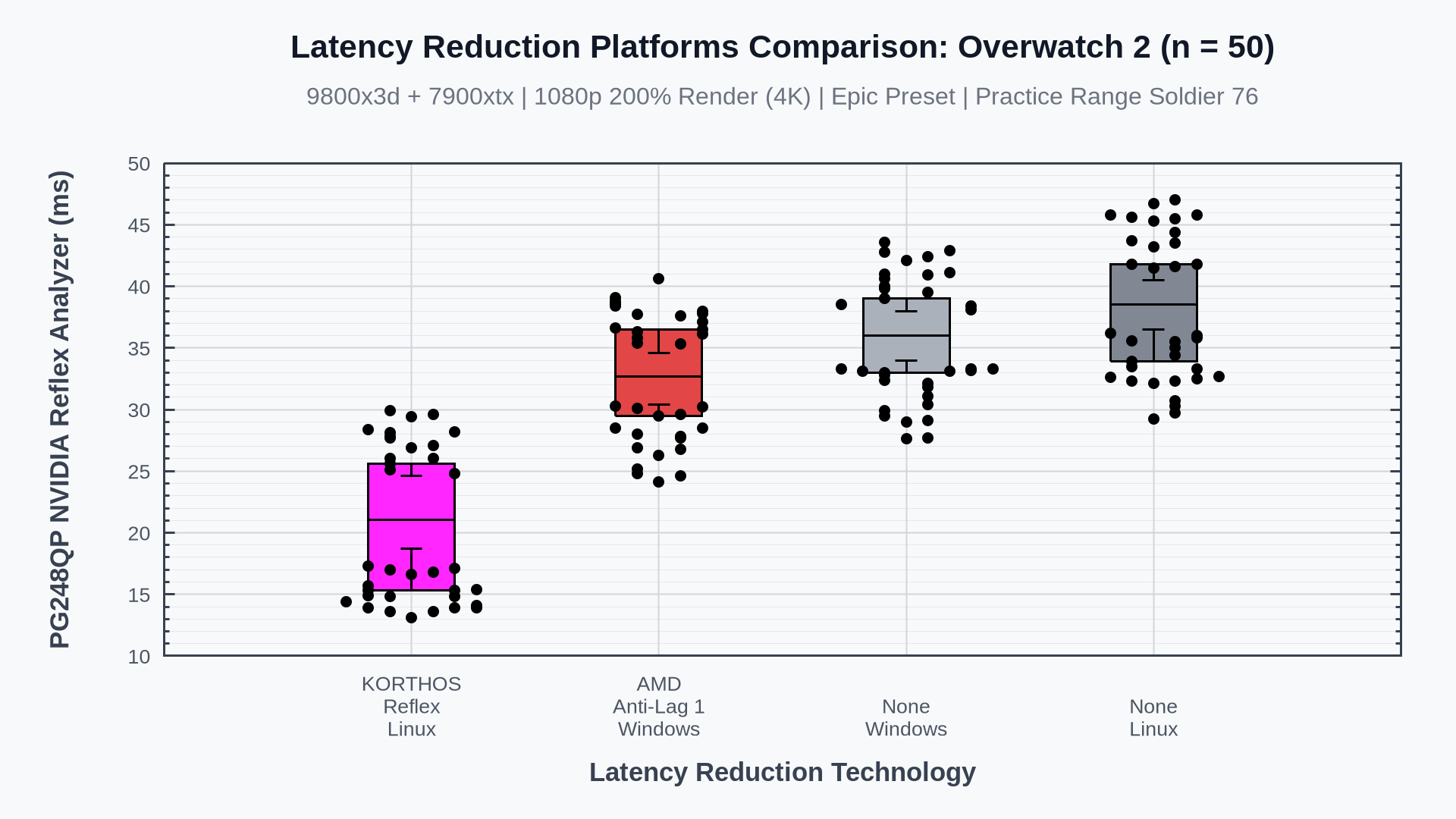
- Overwatch 2 lets us test at 4K without Gamescope latency overhead. As the GPU becomes a greater bottleneck here, the result is more representative of weaker hardware running at lower resolutions.
- Like Resident Evil Requiem, Overwatch 2 supports Reflex but not Anti-Lag 2, so we again compare against Anti-Lag 1 as the closest Windows alternative for AMD users.
- Anti-Lag 1 on Windows tracked the native Linux baseline closely, offering little benefit.
- Our Reflex path performed well, comfortably ahead of the other tested configurations.
This project is licensed under the MIT License - see the LICENSE file for details.