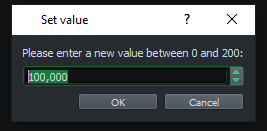
Fix background color of the selected text in the dialogs to enter a parameter, the project notes and editable combo boxes. #5687
Conversation


Align the background color of the selected text in the spinboxes shown in the dialogs to enter a parameter
with the background color of regular text inputs.

🤖 Hey, I'm @LmmsBot from github.com/lmms/bot and I made downloads for this pull request, click me to make them magically appear! 🎩
Linux
Windows
macOS🤖{"platform_name_to_artifacts": {"Linux": [{"artifact": {"title": {"title": "(AppImage)", "platform_name": "Linux"}, "link": {"link": "https://9472-15778896-gh.circle-artifacts.com/0/lmms-1.2.3-733%2Bg580f24f-linux-x86_64.AppImage"}}, "build_link": "https://circleci.com/gh/LMMS/lmms/9472?utm_campaign=vcs-integration-link&utm_medium=referral&utm_source=github-build-link"}], "Windows": [{"artifact": {"title": {"title": "32-bit", "platform_name": "Windows"}, "link": {"link": "https://9474-15778896-gh.circle-artifacts.com/0/lmms-1.2.3-733%2Bg580f24fd1-mingw-win32.exe"}}, "build_link": "https://circleci.com/gh/LMMS/lmms/9474?utm_campaign=vcs-integration-link&utm_medium=referral&utm_source=github-build-link"}, {"artifact": {"title": {"title": "64-bit", "platform_name": "Windows"}, "link": {"link": "https://9473-15778896-gh.circle-artifacts.com/0/lmms-1.2.3-733%2Bg580f24fd1-mingw-win64.exe"}}, "build_link": "https://circleci.com/gh/LMMS/lmms/9473?utm_campaign=vcs-integration-link&utm_medium=referral&utm_source=github-build-link"}, {"artifact": {"title": {"title": "32-bit", "platform_name": "Windows"}, "link": {"link": "https://ci.appveyor.com/api/buildjobs/ntgy2yixb9bqxrb2/artifacts/build/lmms-1.2.2-msvc2017-win32.exe"}}, "build_link": "https://ci.appveyor.com/project/Lukas-W/lmms/builds/35756154"}, {"artifact": {"title": {"title": "64-bit", "platform_name": "Windows"}, "link": {"link": "https://ci.appveyor.com/api/buildjobs/nuq83x0bjlf14gya/artifacts/build/lmms-1.2.2-msvc2017-win64.exe"}}, "build_link": "https://ci.appveyor.com/project/Lukas-W/lmms/builds/35756154"}], "macOS": [{"artifact": {"title": {"title": "", "platform_name": "macOS"}, "link": {"link": "https://9471-15778896-gh.circle-artifacts.com/0/lmms-1.2.3-733%2Bg580f24fd1-mac10.13.dmg"}}, "build_link": "https://circleci.com/gh/LMMS/lmms/9471?utm_campaign=vcs-integration-link&utm_medium=referral&utm_source=github-build-link"}]}, "commit_sha": "157d4059ffc8f35bc349ba15534f371c5776ee19"} |
 DigArtRoks
changed the title
DigArtRoks
changed the title
DigArtRoks
changed the title
DigArtRoks
changed the title

|
Perhaps we could introduce a variable for the color, since it's used in several places? Unless there's a better way to de-duplicate it. For the default theme it's used in 3 places, and the classic theme uses it 4 times (though one use is inside "LmmsPalette"...). As far as I can tell it should be something like this:
|
|
Variables are a good idea. But Qt stylesheets are not supporting them. It is not mentioned in the Qt doc. Searching the internet results in a workaround using the Sass CSS compiler (a 2 step approach, where variables are replaced in the resulting css file) or have your style sheet in the C++ code itself where string formatting is used to reuse the same color. I tried the regular css way using :root, but that results in the debug message "Could not parse application stylesheet" and an ugly interface. A possible solution it to rely on inheritence and define the property at the QObject class.
|
|
Ah, right, it's not actually CSS. With that in mind, the changes LGTM! |

|
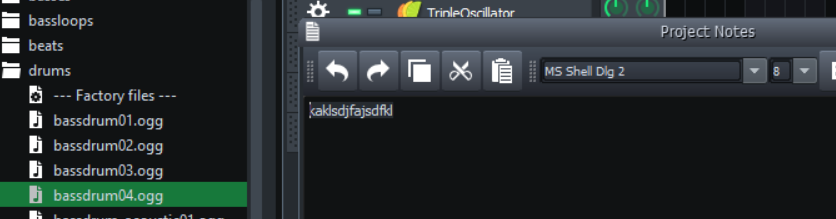
I don't know if it's related to this issue, but testing I found that It doesn't work inside the "Project Notes" window. Nor in the seleccion of font name or size. Neither inside the text area. |
|
@superpaik, on which platform are running LMMS? Are you running the build on the master branch? PR #5628 is merged on master and fixes at least in Windows the problems you mention.
|
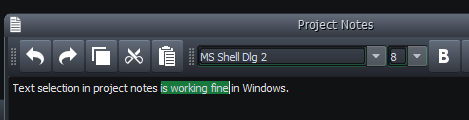
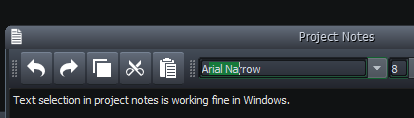
|
I'm running windows 10. I tried both the build done by the bot and build it locally using master+PR 5687. Every other thing seems to work perfectly. Maybe it has to do with the fact that I've installed many time lmms using different PRs ¿? |
|
I'm running windows 10 as well. I reinstalled LMMS using the 2 64bit images created by the bot here and also my own build image and unfortunately it does not work neither anymore at my side with any of the versions... Very strange. I'll try to have a look at it. Nevertheless the parameter dialogs and renaming fields are still working as expected. (for which the PR's were intended to.) |
… and QComboBoxes.

Group the different classes into one style that sets the text color and background color of selected text.
DigArtRoks
changed the title
|
@superpaik, I just did an additional commit on my fork. At my side it now sets correctly the selection background color in the project notes and the comboboxes for font and size. Can you try it? Basically you only need to download style.css and put it in your themes directory. Can you give it a try? |
|
Yes, it works. |
… only when they get focus.
|
Yes indeed, I overlooked that small line. Thanks for remarking. Apparantly text input widgets get a 3D bevel effect using the background color for selected text. I did not find any way to separate the two or disable the bevel effect. Looks like a shortcoming of QT. I did a new commit which improves it a bit, at least for the comboboxes. It only changes the background color of selected text when it gets the input focus. Only at that moment the bevel changes color as well. However for the project notes itself, which uses QTextEdit, that trick does not work. So I left this as is. The bevel effect would change color at focus, but the background of the highlighted text stays black iso green, which is what I wanted to fix. The About Dialog uses QTextEdit's as well but they are not editable. Hence they also show the thin green line at the border. |
|
I find it ok as it is. It was the comboboxes where the green line was more noticeble. |

Agreed easy to revert if needed. Merging. |


5 participants


Align the background color of the selected text in the spinboxes shown in the dialogs to enter a parameter with the background color of regular text inputs.
(related to the issue #5484 and PR #5628).
Before:
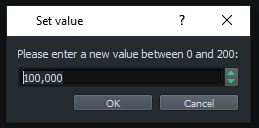
After: