Added option to prefix serial monitor messages with a timestamp. #1189
Conversation


|
Have you tested this with multiple arduino's connected all sending data at the same time? |

|
No, good point. I'll see what I can do. |

| private StringBuilder lineBuffer = new StringBuilder(); | ||
|
|
||
| private DateTimeFormatter timeFormatter = DateTimeFormatter.ofPattern("HH:mm:ss"); //$NON-NLS-1$ | ||
| private static final String arduinoEOL = "\r\n"; //$NON-NLS-1$ |

There was a problem hiding this comment.
It looks to me as if you are assuming arduino always sends \r\n as newline. This is however not true.
\n is a safer option.
There was a problem hiding this comment.
I did wonder about this.
How about I discard all \r and match on \n. A simple implementation of that might be slow but I'll see how it goes.
There was a problem hiding this comment.
I quite often use String.replace ("\r\n","n");
However in this case I don't really like it because you can save the monitor content for later processing and then the user may not get what he wants.
|
|
||
| public synchronized void addData(String event) { | ||
| if (!event.isEmpty()) { | ||
| this.additionalSerialData = this.additionalSerialData + event; |
There was a problem hiding this comment.
wouldn't it be easier to have something like
if (SerialListener.showTimestamps) {
	String ts = LocalTime.now().format(timeFormatter) + ": "; //$NON-NLS-1$
        this.additionalSerialData = this.additionalSerialData + event.replace('\n',ts );
}
else{
         this.additionalSerialData = this.additionalSerialData + event;
}
There was a problem hiding this comment.
I tried that but it wasn't reliable. I can't tell you why because it looks like it should work but it didn't. I still got line breaks in weird places, it was like they were being added by something else but I can't think what. It made no sense, but it didn't work.
The code in the pull request is the only one of 3 or 4 different algorithms I tried that seems to work consistently.
There was a problem hiding this comment.
Thinking about this.... I think it is way better to add this code in the monitor itself
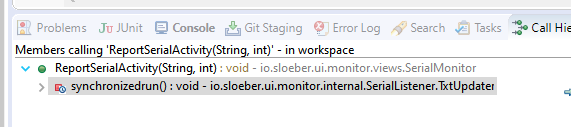
SerialMonitor.ReportSerialActivity
go from
public void ReportSerialActivity(String stInfo, int style) {
int startPoint = monitorOutput.getCharCount();
monitorOutput.append(stInfo);
StyleRange styleRange = new StyleRange();
styleRange.start = startPoint;
styleRange.length = stInfo.length();
to
public void ReportSerialActivity(String stInfo, int style) {
int startPoint = monitorOutput.getCharCount();
String displayInfo;
if (SerialListener.showTimestamps) {
String ts = LocalTime.now().format(timeFormatter) + ": "; //$NON-NLS-1$
displayInfo= stInfo+ event.replace('\n',ts );
}
else{
displayInfo= stInfo;
}
	monitorOutput.append(displayInfo);
	StyleRange styleRange = new StyleRange();
	styleRange.start = startPoint;
            styleRange.length = displayInfo.length();
|
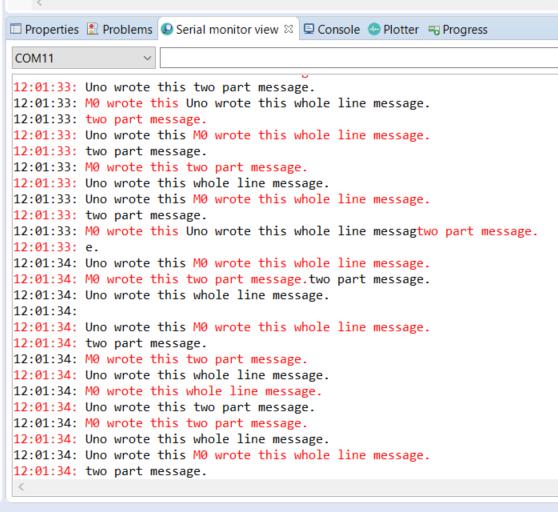
It worked ok with two devices. There doesn't seem to be any thread safety around SerialMonitor.ReportSerialActivity though - could the Eclipse text control have thread safety in it? It might be worth making the SerialMonitor.ReportSerialActivity method synchronized to be sure, but I'm not seeing a problem without synchronized. I wonder what effect the timestamping code would have on your scope function? Would the buffering until EOL break that? I'm testing with the code below. With timestamps on the messages show up nicely. With timestamps off the messages get interleaved due to the delay in the two part message. This is actually an Uno and a M0 Feather, sadly you can't see the colours! 100s of lines like this: 21:38:14: Uno wrote this whole line message. Then I switch off the timestamps. This interleaving is expected due to the way the original code works. 21:38:15: Uno wrote this whole line message. |
There is:
That is why prefer it in the monitor class. At least there you know \n is a newline and not some binary data
Yes and that is the way it is supposed to be. This is why I commented with "From your description the behaviour is going to be pretty different.' |
|
I've done some more exploring and changed my test sketch to include some plotter data. There is SerialListener and PlotterListener, which run in "parallel" in that they don't share data. So any change made to SerialListener won't affect the actual plotted data, but it still might not be the right place for my change - I think you're right and SerialMonitor is where it should go. What does this code do in SerialListener.internalMessage? It's triggered when not filtering the plotter data from the incoming bytes. If the plotter data is not filtered then the String passed to the serial monitor can still contain \r\n as part of the plotter data - my sketch is sending 0xCDAB 0x0002 0x0D0A and I'm getting newlines in the output where-ever the plotter data shows up. |
|
Here is what happens when you don't buffer up the incoming messages into lines. If the SerialMonitor is where the change is made it will have to do the buffering. That means the color index bug I found yesterday will have to be fixed too or the data could all go into one device's buffer. If the plotter data is not being filtered and contains \r\n it will cause unwanted newlines and timestamps but that doesn't worry me because I don't use the plotter.
|
|
I don't know which code you used but this piece of code I proposed is wrong causing things to look wierd it should be something like This way the timestamp should always be followed by content of the same colour (unless the \n is the last char) |
|
Some background info. |
|
Seems I missed part of what you typed in my previous comment ;-)
The only reason to not filter the plotter data is for testing to see whether binary data arrives or not. |
If I remember correctly avoid you get 2 newlines when a \r\n is split in the middle |
|
I have updated my change so it uses the serial port index fix and the time-stamping happens in SerialMonitor. I'm guessing the conflict mentioned above is caused by the fact I redid the serial port index fix in my fork before the pull request was merged and the fix could be brought in that way. I am still buffering lines because I want to avoid messages from multiple serial ports appearing on a single line. If I was using this feature I would write my sketches so their log messages all end with an EOL and I'd want to read them as complete lines without some other message appearing halfway through the line due to serial driver delivery timing. |
| private String additionalSerialData = new String(); | ||
|
|
||
| public synchronized void addData(String event) { | ||
| if (!event.isEmpty()) { |
There was a problem hiding this comment.
I think this line should not be deleted?
Shouldn't we just restore SerialListerner?
There was a problem hiding this comment.
Sorry about that! I've pushed a commit to fix it, but even better would be to just throw away all changes to SerialListener as you suggest. But I don't know enough about git to do that - how would I do it?
|
I think I can resolve the conflict (probably cause by something wierd as it is just a added line) |

|
Hope this worked ok. |
|
I mucked about with git reset and git revert to try and take my master branch back to when I first forked, but couldn't get anything to work. Sorry the history on the files is a bit messy now. |
|
Don't worry I did some things wrong and had to fix after the merge |
2 participants


This commit adds the option to print a timestamp before each line received over the serial port. There is a new button in the serial monitor to switch it on and off. The time used is local time.
This mode won't work well if the sketch isn't regularly sending EOL sequences as it waits for them before flushing the received data. The logic to keep flushing based upon how much data was stored seemed to be difficult and messy for an edge case so I decided to make this compromise.
One sort-of-unrelated change adds EOL to the message saying no serial devices are connected so that the timestamp on the connection message starts on a new line.