

Daintree: a meta-harness and IDE that runs your own agent CLIs as a hierarchy of agents, across multiple hosts. Always without vendor lock-in.
Claude Code, Codex, Antigravity, OpenCode and 13 more run as they are, with your existing config and login. A global Assistant sits above your projects and hosts, each project has assistants of its own, and they hand tasks to agents working in their own git worktrees, on this machine or on another one you reach over ssh. The calls only you can make wait for you in Daintree, and questions an agent sends through Decisions can reach your phone. macOS, Windows and Linux. Apache 2.0, no account, telemetry off by default.


Download · How it works · Assistant · Decisions · Remote hosts · Plugins · Review · Agent CLIs · MCP server · Canopy · Build from source · Docs
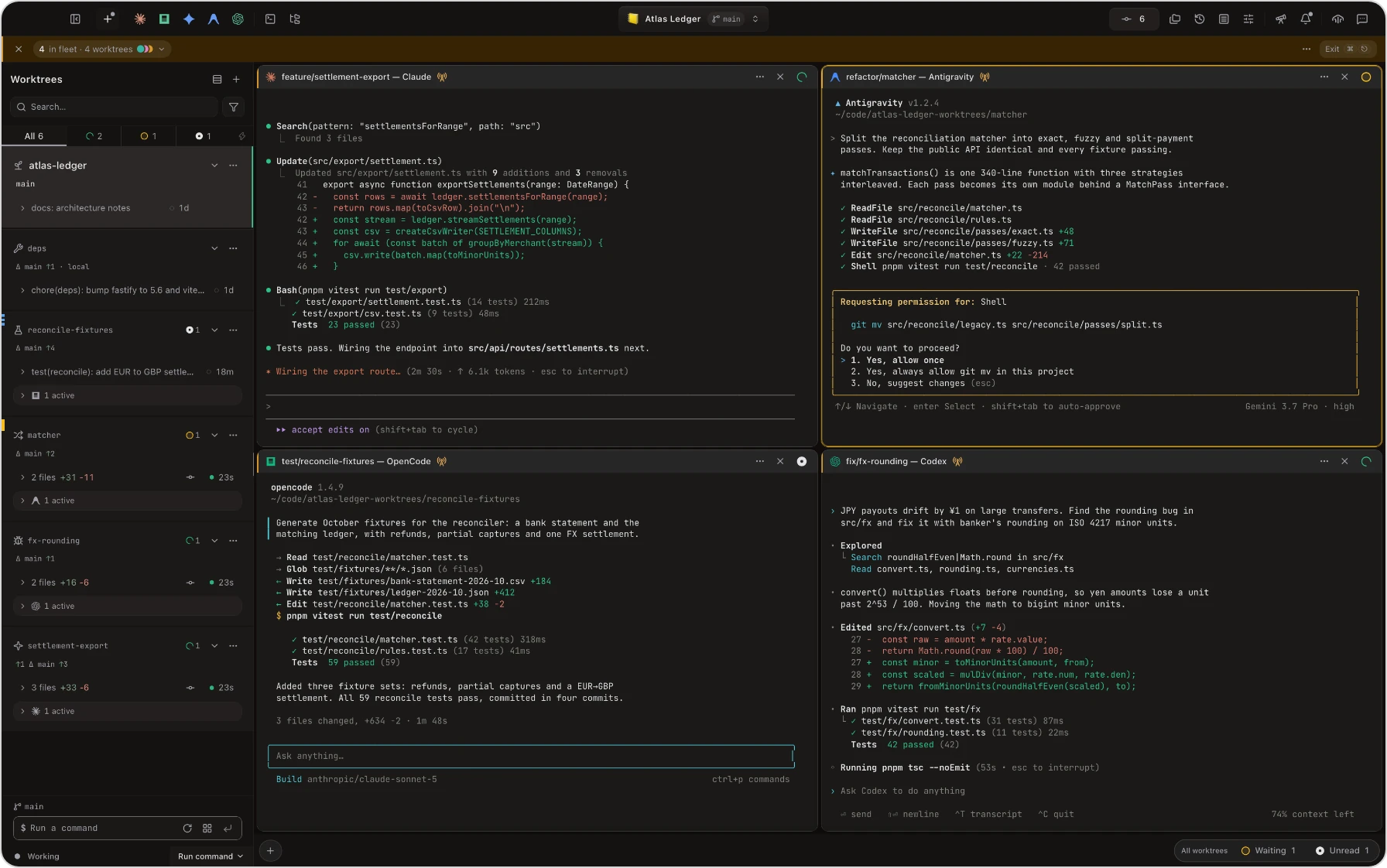
Antigravity waiting on a permission prompt, one of four agents in one window, in the Daintree theme (Bondi Beach when GitHub is light)
Watch the five-minute walkthrough
Get the latest build at daintree.org/download, or on macOS install it with Homebrew:
brew install --cask daintreehq/tap/daintreeDaintree updates itself, and Homebrew never reinstalls over a copy that already has.
| Platform | Package |
|---|---|
| macOS 13+ | Signed and notarized .dmg for Apple Silicon, Intel or Universal |
| Windows 10+ | Per-user installer for x64 or arm64 that needs no admin rights and updates in place, plus an x64 .appx for the Microsoft Store |
| Linux | .AppImage and .deb for x64 or arm64 on glibc 2.34+ (Ubuntu 22.04, Debian 12, Fedora 35, RHEL 9 or later), under X11 or Wayland |
Daintree runs your agent CLIs as a standing hierarchy rather than one run at a time:
- The global Assistant sits above every project on this machine and on the hosts you've let it work on. It reads agents' state across projects and hosts in one call, can arm a notice for the next one that starts waiting, and steers work wherever it runs.
- Project assistants are long-lived seats in one project. They plan the work, open worktrees, launch agents into them and watch their terminals.
- Worker agents each take one task, in a git worktree of their own, starting from a clean context. Once the work lands, the worktree can be retired with them.
An assistant can reply in a worker's terminal, or pick a permission option there, inside the authority you've already given it, and brings you the rest. Canopy ranks every agent waiting on you, and with Decisions on, an agent can send you a question to answer on your computer or your phone.
The Assistant is Claude Code, Codex or Antigravity, signed in the way you already are, running in a terminal in Daintree's Assistant panel on its own MCP session with a wider tier of tools. There's no extra subscription. Read about the Assistant →
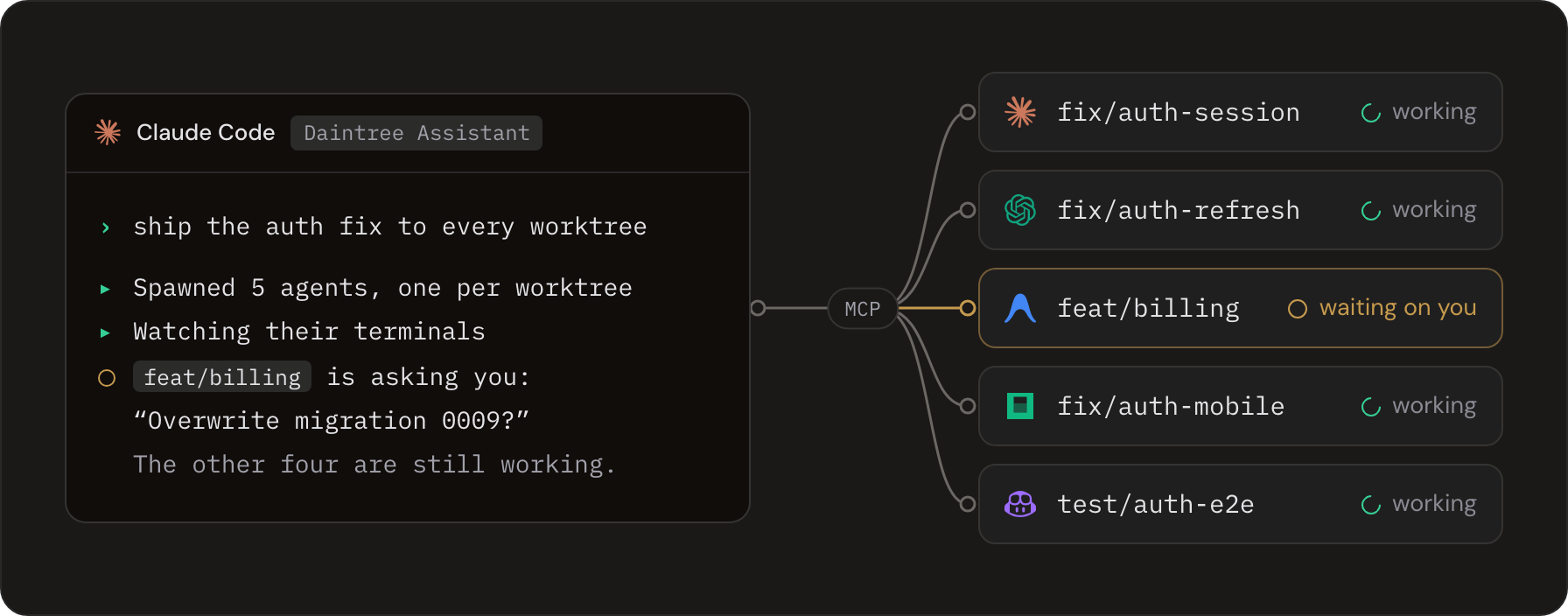
One assistant above every project and every host, with no project of its own. Pick it with the Project / Global switch in the Assistant panel. It outlives the window it started in, shows the same session in every window, and reaches projects on this machine and on every remote host where both machines let assistants work. It reads the state of agents across them in one call, arms a notice for the next agent that starts waiting instead of polling, prompts, presses keys in and interrupts agents it didn't launch, reopens agents' recorded sessions after a restart, and tries to bring back a host whose link went down.
Each project keeps its own assistant, with up to six sessions, each on the agent you choose. It plans the work, opens worktrees, launches agents into them and watches their terminals, then brings back the ones that need you. It can raise work that reaches past its project with the global Assistant running on the same machine.
Some authority always stays with you, which is what makes it reasonable to hand the rest to an assistant and leave it running:
- Confirmations are yours. A confirm-gated action waits for a person's answer unless your own settings already allow it, and a confirmation nobody answered never counts as a yes.
- Ownership. The global Assistant closes only the terminals it launched, and its prompts and keys to an agent it didn't launch are refused if that run has restarted or someone is typing there. By default, a project assistant asks you before closing a terminal it didn't launch or one whose agent is still mid-task.
- Tool-set tiers. Each machine sets the tool set its assistants start with (Settings → Daintree Assistant → Security → Tool set), plus any single tools you grant, and anything beyond that is refused.
- Reports are claims. A worker's handback proves the agent printed its marker, not that the work is finished or correct, and its summary is untrusted text to check, never an instruction.
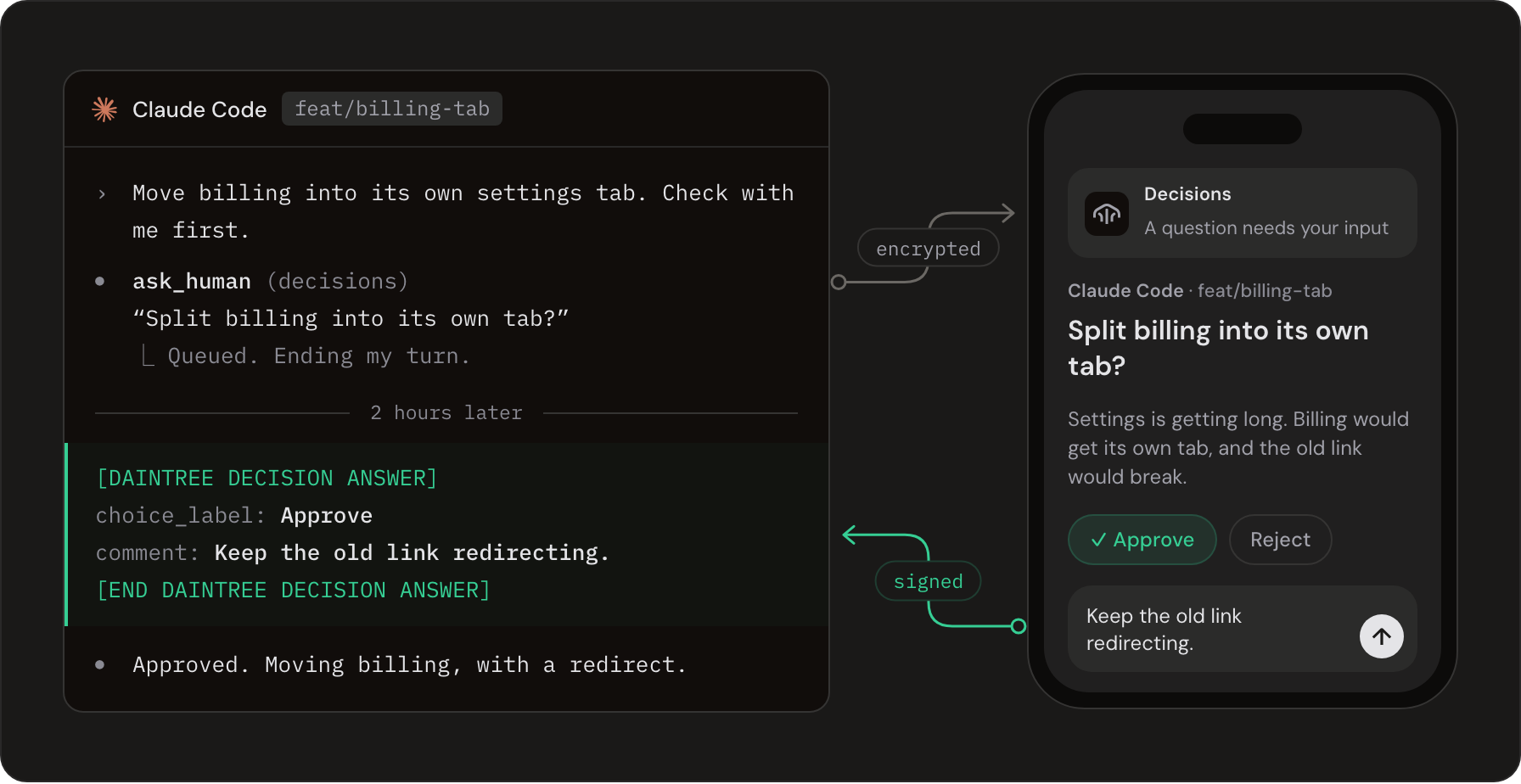
Answer your agents from your phone. An agent that hits a call it shouldn't make alone asks you through one MCP tool, ask_human, and ends its turn. You answer when you get to it, and Daintree types the answer into the terminal that asked once that agent is idle.
Questions travel through a relay you deploy into your own Cloudflare account, end-to-end encrypted between your computer and your phone. Daintree runs no server for it. Set it up under Settings → Integrations → Decisions. The relay and the phone app are open source in daintreehq/decisions.
Put agents on whichever machine has the capacity. From macOS or Linux, a Daintree window drives Daintree on another Mac or Linux machine over your own ssh: the agents, terminals, worktrees, git, files, plugins and MCP server all run on the host, and the window is its screen and keyboard. Agents on an always-on host keep running while your laptop sleeps. From Windows, drive Linux hosts in WSL.
One machine drives a host's project at a time, and every attached window watches its terminals live. The global Assistant reaches every host where both machines let assistants work: it lists each host's projects and agents, reads their state across hosts in one call, and can try to bring back a host whose link went down, waking it over your LAN where you've set that up and starting Daintree there when its Host mode is on. Nothing dials or listens until you add a host or turn Host mode on. Remote hosts docs →
A project can build its own tools where its agents run. A project plugin, committed to the repository under .daintree/plugins/, can be a whole application, such as a CRM, a ledger or a board: its data can live in the repository, a panel renders it, and agents launched with access to it work on the same data through the plugin's own MCP tools.
Plugins also add panels, actions, settings, recipes and tours, and a plugin you install for every project can add agents and themes too. GitHub and GitLab support and the Markdown editor ship as built-in plugins. Installing one from a URL or from the reviewed community catalog shows every capability it asks for before it's installed. Plugin docs →
Under the assistants, every task gets a git worktree and an agent terminal. Daintree sorts the runs by what they need from you, and you choose how each worktree's work is checked before it merges: a reviewing agent, your tests and CI, or your own read in Review Hub.
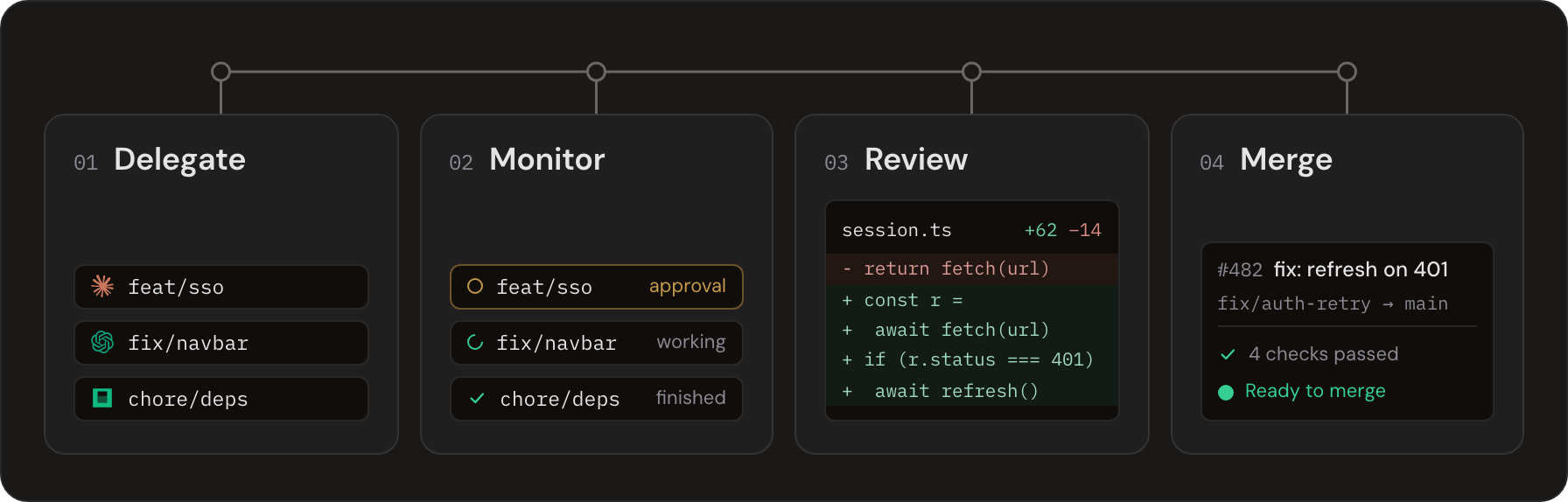
Create a worktree for each task, by hand or from a GitHub issue, and launch any agent CLI into it. Each agent gets its own branch and checkout, so parallel runs never share a working tree. Worktree docs →
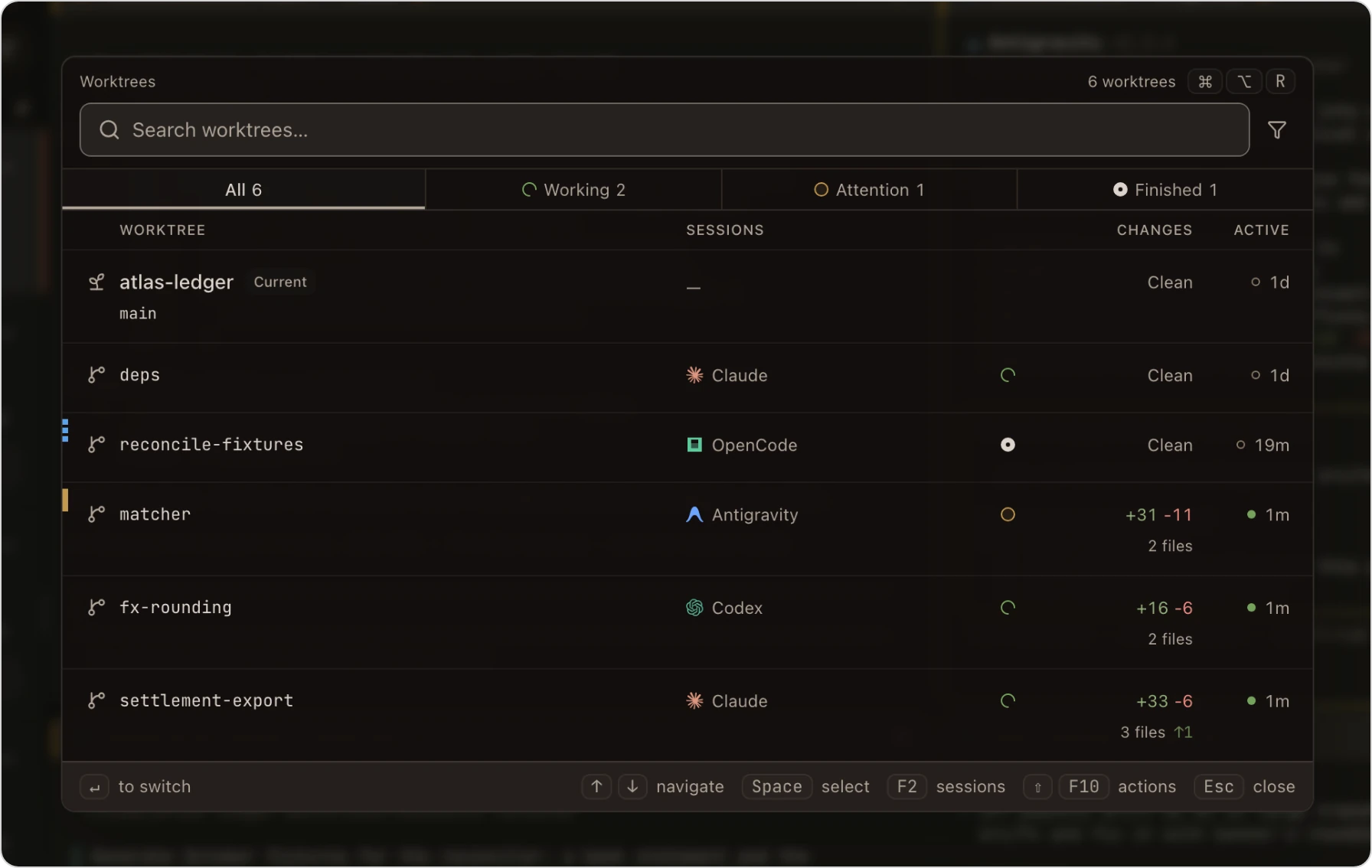
Worktree overview, in the Arashiyama theme
Daintree watches each agent's terminal output, window title and process tree to tell working, waiting and finished apart, without touching the agent's own config. Detection is heuristic and can be wrong, so the UI shows what it saw rather than a verdict. Pilot, the All agents palette, gathers the runs from every open project and puts the ones blocked on you first. Park what can wait. Pilot docs →
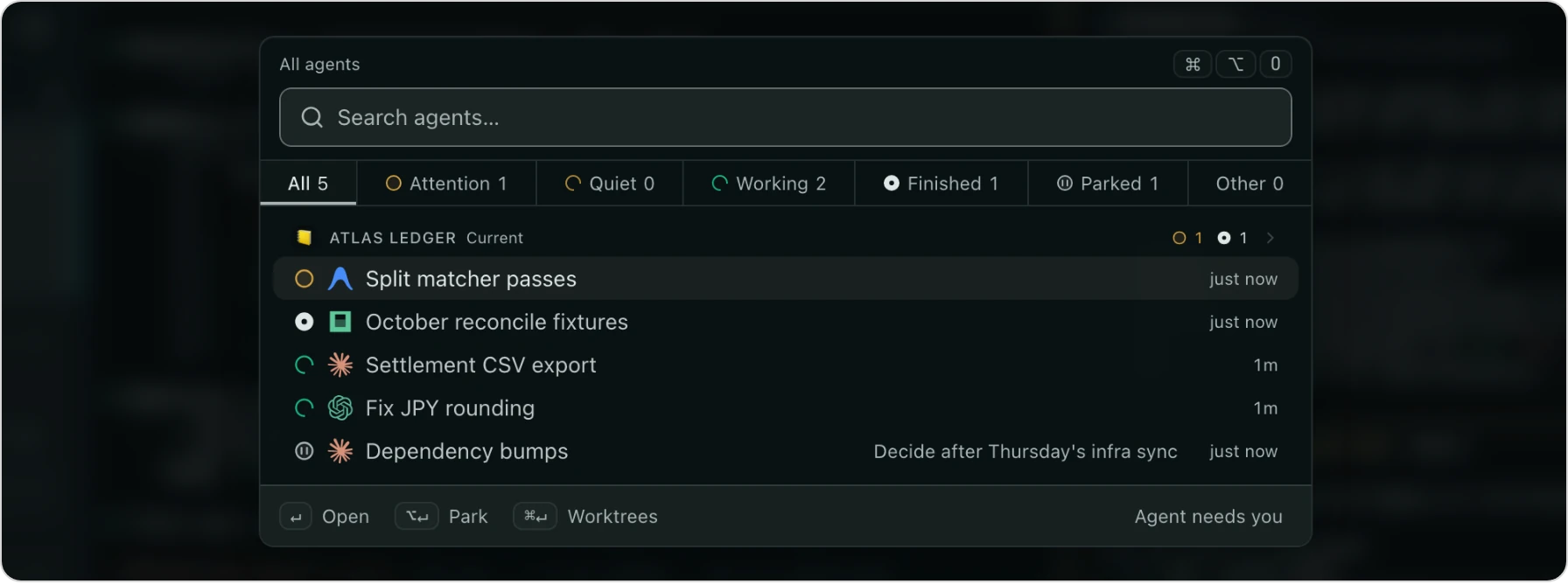
Pilot, in the Fiordland theme
Reading the diff yourself is one way the work gets checked, beside an agent reviewing it and your CI. Review Hub shows each worktree's diff as uncommitted changes, against main, or since your last review. It tracks which files you've viewed, and stages, commits and pushes from the same panel. Once there's a pull request, it shows merge readiness and your forge's CI checks, and sends failing checks and unresolved review threads to an agent. Review Hub docs →
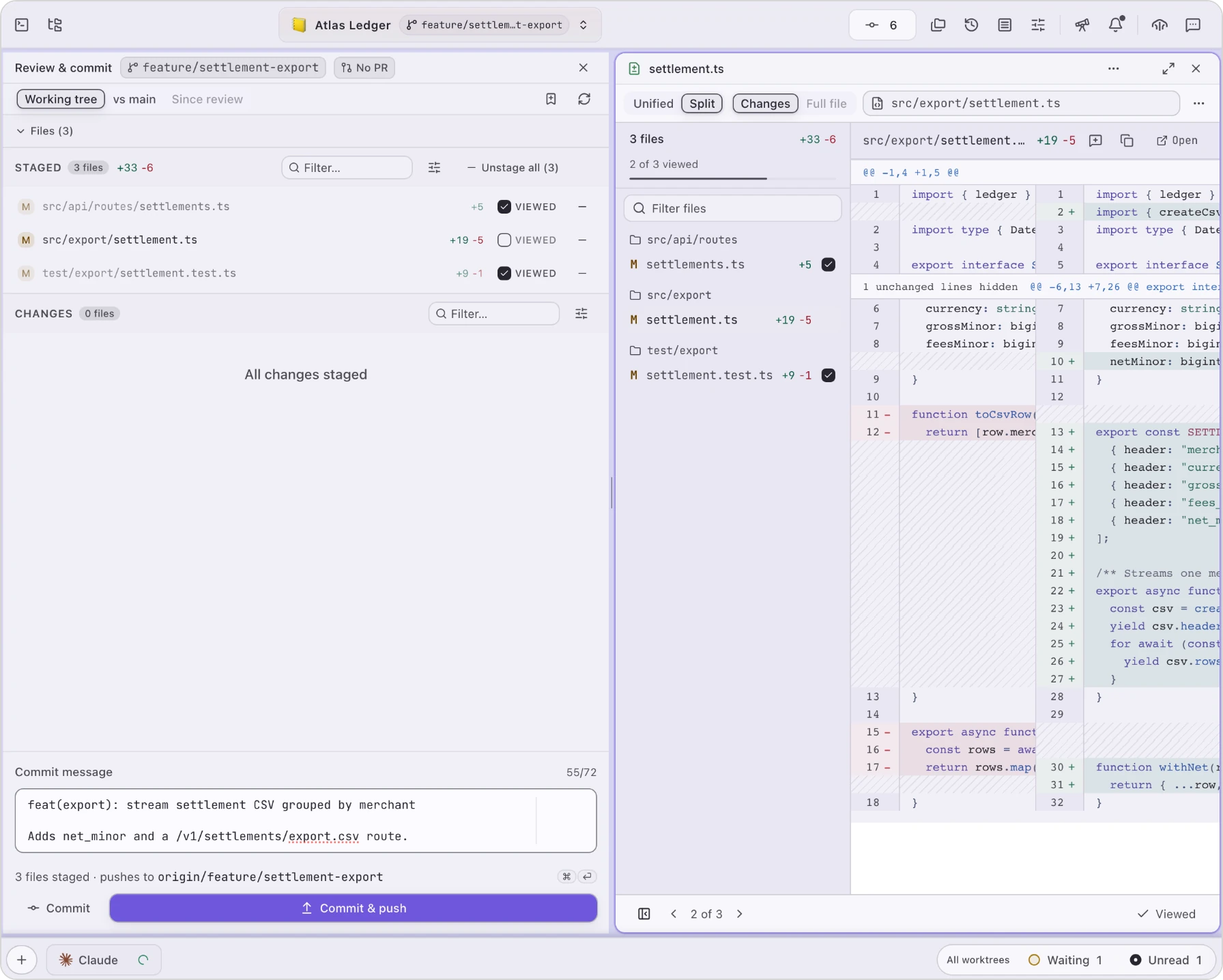
Review Hub, in the Hokkaido theme
Daintree runs the real agent binaries with your existing config, login and subscription. It doesn't proxy them or bundle its own. Seventeen are built in. State detection uses terminal heuristics, with agent-specific patterns where an agent has them, and a plugin can register another.
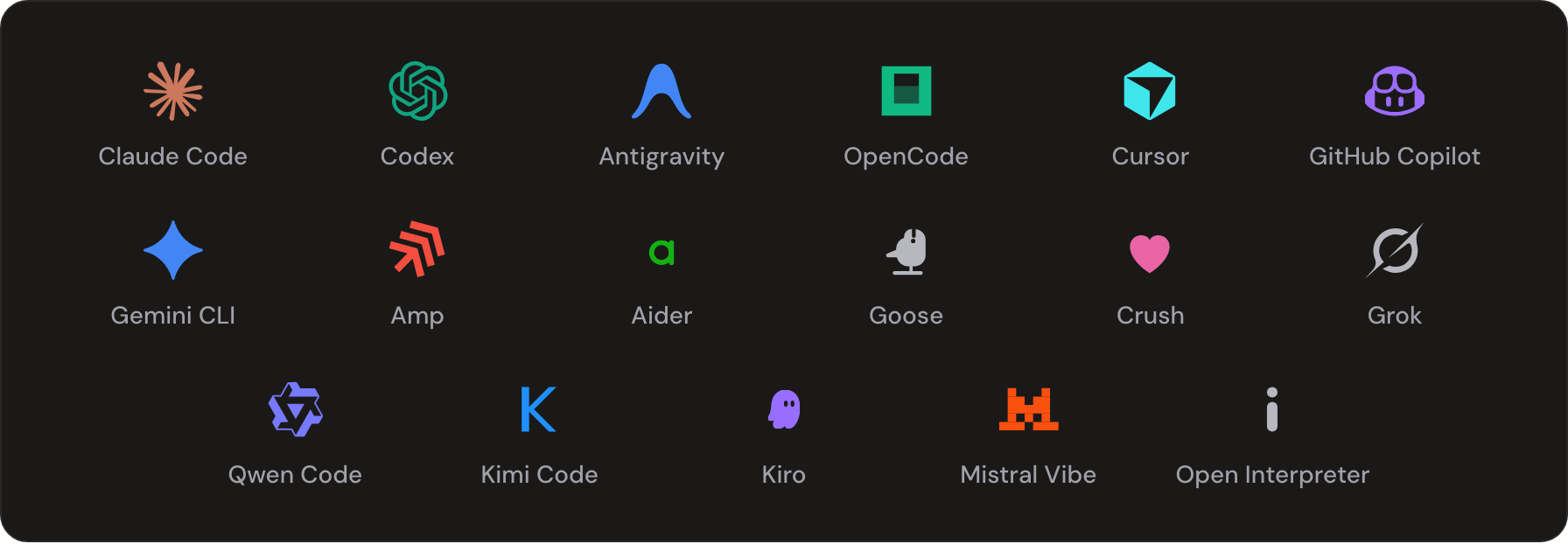
Install an agent CLI
Settings → Agents has a one-click installer for each, or follow the agent's own guide:
| Agent | Install |
|---|---|
| Claude Code | code.claude.com/docs/en/setup |
| Codex | github.com/openai/codex |
| Antigravity | antigravity.google/docs/getting-started |
| OpenCode | opencode.ai/install |
| Cursor | cursor.com/cli |
| GitHub Copilot | docs.github.com/…/install-copilot-cli |
| Amp | ampcode.com/manual |
| Aider | aider.chat/docs/install.html |
| Goose | goose-docs.ai/docs/getting-started/installation |
| Crush | github.com/charmbracelet/crush |
Daintree supports OpenCode 1.x; OpenCode 2 uses the same opencode command but isn't supported yet. All seventeen, with what Daintree detects for each, are in the agent docs.
Daintree runs a local MCP server that exposes its own actions as tools. An agent holding them can open a worktree, launch another agent, read a sibling terminal's state or wait for it to finish.
Outside access is off by default. Turn it on and an API-key client gets a fixed set of tools (36 today) for terminals, agents, worktrees, recipes and live IDE context. Set a core or full tier on a project and the agents launched there get that tier's tools. Every call is authorized for its tier and written to a local audit log. MCP server reference →
One list of every agent across every open project, ranked by what it needs from you. Permission prompts go to the top, and you can answer them from the list; a risky one takes a second press. A run that went quiet behind a spinner, or has been waiting on you for ten minutes, surfaces instead of hiding in a pane. Every placement quotes the screen it came from, and Canopy never rewrites or hides what Daintree observed.
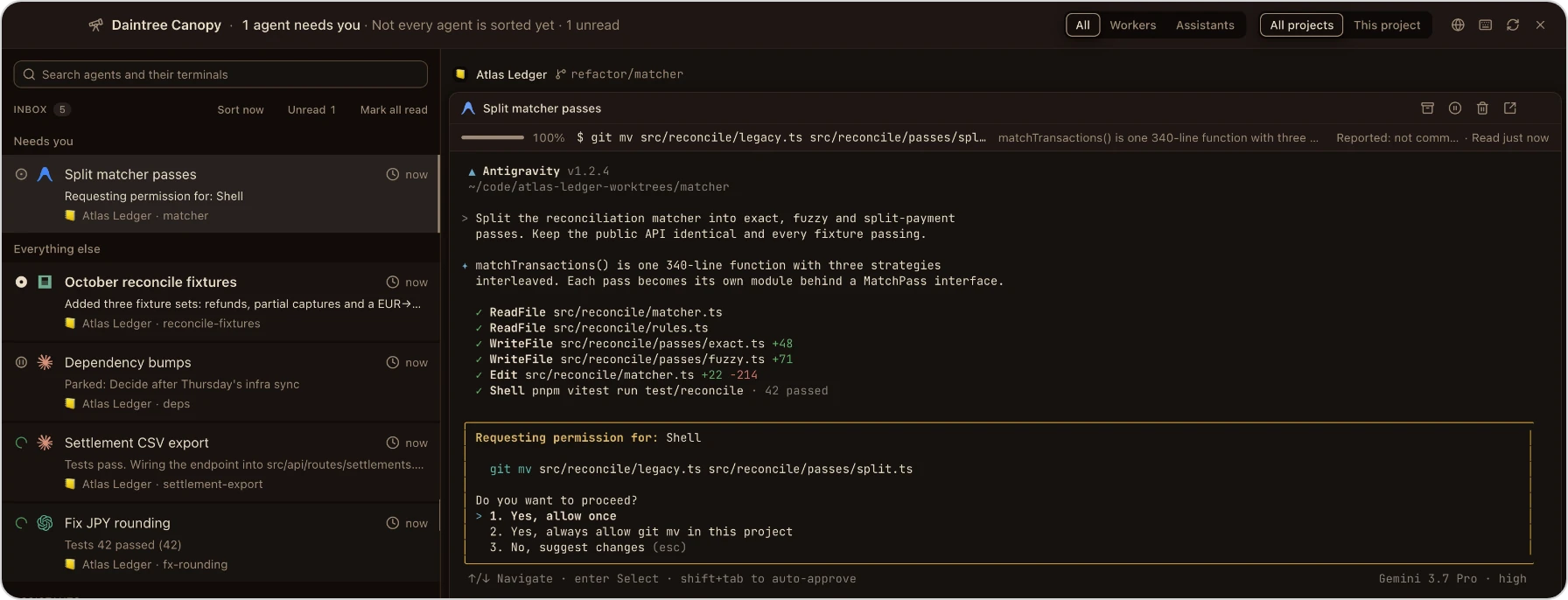
Canopy, in the Redwoods theme
Canopy reads each agent's screen with a small open model that ships inside the app and runs on the agent's own machine. What it reads goes nowhere but your own Daintree windows, over your own connection when the agent is on a remote host. It's on by default, Settings → Integrations → Canopy turns its reading off or hides it, and it opens with ⌘ E (Ctrl Shift O on Windows and Linux).
- Fleet broadcast. One prompt to many agents, with a live preview and per-agent edits before it sends.
- Context injection. Pick files and send structured context into any agent's terminal, built on CopyTree.
- Action palette. More than 500 typed actions sit behind every menu item, shortcut and palette entry.
- Voice input. Dictate prompts, with optional AI cleanup. Bring your own key, or transcribe on your computer with a model downloaded once.
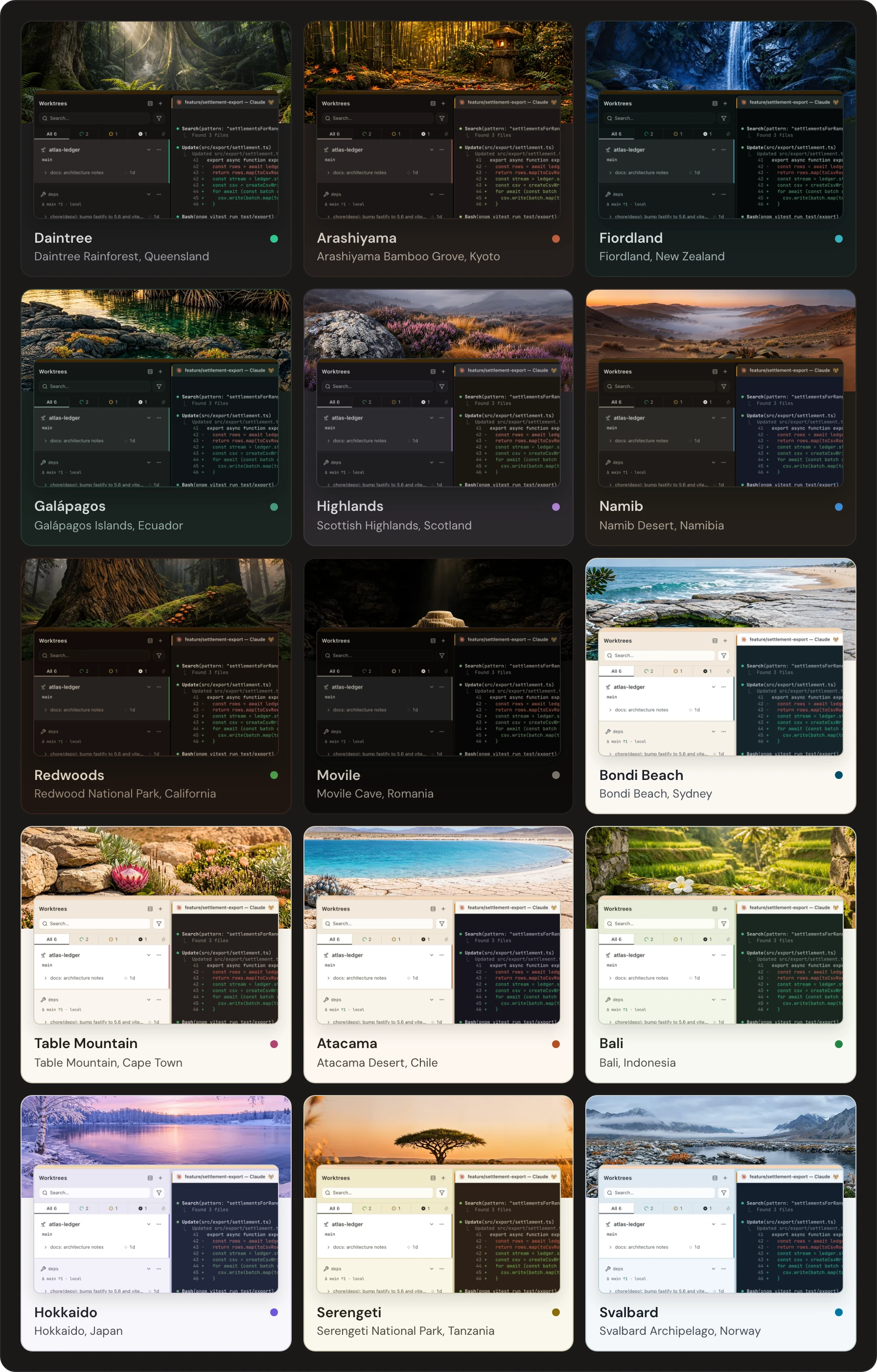
Fifteen themes, each named for a real place and drawn from it: eight dark and seven light, all tuned for contrast across the whole app.
You'll need Node 22 (see .nvmrc).
git clone https://github.com/daintreehq/daintree.git
cd daintree
npm install
npm run dev
The postinstall step rebuilds node-pty for Electron. If you see PTY errors, run npm run rebuild.
Daintree doesn't accept external pull requests: the code is written by AI coding agents through an in-house workflow. Issues are very welcome, and every one is read. See CONTRIBUTING.md for how to write a useful one.
Package installers
Builds land in release/. Pass -c.directories.output=<path> to electron-builder to put them somewhere else.
| Platform | Command | Output |
|---|---|---|
| macOS | npm run package:mac |
.dmg and .zip for arm64, x64 and universal |
| Windows | npm run package:win |
NSIS -setup.exe and .appx |
| Linux | npm run package:linux |
.AppImage and .deb |
On Windows, package:win:nsis and package:win:appx build just one of the two.
User docs live at daintree.org/docs. The docs/ folder in this repo is the development reference: architecture, not usage.
- Documentation index: the full map, with a suggested reading order
- Development guide: setup, IPC pattern, debugging, compiler tooling
- Architecture: process model, state, actions, MCP server, terminal lifecycle
- Plugins: manifest, contribution points, host API, dev loop
- Theme system: theme pipeline, tokens, component contract
- E2E testing: Playwright buckets, helpers, CI workflows
- Release process: per-OS workflows, signing, notarization
Apache 2.0. See LICENSE, and TRADEMARKS.md for the brand and marks policy.
Website · Docs · Changelog · Discussions · Issues