Icons alone are visible for controls unless they are hovered or focussed #15311

Description

Icons alone are visible for controls unless they are hovered or focussed
- Severity: Low
- Affected Populations:
- Motor Impaired
- Cognitively Impaired
- Platform(s):
- All / Universal
- Components affected:
- Global
Issue description
Throughout the editor, large icons denote the meaning of controls
visually. The buttons have programmatically accessible names, and these
names (and their keyboard shortcuts if any) can be made visible by
hovering with the mouse or moving keyboard focus to them.
However hovering is an action that cannot be performed on most touch
devices, and moving keyboard focus generally requires a keyboard (or
something imitating it such as Switch Control). This leaves speech
recognition users (who rely on knowing the name of a control for the
easiest activation) in the position of needing to manually get focus to
the page and then using "press tab" to move focus to each control to
see (and memorise) the name for later use, or using the more cumbersome
Mouse Grid to slowly move the mouse to the desired control.
Touchscreen users with cognitive disabilities have no easy way to learn
what controls are going to do before they interact with them.
Remediation Guidance
One solution would be to provide users with a setting, which shows
labels in place of (or as well as) icons, similar to Gmail's settings.
An example of this can be see at:
https://allenpike.com/images/2019/lukew-translate.jpg
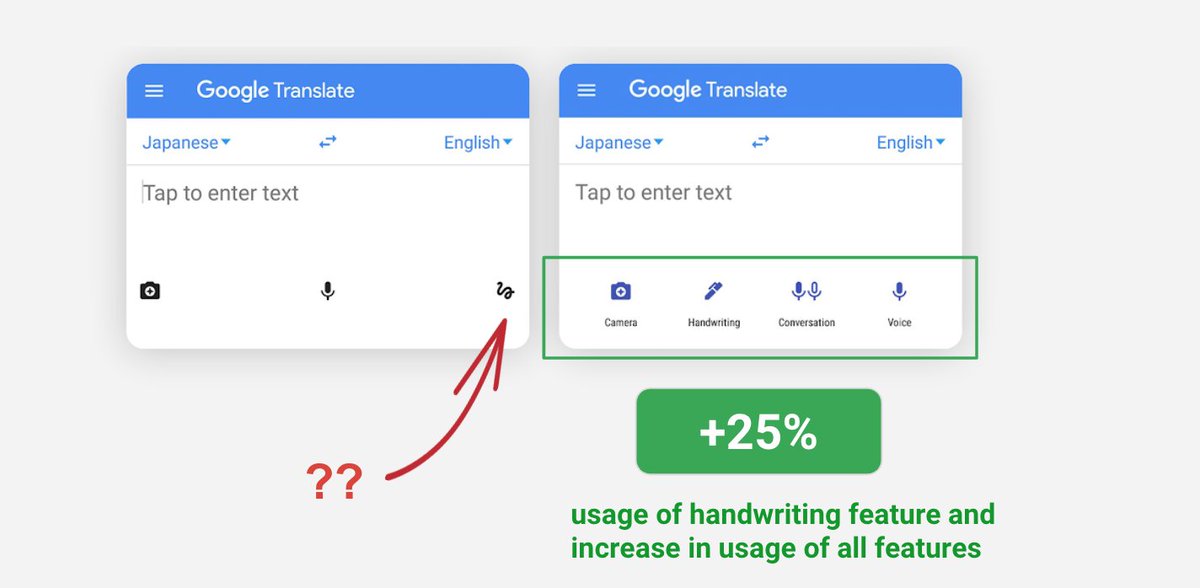
This setting would allow users who prefer icons-only to continue to work
with icons only, while those who prefer or require text labels would
have that option too.
Note: This issue may be a duplicate with other existing accessibility-related bugs in this project. This issue comes from the Gutenberg accessibility audit, performed by Tenon and funded by WP Campus. This issue is GUT-66 in Tenon's report