RichText: convert HTML formatting whitespace to spaces #12166
Conversation


 ellatrix
added
[Status] In Progress
ellatrix
added
[Status] In Progress

|
I re-tested the steps at #11588 (comment) using the I also tested the following steps:
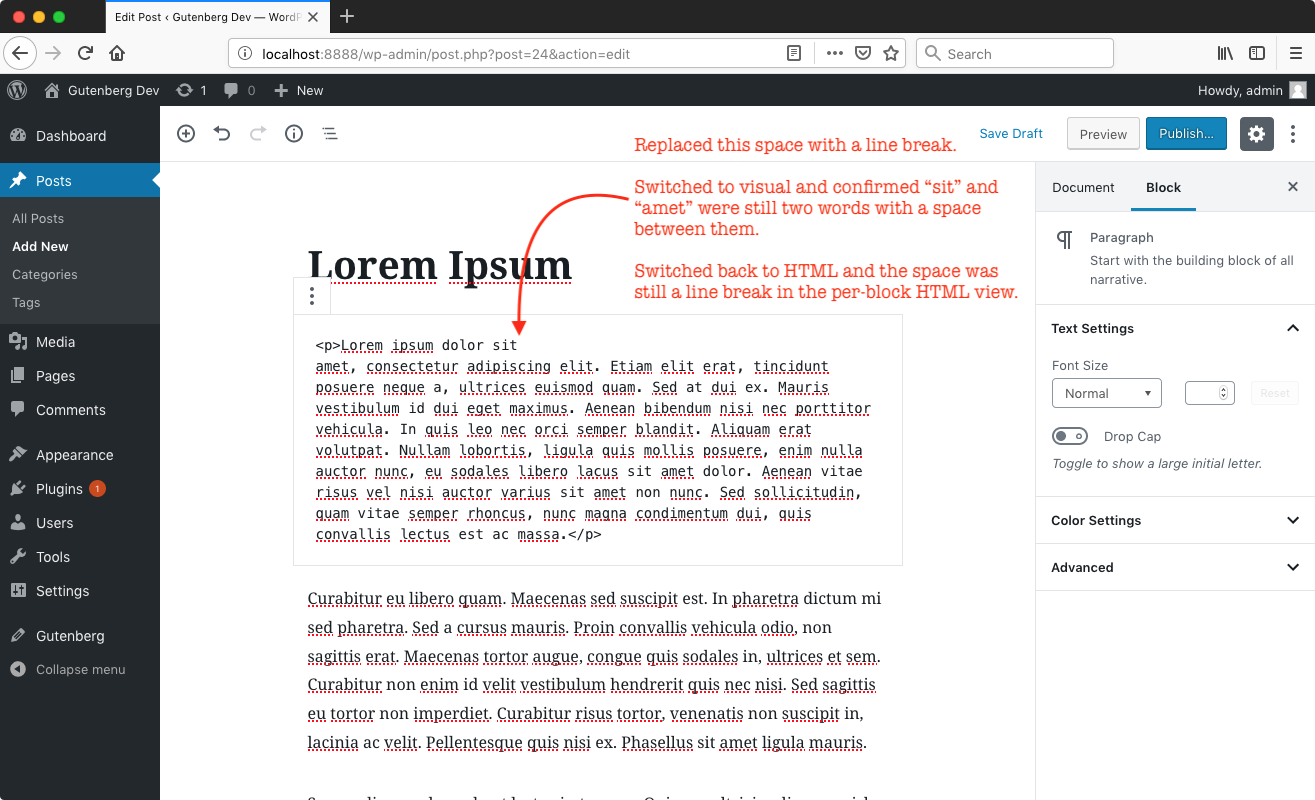
Result: after using "Edit as HTML" and replacing a space with a line break and then switching back to "Edit visually," I could see a space where I had inserted a line break. After switching back to "Edit as HTML" the line break was still there and was not replaced by a space (as described in step 7).
|


|
@designsimply If you switch between visual and HTML mode without editing the content, no content will be saved, so it's normal that the line break stays there if the content in unchanged. |


|
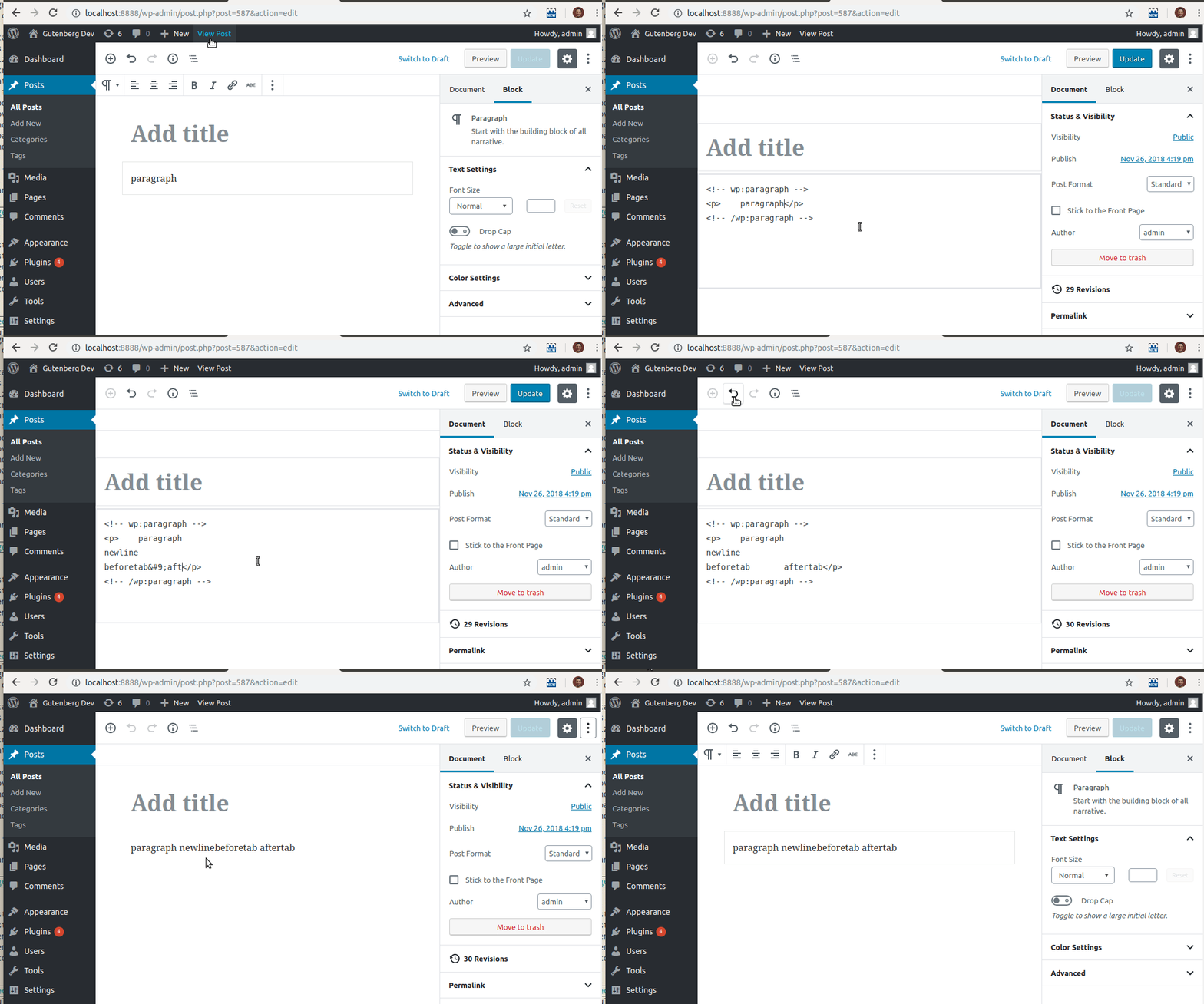
This is what I've tested (both in chrome 70 and firefox 63, Linux OS). This seems ready. #7474 is fixedTest 1:
Test 2:
Test 3:
#5872 is fixedBut I could only repro this one partially. This is what I've tried:
I've also noticed that after saving the post, if I edit that paragraph in the code editor mode, I still see the line break. #11588 is fixedWhat I've tested:
|
|
I'm not very familiar with this part of the code, but I'd like us to spend some time adding e2e or unit tests with the steps I've reported above. They do seem like easily reproducible with a test and also easily missed in the future if we don't have them. I can take a look at adding them tomorrow. |
|
Last time I checked pasting didn't work in puppeteer, but maybe this changed. |

|
Copy/pasting in Puppeteer still, from what I can tell, doesn't work. I think it's because it's more of an OS-level interaction and not a browser one. Last time I tried to write an E2E test with copy/paste I went down an hour-long rabbit-hole and then ended up stopping 🤷♂️ |

| // breaking spaces in between words. If also prevent Firefox from inserting | ||
| // a trailing `br` node to visualise any trailing space, causing the element | ||
| // to be saved. | ||
| white-space: pre-wrap; |
There was a problem hiding this comment.
pre-wrap will preserve newlines, spaces, and tabs. But in filterStringComplete we're only replacing newlines and tabs with spaces. As a consequence of this change, the editor will now show those consecutive spaces.
Before this change:
After this change:

Is that a concern?
There was a problem hiding this comment.
For completeness, here's the same action in visual mode. No visual change, although under the hood the HTML doesn't add nbsp.
Before this change:

After this change:

I've noticed that with this change applied the leading spaces in the first line collapse before the post is reloaded.
There was a problem hiding this comment.
In the rare case that the user want to have those spaces visible on the front end, I think they should insert those non breaking spaces themselves explicitly.
| string = string.replace( /[\r\n]/g, '' ); | ||
| // Reduce any whitespace used for HTML formatting to one space | ||
| // character, because it will also be displayed as such by the browser. | ||
| string = string.replace( /[\n\r\t]+/g, ' ' ); |
There was a problem hiding this comment.
Would it make sense to replace \r and \n with no spaces as it was before, and any number of tabs with one space?
There was a problem hiding this comment.
No, one of the issues this or fixes is exactly replacing line breaks with a space.
 oandregal
left a comment
oandregal
left a comment
oandregal
left a comment
There was a problem hiding this comment.
Now that I've familiarized myself more with the rich-text library, this looks fine code-wise. I couldn't find a way to break this with the changes proposed :)


…rnmobile/danilo-try-to-fix-undo-redo

* 'master' of https://github.com/WordPress/gutenberg:
  Autocompleters: Consider block category (#12287)
  Only init TinyMCE once per instance (#12386)
  RichText: convert HTML formatting whitespace to spaces (#12166)
  Notices: Remove "files" block in package.json (#12438)
  Edit Post: Avoid rendering AdminNotices compatibility component (#12444)
  Correct the docs manifest (#12411)
…HEAD

* 'master' of https://github.com/WordPress/gutenberg:
  [RNmobile] Fix problems with undo/redo on Android (#12417)
  Add registry param to withDispatch component (#11851)
  Autocompleters: Consider block category (#12287)
  Only init TinyMCE once per instance (#12386)
  RichText: convert HTML formatting whitespace to spaces (#12166)
  Notices: Remove "files" block in package.json (#12438)
  Edit Post: Avoid rendering AdminNotices compatibility component (#12444)
  Correct the docs manifest (#12411)

|
Since this touches RichText's |
|
@mcsf It shouldn't affect the fix. In Twenty Nineteen we're replacing a font tile with another, because Hoefler Text has a weird design for a non breaking space. It is true that Chrome will now no longer insert trailing non breaking spaces, so if the fix were to be removed, typing would be fine. But other non breaking spaces would still be displayed too wide. |
|
Thanks for having a look. |
 mtias
added
User Experience (UX)
[Feature] Writing Flow
mtias
added
User Experience (UX)
[Feature] Writing Flow

|
This looks to have been merged into GB 4.7, which was originally intended to be part of WordPress 5.0.1, but then maybe shifted to GB 4.8/ WP 5.0.2 because of the quick 5.0.1 release...
Thanks for the hard work! |


Description
Fixes #11588, #5872 and #7474.
When creating a rich text value from text nodes, this branch reduces any sequence of new lines and tabs to one space. This is needed because any sequence of new lines and tabs is used to format HTML, not as content. The browser will only display it as one space, if it is used in between words.
Previously we were just removing any line breaks, which would normally still be displayed by the browser as a space.
It also visualises and leading and trailing spaces, and and consecutive spaces elsewhere. This prevents buggy behaviour in different browsers when there is only one spaces, and prevent e.g. Chrome from inserting non breaking spaces and Firefox a trailing line break to visualise a trailing space when typing.
How has this been tested?
Edit a paragraph as HTML. Remove a space and insert a line break (use ENTER). Edit visually. You should see a space where you inserted the line break. Edit the content. Edit as HTML. The line break should be replaced by a space.
Previously the line break would have been removed.
Screenshots
Types of changes
Checklist: