Fix: Button block does not centers on the editor #17063
Conversation


 jorgefilipecosta
added
[Type] Bug
jorgefilipecosta
requested review from
Soean,
ajitbohra and
talldan
as code owners
jorgefilipecosta
added
[Type] Bug
jorgefilipecosta
requested review from
Soean,
ajitbohra and
talldan
as code owners


There was a problem hiding this comment.
Conceptually, I don't think we should be having styles that target only previews.
The reason for the display: "table" is that the button container should only wrap the content and not takes the full width. I wonder if there's a way to keep the display table and fix the centering?
There was a problem hiding this comment.
Hi @youknowriad, thank you for the context I submitted an alternative solution that keeps the display table and fixes the centering.
jorgefilipecosta
force-pushed
the
fix/button-block-doees-not-centers-in-the-editor
branch
from
66a54d3 to
3557044
Compare

|
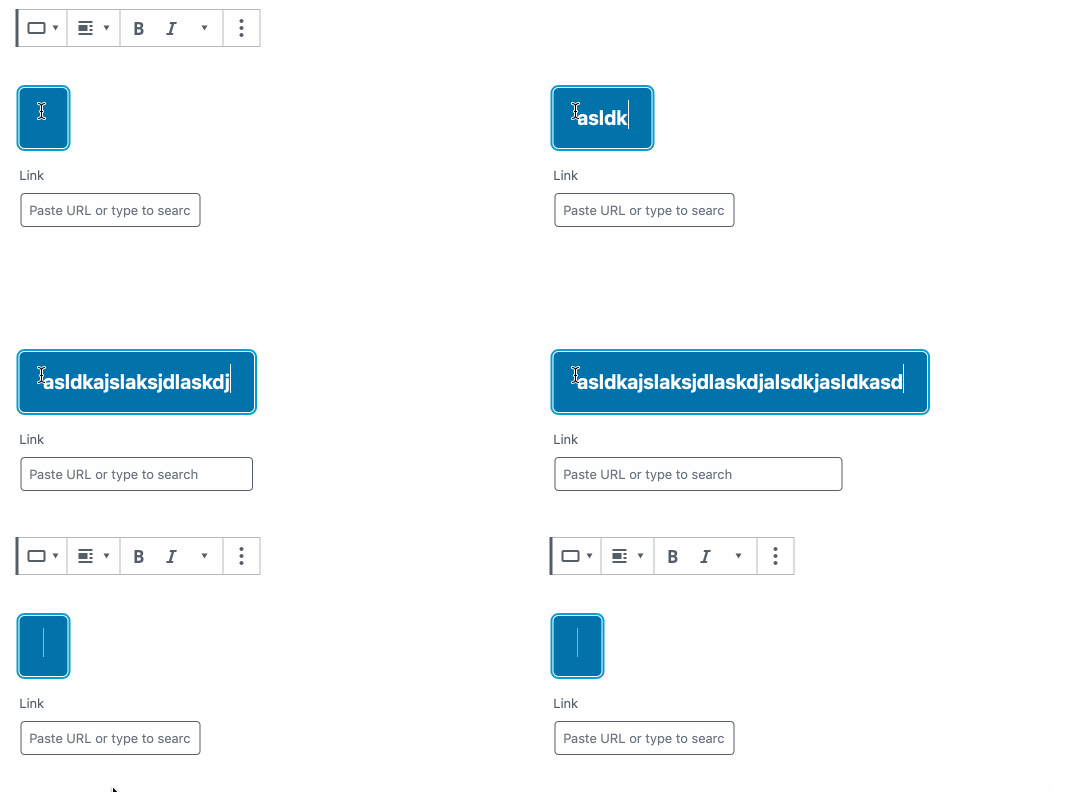
The preview is working properly right now but there's a small issue with the URL input, it's width adapts to the available width, which means if you have just a small button, the input is "cropped". |
Hi @youknowriad, I think this "cropped" behavior will always happen as long as we use the table display mode. The solution I see is not using table display when the block is selected I updated this PR to use this logic. |
|
@jorgefilipecosta why are we using |
I'm not deep inside the reason but I guess, max-width allows us to limit the width but if the button is nested in a small area we will be able to have a small input while if we used width the button would become big and may overflow the available space. |
If that's the reason, cropping the input for small buttons seems fine 🤷♂ |
jorgefilipecosta
deleted the
fix/button-block-doees-not-centers-in-the-editor
branch
Yes, I also think so. @jasmussen, @kjellr any thoughts on this? should we refactor these styles? |


|
Here's a screenshot for reference:
Yeah, I think we should refactor. That cropping isn't totally ideal. I've opened #17086 to keep track of this. |


Description
Fixes: #17059
Regressed in:#16873
In #16873 we started using a display table for the button block in the editor. As with this display mode, the previews look better. But this introduces a regression as in this mode align-center did not work as expected.
We also relied on withFallbackStyles to directly change the dom and add a class. We should avoid direct dom changes so this PR removes the class addition and uses a more complex CSS selector to avoid the need for that class.
This PR also only applies display table for the previews, as using a display table in normal block operation may be unexpected.
With these changes, the block itself got correctly center aligned but the link UI did not align as expected so a margin for the link UI was added.
How has this been tested?
I added a button block.
I tried all the alignment options in and verified the result was the expected one in the editor and in the styles preview.