@wordpress/env: A zero-config, self contained local WordPress environment for development and testing. #17668
Conversation


…velopment and testing.
 epiqueras
added
Framework
epiqueras
requested review from
ajitbohra and
chrisvanpatten
as code owners
epiqueras
added
Framework
epiqueras
requested review from
ajitbohra and
chrisvanpatten
as code owners


 pento
left a comment
pento
left a comment
pento
left a comment
There was a problem hiding this comment.
Nice work, @epiqueras!
I like the idea of making this a package that's intended to be installed globally: it solves a lot of the problems I was running into doing it in @wordpress/scripts. It's also much nicer written than the hacky scripts I put together previously, which is always a plus. 😉
Rather than having two related-but-different ways of doing the dev environment, I think we should look at making this the only way of doing things. Remove the env stuff from @wordpress/scripts, and use this package for Travis.
It'd be good to be able to use this package for WordPress Core (ie, it doesn't need to mount a plugin dir), so that we have the same environment everywhere folks contribute to WordPress projects.
| wp-env <command> | ||
|
|
||
| Commands: | ||
| wp-env start [ref] Starts WordPress for development on port 8888 |
There was a problem hiding this comment.
It'd be good to document here what [ref] is.
| appropiately. | ||
| wp-env stop Stops running WordPress for development and tests | ||
| and frees the ports. | ||
| wp-env clean [environment] Cleans the WordPress databases. |
| const pluginName = path.basename( pluginPath ); | ||
| const pluginTestsPath = fs.existsSync( './packages' ) ? '/packages' : ''; | ||
| const dockerComposeOptions = { | ||
| config: path.join( __dirname, 'docker-compose.yml' ), |
There was a problem hiding this comment.
Specifying the path to docker-compose.yml file causes Docker to not load any docker-composer.override.yml file which may exist.
The override file is often useful for overriding default behaviour, it would likely be useful to continue supporting it.
There was a problem hiding this comment.
Docker is running inside the package folder so it wouldn't use the override anyway, but what is a valid use case for this? I'm concerned that it will cause lots of headaches for people that already use docker in their repo for other things and have docker files lying around.
We could introduce an option that takes a path to a docker compose file to merge in, but I think that's not how a tool like this should work.
If the use case the override enables is common enough that a lot of people request it, then it should be something the CLI infers as a need and supports out of the box. If it's not common, then those people can just use docker directly.
It'd be good to be able to use this package for WordPress Core
That is a great example of something that could be done with an override, but that I think the tool should support out of the box by inspecting if the folder it's running in is not a plugin, but WordPress itself.
There was a problem hiding this comment.
That's a fair point on docker-composer.override.yml. Let's wait and see if there's a need for it.
| WORDPRESS_DB_PASSWORD: password | ||
| image: wordpress | ||
| ports: | ||
| - 8888:80 |
There was a problem hiding this comment.
Hard-coding the port numbers can be problematic, as there will always be clashes with other things. Allowing it to be customised through environment variables is a pretty reliable method.
There was a problem hiding this comment.
How about --port and --tests-port options? They're more self documenting.
There was a problem hiding this comment.
I suspect that folks would want a way to permanently set the port, so they don't have to remember to add an option every time. It's something that docker-composer.override.yml was used for before the switch to the @wordpress/scripts method.
There was a problem hiding this comment.
That makes sense, I'll go with env vars then.
| */ | ||
| const env = require( './env' ); | ||
|
|
||
| // Colors |
There was a problem hiding this comment.
I like the idea of defining standard colours to use for CLI interfaces. This could be spun out into thing that could be used for all CLI scripts. (Not a blocker for this PR, though.)
There was a problem hiding this comment.
Yeah, that'd be nice, I got them from the _colors.scss file.
| const path = require( 'path' ); | ||
| const fs = require( 'fs' ); | ||
| const dockerCompose = require( 'docker-compose' ); | ||
| const NodeGit = require( 'nodegit' ); |
There was a problem hiding this comment.
It'd be good to test that this works on Windows. nodegit is supposed to not require any native dependencies, Windows comes with nothing git-related installed (the GitHub app doesn't provide any global binaries or libraries, either), so it'd be a useful test bed.
There was a problem hiding this comment.
Yeah, it supports all major OSs, https://www.nodegit.org/.

There was a problem hiding this comment.
In release scripts, there is simplegit used:
Line 12 in d75119d

There was a problem hiding this comment.
I was not entirely satisfied with simple-git in the release tool. at some point, I was wondering if just using the git CLI directly is better.
That said, there's some differences in the way this tool is written compared to the release tool (commands, logs...): both have similar requirements, they come up with different solutions (dependencies). It would be good to align.
There was a problem hiding this comment.
nodegit has a more robust API and doesn't require Git to be installed like simple-git does.
There was a problem hiding this comment.
It would be good to align.
This is my biggest concern here. I don't care which one we use as long as we are consistent.

|
Thanks for the review @pento! It seems like these are the next steps:
I think it will be better if we do these in three follow up PRs to ease reviews and more importantly, so that contributors can start using it locally to work on Gutenberg and give us feedback. |
pento
left a comment
pento
left a comment
There was a problem hiding this comment.
Provide options for modifying the default ports.
Given that we're not going to do everything in this PR, let's leave that for a follow up.
Support running outside a plugin context, i.e. for Core development. I assume we'll need to infer we are in
wordpress-developand mount thesrcfolder?
It gets a bit trickier here, since it could be the src or build folder. Also, various config bits and pieces are stored in the root folder of wordpress-develop (wp-config.php and PHPUnit config come to mind).
Replace all usage of
@wordpress/scripts'senvwith this one.
Travis and package.json are the main uses here.
I think it will be better if we do these in three follow up PRs to ease reviews and more importantly, so that contributors can start using it locally to work on Gutenberg and give us feedback.
Agreed, part of the problem with the previous iteration is that it was done in one giant PR that got wildly out of hand.
|
Another one:
|


| @@ -0,0 +1,101 @@ | |||
| 'use strict'; | |||
There was a problem hiding this comment.
In other places, tests are located in the test folder.
There was a problem hiding this comment.
So the parent of this file should be test instead of tests?
There was a problem hiding this comment.
packages/env/test/cli.js - will match the file.
In this case, it matches because of the .test.js extension.
There was a problem hiding this comment.
Yeah, I think this pattern fits in better with this specific package structure, but if we have a convention we should enforce it. Maybe we should add a lint rule for this?
There was a problem hiding this comment.
Well, if you update the test, then Lerna will detect those changes. So we can just include another pattern to ignore when deciding whether the package was updated. In a similar way, this applied to the command which builds packages:
gutenberg/bin/packages/watch.js
Line 30 in 35e44b9
gutenberg/bin/packages/build.js
Lines 128 to 131 in 35e44b9
It isn't something very pressing, but it would be nice to have it all covered one way or another.
There was a problem hiding this comment.
Yeah, I realized that a few minutes ago while updating lerna ignores in the Storybook PR.
So, I changed this in one of the follow up PRs: e0efa05.
| "nodegit": "^0.26.2", | ||
| "ora": "^4.0.1", | ||
| "terminal-link": "^2.0.0", | ||
| "yargs": "14.0.0" |
There was a problem hiding this comment.
Is there any particular reason, it doesn't use ranges for yargs?
There was a problem hiding this comment.
Lerna bootstraps it like that.
| "terminal-link": "^2.0.0", | ||
| "yargs": "14.0.0" | ||
| }, | ||
| "dependencies": { |
There was a problem hiding this comment.
Those dependencies aren't hoisted to the root node_modules folder. I guess some of the dependencies use a different version in other packages or in the root packages.json file. Can we align them?
| "pretest-e2e": "npm run env reinstall", | ||
| "test-e2e": "wp-scripts test-e2e --config packages/e2e-tests/jest.config.js", | ||
| "test-e2e:watch": "npm run test-e2e -- --watch", | ||
| "test-e2e:local": "wp-scripts test-e2e --config packages/e2e-tests/jest.config.js", |
There was a problem hiding this comment.
I don't see any difference between test-e2e and test-e2e:local? Do I miss something?
There was a problem hiding this comment.
something important (just kidding). The difference is that if you run local it won't run the pretest which is annoying if you have a custom env setup. I think npm test-e2e could just do npm run test-e2e:local to avoid duplication though.
There was a problem hiding this comment.
You still need to reset the database because you will see test failures caused by the tests which add taxonomies, categories, etc. So it's mostly the issue with how pretest-e2e works at the moment.
There was a problem hiding this comment.
no you don't, I run tests everyday and I never use pretest and everything works properly.
There was a problem hiding this comment.
Do you run all tests or just the one file which is related to your work? 😄
There was a problem hiding this comment.
it depends I can do both :)
There was a problem hiding this comment.
The difference is that if you run local it won't run the pretest which is annoying if you have a custom env setup.
That was the goal of this change, yes.
| @@ -0,0 +1,48 @@ | |||
| { | |||
| "name": "@wordpress/env", | |||
| "version": "1.0.0", | |||
There was a problem hiding this comment.
Two things here:
- Initial version should be lower than
1.0.0because at the moment Lerna always bumps version. .npmrcfile is missing
See more details:
https://github.com/WordPress/gutenberg/blob/master/packages/README.md#creating-a-new-package
There was a problem hiding this comment.
I'll add it to the follow up PR.
| // Config Variables | ||
| const pluginPath = process.cwd(); | ||
| const pluginName = path.basename( pluginPath ); | ||
| const pluginTestsPath = fs.existsSync( './packages' ) ? '/packages' : ''; |
There was a problem hiding this comment.
Isn't it too much tied to the current structure of the Gutenberg repository?
There was a problem hiding this comment.
yes, I feel some config for these things is necessary:
- wordpress local install (could be useful for core)
- test plugins path
- current plugin path
There was a problem hiding this comment.
The idea is to detect whether you are running in a plugin, theme, or core and react accordingly.
This part assumes that tests are at the root folder or inside a packages folder.
We'll build better heuristics in follow up PRs.
| ) { | ||
| const commonVolumes = ` | ||
| - ${ pluginPath }/:/var/www/html/wp-content/plugins/${ pluginName }/ | ||
| - ${ pluginPath }${ pluginTestsPath }/e2e-tests/mu-plugins/:/var/www/html/wp-content/mu-plugins/ |
There was a problem hiding this comment.
This isn't very useful outside of Gutenberg.
| ```sh | ||
| $ npm -g i @wordpress/env | ||
|
|
||
| $ cd path/to/gutenberg # WordPress install will be in path/to/gutenberg-wordpress. |
There was a problem hiding this comment.
Shouldn't it be
$ cd path/to/plugin-or-theme # WordPress install will be in path/to/plugin-or-theme-wordpress.
There was a problem hiding this comment.
Yeah, I'll add that with the PR that adds theme support.
| ); | ||
| const setupSite = ( isTests = false ) => | ||
| wpCliRun( | ||
| `wp core install --url=localhost:888${ |
There was a problem hiding this comment.
It probably shouldn't be hardcoded to two values: 8888 and 8889. In addition, the title should be based on the name of the plugin or theme.
There was a problem hiding this comment.
Yeah, that's already changed in the first follow up: #17697

|
I see you left some ideas for the follow-up task in:
It addresses some of my comments related to the implementation details. However, I don't see any follow-up issue opened which provides a clear plan for the next steps. There might other contributors willing to get involved in those efforts but this is something that is missing to drive the implementation in one direction. |

|
I second @gziolo's recommendations and concerns. I'd also recommend editing this PR's description on the nature of the change. Experimentation is good. When this PR popped up, I was hopeful for the possibility to establish pros and cons of it and of I understand the motivation to get it out there and get some real testing in, but this is only my own inference, since the PR changes or metadata don't seem to stress the experimental character of |
I'll make one now.
Will do.
This already works better for contributors than the current environment which on most machines, unmounts Gutenberg on every edit.
|


|
Not sure if it's a |
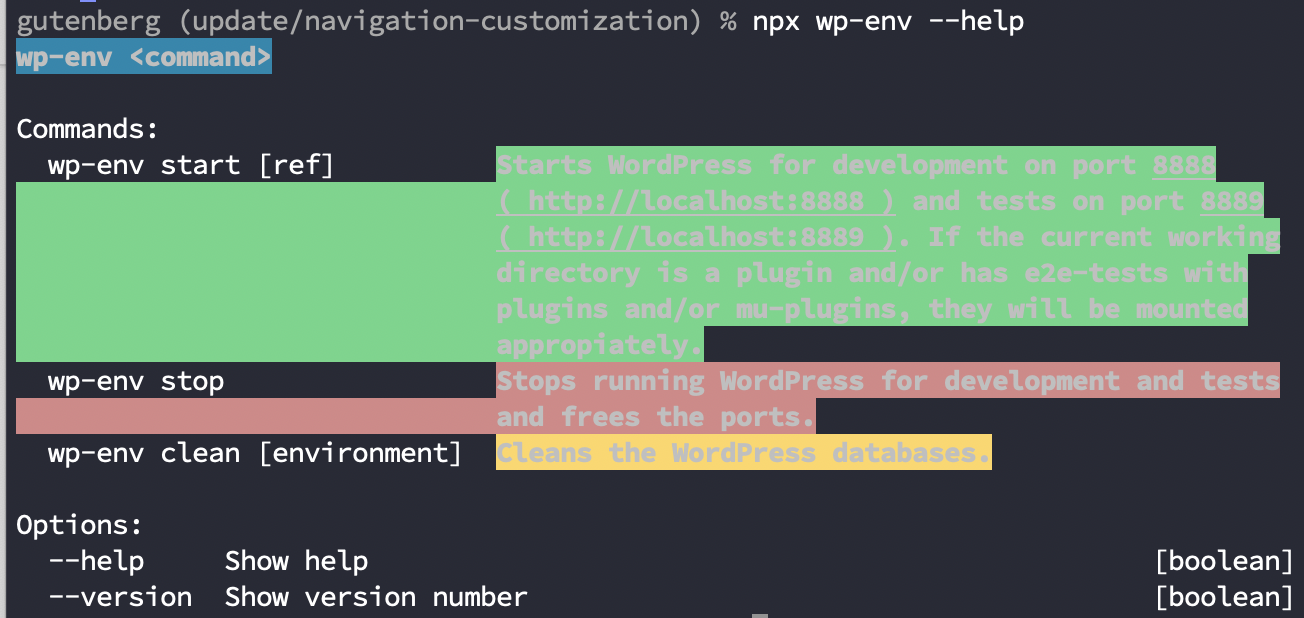
Mmmm, the font color should be Can someone else with Terminal.app reproduce? Should we just remove the color? |
Same here, regardless of background colour:
|
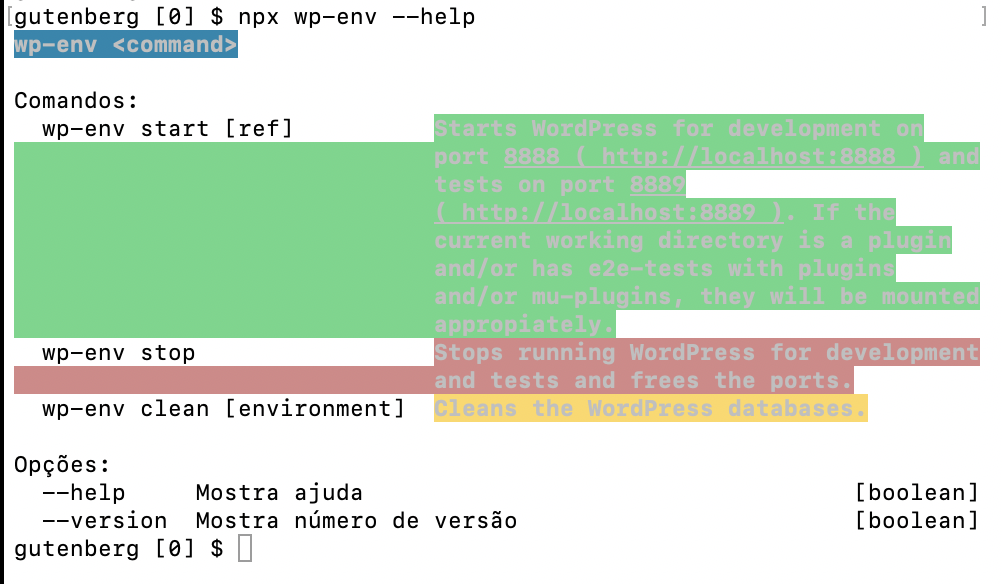
For |
|
You're right, I'm adding it to the task list. |

|
@epiqueras Any estimates when this |
|
When's the next package release @youknowriad @gziolo @jorgefilipecosta ? |
|
I guess after the next Gutenberg release which happens after the upcoming WordPress 5.3 release. I don't know the exact timing. Is it ready for public release? I don't think Gutenberg uses it internally at the moment. So I personally would mark it as private until it's tested in the daily workflow or at least make it very explicit that this might not cover all use cases people could have. |
I'd lean towards this too. I don't think |
|
I think a handful of contributors have been using it with success. We should bring it up in the chat and add a |
|
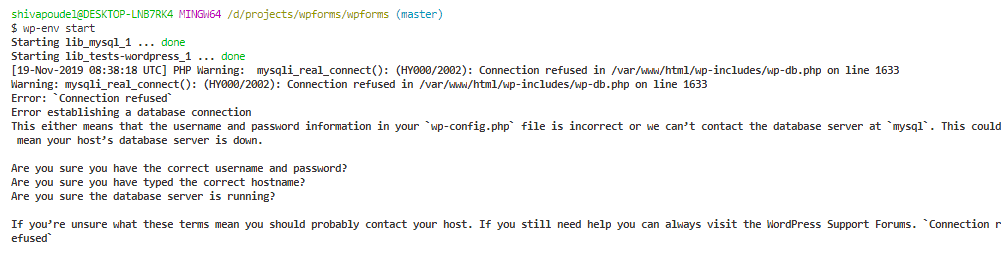
@epiqueras I was using this for some external plugins after resetting the docker in the Windows environment. As soon as I start the
To confirm above issue I tested adding PHPMyAdmin with this command: Error: Unknown database 'tests-wordpress'
Note: IMO the database should be auto initialize on the first run. I have to do it manually in this situation for |

|
It should initialize all DBs automatically for you. It looks like the WP container can't communicate with the DB container. Could you try stopping and removing all your Docker containers, volumes, and networks and trying again? You might have some remnants of previous set ups that are interfering. |
|
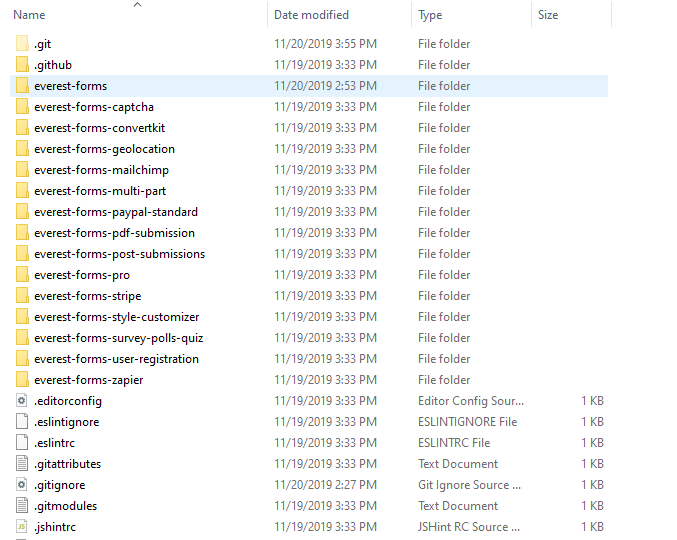
@epiqueras I reset the docker config and the issue above vanished. But it would be great if DB was initialized during the run like this :) I do have a few questions about how can we detect plugins from directory like this. In the below screenshot
If I try to run |
It is.
You need to pick one plugin, say
and then run |
|
@epiqueras Thanks above way works but it seems like this should be bound in a network as many failure docker containers are being created and exited using
I found that test-related volumes are also mounted. Is there any option to ignore those mounted volumes as I used for development purpose only. |
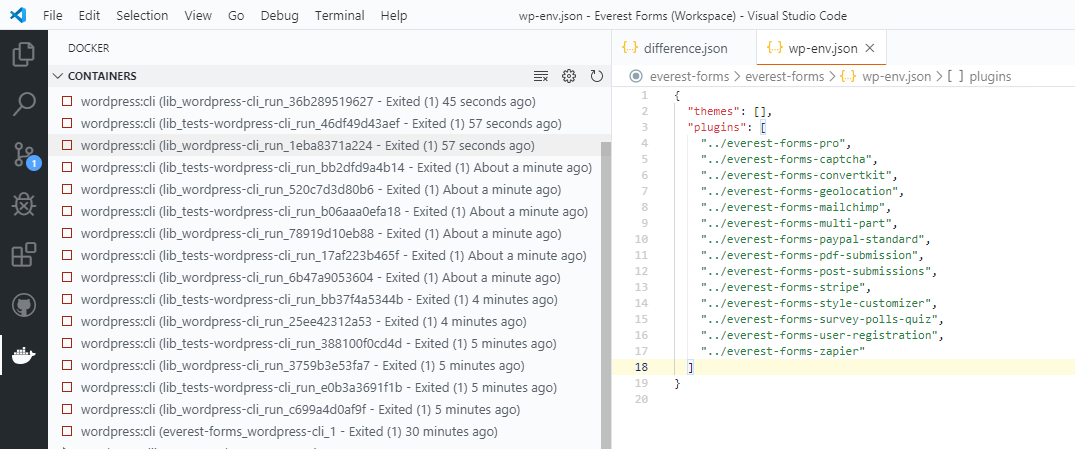
What do you mean by that exactly?
Not at the moment, but you could try opening a PR that adds support for an environment variable that allows it.
No, are they causing issues somehow? It'd be great to keep this tool as zero config as possible. |

| depends_on: | ||
| - mysql | ||
| environment: | ||
| WORDPRESS_DEBUG: 1cq |

There was a problem hiding this comment.
I copied it from another setup. Riad's I think.
There was a problem hiding this comment.
I don't see any docs for it.
Should we have WP_DEBUG=true instead?

There was a problem hiding this comment.
Yeah, we need to change it. WP_DEBUG=true is correct right?
There was a problem hiding this comment.
Based on the documentation for the environment variable, it would be 1, which seems consistent at least with part of what was written here.
https://hub.docker.com/_/wordpress
The actual constant it controls would have a value of true or false:
https://wordpress.org/support/article/debugging-in-wordpress/
I guess it's also a question of whether it's intended to enable debugging mode. I would guess based on its initial presence here, and the fact this is intended for development, it would be safe to say "yes".
There was a problem hiding this comment.
-e WORDPRESS_DEBUG=1 (defaults to disabled, non-empty value will enable WP_DEBUG in wp-config.php)
It's already working. It just needs a non-empty value.
Still opened a PR to be tidy: #19218.
| - ${ pluginPath }/../${ pluginName }-wordpress/:/var/www/html/${ commonVolumes }`; | ||
| const testsVolumes = ` | ||
| - tests-wordpress:/var/www/html/${ commonVolumes }`; | ||
| return `version: '2' |
There was a problem hiding this comment.
For what reason do we use an older version?
Prior to all the revisions to the Docker worfklow, we ran at v3.1
https://github.com/WordPress/gutenberg/blob/v6.4.0/docker-compose.yml#L1
There was a problem hiding this comment.
Some of the features we were using broke with version 3 and https://www.npmjs.com/package/docker-compose.


Starts #17724
Description
This PR adds a new package intended to be installed globally by contributors and other plugin developers for painlessly running instances of specific versions of WordPress for local plugin development:
@wordpress/envPreview
Usage
How has this been tested?
Unit tests were added for the new CLI and all the commands were verified to work as described by the CLI help output.
Types of Changes
New Feature: A new global CLI package,
@wordpress/env, for painlessly spinning up specific versions of WordPress for local plugin development.Checklist: