Restructure code bock styling #38712
Conversation


 ndiego
added
[Type] Bug
ndiego
added
[Type] Bug
|
@jasmussen here is the PR we discussed yesterday. I did discover some strange "orphan" CSS coming from WordPress even though Gutenberg was active? More info is provided above in the Testing Instructions. This is likely a separate issue, but a bit baffling. |

|
Sort of related, I wonder why the pre element is used, and if it can be removed. |

|
Thanks for taking a stab! This is looking very good to me in terms of a singular styling interface that touches border and radius correctly:
Global styles also sets proper defaults in the right place: Happy to give this a green check, but I'd love a sanity check by someone with a little more depth of knowledge on Global Styles, such as @jorgefilipecosta perhaps?
I wasn't able to find anything in the history, but my guess would be that the |
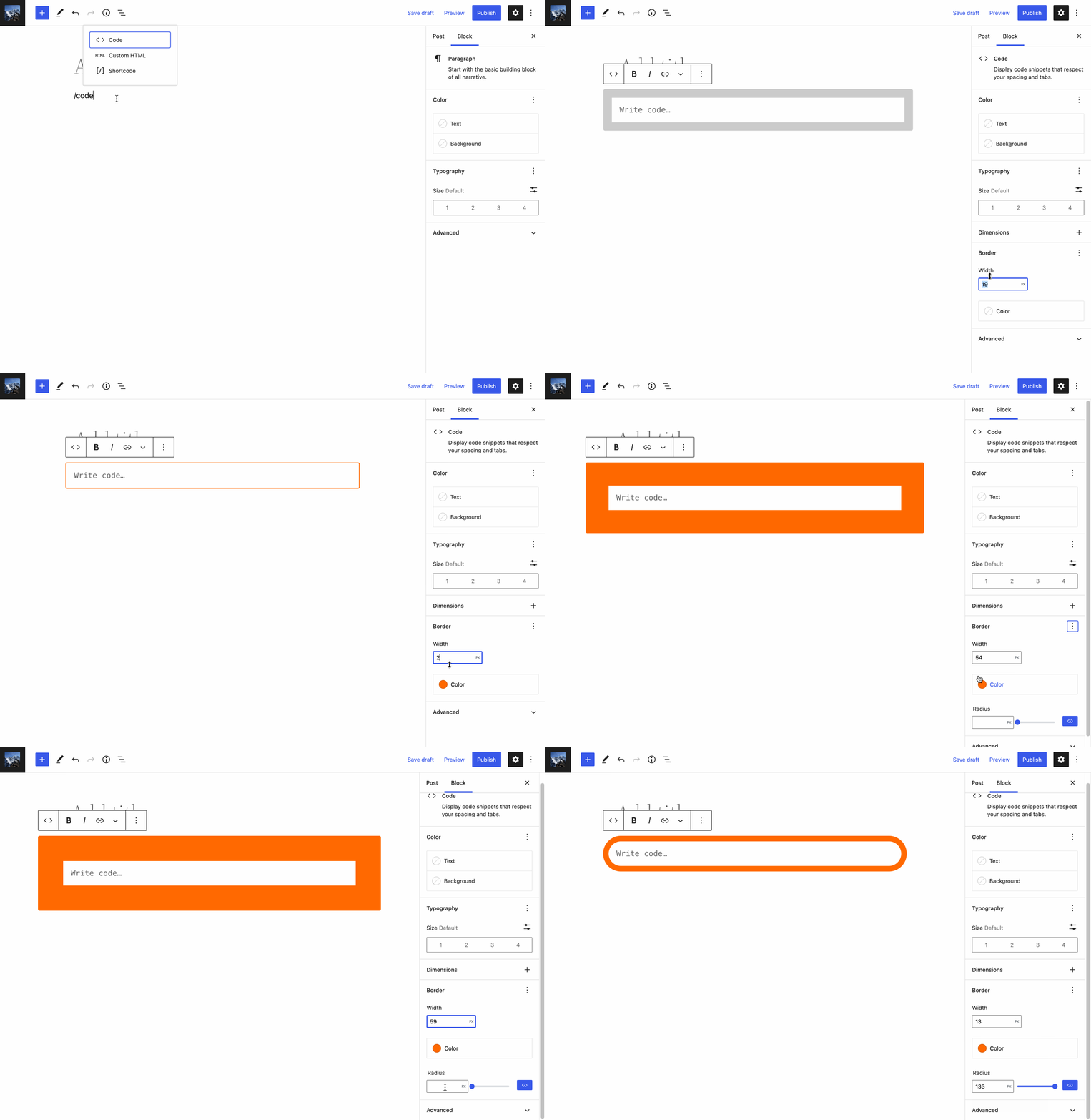
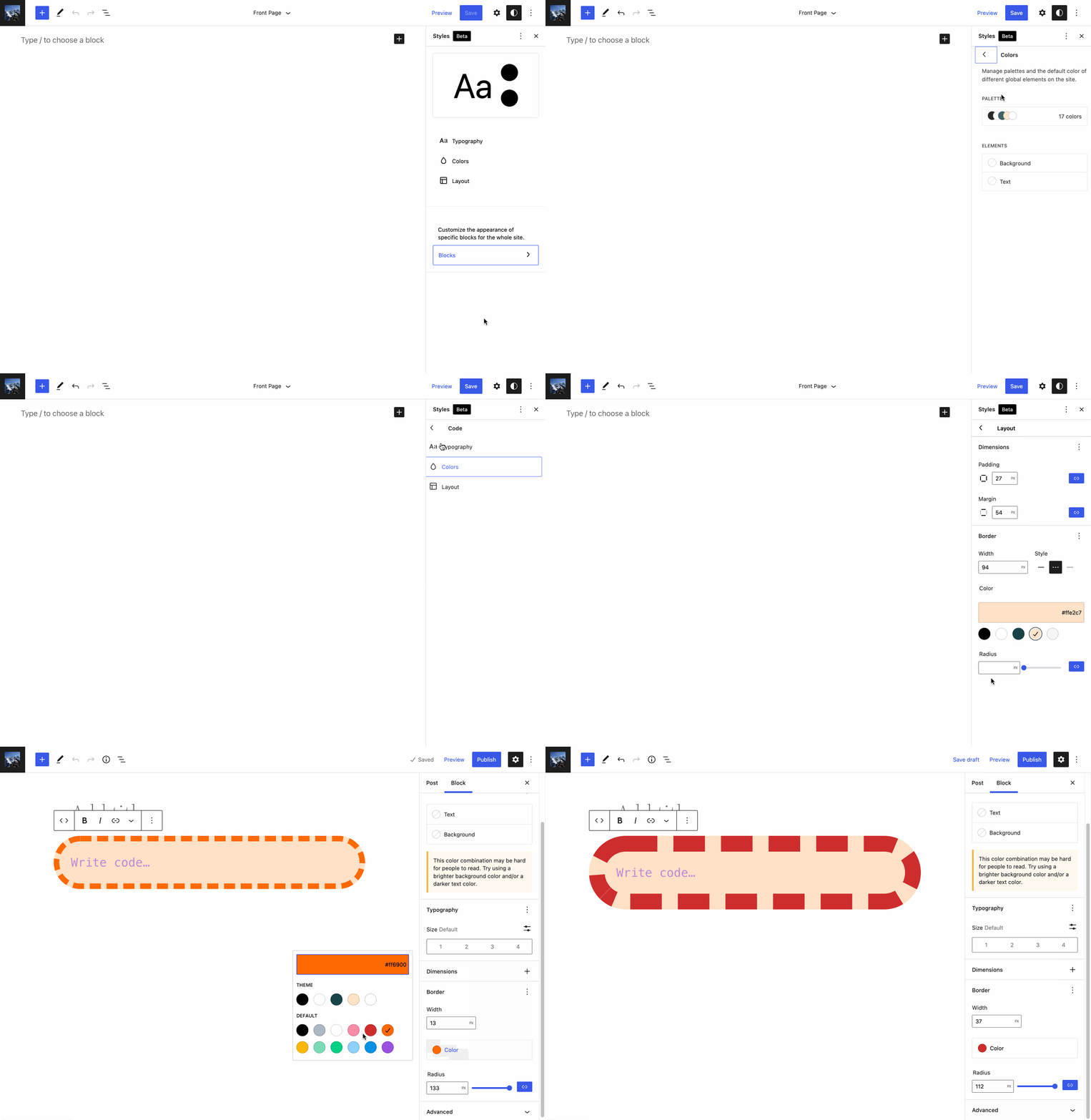
Yes, this is my understanding too. Not that it directly impacts this PR, but I am concerned about that CSS coming from WordPress core (mentioned under the testing steps above). I cannot figure out why this is still getting generated when Gutenberg is active. I was under the impression that the block styling in Gutenberg get rendered instead of those in WordPress core when the plugin is active, but I could be wrong. 🤔 |
|
CC: @oandregal, for the question around those styles in the testing steps. If you have time to look, thank you! |


I've taken a look and this is what I see: it only happens when the It sounds like either the generation of the block embedded stylesheets is not working as expected or someone is hooking more content into that. I couldn't find in a quick look what's happening. cc @aristath in case it rings any bell or you can help debug this more quickly than I am (I won't be able to look for a couple of days). It sounds like it's an issue for more blocks than the code block. This is what I've found:
/* THIS COMES FROM STYLE.SCSS AND IS MINIFIED */
.wp-block-code code{display:block;overflow-wrap:break-word;white-space:pre-wrap}

/* THIS COMES FROM THEME.SCSS AND IS MINIFIED */
.wp-block-code{border:1px solid #ccc;border-radius:4px}.wp-block-code>code{font-family:Menlo,Consolas,monaco,monospace;padding:.8em 1em}

/* WHERE DOES THIS COME FROM? IT IS NOT MINIFIED */
.wp-block-code > code {
  font-family: Menlo, Consolas, monaco, monospace;
  color: #1e1e1e;
  padding: 0.8em 1em;
  border: 1px solid #ddd;
  border-radius: 4px;
}
/* THIS COMES FROM STYLE.SCSS AND IT's MINIFIED */
.wp-block-group{box-sizing:border-box}

/* THIS COMES FROM THEME.SCSS AND IT'S MINIFIED*/
:where(.wp-block-group.has-background){padding:1.25em 2.375em}

/* WHERE DOES THIS COME FROM? IT'S NOT MINIFIED. */
.wp-block-group:where(.has-background) {
  padding: 1.25em 2.375em;
}
/* WHERE DOES THIS COME FROM? */
@charset "UTF-8";

/* COMES FROM STYLE.SCSS and IT's MINIFIED */
.wp-block-separator{border-bottom:1px solid;border-top:1px solid}.wp-block-separator.is-style-dots{background:none!important;border:none;height:auto;line-height:1;text-align:center}.wp-block-separator.is-style-dots:before{color:currentColor;content:"···";font-family:serif;font-size:1.5em;letter-spacing:2em;padding-left:2em}

/* COMES FROM THEME.SCSS and IT'S MINIFIED */
.wp-block-separator{border:none;border-bottom:2px solid;margin-left:auto;margin-right:auto;opacity:.4}.wp-block-separator:not(.is-style-wide):not(.is-style-dots){width:100px}.wp-block-separator.has-background:not(.is-style-dots){border-bottom:none;height:1px}.wp-block-separator.has-background:not(.is-style-wide):not(.is-style-dots){height:2px}

/* WHERE DOES THIS COME FROM? IT'S NOT MINIFIED */
.wp-block-separator {
  border: none;
  border-bottom: 2px solid currentColor;
  margin-left: auto;
  margin-right: auto;
  opacity: 0.4;
}
.wp-block-separator:not(.is-style-wide):not(.is-style-dots) {
  width: 100px;
}
.wp-block-separator.has-background:not(.is-style-dots) {
  border-bottom: none;
  height: 1px;
}
.wp-block-separator.has-background:not(.is-style-wide):not(.is-style-dots) {
  height: 2px;
} |

 jorgefilipecosta
left a comment
jorgefilipecosta
left a comment
jorgefilipecosta
left a comment
There was a problem hiding this comment.
This change here seems to be in a good direction 👍
I think we should just address https://github.com/WordPress/gutenberg/pull/38712/files#r806088001 first.
Good catch @jorgefilipecosta, I will fix this later today.
Very interesting, thanks for taking the time to explore this. Yeah, I cannot seem to figure it out, but I am very new to this area of Gutenberg 😅 |
ndiego
force-pushed
the
try/restructure-code-block-styling
branch
from
4fab48a to
90bab97
Compare
I have been able to replicate this.
@aristath, @oandregal looping back on this issue regarding mysterious CSS getting injected. It seems to be separate, would you like me to add a separate issue and we can track there? I am at a loss how to fix it, but I can create the issue 😅 |

|
I'm merging this PR it seems the other points remaining should be tracked separately. |


I went ahead and created the issue #39393 |
5 participants


Description
The styling for the Code block has gone through many iterations. In the last PR #37818, the border styling was moved to the
preelement. While this was an improvement, any Code block styles specified in theme.json were actually mapped to thecodeelement. So if a user added border styling in theme.json, they would end up with a double border, one onpreset by WordPress theme.css and one set by the user.In exploring solutions, the best appears to be removing the
"__experimentalSelector": ".wp-block-code > code"line in block.json. Then any user styles in theme.json get applied to thepreelement and override any theme.css styles as expected.The one downside of this approach is that browsers commonly set
font-familyoncodeelements. As mentioned by @jasmussen in #37818, an easy solution to this is to simply setfont-family: inheriton thecodeelement, which will inherit any custom font styling applied to thepreelement. This approach was implemented in this PR.Testing Instructions
So now everything works as expected, but there is a strange issue that I am hoping someone might be able to help with. I was under the impression that Gutenberg block styles replace any set by WordPress core. However, in testing this PR, I noticed some "orphan" styling that is getting applied, which is coming from WordPress, not Gutenberg.
This is likely a separate issue, but be aware when testing this PR. You will want to unset these styles as indicated below. They only appear on the frontend.
Testing Steps
Types of changes
Bug Fix / Enhancement
Checklist:
*.native.jsfiles for terms that need renaming or removal).