Tiny JavaScript plugin for highlighting and replacing text in the DOM

Include hr.js file:
<script src="src/hr.js"></script>or use CDN:
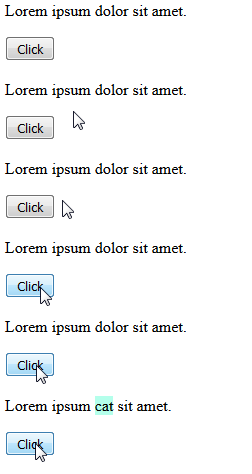
<script src="https://rawgit.com/mburakerman/hrjs/master/src/hr.js"></script><p id="mytext">Lorem ipsum dolor sit amet.</p>Activate
<script>
  new HR("#mytext", {
    highlight: "dolor",
    replaceWith: "cat",
    backgroundColor: "#B4FFEB"
  }).hr();
</script>
That's it!
You can also highlight and replace multiple keywords.
<p id="mytext">I love JavaScript.</p><script>
new HR("#mytext", {
highlight: ["love","JavaScript"],
replaceWith: ["like", "jQuery"],
backgroundColor: "#B4FFEB"
}).hr();
</script>To highlight only, just add your keyword to highlight option.
<p class="mytext">Lorem ipsum dolor sit consectetur amet.</p>
<h3 class="mytext">Consectetur enim ipsam voluptatem quia</h3><script>
new HR(".mytext", {
highlight: "consectetur",
backgroundColor: "#B4FFEB"
}).hr();
</script>These are default options.
new HR("elem", {
  highlight: null,
  replaceWith: null,
  backgroundColor: "#FFDE70"
}).hr();- IE 10+
- Chrome
- Firefox
- Safari
- Opera
Licensed under the MIT License.