[SPARK-23653][SQL] Show sql statement in spark SQL UI #20803
Conversation


|
@gatorsmile @cloud-fan Could you add some comments? |

|
Can one of the admins verify this patch? |

|
what if an SQL execution triggers multiple jobs? |

|
|
@cloud-fan one SQL execution only has one sql statement whatever how many jobs it triggered. |
What's meaning? Can you give an example? |
cat <<EOF > test.sql
select '\${a}', '\${b}';
EOF

spark-sql --hiveconf a=avalue --hivevar b=bvalue -f test.sql
SQL text is |

| private val executionIdToSqlText = new ConcurrentHashMap[Long, String]() | ||
|
|
||
| def setSqlText(sqlText: String): Unit = { | ||
| executionIdToSqlText.putIfAbsent(_nextExecutionId.get(), sqlText) |

There was a problem hiding this comment.
Does the executionId used here match the current execution? IIUC, the execution id is incremented in withNewExecutionId, and the one you used here mostly refers to the previous execution, please correct me if I'm wrong.
There was a problem hiding this comment.
setSqlText is invoked before withNewExecutionId. First time _nextExecutionId is 0 by default, so setSqlText store (0, x) in map. When withNewExecutionId is invoked, the code val executionId = SQLExecution.nextExecutionId increase the execution id and return the previous execution id, 0. Then val sqlText = getSqlText(executionId) will return the sql text which 0 mapped, x. Next time when setSqlText is invoked, _nextExecutionId.get() return the increased id, 1. So the new sql text store in map (1, y).
There was a problem hiding this comment.
Ohh, I see. Sorry I misunderstood it.
|
@wangyum Good point. Unfortunately it is |
|
So this patch duplicates the SQL text info on the jobs page to the SQL query page. I think it's good and more user-friendly, but we need to make sure the underlying implementation reuse the code, to avoid problems like missing the |
|
Thanks a lot, @cloud-fan . The problems like missing the |

|
Hi @wangyum, the problem about variable substitution now is resolved. |

| } | ||
|
|
||
| def getSqlText(executionId: Long): String = { | ||
| executionIdToSqlText.get(executionId) |

There was a problem hiding this comment.
what if this execution doesn't have SQL text?
| * @since 2.0.0 | ||
| */ | ||
| def sql(sqlText: String): DataFrame = { | ||
| SQLExecution.setSqlText(substitutor.substitute(sqlText)) |
There was a problem hiding this comment.
I think the most difficult part is, how to connect the SQL text to the execution. I don't think the current one works, e.g.
val df = spark.sql("xxxxx")
spark.range(10).count()
You set the SQL text for the next execution, but the next execution may not happen on this dataframe.
I think SQL text should belong to a DataFrame, and executions on this dataframe show the SQL text. e.g.
val df = spark.sql("xxxxxx")
df.collect() // this should show sql text on the UI
df.count() // shall we shall sql text?
df.show() // this adds a limit on top of the query plan, but ideally we should shall the sql text.
df.filter(...).collect() // how about this?
There was a problem hiding this comment.
@cloud-fan, Bind sql text to DataFrame is a good idea. Trying to fix the list you mentioned above.
There was a problem hiding this comment.
It's better to answer the list first. Strictly speaking, except collect, most of the dataframe operations will create another dataframe and execute. e.g. .count() creates a new dataframe with aggregate, .show() creates a new dataframe with limit.
It seems like df.count should not show the SQL, but df.show should as it's very common.
|
@cloud-fan, please review. |
|
@cloud-fan @jerryshao In the last commit, seems I faced a Scala bug. :-(
|
|
Sorry I didn't clarify it clearly enough. I was not suggesting to show sql text for all of these cases, but tried to raise a discussion about when we should show sql text. e.g. for |
|
@cloud-fan, please review. |
| @DeveloperApi @InterfaceStability.Unstable @transient val queryExecution: QueryExecution, | ||
| encoder: Encoder[T]) | ||
| encoder: Encoder[T], | ||
| val sqlText: String = "") |
There was a problem hiding this comment.
what's the exact rule you defined to decide whether or not we should propagate the sql text?
There was a problem hiding this comment.
And how does the SQL shell execute commands? like SELECT * FROM ..., does it display all the rows or add a LIMIT before displaying? Generally we should not propagate sql text, as a new DataFrame usually means the plan is changed, the SQL text is not accurate anymore.
There was a problem hiding this comment.
Thanks for your review. I agree this comment. Before the discuss, let me reproduce the scenario our company met. Team A developed a framework to submit application with sql sentences in a file
spark-submit --master yarn-cluster --class com.ebay.SQLFramework -s biz.sql
In the biz.sql, there are many sql sentences like
create or replace temporary view view_a select xx from table ${old_db}.table_a where dt=${check_date};
insert overwrite table ${new_db}.table_a select xx from view_a join ${new_db}.table_b;
...
There is no case like
val df = spark.sql("xxxxx")
spark.range(10).collect()
df.filter(..).count()
Team B (Platform) need to capture the really sql sentences which are executed in whole cluster, as the sql files from Team A contains many variables. A better way is recording the really sql sentence in EventLog.
Ok, back to the discussion. The original purpose is to display the sql sentence which user inputs. spark.range(10).collect() isn't a sql sentence user inputs, either df.filter(..).count() . Only "xxxxx" is. So I have two proposals and a further think.
- Change the display behavior, only displays the sql which can trigger action. like "create table", "insert overwrite", etc. Do not care about the select sentence. That won't propagate sql text any more. The test case above won't show anything in SQL ui. Also, the ui will show "Sql text which triggers this execution" instead of "Sql text"
- Add a SQLCommandEvent and post an event with sql sentence in method SparkSession.sql(), then in the EventLoggingListener, just logging this to eventlog. I am not sure in this way, we still can get the sql text in ui.
Further more, what about open another ticket to add a command option --sqlfile biz.sql in spark-submit command. biz.sql must be a file consist by sql sentence. Base this implementation, not only client mode but also cluster mode can use pure sql.
How do you think? @cloud-fan
There was a problem hiding this comment.
spark-submit --master yarn-cluster --class com.ebay.SQLFramework -s biz.sql
How does com.ebay.SQLFramework process the sql file? just call spark.sql(xxxx).show or other stuff?
There was a problem hiding this comment.
Your speculation is almost right. First call val df = spark.sql(), then separates the sql text with pattern matching to there type: count, limit and other. if count, then invoke the df.showString(2,20). if limit, just invoke df.limit(1).foreach, the last type other will do noting.
|
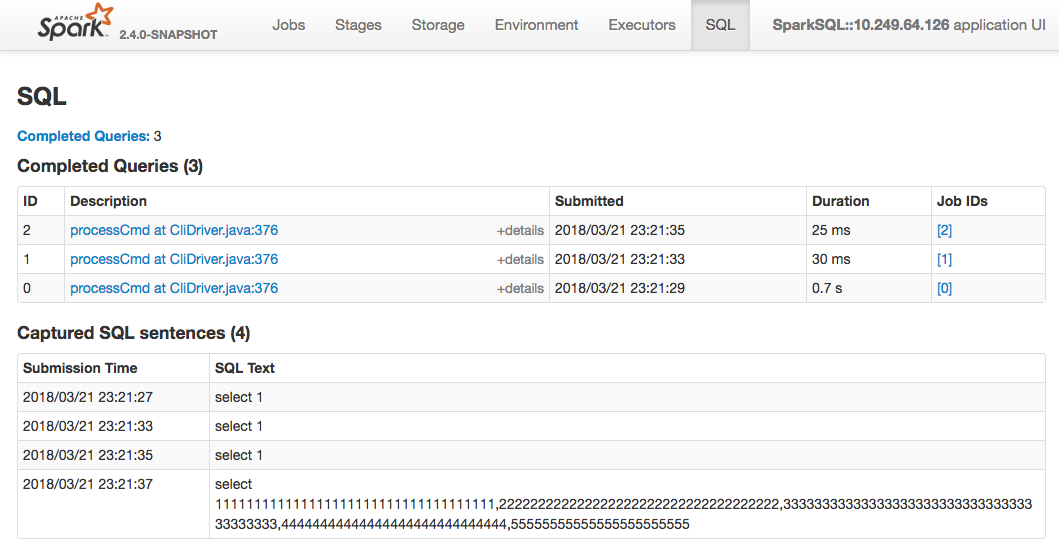
I have decoupled the sqlText with sql execution. In current implementation, when user invoke spark.sql(xx), it will create a new SparkListenerSQLTextCaptured event to listenerbus. Then in SQLAppStatusListener, the information will be stored and all the sql sentences will display in AllExecutionPage in order with submission time, instead of in each ExecutionPage. I will upload the commit after testing. (Better to create a new PR?) |
|
|

| def sql(sqlText: String): DataFrame = { | ||
| Dataset.ofRows(self, sessionState.sqlParser.parsePlan(sqlText)) | ||
| Dataset.ofRows(self, sessionState.sqlParser.parsePlan(sqlText), | ||
| substitutor.substitute(sqlText)) |

There was a problem hiding this comment.
Hi, @LantaoJin .
What you need is just grapping the initial SQL text here, you can use Spark extension. Please refer Spark Atlas Connector for a sample code.
There was a problem hiding this comment.
You may want to refactor this PR into ParserExtension and UI part. I think that will be less intrusive than the current implementation.
There was a problem hiding this comment.
BTW, in general, the initial SQL texts easily become meaningless when another operations are added. In your example, the following case shows a misleading and wrong SQL statement instead of real executed SQL plan.
val df = spark.sql("xxxxx")
df.filter(...).collect() // shows sql text "xxxxx"
As another example, please try the following. It will show you select a,b from t1.
scala> spark.sql("select a,b from t1").select("a").show
+---+
|  a|
+---+
|  1|
+---+There was a problem hiding this comment.
the following case shows a misleading and wrong SQL statement instead of real executed SQL plan.
Yes. We know this, so current implementation which bind sql text to DF is not good.
|
Hi @jerryshao @cloud-fan @dongjoon-hyun, I would like to close this PR and open another one #20876, would you please move to that? |
6 participants


What changes were proposed in this pull request?
SPARK-4871 had already added the sql statement in job description for using spark-sql. But it has some problems:
long sql statement cannot be displayed in description column.
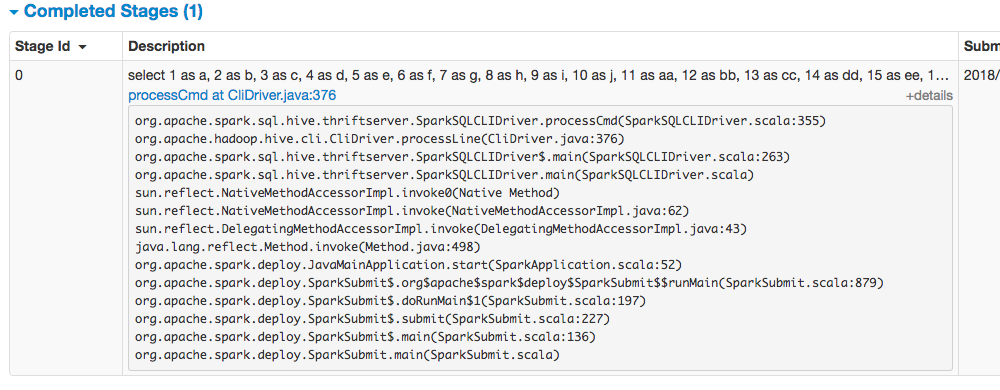
sql statement submitted in spark-shell or spark-submit cannot be covered.
In eBay, most spark applications like ETL using spark-submit to schedule their jobs with a few sql files. The sql statement in those applications cannot be saw in current spark UI. Even we get the sql files, there are many variables in the it such as "select * from ${workingBD}.table where data_col=${TODAY}". So this
How was this patch tested?