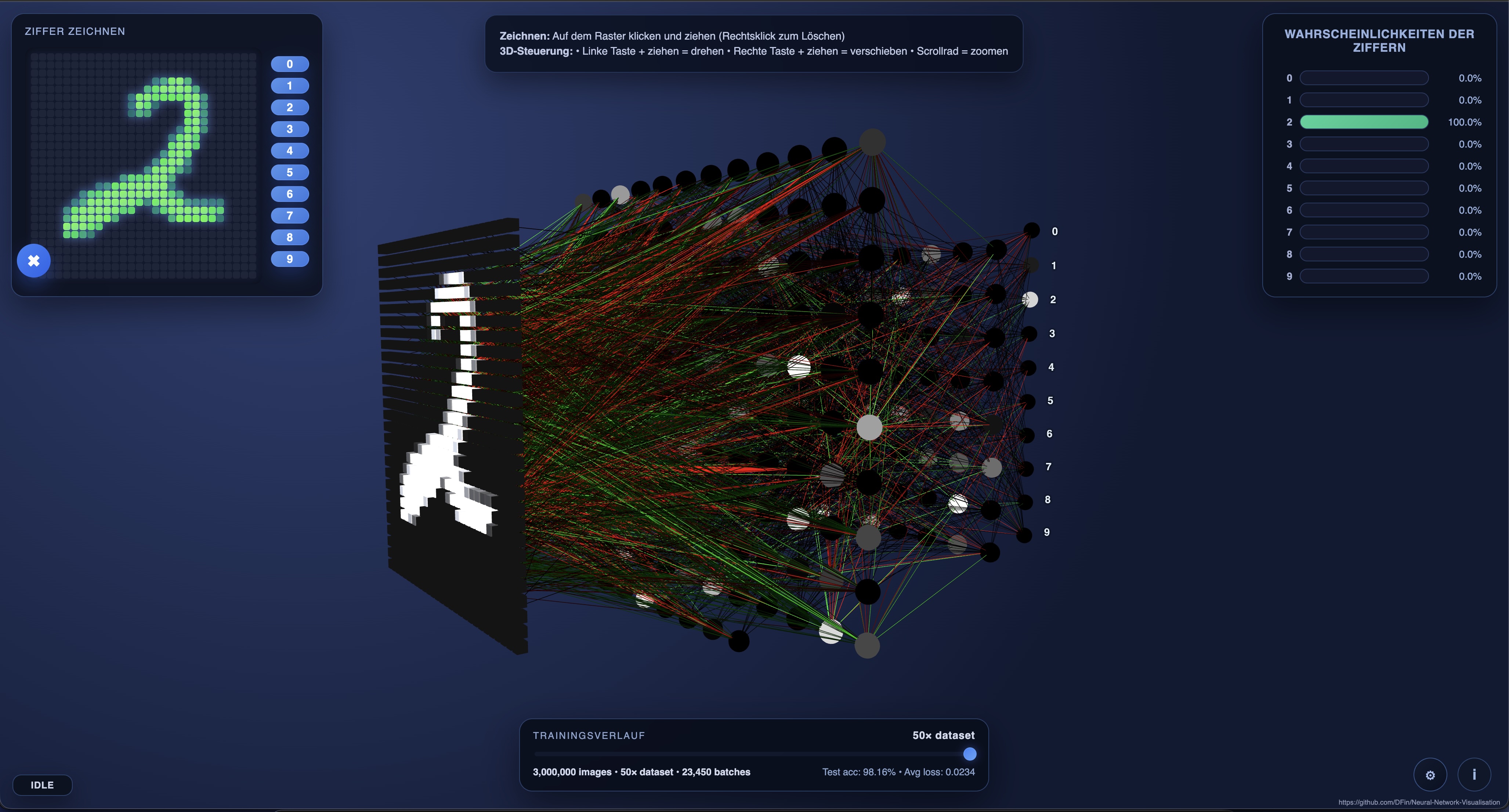
Interactive web visualisation for a compact multi-layer perceptron trained on the MNIST handwritten digit dataset. Draw a digit, watch activations propagate through the network in 3D, and inspect real-time prediction probabilities.
This is still in a rough state and under active development. If you want something useable for a museum etc check back later. I have a couple of features in mind (like being able to connect a tablet to draw a number) to make this a good educational visualisation.
index.html/assets/– Static Three.js visualiser and UI assets.exports/mlp_weights.json– Default weights with timeline snapshots (generated from the latest training run).training/mlp_train.py– PyTorch helper to train the MLP (with Apple Metal acceleration when available) and export weights for the front-end.
-
(Only for training) Install Python dependencies (PyTorch + torchvision):
python3 -m pip install torch torchvision
-
Launch a static file server from the repository root (any server works; this example uses Python):
python3 -m http.server 8000
-
Open
http://localhost:8000in your browser. Draw on the 28×28 grid (left-click to draw, right-click to erase) and explore the 3D network with the mouse or trackpad.
The repository also includes an experimental GEMM timeline viewer powered by a small Rust CLI generator and a Three.js page under public/matmul/.
-
Generate (or refresh) the sample timeline JSON:
cargo run -p rust-tracer --release -- \
  --out public/matmul/sample.json \
  --schedule ikj \
  --dims 128,128,128 \
  --tile 16,16,16
The defaults match the command above, so you can omit the flags unless you want to explore different loop orders or tile sizes.
-
From the repository root, start any static server (the main quick-start server from above works fine):
python3 -m http.server 8000
-
Open
http://localhost:8000/public/matmul/(or click the Matmul Demo link in the main UI). Use the play/pause button and speed slider to scrub through the generated timeline while watching the A/B/C tile grids animate.
For additional details see public/matmul/README.md.
training/mlp_train.py trains a small MLP on MNIST and writes a JSON export the front-end consumes. Metal (MPS) is used automatically when available on Apple Silicon; otherwise the script falls back to CUDA or CPU.
Typical usage:
python3 training/mlp_train.py \
  --epochs 5 \
  --hidden-dims 128 64 \
  --batch-size 256 \
  --export-path exports/mlp_weights.json
Key options:
--hidden-dims: Hidden layer sizes (default128 64). Keep the network modest so the visualisation stays responsive.--epochs: Minimum training epochs (default5). The script will automatically extend the run so the timeline hits the 50× dataset milestone.--batch-size: Mini-batch size (default128).--device: Forcemps,cuda, orcpu. By default the script picks the best available backend.--skip-train: Export the randomly initialised weights without running training (useful for debugging the pipeline).
After training, update VISUALIZER_CONFIG.weightUrl in assets/main.js if you export to a different location/name. Refresh the browser to load the new weights.
Every exported JSON now includes a timeline array spanning 35 checkpoints: densely spaced early snapshots (≈50, 120, 250, 500, 1k, 2k, 3.5k, 5.8k, 8.7k, 13k, 19.5k, 28.5k, 40k images), followed by dataset-multiple milestones from 1× through 50×. The JSON manifest stays small; each snapshot’s weights are stored separately as float16-encoded files under exports/<stem>/NNN_<id>.json, and the front-end streams them on demand so you can scrub the timeline without downloading the entire 50× run up front. Re-export the weights with the updated script to generate fresh timeline data for your own runs.
- The visualiser highlights the top-N (configurable) strongest incoming connections per neuron to keep the scene legible.
- Colors encode activation sign and magnitude (cool tones for negative/low, warm tones for strong positive contributions).
- The default export (
exports/mlp_weights.json) already includes timeline milestones from a multi-epoch training run. Retrain (and re-export) if you want to showcase a different progression. - If you adjust the architecture, ensure the JSON export reflects the new layer sizes; the front-end builds the scene dynamically from that metadata.
The server keeps live assets separate from active development under releases/:
releases/current/– files served by your static HTTP server.releases/backups/<timestamp>/– point-in-time snapshots for quick rollback.releases/.deploy_tmp/– staging area used during deployment.
To publish the code you currently have checked out, run the deploy script from the repository root:
./deploy.shYou can target a different commit or branch explicitly:
./deploy.sh <commit-ish>The script exports the requested commit into the staging area, syncs it into releases/current/, and saves the same tree under releases/backups/<timestamp>/ with the commit hash recorded in .commit.