A hands-on course for product managers who want to ship real things — without waiting on engineering.
Build production apps, write PRDs with AI, and go from idea to deployed product using Claude Code. No coding background required.




Taught by Hamza Farooq — Founder at Traversaal.ai · UCLA Anderson · ex-Google
⭐ #1 Highest Rated Claude Course on Maven

A premium scroll-driven product landing page built from a single 15-second video. Drop in a product video, brief Claude with the video-to-website skill, and Claude scaffolds the whole site: frame-by-frame canvas playback bound to scroll, GSAP timelines per section, Lenis smooth scroll, persistent CTA. Vanilla HTML/CSS/JS, no bundler.

→ Open the example · README walkthrough · video-to-website skill · 20-sec demo (mp4) · Live site
Built live for the Audemars Piguet × Swatch Royal Pop launch. The full README walks through how to do the same thing with your own product video, including the exact prompt for generating a luxury product turnaround video and the seven readability fixes that always come up.
Three steps to your first session:
# 1. Clone the repo
git clone https://github.com/hamzafarooq/claude-code-starter.git
cd claude-code-starter/module-1

# 2. Launch Claude Code
claude

# 3. Open your first assignment
# → See module-1/README.md
First time? Follow the full Installation guide below — takes about 10 minutes.
Once you've built something — a static site like Royal Pop, a Next.js app like MeetingMemo, or any project in this repo — get it on a live URL in under a minute. No build config, no DNS wrangling.
# Install the Vercel CLI (one time, globally)
npm i -g vercel

# Log in (opens your browser; pick GitHub / Google / email)
vercel login# 1. Move into the project you want to deploy
cd examples/royal-pop-website # or any folder with an index.html / package.json
# 2. First deploy — Vercel auto-detects the framework and creates the project
vercel --yes
# 3. Promote to production
vercel --prodThat's it. Vercel returns two URLs — a preview URL for that deployment and the production alias (e.g. https://your-project.vercel.app). Every subsequent vercel --prod re-deploys instantly.
| Project type | Framework preset | Build command | Output |
|---|---|---|---|
| Static HTML/CSS/JS (Royal Pop) | Other | none | repo root |
| Next.js (MeetingMemo) | Next.js | next build |
.next/ |
| Vite / React | Vite | vite build |
dist/ |
| FastAPI / Python backend | — | — | use Fly.io instead (Vercel runs serverless functions, not long-lived servers) |
Run the /deploy-checklist skill — it catches the five most common failures (missing env vars, hardcoded localhost URLs, oversized assets, missing .gitignore entries, broken build commands) before Vercel tells you about them.
# In Claude Code:
/deploy-checklistIf your app uses an ANTHROPIC_API_KEY (or any other secret), don't commit it. Add it in the Vercel dashboard:
- Open your project on vercel.com
- Settings → Environment Variables
- Add
ANTHROPIC_API_KEYfor Production (and Preview if you want PR previews to work) - Re-deploy:
vercel --prod
Full walk-through in Module 4, Assignment 4b.
All course code, templates, skills, and commands live here. Come back here whenever you need files from class.
| What | Where |
|---|---|
| Module guides & assignments | module-N/README.md |
| CLAUDE.md starter templates | module-N/CLAUDE-template.md |
| Skills | module-N/.claude/skills/<name>/SKILL.md |
| Commands | module-N/.claude/commands/<name>.md |
| Community resources | docs/resources.md |
Real apps built live in class using Claude Code — no engineering team. Fork them, break them, learn from them.
| App | What it does |
|---|---|
| word-humanizer | Word add-in that rewrites AI-generated paragraphs to sound human — sits inside Word as a sidebar, rewrites one paragraph at a time, and shows exactly what patterns were removed |
| seo-writer | AI agent that researches a topic, finds images, and produces a finished SEO article in Markdown, HTML, and DOCX — learns from your existing articles to match your voice |
| linkedin-growth | Audits your LinkedIn profile against profiles you admire and produces a 90-day content plan — all from a single command in Claude Code |
| sprint-zero | Give it a reference URL and answer 3 questions — it generates a full spec (PRD, user stories, API contracts) and a working app using parallel sub-agents for backend, frontend, and QA. MVP scope ships in 10–20 minutes |
| how-the-web-works | Interactive visual explainer built in Module 2 — shows exactly how frontend, backend, and AI backend talk to each other with live animated request/response flows. Open it in a browser, no install needed |
| meetingmemo | Converts raw meeting notes into a structured standup update — built live in class in 30 minutes. Next.js + Anthropic API. The simplest possible example of a Claude API call in production |
More apps get added as the course runs. See also the Royal Pop featured project above.
Skills are triggered with a /command. Install them once; Claude runs them on demand. All skills live in .claude/skills/<name>/SKILL.md, and every skill has a matching slash command file in .claude/commands/<name>.md so you can invoke it as /<name> directly from Claude Code.
.claude/
├── skills/<name>/SKILL.md   ← the full instruction set
└── commands/<name>.md        ← thin wrapper that triggers the skill via /<name>
To install a skill in your own project, copy both the skills/<name>/ folder and the matching commands/<name>.md file into your project's .claude/ directory.
34 skills across 7 categories. Click any skill name to open its SKILL.md file.
| Skill | Command | What it does |
|---|---|---|
| Competitor Research | /competitor-research |
Researches 3–5 competitors: positioning, pricing, differentiators, and gap analysis |
| Market Sizing | /market-sizing |
Estimates TAM/SAM/SOM from a product description using a bottom-up approach |
| Customer Persona | /customer-persona |
Builds a deep ICP: jobs-to-be-done, pain points, objections, buying triggers |
| Meeting Analyzer | /meeting-analyzer |
Extracts action items, decisions, risks, and open questions from meeting notes |
| Trend Spotter | /trend-spotter |
Scans a market for strong signals, weak signals, and noise — with evidence |
| YouTube Deep Dive | /youtube-deepdive |
Visits YouTube URLs with Brave MCP — returns timestamps, key moments, top comments |
| YouTube Researcher | /youtube-researcher |
Searches YouTube on any topic, returns ranked videos with a top-pick recommendation |
| Explain Me a Repo | /explain-me-a-repo |
Visits a GitHub URL with Brave MCP — returns what it does, how it's built, key files |
| Skill | Command | What it does |
|---|---|---|
| Voice DNA | /voice-dna |
Analyzes your writing samples and extracts your voice fingerprint — tone, patterns, taboo words |
| Newsletter Ideator | /newsletter-ideator |
Generates 7 unique angles for a newsletter issue using SCAMPER and contrarian frameworks |
| LinkedIn Post | /linkedin-post |
Writes 2 versions of a LinkedIn post — story-led and insight-led — with hook and CTA |
| Email Writer | /email-writer |
Writes launch, follow-up, re-engagement, or cold outreach emails with 3 subject line options |
| Content Repurposer | /content-repurposer |
Turns one long-form piece into 5 formats: tweet thread, LinkedIn, newsletter blurb, Substack Note, TL;DR |
| SEO Optimizer | /seo-optimizer |
Analyzes a draft for keyword gaps, rewrites title/meta/H2s for search without killing the voice |
| Skill | Command | What it does |
|---|---|---|
| PRD Generator | /prd-generator |
Writes a full 9-section PRD: problem, solution, risks, acceptance criteria, open questions |
| User Story Writer | /user-story-writer |
Turns rough ideas into user stories with Given/When/Then criteria and edge cases |
| Sprint Planner | /sprint-planner |
Turns a backlog into a prioritized 2-week sprint with effort estimates and capacity check |
| Business Case | /business-case |
Builds a business case: problem, options analysis, ROI estimate, risks, recommendation |
| Feature Prioritizer | /feature-prioritizer |
Scores features using RICE (Reach × Impact × Confidence ÷ Effort) and returns a ranked table |
| OKR Writer | /okr-writer |
Turns a goal into 3 Objectives with 3 measurable Key Results each — with a health check |
| Stakeholder Update | /stakeholder-update |
Writes a weekly/monthly status update from raw notes: progress, blockers, decisions needed |
| Retro Facilitator | /retro-facilitator |
Generates a sprint retrospective doc: what worked, what didn't, 3 action items with owners |
| Launch Checklist | /launch-checklist |
Creates a go-to-market launch checklist phased across 2 weeks before → launch day → post-launch |
| Skill | Command | What it does |
|---|---|---|
| Verify Work | /verify-work |
End-of-session review: console.logs, unused imports, hardcoded values, missing error handling |
| Changelog Writer | /changelog-writer |
Reads git log and writes a user-facing changelog in Keep a Changelog format |
| Test Writer | /test-writer |
Writes unit tests for any function — happy path, edge cases, and error cases |
| Dockerfile Generator | /dockerfile-generator |
Creates a production Dockerfile and deployment config optimized for size and security |
| Code Reviewer | (sub-agent) | Read-only audit: security vulnerabilities, logic errors, missing test coverage |
| Skill Evaluator | /skill-evaluator |
Scores a Skill's output against ground truth, identifies failure patterns |
| Deploy Checklist | /deploy-checklist |
Pre-deploy checks before pushing to Vercel or Fly.io — catches the five most common failures |
| Skill | Command | What it does |
|---|---|---|
| Slides Builder | /slides-builder |
Generates a complete self-contained HTML slide deck — McKinsey-style, one insight per slide |
| Exec Summary | /exec-summary |
Rewrites any document as a 3-bullet executive summary — optimized for a VP with 30 seconds |
| Proposal Writer | /proposal-writer |
Writes a structured proposal: problem, solution, timeline, investment, and next steps |
| Skill | Triggers when… | What it does |
|---|---|---|
| Research Agent | You ask for research, competitors, or market context | Web search specialist — structured findings with sources |
| PRD Reviewer | You ask to review or audit a PRD | Returns 3 risks, 3 missing edge cases, 1 scope creep flag |
| Data Analyst | You share a CSV, JSON, or data export | Returns 3 key stats, 1 anomaly, 1 trend |
| Copy Writer | You ask for in-app copy, tooltips, or button labels | Returns 3 options: [Direct], [Warm], [Bold] — all under 12 words |
| Deck Builder | You ask for a presentation or deck | Researches the topic, then builds a McKinsey-style deck |
Inspired by how the best practitioners actually use Claude Code. These skills enforce those principles directly in your workflow.
| Skill | Command | What it does |
|---|---|---|
| Karpathy Review | /karpathy-review |
Reviews code or a plan against Karpathy's 4 principles: explicit assumptions, simplicity, surgical changes, verifiable goals · inspired by Andrej Karpathy, adapted by Forrest Chang |
| Boris Plan | /boris-plan |
Writes a complete plan with assumptions, steps, scope, and verification — waits for your approval before touching a single file · based on Boris Cherny's workflow at howborisusesclaudecode.com |
The 25 skills in this library were designed for this course, informed by research across the community. Key sources:
| Source | What we learned from it |
|---|---|
| hesreallyhim/awesome-claude-code by @hesreallyhim | Definitive index of skills, commands, and agent patterns |
| ComposioHQ/awesome-claude-skills by Composio | Business, marketing, and data skill patterns |
| travisvn/awesome-claude-skills by @travisvn | Curated skill examples and workflow patterns |
| VoltAgent/awesome-claude-code-subagents by VoltAgent | Sub-agent patterns and specialist agent design |
| Imbad0202/academic-research-skills by @Imbad0202 | Research pipeline skill design |
| aiblewmymind.substack.com | Real-world skill examples from 23 creators |
All SKILL.md files in this repo are original work, written for a PM audience. Patterns and ideas from the above are adapted, not copied.
Sub-agents are specialists Claude delegates to automatically — no /command needed. When your request matches an agent's description, Claude hands it off, runs it in a separate context, and returns only the findings. All agents live in .claude/agents/<name>.md.
| Agent | Model | What it does |
|---|---|---|
research-agent |
Opus | Searches the web and returns structured findings: key facts, sources, and gaps. Triggers on any research, competitor analysis, or market context request |
prd-reviewer |
Sonnet | Reads any PRD and returns exactly 3 risks (rated HIGH/MED/LOW), 3 missing edge cases, and 1 scope creep flag — no summaries, no praise |
code-reviewer |
Sonnet | Read-only audit of code files — flags security vulnerabilities, logic errors, and missing test coverage. Never modifies files |
data-analyst |
Sonnet | Reads CSV, JSON, or data exports and returns 3 key stats, 1 anomaly worth investigating, and 1 directional trend |
copy-writer |
Haiku | Writes in-app copy, tooltips, button labels, and microcopy. Returns 3 options tagged [Direct], [Warm], or [Bold] — all under 12 words |
deck-builder |
Sonnet | Researches a topic using Brave MCP (Reddit, Medium, YouTube) and produces a McKinsey-style presentation deck with speaker notes — designed for non-technical audiences |
Three different ways to extend Claude Code. Here's when to use each one:
| Skill | Sub-Agent | Agent | |
|---|---|---|---|
| What it is | A prompt template you invoke with a /command |
A specialist Claude spins up automatically and delegates to | A fully autonomous Claude instance with its own tools, model, and instructions |
| How it's triggered | You type /skill-name |
Claude decides when to use it based on your request | Triggered by Claude or called explicitly via the Agent tool |
| Who controls it | You — you call it deliberately | Claude — it decides when to hand off | Claude or the system |
| Memory/context | Shares the main conversation context | Runs in a separate context, returns only results | Fully isolated context with its own tool access |
| Best for | Repeatable tasks you always want to run the same way (PRD generation, user stories) | Background specialists that shouldn't clutter your main thread (research, code review, data analysis) | Complex multi-step tasks that need dedicated focus or different model/tool access |
| Lives in | .claude/skills/<name>/SKILL.md |
.claude/agents/<name>.md |
.claude/agents/<name>.md (same file format as sub-agents) |
| Example | /prd-generator — you run it, Claude fills in a PRD |
research-agent — Claude uses it when you ask for competitor research |
A pipeline agent that runs research → writes PRD → reviews PRD autonomously |
Simple rule of thumb:
- Use a skill when you want to run the same prompt yourself, on demand.
- Use a sub-agent when you want Claude to automatically hand off specialist work (and you don't want the details in your main chat).
- An agent is the underlying mechanism — sub-agents are agents, just scoped to delegate-and-return behavior. You'll hear both terms used interchangeably.
Both let Claude interact with a browser. Here's when to use each:
| Playwright | MCP (e.g. Brave MCP) | |
|---|---|---|
| What it is | A code library that automates browsers via scripts | A live browser Claude controls in real time through a protocol |
| How it works | You (or Claude) writes code that drives the browser — clicks, fills forms, scrapes pages | Claude connects to a running browser and takes actions directly, no code required |
| Best for | Repeatable, scheduled, or high-volume browser tasks (scraping, regression testing, form automation) | One-off research, reading live pages, visiting URLs during a conversation |
| Requires coding? | Yes — Python or JavaScript scripts | No — Claude drives it through natural language |
| Speed | Fast at scale, runs headless | Slower, real browser with a visible UI |
| When you'd use it | "Scrape 500 product pages every night" or "Run login tests on every deploy" | "Visit this GitHub repo and summarise it" or "Read the top 3 results for this search" |
| In this course | Not covered (engineering territory) | Used in Module 2 for /explain-me-a-repo and /youtube-deepdive |
Simple rule of thumb: Use MCP when you want Claude to browse something now, in conversation. Use Playwright when you need browser automation to run reliably at scale or on a schedule — that's usually an engineering task.
Set up Claude Code, write a CLAUDE.md that gives Claude context about your project, install two skills, and ship something by the end of the module.
| Assignment | What you'll do |
|---|---|
1. Set up CLAUDE.md |
Write your project context file so Claude knows your stack and goals |
| 2. Install skills | Add /prd-generator and /user-story-writer to your workflow |
| 3. Ship something | Go from idea → PRD → working MVP |
Skills included:
/prd-generator— generates a structured PRD from a feature description/user-story-writer— converts rough ideas into user stories with acceptance criteria
Files:
- module-1/README.md — setup guide and assignments
- module-1/CLAUDE-template.md — starter template
- module-1/.claude/skills/ — skill files
Learn what frontend, backend, and AI backend actually mean, build a custom skill that reads GitHub repos, set up Brave MCP for live browsing, and use it all to understand a real codebase.
| Assignment | What you'll do |
|---|---|
1. Build /explain-me-a-repo |
Write a skill that uses Brave MCP to read and summarize any GitHub repo |
| 2. Set up Brave MCP | Connect Claude Code to a live browser |
| 3. Use it on a real codebase | Run the skill on a repo you care about |
Skills & commands included:
/explain-me-a-repo— navigates to a GitHub URL and produces a structured repo write-up/youtube-deepdive— visits YouTube URLs and produces a highlight report with timestamps and top comments/youtube-researcher— searches YouTube on any topic and returns a ranked list of videos with a top-pick recommendation
Files:
- module-2/README.md — assignment guide
- module-2/CLAUDE-template.md — starter template
- module-2/demo/index.html — frontend/backend/AI backend live demo
- module-2/.claude/skills/explain-me-a-repo/SKILL.md
Learn what sub-agents are, when to use them vs. skills, and build a library of 5 specialist agents. Culminates in a three-stage automated pipeline: competitor research → PRD → spec review — in one prompt.
| Assignment | What you'll do |
|---|---|
3a. Build research-agent |
Web search specialist that returns clean structured findings |
3b. Build prd-reviewer |
Reads any PRD and returns risks, edge cases, and scope creep flag |
| 3c. Build a pipeline | Chain research-agent → write PRD → prd-reviewer in a single prompt |
3d. Build code-reviewer |
Read-only code audit for security and logic errors |
3e. Add data-analyst + copy-writer (optional) |
Complete your specialist library |
Agents included:
research-agent— Opus + web search, structured findingsprd-reviewer— Sonnet, reads and audits any PRDcode-reviewer— Sonnet, read-only security and logic reviewdata-analyst— Sonnet, stats and anomaly detection from data filescopy-writer— Haiku, fast in-app copy with 3 tone optionsdeck-builder— Sonnet, researches a topic and produces a McKinsey-style deck for non-technical audiences
Files:
- module-3/README.md — assignment guide
- module-3/.claude/agents/ — all agent files
Write evals for your skills, deploy your app to a live URL, and learn how to convert a Claude Code Skills pipeline into a production server using the Anthropic API directly.
| Assignment | What you'll do |
|---|---|
| 4a. Write evals | Build a ground truth table and run /skill-evaluator until you hit 8/10 |
| 4b. Deploy to Vercel | Get your app to a live URL in 5 commands |
| 4c. Skills in production | Convert a Claude Code pipeline into a Python/FastAPI app using the Anthropic SDK |
Skills included:
/skill-evaluator— scores a Skill's output against ground truth, identifies failure patterns/deploy-checklist— runs pre-deploy checks before pushing to Vercel or Fly.io
Demo app:
MeetingMemo— converts raw meeting notes into a structured standup update; built live in class in 30 minutes
Files:
- module-4/README.md — assignment guide
- module-4/CLAUDE-template.md — starter template for deploy-ready projects
- module-4/code-reference.md — all code from the slides in one place
- module-4/.claude/skills/ — skill files
Top GitHub repos for going deeper on skills, best practices, and memory management. Full write-ups in docs/resources.md.
| Repo | Stars | What it is |
|---|---|---|
| hesreallyhim/awesome-claude-code | ⭐ 39k | The definitive curated list: skills, hooks, commands, agents, plugins |
| sickn33/antigravity-awesome-skills | ⭐ 33k | 1,400+ installable agentic skills for Claude Code and other AI CLIs |
| VoltAgent/awesome-claude-code-subagents | ⭐ 17k | 100+ specialized Claude Code subagents for development use cases |
| VoltAgent/awesome-agent-skills | ⭐ 16k | 1,000+ agent skills from official teams and the community |
| travisvn/awesome-claude-skills | ⭐ 11k | Curated Claude Skills list with workflow examples |
| Repo | Stars | What it is |
|---|---|---|
| YYH211/Claude-meta-skill | ⭐ 256 | Reusable skill modules — good reference for structuring your own |
| agamm/claude-code-owasp | ⭐ 128 | OWASP security best practices skill (Top 10:2025, ASVS 5.0) |
| ThamJiaHe/claude-code-handbook | ⭐ 104 | Guide for professional Claude prompts with MCP and Skills |
| Repo | What it is |
|---|---|
| lucasrosati/claude-code-memory-setup | Obsidian + Graphify — up to 71.5x fewer tokens per session. Persistent memory and codebase knowledge graphs. |
Takes about 10 minutes. You'll do it once.
Option A: Claude Max (recommended)
Claude Max ($100/month) includes Claude Code with no usage limits and no per-token billing.
- Go to claude.ai/upgrade → subscribe to Max
- Claude Code is included — no API key needed
- Run
claudeand log in with your Claude account
Option B: API Key (pay as you go)
Better if you want to control costs or are already an API customer.
- Go to console.anthropic.com → create account → API Keys → Create Key
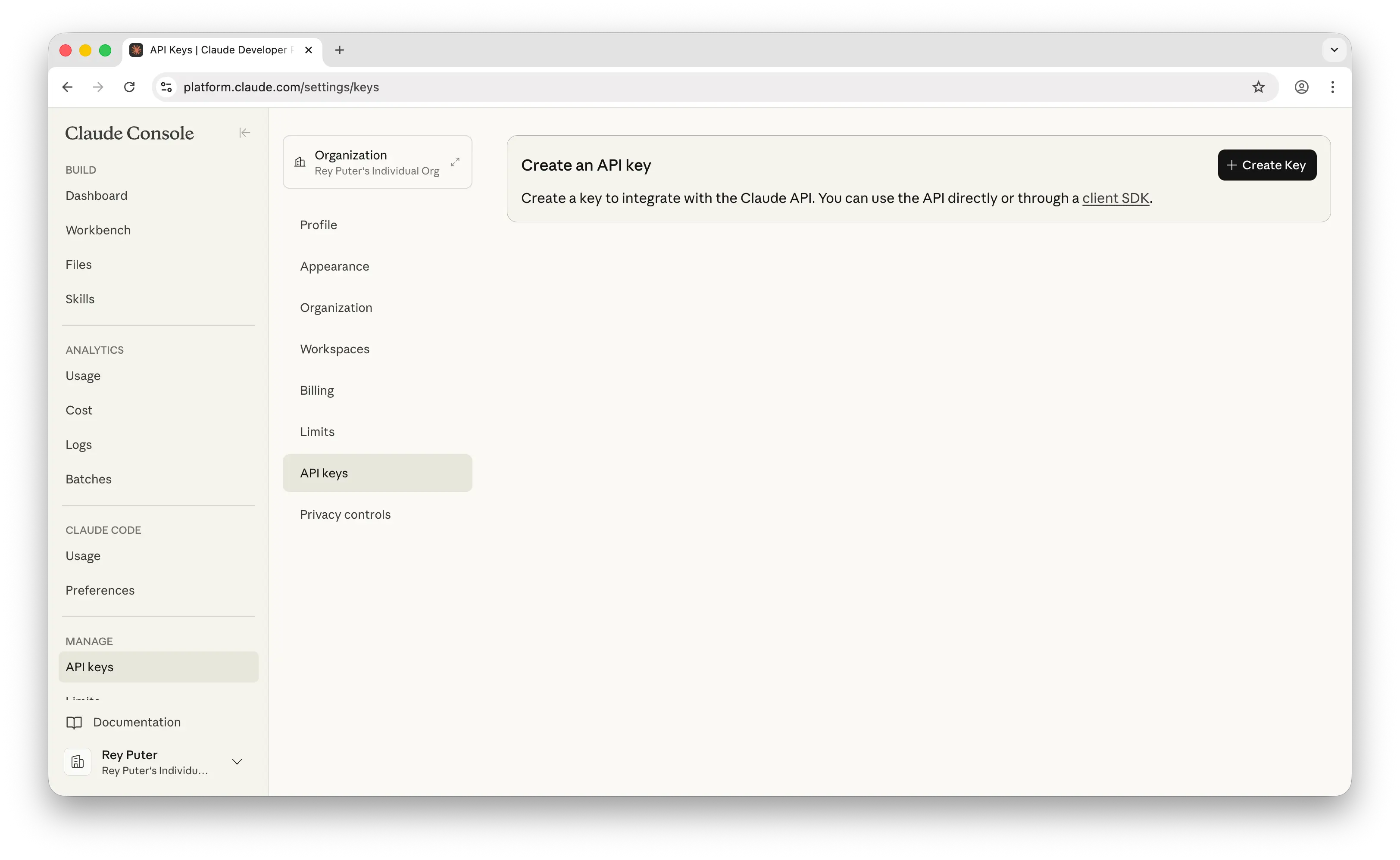
- Copy the key (starts with
sk-ant-...) — you won't see it again - Set it in your terminal:
export ANTHROPIC_API_KEY=sk-ant-your-key-here

# Make it permanent:
echo 'export ANTHROPIC_API_KEY=sk-ant-your-key-here' >> ~/.zshrc
source ~/.zshrc
Never commit your API key to GitHub.
Requires Node.js (LTS version).
npm install -g @anthropic/claude-code

# Verify:
claude --versioncd claude-code-starter/module-1
claude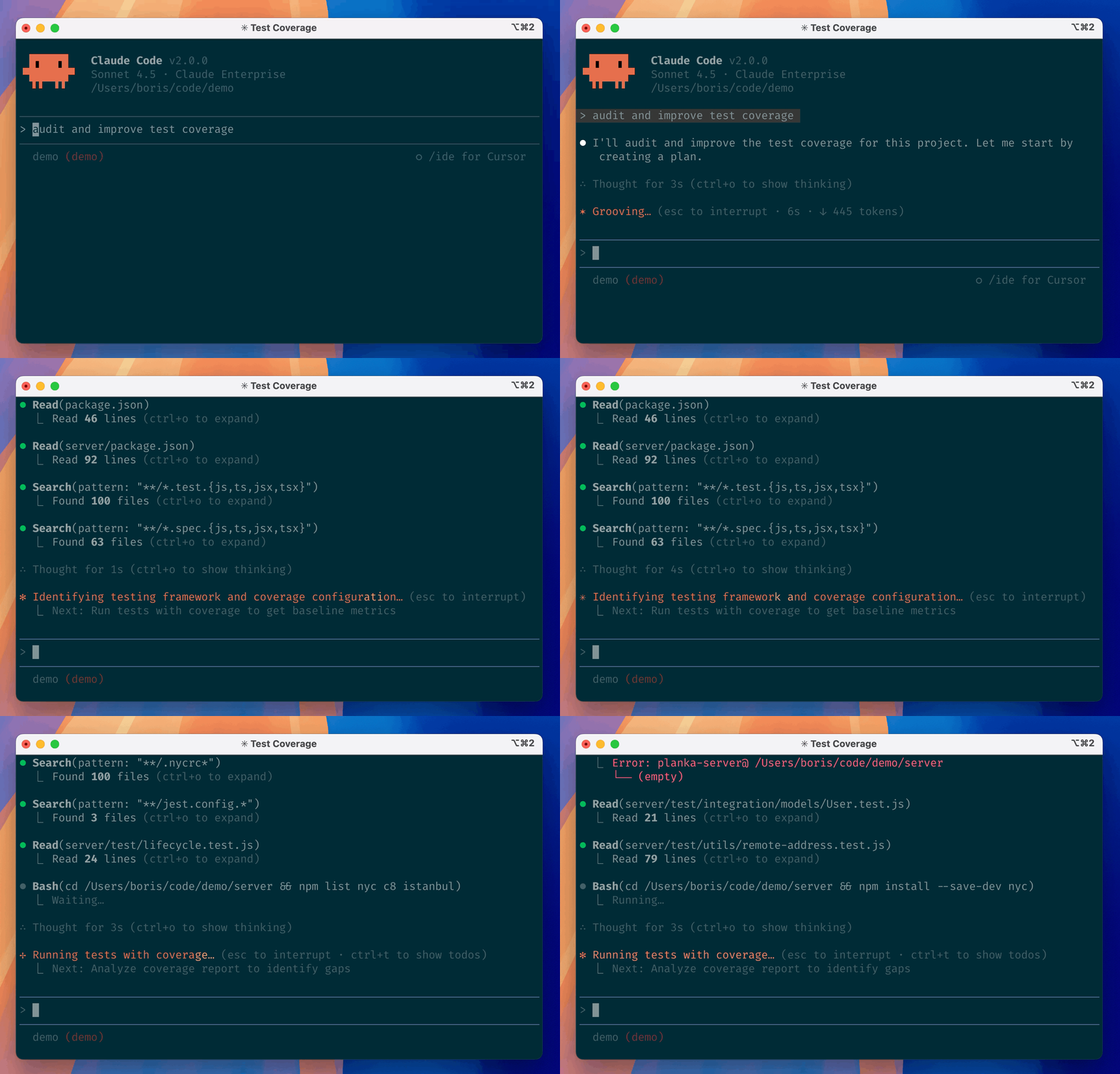
You're in. Head to module-1/README.md for your first assignment.
| What you want | What to type |
|---|---|
| Generate a PRD | /prd-generator |
| Write user stories | /user-story-writer |
| Plan a sprint | /sprint-planner |
| Prioritize features | /feature-prioritizer |
| Write OKRs | /okr-writer |
| Write a stakeholder update | /stakeholder-update |
| Build a business case | /business-case |
| Research competitors | /competitor-research |
| Size a market | /market-sizing |
| Build a customer persona | /customer-persona |
| Analyze meeting notes | /meeting-analyzer |
| Scan for market trends | /trend-spotter |
| Write a LinkedIn post | /linkedin-post |
| Repurpose content | /content-repurposer |
| Optimize for SEO | /seo-optimizer |
| Build a slide deck | /slides-builder |
| Write a proposal | /proposal-writer |
| Summarize for an exec | /exec-summary |
| Eval a skill | /skill-evaluator |
| Pre-deploy check | /deploy-checklist |
| Review code against Karpathy's principles | /karpathy-review |
| Plan a task before touching any files | /boris-plan |
| Final code review | /verify-work |
| Write tests | /test-writer |
| Find gaps in a spec | "Review docs/prd.md and tell me what's missing" |
| Prep for engineering | "What questions will engineers ask about this PRD?" |
| Stress-test a flow | "What edge cases am I missing here?" |
command not found: claude
Run npm install -g @anthropic/claude-code again. Check Node.js is installed: node --version.
API key error
Run export ANTHROPIC_API_KEY=your-key-here. Make sure the key includes sk-ant-.
Claude isn't reading my CLAUDE.md
The file must be named exactly CLAUDE.md (all caps) in the folder where you ran claude.
Skill not triggering
Check the path is .claude/skills/<name>/SKILL.md and the name: field in the frontmatter matches what you typed after /.
Claude Code in Practice · Hamza Farooq · Traversaal.ai · ⭐ #1 Highest Rated Claude Course on Maven