Fixes to help make VisualFSharp.sln more usable #4555
Conversation


|
|
||
| <ItemGroup> | ||
| <EmbeddedResource Update="FSharp.Editor.resx"> | ||
| <EmbeddedResource Include="FSharp.Editor.resx"> |
There was a problem hiding this comment.
@brettfo I'm pretty sure this is normal, I think you were only using Update to avoid EnableDefaultEmbeddedResourceItems?

There was a problem hiding this comment.
Correct, I was using Update because $(EnableDefault...) was true. What's the benefit to specifying it this way, e.g., to not allowing the **/*.resx glob from running? The default behavior for SDK projects is to auto-include all *.resx files into the @(EmbeddedResource) item collection. I was trying to stay in line with that so that if another *.resx file is added to this directory that it's automatically included in the group so we don't have to manually manage the files in the project.


| <Import Project="..\src\root.traversal.targets"/> | ||
|
|
||
| <Target Name="Restore"> | ||
| <MSBuild Projects="@(ProjectFiles)" Targets="Restore" /> |
There was a problem hiding this comment.
If you're going to restore everything then remove all of the <SdkProjects> lines; those only existed to restore a subset of the projects.
There was a problem hiding this comment.
agreed we don't need this
|
|
||
| <ItemGroup> | ||
| <EmbeddedResource Update="FSharp.Editor.resx"> | ||
| <EmbeddedResource Include="FSharp.Editor.resx"> |
There was a problem hiding this comment.
Correct, I was using Update because $(EnableDefault...) was true. What's the benefit to specifying it this way, e.g., to not allowing the **/*.resx glob from running? The default behavior for SDK projects is to auto-include all *.resx files into the @(EmbeddedResource) item collection. I was trying to stay in line with that so that if another *.resx file is added to this directory that it's automatically included in the group so we don't have to manually manage the files in the project.
|
|
||
| <ItemGroup> | ||
| <EmbeddedResource Update="Microsoft.VisualStudio.Package.LanguageService.resx"> | ||
| <EmbeddedResource Include="Microsoft.VisualStudio.Package.LanguageService.resx"> |
There was a problem hiding this comment.
Same Update vs. Include comment as above.
There was a problem hiding this comment.
As mentioned below, the default globbing was incorrectly picking up resources from a project in MockTypeProviders subfolder after you built those projects
| <ItemGroup> | ||
| <!-- VSPackage.resx already included --> | ||
| <EmbeddedResource Update="FSLangSvcStrings.resx"> | ||
| <EmbeddedResource Include="FSLangSvcStrings.resx"> |
| <NoWarn>$(NoWarn);45;47;52;58;75</NoWarn> | ||
| <DisableImplicitFSharpCoreReference>true</DisableImplicitFSharpCoreReference> | ||
| <UsePackageTargetFallbackHack>true</UsePackageTargetFallbackHack> | ||
| <EnableDefaultEmbeddedResourceItems>false</EnableDefaultEmbeddedResourceItems> |
There was a problem hiding this comment.
What's the benefit, particularly with this project and VisualFSharp.UnitTests where there are no *.resx files? If the **/*.resx glob is breaking incremental build then that's a larger issue we should address at the SDK level.
There was a problem hiding this comment.
@brettfo It wasn't the incremental build (that is still broken) - it was that VisualFSharp.UnitTests project has non-SDK projects in the MockTypeProviders sub-directories which put resources in obj/Debug directories when built, and the implicit glob was incorrectly picking those up, but only after a build
There was a problem hiding this comment.
I didn't know about the obj\Debug issue. I see that you rearranged the directories which I like. Only one final nit-pick; instead of decorating each project with <EnableDefault...>false</> can you add it to an appropriate upstream Directory.Build.props or FSharp.Directory.Build.props? That way we won't forget to add it to any new projects in those subdirectories.


|
@brettfo I had the same question, but came down on the side of meh ... at least this way it is explicit. |

|
Re Are we actually relying on the implicit glob anywhere? |
|
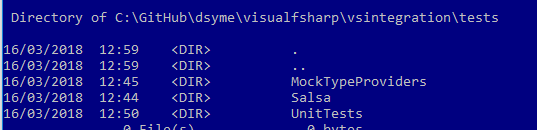
@brettfo @KevinRansom I've also permanently removed the use of nested projects:
Those renames/moves are enough to solve the problem
|
|
@brettfo I'll merge this if that's ok - I've mentioned above why moving to implicit globbing was a problem for us |
|
@brettfo Sorry, I didn't see this comment for some reason:
Agreed we should do that |
* fixes for VisualFSharp.sln usage

* fixes for VisualFSharp.sln usage

* Update FSharpEmbedResourceText.fs

* move MockTypeProviders

* rename vsintegration/tests/unittests --> vsintegration/VisualFSharp.UnitTests

* rename again

* fix paths
3 participants


The most important thing is
<EnableDefaultEmbeddedResourceItems>false</EnableDefaultEmbeddedResourceItems>in VisualFSharp.UnitTests.fsproj. The other changes use more normal ways to specify the resources, and ensure we restore test projects withbuild vsWith this was able to
However this doesn't solve the endless rebuild of FSHarp.Editor, which really kills the usability of VisualFSharp.sln when hitting F5
@brettfo please take a look.