Use Roslyn for backing metadata bytes in VS #4586
Conversation


Could it be added to the file system shim? Clients then could use that behaviour or override if needed. |

src/absil/ilread.fs
Outdated
| let stableFileHeuristicApplies (filename:string) = | ||
| try | ||
| let directory = Path.GetDirectoryName(filename) | ||
| directory.Contains("Reference Assemblies") || directory.Contains("packages") || directory.Contains("lib/mono") |

There was a problem hiding this comment.
Maybe include path separators ? To avoid any project named "foopackageme" to get considered stable :)
Also is there any consequences for paket users where /packages/ dlls can change on paket install/update ?

There was a problem hiding this comment.
Yes path does not change when paket updates a lib. But a gazillion of other things like file size, file version, last modified date,....
There was a problem hiding this comment.
So in that sense it's not different than me maintaining a lib folder and replacing a dll in it
There was a problem hiding this comment.
Yes except that the dll in the lib folder will be loaded into memory because it won't benefit from the heuristic :)
I was just wondering what is the failure case, is it just a single build in FCS that warn/fail if it build while the packages are updating or if there is more long lived consequences.
There was a problem hiding this comment.
I was just wondering what is the failure case, is it just a single build in FCS that warn/fail if it build while the packages are updating or if there is more long lived consequences.
The failure would normally be an exception surfaced as a intellisense error saying "please reload"

|
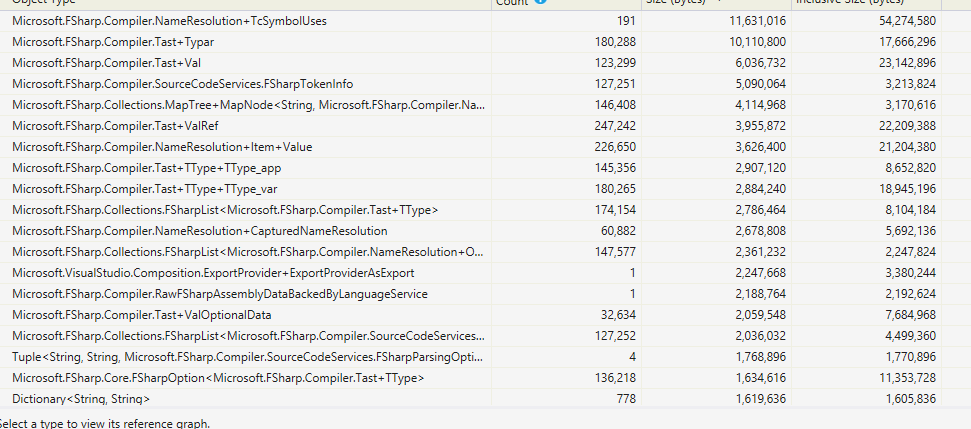
I've validated that this is using Roslyn manager to manage the memory for DLL references. There are now now ByteFile/WeakByteFile references showing in VS dumps
|
Yes, I will do that |
 dsyme
changed the title
dsyme
changed the title

| @@ -3184,215 +3276,34 @@ let getPdbReader opts infile = | |||
| with e -> dprintn ("* Warning: PDB file could not be read and will be ignored: "+e.Message); None | |||
| #endif | |||
|
|
|||
| //----------------------------------------------------------------------- | |||
There was a problem hiding this comment.
This big change is shifting around code to split the PE reader and IL metadata reader
| let ilModule, ilAssemblyRefs, pdb = openPE (fileName, pefile, opts.pdbPath, (opts.reduceMemoryUsage = ReduceMemoryFlag.Yes), opts.ilGlobals) | ||
| new ILModuleReader(ilModule, ilAssemblyRefs, (fun () -> ClosePdbReader pdb)) | ||
|
|
||
| let OpenILModuleReader fileName opts = |
There was a problem hiding this comment.
This is the routine that makes decisions about how to open a binary

|
@dsyme how do you read the memory dump of the all objects and their types like that? Is it from the "Debug Managed Memory" that appears from a minidump file, which is only available in VS Enterprise? Is it possible to read it without VS Enterprise? |
Yes, I'm using VS Enterprise. I think you can use |

|
@chinwobble look at #4580 with clrmd you can read managed heap of dump with code also you can attach to live proccess |
|
This is ready |
|
@KevinRansom Requesting a review. It's a large change but is mostly just plumbing The Roslyn metadata service is accessed here https://github.com/Microsoft/visualfsharp/pull/4586/files#diff-cdf0a4fbb7615b8029d78133924259c3R51 I've been using this all day in VS and not seen any problems. |

| mutable projectReferences : IProjectReference list | ||
| mutable knownUnresolvedReferences : UnresolvedAssemblyReference list | ||
| optimizeForMemory: bool | ||
| reduceMemoryUsage: ReduceMemoryFlag |

There was a problem hiding this comment.
Here might be a good location to give overview of what this flag implies in the implementation.
Will also help when updating https://fsharp.github.io/ in context of those optimization.
There was a problem hiding this comment.
Sorry, missed that it is done in the .fsi...
There was a problem hiding this comment.
Yes, there are docs here https://github.com/Microsoft/visualfsharp/pull/4586/files#diff-3835db36ed701c86797a3c95c330f3daR51 but the Compiler Guide is an important place to update too
dsyme
changed the title
|
I'll merge this, since it is needed as a basis for #4596. I've been through and added some further comments. |


* weak ByteFile

* cleanup, only use in VS

* cleanup flags

* some comments

* some comments

* use Roslyn memory manager for metadata in VS

* report statistics only with --times, clarify flags2

* minor updates

* us in VS

* fix build

* fix build

* fix build

* add SFH to FileSystem

* fix build

* fix build

* fix build

* fix build

* add some comments
7 participants


This is a replacement for #4528
This is a solution to the "ByteFile" memory usage problem discussed here and here
It uses resources for referenced DLLs as follows :
fsc.exe: uses memory mapped files like it's always done. It releases them on process exit.fsi.exe: uses short-lived memory mapped files to open PE files, then strongly-held ByteFile after that.devenv.exe: By default, Visual Studio uses the Roslyn memory manager to get metadata resources for DLLs. A short-lived memory mapped file is used to open PE files, but then it's closed again.Much of the change is splitting our .NET binary reader into the PE reader and the Metadata reader
Background
ByteFile accounts for something like 25% of F# memory usage in Visual Studio and long running FCS applications (we have to revalidate that this is still the case, but we expect it to be)
@vbfox says:
ByteFile objects come from DLL references - we read the whole DLL into memory. The memory gets collected if you move on to a new project or the builder for the project is otherwise collected. But while the project is being edited the memory is held strongly.
The memory held by
byte[]is not very intrusive for GC, but is a killer when the memory reaches max address space, which affects Visual Studio in particular (most other F# editing tools use 64-bit address spaces)Validating which storage is used
The
--timesflag now shows the kind of storage used and the instance count. Some asserts have also been added.This validates that
fsc.exeis using memory mapped files where possible, byte arrays elsewhere:This validates that
fsi.exeis using ByteFile (the memory mapped files are temporary while cracking the files):Details for FCS docs:
By default, FCS uses a "stable name heuristic". This is not used by Visual Studio, which uses the Roslyn memory manager - we don't use this to avoid taking a dependency on Roslyn). The solution here is to hold the ByteFile memory weakly for stable DLLs:
FCS holds the bytes weakly, resurrects them if they are needed and have been collected, and complains if the file has been written to under its feet.
Done: