Skip to content

Conversation

@brettfo
Copy link
Member

@brettfo brettfo commented Jan 4, 2019

This is required as we move forward for divisional purposes.

Once this is in the basic method of building/testing this repo on Windows will be:

  • Build.cmd optionally with -configuration Release builds everything. If -configuration is not specified, Debug is default.
  • Build.cmd -testDesktop build everything and run the desktop test suite.

On Linux:

  • ./build.sh optionally with --configuration Release builds everything. If --configuration is not specified, Debug is default.
  • ./build.sh --testcoreclr build everything and run the CoreCLR test suite.

Note that building a subset of the code with things like build.cmd vs, build.cmd net40, etc. is no longer a scenario; Build.cmd will always build every supported project on that platform, although you can build individual projects as expected, e.g.: msbuild src\fsharp\FSharp.Core\FSharp.Core.fsproj.

For all options see eng/Build.ps1 or eng/build.sh.

@brettfo brettfo force-pushed the arcade-sdk branch 30 times, most recently from 01f9c28 to 67f332d Compare January 11, 2019 04:57
@brettfo brettfo changed the title [WIP] consume dotnet arcade sdk consume dotnet arcade sdk Mar 21, 2019
@brettfo brettfo merged commit 4363f4c into master Mar 21, 2019
@brettfo brettfo deleted the arcade-sdk branch March 21, 2019 20:50
build.cmd vs -- build the Visual F# IDE Tools in Release configuration (see below)
build.cmd vs debug -- build the Visual F# IDE Tools in Debug configuration (see below)
build.cmd vs test -- build Visual F# IDE Tools, run all tests (see below)
Build.cmd -- build all F# components under the default configuration (Debug)
Copy link
Contributor

@dsyme dsyme Mar 21, 2019

Choose a reason for hiding this comment

The reason will be displayed to describe this comment to others. Learn more.

Minor nit: why the uppercase Build.cmd? It looks really odd.


All test options:

-testDesktop -- test all net46 target frameworks
Copy link
Contributor

Choose a reason for hiding this comment

The reason will be displayed to describe this comment to others. Learn more.

Minor nit: the capitalization in these flags looks odd - Fcs? we never use that. Just stick to lowercase for flags

Copy link
Member Author

Choose a reason for hiding this comment

The reason will be displayed to describe this comment to others. Learn more.

I use mixed case to try to improve readability, but Powershell is case insensitive when parsing switches so you can supply either at the command line.

Copy link
Contributor

Choose a reason for hiding this comment

The reason will be displayed to describe this comment to others. Learn more.

OK, then let's just change the help. You're sort of right that it improves readability, but the whole world just expects command line flags to be lower case, and we don't want to look odd :)

@@ -0,0 +1,286 @@
#
Copy link
Contributor

Choose a reason for hiding this comment

The reason will be displayed to describe this comment to others. Learn more.

Feels really odd to have powershell in the repo after all this time, but it's simple enough and great to see the build.cmd go

@dsyme
Copy link
Contributor

dsyme commented Mar 21, 2019

What is the replacement for

build net40

which just builds FSharp.Core, fsc.exe, fsi.exe - i.e the minimal desktop tools to compile and run F# code, avoiding anything to do with Visual Studio?

thanks

@brettfo
Copy link
Member Author

brettfo commented Mar 21, 2019

Short answer: that's not supported by Arcade; just run build.cmd and deal with it. Unsatisfying, yes.

You could try, however, to instead directly build FSharp.sln which is what's used for cross-plat work:

msbuild FSharp.sln /restore

@dsyme
Copy link
Contributor

dsyme commented Mar 21, 2019

Ah ok, thanks.

Are the .NET Framework binaries ngen'd? I see this which looks dodgy:

>ngen install artifacts\bin\fsc\Debug\net46\fsc.exe

Microsoft (R) CLR Native Image Generator - Version 4.7.3190.0
Copyright (c) Microsoft Corporation.  All rights reserved.
Failed to compile C:\GitHub\dsyme\visualfsharp2\artifacts\bin\fsc\Debug\net46\fsc.exe because of the following error: Strong name validation failed. (Exception from HRESULT: 0x8013141A).
Uninstalling assembly C:\GitHub\dsyme\visualfsharp2\artifacts\bin\fsc\Debug\net46\fsc.exe because of an error during compilation: Failed to compile C:\GitHub\dsyme\visualfsharp2\artifacts\bin\fsc\Debug\net46\fsc.exe because of the following error: Strong name validation failed. (Exception from HRESULT: 0x8013141A).
Strong name validation failed. (Exception from HRESULT: 0x8013141A)

@tmat
Copy link
Member

tmat commented Mar 21, 2019

Actually, you can do that. You can create a solution that only contains the projects you want to build and then build that solution. Roslyn does it for Compilers.sln - these are just compiler projects that build xplat.

I guess FSharp.sln is such solution?

@tmat
Copy link
Member

tmat commented Mar 21, 2019

Also, /eng/build.ps1 can be customized as you like. So you'd want a parameter that only builds FSharp.sln then you can do that as well.

See e.g. https://github.com/dotnet/roslyn/blob/master/eng/build.ps1#L213

@dsyme
Copy link
Contributor

dsyme commented Mar 21, 2019

It looks like this works well enough for an incremental build of the compiler:

msbuild src\fsharp\Fsc\fsc.fsproj /p:TargetFramework=net46

I'm a little confused why this doesn't work:

dotnet build src\fsharp\Fsc\fsc.fsproj /p:TargetFramework=net46

The problem is that the build attempts to use dotnet artifacts\Bootstrap.fsc.exe but that's a .NET Framework program.

@dsyme
Copy link
Contributor

dsyme commented Mar 21, 2019

Hey build -restore gives an error, shown below

On a similar topic, is there any way to skip the restore step?

C:\GitHub\dsyme\visualfsharp2>build -restore
C:\GitHub\dsyme\visualfsharp2\eng\build.ps1 : Cannot bind parameter because parameter 'restore' is specified more than
once. To provide multiple values to parameters that can accept multiple values, use the array syntax. For example,
"-parameter value1,value2,value3".
At line:1 char:65
+ ... C:\GitHub\dsyme\visualfsharp2\eng\build.ps1" -build -restore -restore
+                                                                  ~~~~~~~~
    + CategoryInfo          : InvalidArgument: (:) [build.ps1], ParameterBindingException
    + FullyQualifiedErrorId : ParameterAlreadyBound,build.ps1

@dsyme
Copy link
Contributor

dsyme commented Mar 22, 2019

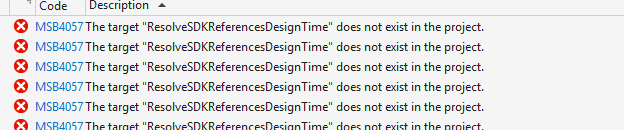
Hey after this change nothing seems to work in VisualFSharp.sln when using VS2017 (normal for master). I need to double check on a clean branch but currently I get this:

image

@auduchinok
Copy link
Member

@brettfo Could you please explain why all the build stuff is now placed in the eng folder?

@dsyme
Copy link
Contributor

dsyme commented Mar 22, 2019

Hey after this change nothing seems to work in VisualFSharp.sln when using VS2017 (normal for master). I need to double check on a clean branch but currently I get this:

Ignore this, it looks like projects weren't restored fully

@KevinRansom
Copy link
Contributor

@auduchinok.

We are aligning our build to match the builds of the other dotnet repos. This has important code flow benefits for us. Following this insertion of F# builds into Visual Studio and the dotnet sdk will be fully automatic. Previously they required us to perform a manual insertion into Visual Studio, and a separate manual insertion into the various dotnet Cli versions.

As far as the directory called eng the guys who designed arcade picked that name. You will note that Roslyn also an eng folder with similar contents, as does coreclr and corefx, and I expect the cli and msbuild projects too..

Over time we will add back ease of use switches to build.cmd. But just getting to the current position was an enormous engineering lift.

The current build is infinitely better than the build we had a year ago.

It seems quite clear that we are going to need an equivalent to:

  • build net40
  • build coreclr
  • build vs
  • specific test options and release and debug modifiers

I use variations of the above daily and so miss them immensely, already.

@dsyme
Copy link
Contributor

dsyme commented Mar 22, 2019

@brettfo Could you please explain why all the build stuff is now placed in the eng folder?

"eng" is for "engineering" I think

I think this is following the same pattern as Roslyn now - this is part of a bigger effort to share engineering practice with the Roslyn team.

@KevinRansom
Copy link
Contributor

@dsyme
I just successfully did a build and rebuild in 15.9.9 visualstudio.sln

@auduchinok
Copy link
Member

auduchinok commented Mar 22, 2019

@KevinRansom @dsyme Thank you for the explanation.
I'm used to see eng being short for English more often so was confused.

@KevinRansom
Copy link
Contributor

@auduchinok --- I prefer your explanation,.

@cartermp
Copy link
Contributor

en-us and en-gb, the latter of which is always incorrect, is typical for language codes 😄

@brettfo
Copy link
Member Author

brettfo commented Mar 22, 2019

@dsyme I opted to restore by default (see Build.cmd) because I expected it to be easier to use and more in line with what we previously had. If the better default would be to not restore then we can certainly remove that and update DEVGUIDE.md to suggest the -restore flag on first build (and update eng\CIBuild.cmd and .vsts-*.yaml). The other approach would be to add a -noRestore switch that overrides -restore. I'm open to either (or other) options.

@dsyme
Copy link
Contributor

dsyme commented Mar 22, 2019

-noRestore would be fine by me

@brettfo
Copy link
Member Author

brettfo commented Mar 22, 2019

Added #6371 for -noRestore.

Sign up for free to join this conversation on GitHub. Already have an account? Sign in to comment

Labels

None yet

Projects

None yet

Development

Successfully merging this pull request may close these issues.

7 participants