Add APIs that remove redundant segments from paths #37939
Conversation


|
Note regarding the This serves as a reminder for when your PR is modifying a ref *.cs file and adding/modifying public APIs, to please make sure the API implementation in the src *.cs file is documented with triple slash comments, so the PR reviewers can sign off that change. |


This comment has been minimized.
This comment has been minimized.


There was a problem hiding this comment.
Paths in the form of \\?\ and \??\ should never change as they are, by definition, fully qualified. If you pass a path with ? to Windows there is no concept of "relative" segments- they won't be eaten/skipped. It is also theoretically possible to have some device that needs \.\ and \..\ to be retained, ? allows you to do that.
I don't think we should remove segments from \\?\C:\. as \\?\C:\ is not treated the same by Windows. No matter what you do we should be super explicit in the docs about the special behavior of \\?\.
\\.\ paths should, however, eat down to Path.GetPathRoot():
\\.\C:\
\\.\MyDrive\
\\.\UNC\Server\Share\
There was a problem hiding this comment.
@JeremyKuhne I though about this case, but then I thought: if the user is explicitly asking to remove paths from the path prefixed with \??\ or \\?\, we probably should help them. It's only when they call GetFullPath or other APIs that they need to be considered already fully qualified.
But now that you mention that . and .. could be needed by devices, and need to be retained, I'll make sure to adjust the code and the unit tests to avoid removing segments from paths with these prefixes. If users need to remove segments from these paths, they can check if the path starts with \\?\ or \??\, in which case, they should call the RemoveRedundantSegments APIs that take a span, and pass their string sliced (removing the prefix).
Thanks for confirming this.
There was a problem hiding this comment.
By the way, Path.GetPathRoot() does some amazing magic that helped me ensure a lot of cases got pre-covered.
There was a problem hiding this comment.
The other main issue I had with manipulating them is that they are no longer equivalent. Everything else you'd get the same results using the path before and after removing relative segments. I think that is one of the contracts here- you get the same results before and after. That said, there is weirdness around traversing links on Unix that I've never really rationalized. 🤷♂️
There was a problem hiding this comment.
@JeremyKuhne I remember another reason why I decided to make the RemoveRedundantSegments methods to work with paths prefixed with \\?\:
the pre-existing System.Runtime.Extensions unit tests for GetFullPath are expecting the paths prefixed with \\?\ to get normalized.
Removing the ability from GetFullPath from removing redundant segments and duplicate separators from paths prefixed with \\?\ or \??\ would be considered a breaking change, wouldn't it?
There was a problem hiding this comment.
I'm inclined to consider this a bug fix instead: Paths that begin with \\?\ should not get modified by either GetFullPath(string, string) or RemoveRedundantSegments, in which case I would update these unit tests so when calling GetFullPath(string, string) with a path prefixed with \\?\ would expect the same string.
There was a problem hiding this comment.
Emphasis on "duplicate separators". It seems all these pre-existing unit tests are failing because they only expect duplicate separators to be collapsed, but maybe even that should not be addresed for paths prefixed with \\?\ and \??\.
There was a problem hiding this comment.
I think I understand what's happening. Those GetFullPath unit tests expect the \\?\ paths to get combined with the base path. I will create a separate unit test method to verify extended paths only.
There was a problem hiding this comment.
I updated the old existing unit tests. I split the cases that get \\?\ prefixed into separate unit tests with different outputs (unmodified, except when the paths get combined).
There was a problem hiding this comment.
The device path should eat down to ..\folder here as only the first .. is the "volume". Device paths are, by definition, always fully qualified.
There was a problem hiding this comment.
On that same note \\?\C:A\bar.txt the root is \\?\C:A\. Wanted to point that out so we don't get that confused with drive relative, which only happens in the C:A form.
There was a problem hiding this comment.
The device path should eat down to
..\folderhere as only the first..is the "volume". Device paths are, by definition, always fully qualified.
Thanks. If I'm understanding this correctly, it seems that my answer in the comment above will make sure this case gets covered.
On that same note
\\?\C:A\bar.txtthe root is\\?\C:A\. Wanted to point that out so we don't get that confused with drive relative, which only happens in theC:Aform.
Thanks for confirming. Yes, I found out about edge cases like C:A when I realized Path.GetPathRoot() was giving me some strange root lengths after the device prefix, but I read its code and understood the reason.
There was a problem hiding this comment.
To be fully explicit:
\\?\..\..\folder->\\?\..\..\folder(untouched)\\.\..\..\folder->\\.\..\folder(\\.\..\is the root)\\.\C:\..\folder->\\.\C:\folder\(for a more common root example)
There was a problem hiding this comment.
For the first example, I just made the adjustment in my last commits to ensure they are not modified.
I see what you mean with your 2nd example. I think my code may be able to handle that case right now, but I need to double check if I have unit tests for it.
The third case is handled for sure.
There was a problem hiding this comment.
Update: For the 1st case, I submitted a commit to ensure they are not modified. For the 2nd case, I was already testing it in the unit tests that consume member data containing the substring Prefix_DriveRootless in their name.

|
I'm investigating why the net472 leg is failing. |

 ericstj
left a comment
ericstj
left a comment
ericstj
left a comment
There was a problem hiding this comment.
some minor feedback, haven't had time to really dig in and understand this. Curious if there is a way to better visualize the diff to the product code so it doesn't look like such a rewrite.
There was a problem hiding this comment.
VS keeps modifying them automatically.


There was a problem hiding this comment.
Is this going to regress performance of the existing GetFullPath API? This API was not allocating anything when there was nothing to normalize. It is always going to allocate a new string after this change.
There was a problem hiding this comment.
This is how the old API used to look. There was one allocation that was always being done, when calling the constructor:
        internal static string RemoveRelativeSegments(string path, int rootLength)
        {
            var sb = new ValueStringBuilder(stackalloc char[260 /* PathInternal.MaxShortPath */]);

            if (RemoveRelativeSegments(path.AsSpan(), rootLength, ref sb))
            {
                path = sb.ToString();
            }

            sb.Dispose();
            return path;
        }
Then the overload that takes 3 arguments, which is being called in the if clause, would do the job of copying all the characters from the original path into the ValueStringBuilder instance.
The allocations were being done before. The main difference is that I added extra logic to handle some edge cases that the former method was not handling.
There was a problem hiding this comment.
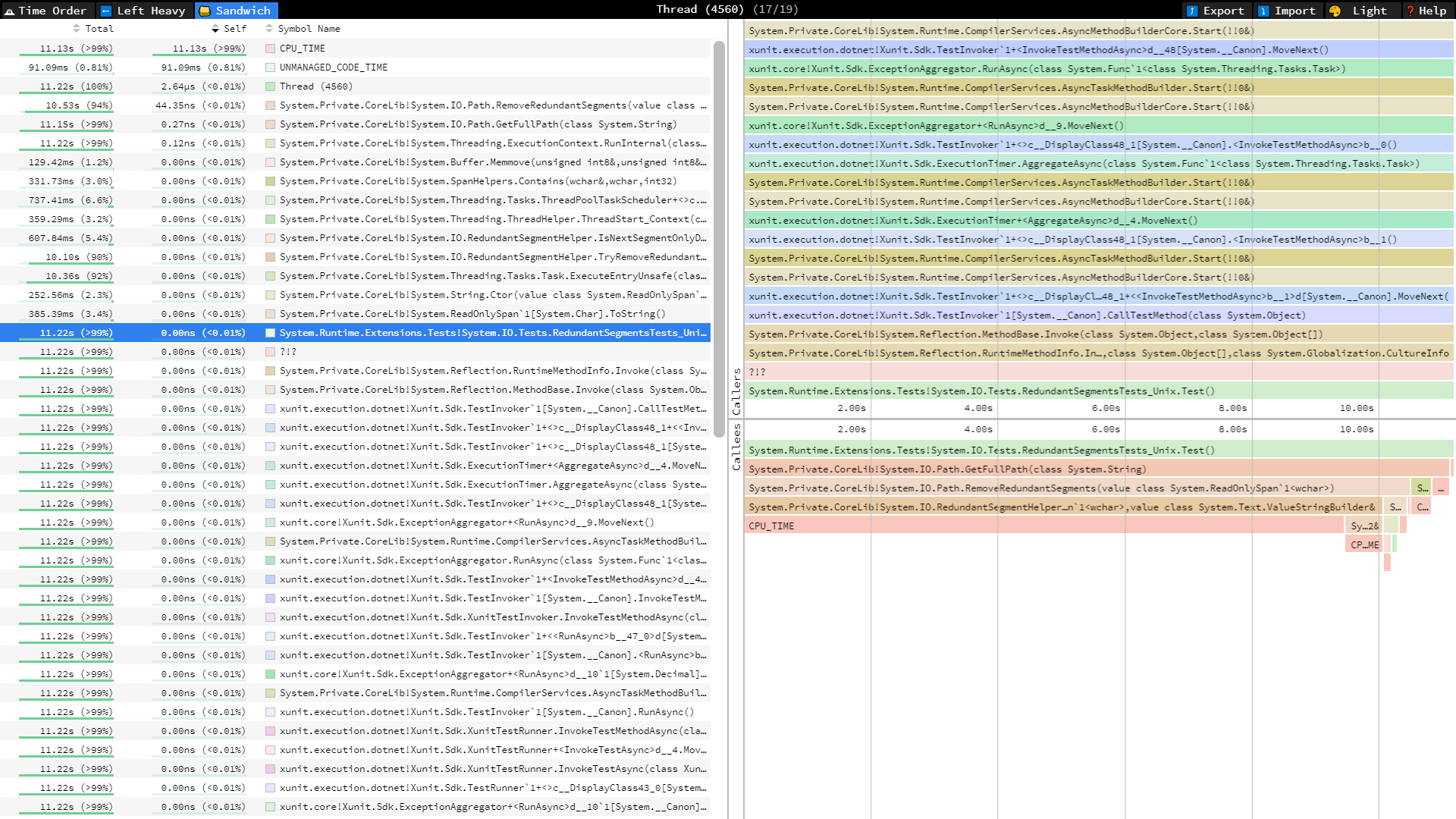
I ran a unit test calling Path.GetFullPath, with my changes, inside an infinite while loop, and collected time spent using dotnet trace for a few seconds, then viewed the results in speedscope.app.
On the right side you can see the stack of calls, and the length of each bar is the time spent on each method. Most of the time is spent in CPU_TIME inside the TryRemoveRedundantSegments method.
There was a problem hiding this comment.
There was one allocation that was always being done, when calling the constructor:
There is no allocation done on GC heap in the current implementation of GetFullPath API when there is nothing to normalize.
There was a problem hiding this comment.
Having performance numbers before/after this change for the existing Path APIs would be useful. https://github.com/dotnet/performance has micro-benchmarks for Path APIs.
On Windows, this change is replacing ~100 line RemoveRelativeSegments method with ~400 lines in a new RedundantSegmentHelper type and multiple methods. That's a bit concerning for an API that was advertised as already implemented as an internal API (#2162 (comment)).
There was a problem hiding this comment.
No problem. I'm working on getting the performance numbers.
Some things to keep in mind:
- The reason why I had to rewrite everything is because the original internal method was unable to handle all the Windows edge cases, particularly with device prefixes.
- I put everything in a new type because it would help having the code organized. Should I put everything in
Path.csto prevent creating a new type, even if that class gets cluttered? - I split the functionality into all those methods to make the code more readable. Should I instead put as much code as possible into fewer methods, even if we sacrifice readability?

There was a problem hiding this comment.
@jkotas / @carlossanlop I recommend we:
- Capture the numbers to see how much of a regression we introduce
- Decide if the regression is either A) acceptable, B) within reason, but should be tuned, or C) not within reason
- If it's within reason but should be tuned, file a perf regression issue to fix after Preview 8 and before RC2 (with other perf regression issues)
- If it the regression ends up being so egregious that we aren't confident we'd be able to tune it back within reason, reevaluate this PR

src/libraries/Common/tests/Tests/System/IO/PathInternal.Tests.cs
Outdated
Show resolved
Hide resolved

There was a problem hiding this comment.
VS keeps modifying them automatically.
There was a problem hiding this comment.
Why 260?
Also, can this be a const?
There was a problem hiding this comment.
MaxShortPath is a limit on Windows, but not on Unix. There are other places in cross-platform files where we do this same thing.
For example:
What I can do is create an additional private constant with a name that describes the maximum cross platform path length, and use it in all these places.
There was a problem hiding this comment.
Please do, magic numbers bad. Constants have same IL as literals and are more maintainable.
There was a problem hiding this comment.
Store path.AsSpan() on a local variable since is called more than once.
src/libraries/System.Private.CoreLib/src/System/IO/RedundantSegmentHelper.Windows.cs
Outdated
Show resolved
Hide resolved
There was a problem hiding this comment.
Can you elaborate on why you have to get the root length again after trimming the prefix? Also, shouldn't rootLength be added to charsToSkip?
There was a problem hiding this comment.
charsToSkip is the result of calling PathInternal.GetRootLength(originalPath), which is a method that for some special cases (specifically in paths that start with a device prefix), will tell me the root includes some segments beyond the prefix and the drive segment. The charsToSkip value will help ensure we don't remove segments beyond these characters (that substring must remain unmodified).
But it doesn't tell me if the path was rooted or not. Calling PathInternal.GetRootLength(pathWithoutPrefix) (with the prefix excluded) returns a different value that excludes those additional segments after the drive.
Here's an example:
using System;
using System.IO;
namespace ConsoleApp
{
    class Program
    {
        static void Main()
        {
            string[] paths = new string[]
            {
                @"\\.\C:..\folder\subfolder\file.txt", // GetPathRoot returns "\\.\C:..\"
                @"C:..\folder\subfolder\file.txt"      // GetPathRoot returns "C:"
            };

            foreach (string path in paths)
            {
                Console.WriteLine(Path.GetPathRoot(path));
            }
        }
    }
}There was a problem hiding this comment.
I added a comment to the code to explain why I'm doing those two calls.
src/libraries/System.Private.CoreLib/src/System/IO/RedundantSegmentHelper.Windows.cs
Outdated
Show resolved
Hide resolved
|
@jkotas @jozkee @jeffhandley here is the perf PR: dotnet/performance#1394 Resultsmaster branch
RRS branch (this PR)
Comparison❯ dotnet run --base "D:\perf_before" --diff "D:\perf_after" --threshold 0.01% summary: No Slower results for the provided threshold = 0.01% and noise filter = 0.3ns.
|

|
Your performance test is Windows specific and it is testing atypical case that is very unlikely to appear in the real world. Corner cases like this one are good for functional testing, but they are not appropriate for performance testing. You should focus performance testing on common real world use cases of this API, and also cover both Windows and Unix. E.g. I have done a quick check on Linux that run |
|
I checked-out this branch in my WSL with Ubuntu. I ran all the Path benchmarks, where I also made sure to include a benchmark testing the path shared by @jkotas above (see PR), and the new benchmark did not show up: |
|
I still see the regression for the example I gave above. Can you run this program before and after changes: I prints |
There was a problem hiding this comment.
There was one allocation that was always being done, when calling the constructor:
There is no allocation done on GC heap in the current implementation of GetFullPath API when there is nothing to normalize.

…d for Interop.GetNodeName.cs to compile due to the dependency.
…returned if no redundancy is found, and avoid one allocation
|
@jkotas I modified I ran your code snippet in my Mac, and there was only a slight improvement:
Would it be possible to get the changes merged as they are right now so we can get potential feedback in Preview 1? I can open an issue to make additional performance improvements later, before we ship. |
Who do you expect to use these APIs and to get a feedback from? |
|
The original proposal had some links from people interested in it: #15584, MonoGame/MonoGame#7167. There was also an issue from the arcade repo I think, but right now I can't find it. |
|
Could you please ask somebody from your feature crew to do detailed review of this change? I can do sanity check and sign-off after you have signoff from a member of your feature crew. |
Does this mean that there is still 1.8x performance regression caused by your changes? It does not sound acceptable to me. |
|
The code's doing more work than before, too. I had to make sure to handle more cases than the original internal method was handling. |
I do not think that this is a good justification for introducing 1.8x regression in existing public APIs. |

|
I retrieved official benchmark results for Windows And Linux. Here is the performance PR. The |

|
Those perf results look much better, @carlossanlop. Do I understand the following from those results correctly?
That all seems acceptable to me for this new functionality. |
|
Note that this is change is not adding any new functionality to the existing APIs. The existing APIs function exactly same as before, except that they are somewhat slower now. It may be useful to understand where this regression is coming from and whether it is possible to fix it by small tweaks while still allowing sharing of the code with the new APIs. |
|
My mistake; thanks, @jkotas. I had it in my head we were introducing the redundant segment removal behavior for the existing APIs as part of this--I forgot that behavior was already there and we are just refactoring those methods to extract the new public API. @carlossanlop -- can you confirm that |

|
I am not sure this helps but if you want a real world example how PowerShell uses relative paths you could look PowerShell |

|
Hi, I'm looking forward to this change. |
@hamarb123 It depends on the OS where you are calling this API:
Yes, this API should preserve trailing separators, but making sure they get normalized ( |

|
Draft Pull Request was automatically closed for inactivity. It can be manually reopened in the next 30 days if the work resumes. |
 ghost
closed this
ghost
locked as resolved and limited conversation to collaborators
ghost
closed this
ghost
locked as resolved and limited conversation to collaborators
10 participants


Fixes: #2162
The APIs added in this PR are:
The original internal methods were not able to handle all the edge cases.
The unit tests for both Windows and Unix are passing, as well as all the previously existing unit tests for
Path.GetFullPath, which is the main method inSystem.IOthat was consuming the formerly internal method that removed redundant segments.The code is different between Linux and Windows because there are many special cases in Windows.
Unix rules:
/at the beginning of the path means the path is rooted. It's also the segment separator. Repeated contiguous separators get merged into one./is unknown and either there are no more directories to backtrack, or all other previous segments are also "..", in which case, the current segment must also stay.\is a valid file or folder character. For example:one\segmentis a single file or folder name.Windows rules:
\and/are considered path separators. The/character gets automatically normalized to\when detected. Repeated contiguous separators get merged into one.\\.\,\\?\or\??\) have some special rules:\folder.PathInternal.GetRootLengthalready contains the logic to decide what portion of the path should be considered the root. It can vary depending if the path begins with a device prefix, or is in the\\Server\Shareformat, or if the root has no drive, or if the root has no separator.Windows paths are explained in detail in these sources: