
Integration of the Mixpanel library into Symfony.
- Installation
- Usage
- Killer Feature
- Sending people information to Mixpanel
- Attributes
- Send an event based on a condition
- MixpanelEvent
- Override Props in all Attributes
- Upgrading from 6.x
- Symfony Profiler Integration
- Reference Configuration
- Spec
- License
This version requires PHP ^8.2 and Symfony ^6.4 || ^7.4 || ^8.0.
Require gordalina/mixpanel-bundle using composer
$ php composer.phar require gordalina/mixpanel-bundle:~7.0Or require
gordalina/mixpanel-bundle
to your composer.json file:
{
    "require": {
        "gordalina/mixpanel-bundle": "~7.0"
    }
}
Register the bundle in config/bundles.php:
// config/bundles.php
    return [
        // ...
        Gordalina\MixpanelBundle\GordalinaMixpanelBundle::class => ['all' => true],
    ];
}
Enable the bundle's configuration in config/packages/gordalina_mixpanel.yaml:
# config/packages/gordalina_mixpanel.yaml

gordalina_mixpanel:
    projects:
        default:
token: xxxxxxxxxxxxxxxxxxxxThis bundle registers a gordalina_mixpanel.default, mixpanel.default and mixpanel
service which is an instance of Mixpanel (from the official library).
You'll be able to do whatever you want with it.
NOTE: This bundle sends your client's ip address automatically. If you have
a reverse proxy in you servers you should set it in your front controller public/index.php:
// public/index.php
Request::setTrustedProxies(
    // the IP address (or range) of your proxy
    ['192.0.0.1', '10.0.0.0/8'],
    Request::HEADER_X_FORWARDED_FOR | Request::HEADER_X_FORWARDED_HOST | Request::HEADER_X_FORWARDED_PORT | Request::HEADER_X_FORWARDED_PROTO
);
You can find more documentation on Symfony website: How to Configure Symfony to Work behind a Load Balancer or a Reverse Proxy
Track an event with a single attribute
<?php
// CheckoutController.php

use Gordalina\MixpanelBundle\Attribute as Mixpanel;

class CheckoutController
{
    #[Mixpanel\Track('View Checkout')]
    public function view(Request $request)
    {
        // ...
}Mixpanel allows you to track your user's behaviours, but also some user information. When using attributes which require the distinct_id, this will be set automatically. This is done automatically provided you have configured it properly. You are able to override this value if you wish.
# config/packages/gordalina_mixpanel.yaml

gordalina_mixpanel:
    projects:
        default:
            token: xxxxxxxxxx
    users:
        Symfony\Component\Security\Core\User\UserInterface:
            id: username
            $email: email

        # All possible properties
        YourAppBundle\Entity\User:
            id: id
            $first_name: first_name
            $last_name: last_name
            $email: email
            $phone: phone
            extra_data:
                - { key: whatever, value: test }
This bundle uses property access to get the values out of the user object, so
event if you dont have a first_name property, but have a getFirstName method
it will work.
NOTE: extra_data corresponding non-default properties in Mixpanel user profile
<?php
// UserController.php

use Gordalina\MixpanelBundle\Attribute as Mixpanel;

class UserController
{
    #[Mixpanel\UpdateUser]
    public function userUpdated(User $user, Request $request)
    {
        // ...
    }
In the following example, we call UpdateUser, which sends all information registered
in the configuration above, but we override the id property with an expression
that evaluates the user id.
The Expression placeholder uses ExpressionLanguage
for evaluation.
<?php
// OrderController.php

use Gordalina\MixpanelBundle\Attribute as Mixpanel;

class OrderController
{
    #[Mixpanel\Track('Order Completed', props: [
        'user_id' => new Mixpanel\Expression('user.getId()'),
    ])]
    #[Mixpanel\TrackCharge(
        amount: new Mixpanel\Expression('order.getAmount()'),
        id: 324,
    )]
    public function orderCompleted(Order $order, Request $request)
    {
        // ...
}Every action below can be placed on a controller class or on a controller method, and can be repeated as many times as needed.
Events
#[Mixpanel\Register(prop: 'visits', value: 3)]#[Mixpanel\Track(event: 'name', props: ['firstTime' => true])]#[Mixpanel\Unregister(prop: '$email')]
Engagement
#[Mixpanel\Append(prop: 'fruits', value: 'apples' [, id: 324, ignoreTime: false])]#[Mixpanel\ClearCharges([id: 324, ignoreTime: false])]#[Mixpanel\DeleteUser([id: 324, ignoreTime: false])]#[Mixpanel\Increment(prop: 'visits', value: 3 [, id: 324, ignoreTime: false])]#[Mixpanel\Remove(props: ['$email' => 'a@b.com'] [, id: 324, ignoreTime: false])]#[Mixpanel\Set(props: ['firstTime' => true] [, id: 324, ignoreTime: false])]#[Mixpanel\SetOnce(props: ['firstTime' => true] [, id: 324, ignoreTime: false])]#[Mixpanel\TrackCharge(amount: '20.0' [, id: 697, ignoreTime: false])]#[Mixpanel\UpdateUser]
Note: Required arguments come first, so they can also be passed positionally,
e.g. #[Mixpanel\Track('name')] or #[Mixpanel\Set(['firstTime' => true])].
Note: All id arguments can be omitted, as they will be set with the id of
the currently authenticated user.
Note: Every action also accepts a project argument to target a project other
than the default one.
These are not attributes, they are objects you pass as an argument value of an action and that get resolved at runtime:
new Mixpanel\Id()— the current user's distinct idnew Mixpanel\Expression('<expression>')— the result of an ExpressionLanguage expression
#[Mixpanel\Set(props: ['plan' => 'pro'], id: new Mixpanel\Id())]In all attributes, you can add conditions with Expression Language
#[Mixpanel\Track('Your event', condition: "request.getMethod() in ['GET']")]
public function yourAction()
{
  // ...
}Note: By default condition is true and is not required.
You can also send an event through symfony events when the attributes are not sufficient like this:
#In controller
namespace myNamespace;

use Gordalina\MixpanelBundle\Attribute as Mixpanel;
use Gordalina\MixpanelBundle\Mixpanel\Event\MixpanelEvent;
use Symfony\Component\EventDispatcher\EventDispatcherInterface;

// ...

public function edit(User $user, EventDispatcherInterface $eventDispatcher, Request $request)
{
    // Your code
    $attribute = new Mixpanel\Track('My event', [
        'prop 1' => 'data 1',
        'prop 2' => 'data 2',
    ]);

    $eventDispatcher->dispatch(new MixpanelEvent($attribute, $request));
    // Rest of your code
}In all your attributes, you can have something like this:
    #[Mixpanel\Track('Your event', props: [
        'user_id' => new Mixpanel\Expression('user.getId()'),
    ])]
    public function yourAction()
    {
        // ...
    }
It can be annoying to always have to put the same properties in your attributes. The functioning of the events allows us to avoid that.
namespace YourNamespace;

use Gordalina\MixpanelBundle\Attribute;
use Symfony\Bundle\SecurityBundle\Security;
use Symfony\Component\HttpKernel\Event\ControllerEvent;

class MixpanelListener
{
    public function __construct(private Security $security)
    {
    }

    public function onKernelController(ControllerEvent $event): void
    {
        foreach ($event->getAttributes() as $attributes) {
            foreach ($attributes as $attribute) {
                if ($attribute instanceof Attribute\Action && property_exists($attribute, 'props')) {
                    $attribute->props['user_id'] = $this->security->getUser()->getId();
                }
            }
        }
    }
}
And in your config:
# config/services.yaml

services:
    YourNamespace\MixpanelListener:
        tags:
- { name: kernel.event_listener, event: kernel.controller, method: onKernelController, priority: -200 }Note: the priority must be higher than -256, which is the priority the bundle's
own listener runs at. ControllerEvent::getAttributes() returns the very instances
the bundle will read, so mutating them here is enough.
Upgrading: if such a listener used a Doctrine\Common\Annotations\Reader to
reach the annotations, it must be rewritten as above. A reader never sees PHP
attributes, so it stops enriching anything — silently, with the events still being
sent without the added properties.
See Upgrading from 6.x in the changelog.
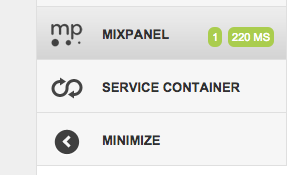
Mixpanel bundle additionally integrates with the Symfony profiler. You can check number of events and engagements sent, total execution time and other information.
You'll find the reference configuration below:
# config/packages/gordalina_mixpanel.yaml

gordalina_mixpanel:
    enabled: true                                          # defaults to true
    enable_profiler: '%kernel.debug%'                      # defaults to %kernel.debug%
    auto_update_user: '%kernel.debug%'                     # defaults to %kernel.debug%
    throw_on_user_data_attribute_failure: '%kernel.debug%' # defaults to %kernel.debug%
    projects:
        default:
            token: xxxxxxxxxxxxxxxxxxxxxxxxxxxx # required
            options:
                max_batch_size:  50               # the max batch size Mixpanel will accept is 50,
                max_queue_size:  1000             # the max num of items to hold in memory before flushing
                debug:           false            # enable/disable debug mode (logs messages to error_log)
                consumer:        curl             # which consumer to use (curl, file, socket)
                consumers:
                    custom_consumer:  ConsumerStrategies_CustomConsumConsumer # Your consumer, update above to use it
                host:            api.mixpanel.com # the host name for api calls
                events_endpoint: /track           # host relative endpoint for events
                people_endpoint: /engage          # host relative endpoint for people updates
                use_ssl:         true             # use ssl when available
                error_callback:  'Doctrine\Common\Util\Debug::dump'

        minimum_configuration:
            token: xxxxxxxxxxxxxxxxxxxxxxxxxxxx
    users:
        Symfony\Component\Security\Core\User\UserInterface:
            id: username
            $email: email

        # All possible properties
        YourAppBundle\Entity\User:
            id: id
            $first_name: first_name
            $last_name: last_name
            $email: email
$phone: phoneIn order to run the specs install all components with composer and run:
./bin/phpspec run
This bundle is released under the MIT license. See the complete license in the bundle: