







The Kedro-Dagster plugin enables seamless integration between Kedro, a framework for creating reproducible and maintainable data science code, and Dagster, a data orchestrator for machine learning and data pipelines. This plugin makes use of Dagster's orchestration capabilities to automate and monitor Kedro pipelines effectively.
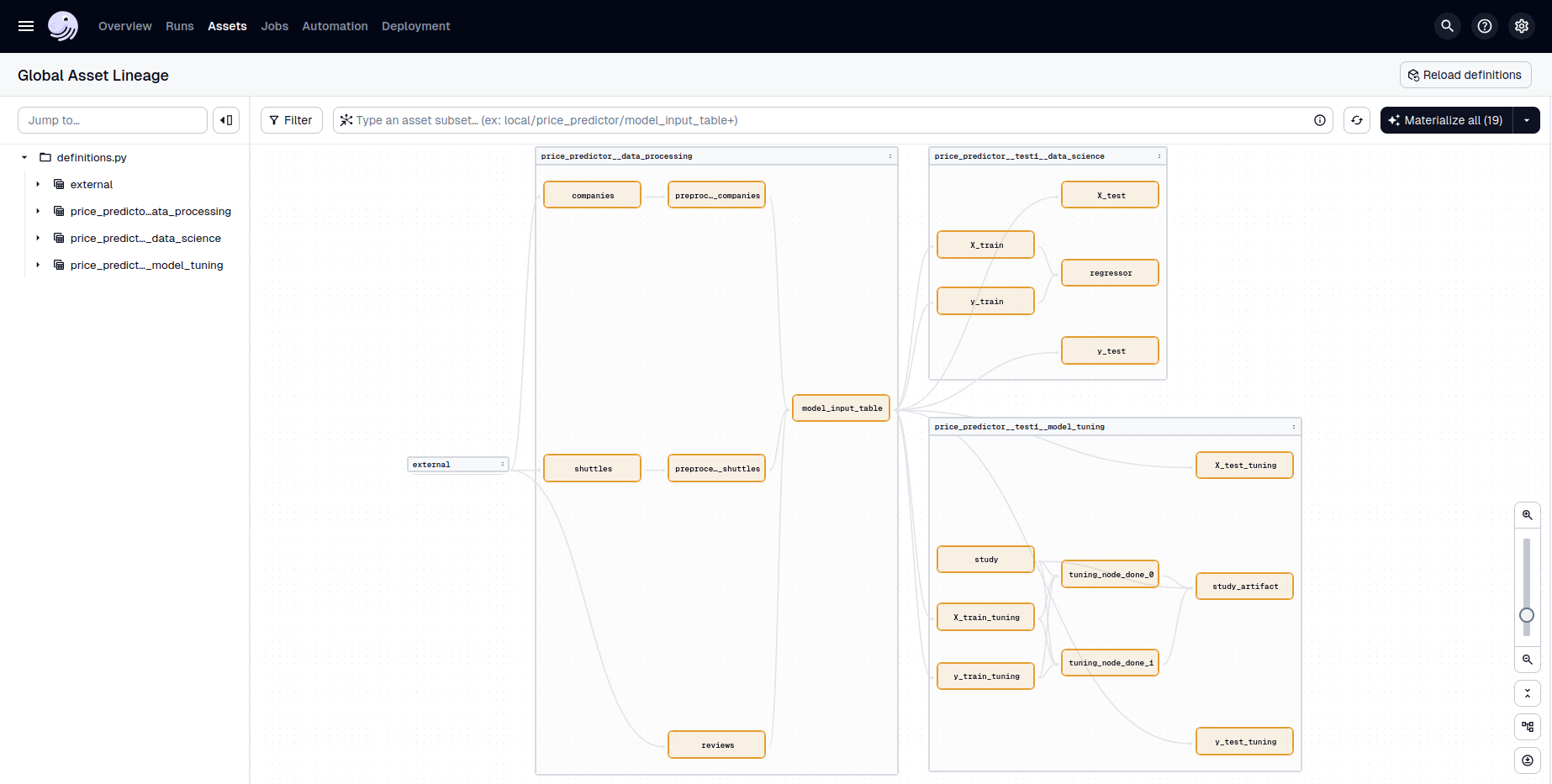
Currently, Kedro-Dagster supports Kedro versions 0.19.x and 1.x, and Dagster versions 1.10.x, 1.11.x, and 1.12.x.
- Configuration‑driven workflows: Centralize orchestration settings in a
dagster.ymlfile for each Kedro environment. Define jobs from filtered Kedro pipelines, assign executors, schedules. - Customization: The core integration lives in the auto‑generated Dagster
definitions.py. For advanced use cases, you can extend or override these definitions. - Kedro hooks preservation: Kedro hooks are preserved and called at the appropriate time during pipeline execution, so custom logic (e.g., data validation, logging) continues to work seamlessly.
- MLflow compatibility: Use Kedro-MLflow with Dagster’s MLflow integration to track experiments, log models, and register artifacts.
- Logger integration: Unifies Kedro and Dagster logging so logs from Kedro nodes appear in the Dagster UI and are easy to trace and debug. Additionally, provides configuration to customize Dagster run loggers.
- (Experimental) Dagster partition support: Make use of Dagster's partitions to fan-out Kedro nodes acting on partitioned data.
Install the Kedro-Dagster plugin using pip:
pip install kedro-dagsteror using uv:
uv pip install kedro-dagsteror using conda:
conda install -c conda-forge kedro-dagsteror using mamba:
mamba install -c conda-forge kedro-dagsteror alternatively, add kedro-dagster to your requirements.txt or pyproject.toml file.
- Initialize the plugin in your Kedro project
Use the following command to generate a definitions.py file, where all translated Kedro objects are available as Dagster objects, and a dagster.yml configuration file:
kedro dagster init --env <ENV_NAME>- Configure jobs, executors, and schedules
Define your job executors and schedules in the dagster.yml configuration file located in your Kedro project's conf/<ENV_NAME> directory. This file allows you to filter Kedro pipelines and assign specific executors and schedules to them.
# conf/local/dagster.yml
schedules:
  daily: # Schedule name
    cron_schedule: "0 0 * * *" # Schedule parameters

executors: # Executor name
  sequential: # Executor parameters
    in_process:

  multiprocess:
    multiprocess:
      max_concurrent: 2

jobs:
  default: # Job name
    pipeline: # Pipeline filter parameters
      pipeline_name: __default__
    executor: sequential

  parallel_data_processing:
    pipeline:
      pipeline_name: data_processing
      node_names:
      - preprocess_companies_node
      - preprocess_shuttles_node
    schedule: daily
    executor: multiprocess

  data_science:
    pipeline:
      pipeline_name: data_science
    schedule: daily
executor: sequential- Launch the Dagster UI
Start the Dagster UI to monitor and manage your pipelines using the following command:
kedro dagster dev --env <ENV_NAME>The Dagster UI will be available at http://127.0.0.1:3000.
For a concrete use-case, see the Kedro-Dagster example repository.
Full documentation is available at https://kedro-dagster.readthedocs.io/en/latest/.
We welcome contributions, feedback, and questions:
- Report issues or request features: GitHub Issues
- Join the discussion: Kedro Slack
- Contributing Guide: CONTRIBUTING.md
If you are interested in becoming a maintainer or taking a more active role, please reach out to Guillaume Tauzin on the Kedro Slack.
There is a growing community around the Kedro project and we encourage you to become part of it. To ask and answer technical questions on the Kedro Slack and bookmark the Linen archive of past discussions. For questions related specifically to Kedro-Dagster, you can also open a discussion.
This project is licensed under the terms of the Apache 2.0 License.
This plugin is developed and maintained by Guillaume Tauzin.
It is inspired by existing Kedro plugins such as the official Kedro plugins, kedro-kubeflow, kedro-mlflow.