Skip to content

Conversation

@TD-er
Copy link
Member

@TD-er TD-er commented Dec 12, 2018

Some changes had to be made and some plugins disabled, due to exceeding the amount of iRAM available.
That should be taken care of later.

But for now, we are able to test core 2.5.0, since it contains a number of fixes we may really need.
For example this one: esp8266/Arduino#5210

In short, that pull request does change behavior on a low level which will make sure the ESP does receive broadcast messages, or at least will not miss them as often.
One of these broadcast messages are ARP requests, which tell a switch to which port packets should be sent, based on MAC addresses.
If these ARP requests are missed, a switch will throw them out of the ARP cache table and thus replies sent to the ESP will not be delivered.
If the ESP will not receive a reply to a (TCP) packet, it may wait forever and cause either WD resets, or it may be unreachable for other communications like commands or opening the web interface.

These are all issues which have been reported by users over-and-over.
So my hope is the core 2.5.0 will fix at least a number of these issues.

@TD-er TD-er added Category: Core related Related to the (external) core libraries Category: Build Related to building/IDE/releases labels Dec 12, 2018
Disabling dev/test builds for 1 MB chips, since the bin files will be too big to fit on 1 MB modules.
We have to decide later how to make the plugins in dev/test state available for 1 MB modules.
@TD-er
Copy link
Member Author

TD-er commented Dec 12, 2018

A test build for people to test.

The status is: It compiles :)

P003 (pulse), P008 (RF-ID reader) and Servo are left out for now, because we're hitting a limit on iRAM usage.
Also only the bin files are included which can be flashed and used (within the allowed limits without overwriting SPIFFS)

@micropet
Copy link

Thank you @TD-er.

Works with:
DS18b20
NeoPixel
PCA9685
BME280
BH1750
Pir
all in one Unit

Unit: 201
Local Time: 2018-12-12 23:18:05
Uptime: 0 days 4 hours 8 minutes
Load: 31.90% (LC=2956)
Free Mem: 6112 (3632 - duringDataTX)
Free Stack: 3600 (1024 - parseTemplate)
Boot: Cold boot (0)
Reset Reason: Software/System restart
ESP82xx Core 2.5.0-beta1, NONOS SDK 3.0.0-dev(c0f7b44), LWIP: 2.1.2 PUYA support

@TD-er
Copy link
Member Author

TD-er commented Dec 12, 2018

I am running it now also on Sonoff POW and POW-r2.
Both experienced HW watchdog resets using core 2.4.2
Also a unit in the garden, running a SDS011 is now running on this build.

I have noticed the LC (loop count) is quite low with core 2.5.0, but the wifi response keeps feeling snappy.
With core 2.4.2 I had sometimes the feeling the browser had to retry a number of times.

@Domosapiens
Copy link

@TD-er , thanks for your effort.
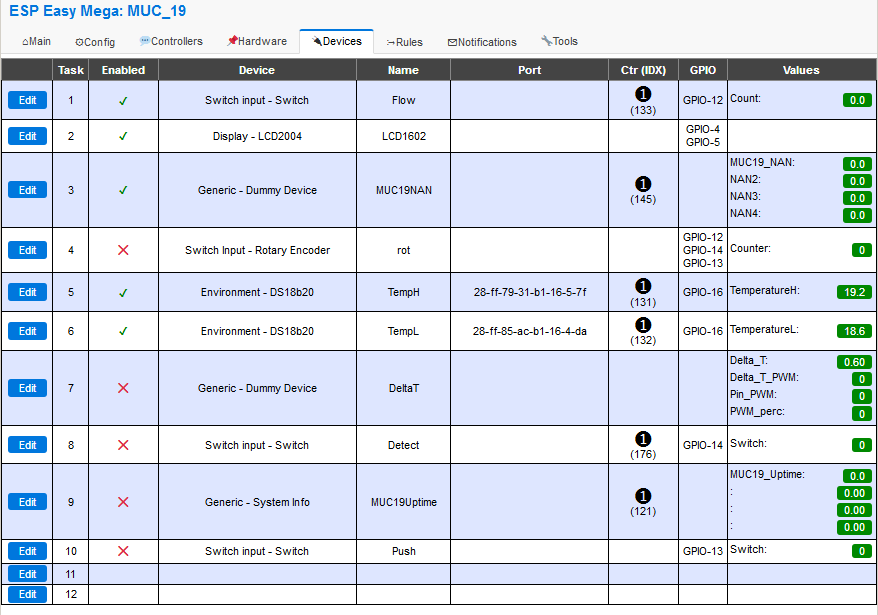
1# Wemos D1 running here with this test build.
This unit, with this configuration, has a reputation of 8-22hr between meeting the Dog:
image
Will report back.

@micropet
Copy link

The .bin files are running.
Compiling does not work yet.

Linking .pioenvs\test_ESP8266_4096\firmware.elf
c:/users/peter/.platformio/packages/toolchain-xtensa/bin/../lib/gcc/xtensa-lx106-elf/4.8.2/../../../../xtensa-lx106-elf/bin/ld.exe: .pioenvs\test_ESP8266_4096\firmware.elf section . text' will not fit in region iram1_0_seg'
collect2.exe: error: ld returned 1 exit status
*** [.pioenvs\test_ESP8266_4096\firmware.elf] Error 1

@TD-er
Copy link
Member Author

TD-er commented Dec 13, 2018

@micropet Indeed, not all sets can be built.
I had to de-activate P003, P008 and servo to make it compile. (not for all env definitions)
Also make sure you do a clean build!!

@micropet
Copy link

@TD-er,
Yes, I had read that and thought that the two plugins are disabled by the line:

#ifdef CORE_2_5_0
// These use too much iRAM.
// See: esp8266/Arduino#5476
#ifdef USES_P003 // pulse
#undef USES_P003
#endif
#ifdef USES_P008 // RFID
#undef USES_P008
#endif
#ifdef USE_SERVO
#undef USE_SERVO
#endif
#endif

@TD-er
Copy link
Member Author

TD-er commented Dec 13, 2018

All versions included in the ZIP file should be able to build using these settings.
I built the versions in de ZIP in Linux, maybe there is a slight difference?

And you really should make sure to do a clean of the project too.
I have seen a lot of strange issues when not running a clean while switching these platforms.

N.B. The define of CORE_2_5_0 is mine, see the config in PlatformIO.ini.

@micropet
Copy link

Hm, I did a clean and I get the same mistake.
I use the test source from you.
It looks like the two plugins are not disabled.

@clumsy-stefan
Copy link
Contributor

On Arduino IDE on a mac it compiles (after disabling some plugins due to the size) the compiler only complains about line 1971 return round(first) % round(second); in misc.ino due to

Misc:1971: error: invalid operands of types 'double' and 'double' to binary 'operator%'
       return round(first) % round(second);

casting them to (int) seems to work.

however when accessing the webpage it hits a SW WDT:

pm open,type:2 0
32374 : Memtrace
0: lowest: 17968  rulesProcessingFile-> 20928 rulesProcessingFile2-> 20880 rulesProcessingFile-> 20928 rulesProcessingFile2-> 20880 rulesProcessingFile-> 20928 rulesProcessingFile2-> 20880 PluginCall_s (10)-> 20824 PluginCall_s (10)-> 20824 PluginCall_s (10)-> 20824 LoadControllerSettings-> 20216 LoadFromFile-> 20232 LoadTaskSettings-> 19832 LoadTaskSettings-> 19008 LoadTaskSettings-> 19008 LoadTaskSettings-> 17968
32376 : 1: lowest: 17968  rulesProcessingFile2-> 20880 rulesProcessingFile-> 20928 rulesProcessingFile2-> 20880 rulesProcessingFile-> 20928 rulesProcessingFile2-> 20880 PluginCall_s (10)-> 20824 PluginCall_s (10)-> 20824 PluginCall_s (10)-> 20824 LoadControllerSettings-> 20216 LoadFromFile-> 20232 LoadTaskSettings-> 19832 LoadTaskSettings-> 19008 LoadTaskSettings-> 19008 LoadTaskSettings-> 17968 LoadTaskSettings-> 17968
32377 : 2: lowest: 19008  rulesProcessingFile2-> 20816 rulesProcessingFile-> 20928 rulesProcessingFile2-> 20880 rulesProcessingFile-> 20928 rulesProcessingFile2-> 20880 rulesProcessingFile-> 20928 rulesProcessingFile2-> 20880 PluginCall_s (10)-> 20824 PluginCall_s (10)-> 20824 PluginCall_s (10)-> 20824 LoadControllerSettings-> 20216 LoadFromFile-> 20232 LoadTaskSettings-> 19832 LoadTaskSettings-> 19008 LoadTaskSettings-> 19008
32378 : WD   : Uptime 1 ConnectFailures 0 FreeMem 19552
33264 : LoopStats: shortestLoop: 227 longestLoop: 952902 avgLoopDuration: 285.17 loopCounterMax: 132158 loopCounterLast: 102531 countFindPluginId: 0
33265 : Scheduler stats: (called/tasks/max_length/idle%) 102581/2037/8/81.20
35820 : EVENT: Clock#Time=Thu,14:53
RuleDebug Processing:rules1.txt
     flags CMI  parse output:
35829 : RuleDebug: 100: system#boot do
35832 : RuleDebug: 101: rtttl,15:d=8,o=5,b=150:8f
35834 : RuleDebug: 101: timerset,2,60
35837 : RuleDebug: 000: endon
35848 : RuleDebug: 100: system#sleep do
35851 : RuleDebug: 101: rtttl,15:d=4,o=5,b=125:c.,c,8c,c.,d#,8d,d,8c,c,8c,2c.
35854 : RuleDebug: 000: endon
RuleDebug Processing:rules2.txt
     flags CMI  parse output:
RuleDebug Processing:rules3.txt
     flags CMI  parse output:
RuleDebug Processing:rules4.txt
     flags CMI  parse output:
35865 : EVENT: Clock#Time=Thu,14:53 Processing time:44 milliSeconds
41430 : sendcontent free: 18752 chunk size:400
41439 : sendcontent free: 18080 chunk size:400
41448 :
Soft WDT reset

sometimes more content can be sent, sometimes less.... still trying to find why... tried with lwip2 high bandwith and low mem versions...

@TD-er
Copy link
Member Author

TD-er commented Dec 13, 2018

Have you also tried the pre-compiled ones?
Do they also give Software WDT resets?

Also strange the compiler didn't complain about that modulo operator. It has been in there for a while.
I do agree with the compiler by the way, it is an error.

@clumsy-stefan
Copy link
Contributor

Have you also tried the pre-compiled ones?
Do they also give Software WDT resets?

Yep, seems to work fine... strange... need to find the difference.. especially as it's on a node with only 1 task (system info). So I need to dig deeper why it fails... probably a mem, heap or stack issue, as I do have more plugins enabled (biary size close to max, 98%)...

Also strange the compiler didn't complain about that modulo operator. It has been in there for a while.
I do agree with the compiler by the way, it is an error.

Agree, no clue why it did not complain before 2.5.0 as the arduino framework is still the same...

how should that line really be though?

@TD-er
Copy link
Member Author

TD-er commented Dec 13, 2018

how should that line really be though?

       return static_cast<int>(round(first)) % static_cast<int>(round(second));

@TD-er TD-er merged commit ed50071 into letscontrolit:mega Dec 13, 2018
@TD-er TD-er deleted the feature/testbuild_core2_5_0_beta1 branch December 13, 2018 16:15
@micropet
Copy link

Am I doing something wrong?
Even the current source brings a mistake.

Linking .pioenvs\test_core_250_beta_ESP8266_4096\firmware.elf
c:/users/peter/.platformio/packages/toolchain-xtensa/bin/../lib/gcc/xtensa-lx106-elf/4.8.2/../../../../xtensa-lx106-elf/bin/ld.exe: .pioenvs\test_core_250_beta_ESP8266_4096\firmware.
elf section .text' will not fit in region iram1_0_seg'
collect2.exe: error: ld returned 1 exit status
*** [.pioenvs\test_core_250_beta_ESP8266_4096\firmware.elf] Error 1
[ERROR] Took 36.33 seconds

@clumsy-stefan
Copy link
Contributor

the SW WDT's I'm experiencing seem to happen quite randomly... mainly on the main system info page... calling directly the tools or config page mostly works... probably if the delay is too big (weak signal or similar) and it has to wait too long for a response... so I'm still investigating, just as an update...

@TD-er
Copy link
Member Author

TD-er commented Dec 13, 2018

I added a few builds in the daily deploy script. (marked with "core_250_beta") so others may also test them.
I will also update the readme to describe the changes.

@micropet
Copy link

test_core_250_beta_ESP8266_4096 did not compile:
text' will not fit in region `iram1_0_seg'

@TD-er
Copy link
Member Author

TD-er commented Dec 13, 2018

This one will be merged after diner and putting my daughter to bed.
I've already built it on my PC, so I want to test it first.
I can put the test build online so you can also test?

It is mainly the revert of the GPIO stuff, so we can make that one right in a separate branch and test it before merging it and let others see failing rules. etc.

@micropet
Copy link

OK, i will test it :)

@clumsy-stefan
Copy link
Contributor

ok, it seems in ESP-Core for Arduino IDE there is a (new) flag enabled by default at compile time called -fexceptions. Disabling this (via menu resultin in a -fno-exceptions makes everything work again....

so now testing if the new core is more stable than 2.4.2 can start.

I think this is just for information for other Arduino-IDE self-builders!

@TD-er
Copy link
Member Author

TD-er commented Dec 13, 2018

It is indeed one of the flags I had to set.

See these flags. Top one is the old config, 2nd one is needed for core 2.5.0

ESPEasy/platformio.ini

Lines 72 to 88 in 02ef853

[esp82xx_defaults]
build_flags = -D BUILD_GIT='"${sysenv.TRAVIS_TAG}"'
-D NDEBUG
-lstdc++ -lsupc++
-mtarget-align
-DPIO_FRAMEWORK_ARDUINO_LWIP2_LOW_MEMORY
-DVTABLES_IN_FLASH
[esp82xx_2_5_0]
build_flags = -D BUILD_GIT='"${sysenv.TRAVIS_TAG}"'
-DNDEBUG
-DVTABLES_IN_FLASH
-fno-exceptions
-lstdc++-nox
-DPIO_FRAMEWORK_ARDUINO_LWIP2_LOW_MEMORY_LOW_FLASH
-DCORE_2_5_0

@micropet
Copy link

Now the source can be compiled, thanks.
Have a few units flashed, let's see how it works.

@Domosapiens
Copy link

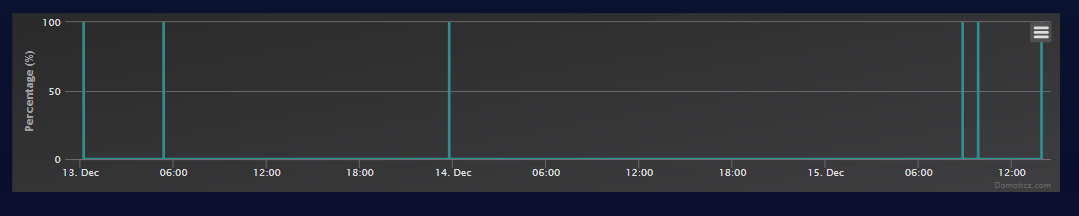
1# Wemos D1 running here with this test build.
This unit, with this configuration, has a reputation of 8-22hr between meeting the Dog:

image

... the dog is still there
Build:⋄
20103 - Mega
Libraries:⋄
ESP82xx Core 2.5.0-beta1, NONOS SDK 3.0.0-dev(c0f7b44), LWIP: 2.1.2 PUYA support
GIT version:⋄

Plugins:⋄
44 [Normal]
Build time:⋄
Dec 12 2018 16:17:22
Binary filename:⋄
ESP_Easy_mega-20181208-6-PR_normal_ESP8266_4096.bin

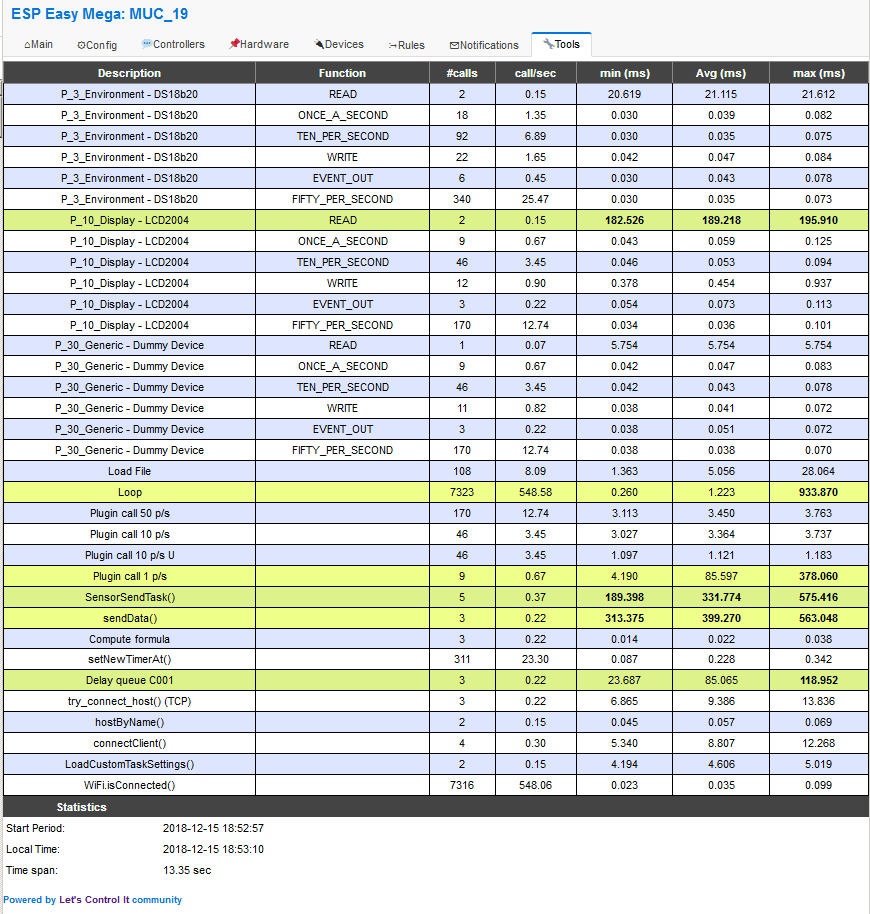
image

Hope this helps

@TD-er
Copy link
Member Author

TD-er commented Dec 15, 2018

Your loop frequency is quite low.
I noticed a significant drop in loop counts too, but mine were still in 1200 - 2200 loops/sec range.
Although this screenshot is just from a short period, but you may want to look at the LC value when it is running a while (a few minutes or so)

@clumsy-stefan
Copy link
Contributor

ALso the layer 2 group-key timeout still happen... not quite so often though...

@TD-er
Copy link
Member Author

TD-er commented Dec 15, 2018

@clumsy-stefan It is better (less worse) with core 2.5.0?
And the layer 2 issues can very well be explained by missing broadcast packets.

ARP packets are also broadcasts. These are needed by switches to know what MAC address is reachable by what port on the switch.
If there is no reply to ARP packets, a switch may remove the MAC from the MAC-table and thus cannot route the packets for that MAC-address.
This may lead to the situation where a node still sends to a controller, but is not reachable via the network.
So replies to sent packets may also get lost.

@clumsy-stefan
Copy link
Contributor

I can't statistically "prove" it, but it seems better than 2.4.2...

ARP is already a layer higher, when WiFi is up and running. so when the reported group-key-timeout happens, ARP can't be done at all anymore (as no WiFi connection anymore to the node)... Besides I can see ARP Cache is still valid on the Server and has an entry for the not-reachable node...

@clumsy-stefan
Copy link
Contributor

clumsy-stefan commented Dec 15, 2018

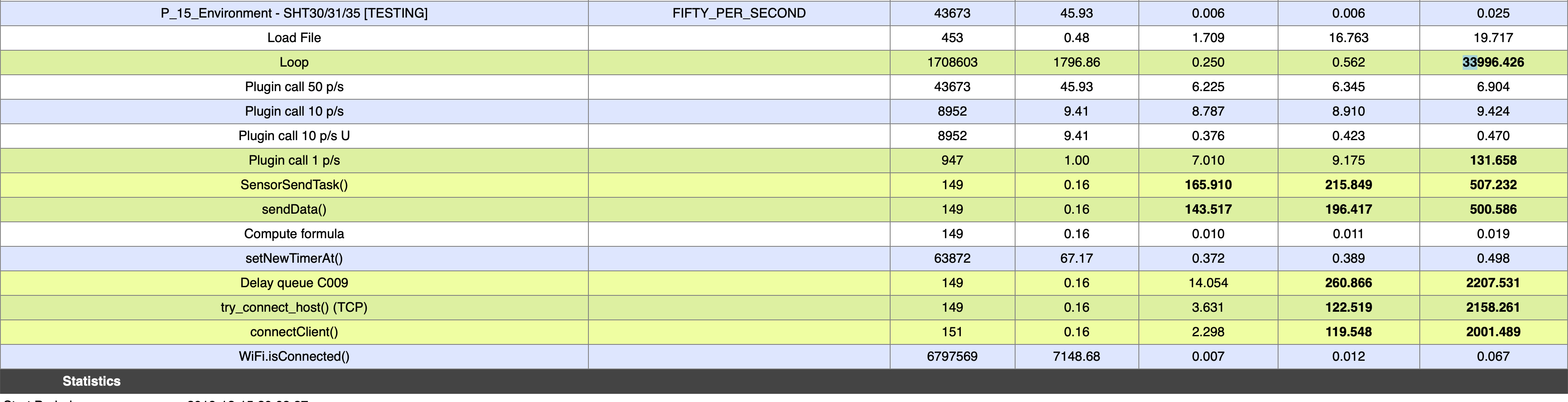
@TD-er probably unrelated here and stupid question, but while searching for issues (especially why my loop time are often >2sec.) I saw the main loop in ESPEasy.inocallsrunPeriodicalMQTT` now I don't have any MQTT enabled, even worse, I did not even compile in any MQTT controller. Is that a problem?

Especially as in this function it tests for

 if (enabledMqttController >= 0) {

>= ?

EDIT: or worse than 2sec:
image

@TD-er
Copy link
Member Author

TD-er commented Dec 15, 2018

Finding enabled MQTT controller may return -1.
See:

ESPEasy/src/ESPEasy.ino

Lines 396 to 404 in ebe1124

int firstEnabledMQTTController() {
for (byte i = 0; i < CONTROLLER_MAX; ++i) {
byte ProtocolIndex = getProtocolIndex(Settings.Protocol[i]);
if (Protocol[ProtocolIndex].usesMQTT && Settings.ControllerEnabled[i]) {
return i;
}
}
return -1;
}

And that time of 33+ seconds, do you have deepsleep enabled?
Or is it the first look at the timingstats after flashing via serial?
I have seen the millis() timer after flashing reporting the flash duration.

I see the runPeriodicalMQTT may have a look to see what can be improved.

@clumsy-stefan
Copy link
Contributor

Ah, thanks, didn't see that...

Neither, nor... no deepsleep and not the first stat since flashing... and I see regular timings >4sec...

also I just saw in the reference http://esp8266.github.io/Arduino/versions/2.0.0/doc/reference.html

If you have a loop somewhere in your sketch that takes a lot of time (>50ms) without calling delay, you might consider adding a call to delay function to keep the WiFi stack running smoothly.

so if any of the connect or send functions take too long, it may cause issues to the WiFi stack..

@TD-er
Copy link
Member Author

TD-er commented Dec 15, 2018

so if any of the connect or send functions take too long, it may cause issues to the WiFi stack..

That's why I created the timingstats + webpage.

@clumsy-stefan
Copy link
Contributor

That's why I created the timingstats + webpage.

yes, that's great, that's why I now now that try_connect_host() and SensorSendTask() can take >2sec... but I still don't know why, and how I can improve and if wifi has an issue exactly because of that.... but I won't give up 😄

@TD-er
Copy link
Member Author

TD-er commented Dec 15, 2018

The try_connect_host do perform a retry and default timeout is 1000 msec (?)
So that may explain why it may take a while.
And maybe we should not retry but reschedule.

@clumsy-stefan
Copy link
Contributor

yes, that's one thing (which obviously can be parametized already now) but I'm more worried about the sending of the values... if the connection is really slow, you can't do anything there as the client.printfunction is a single library call...

I'm just experimenting though using client.write(buf, len) instead of client.print(buf) as I read that the print function could happen to call write for each byte sepparately and thus causing to wait for an ack everytime (RTT * 2).... depending on the RTT that can get very lengthy...

@TD-er
Copy link
Member Author

TD-er commented Dec 15, 2018

The IP stack will buffer those.
You're not sending a TCP/UDP packet for every byte sent.

Sign up for free to join this conversation on GitHub. Already have an account? Sign in to comment

Labels

Category: Build Related to building/IDE/releases Category: Core related Related to the (external) core libraries

Projects

None yet

Development

Successfully merging this pull request may close these issues.

4 participants