📋 Changelog · Installation · Features · Developer docs
Seamlessly integrate Artemis: Interactive Learning with Individual Feedback directly into your VS Code environment. This extension brings Artemis (an interactive platform for programming exercises, instant feedback, and AI-powered tutoring) right into your IDE, so you can access personalized support, exercise materials, and intelligent feedback without leaving your workspace.
Are you a developer working on the extension itself? See DEVELOPER.md for build, architecture, and release docs, and CONTRIBUTING.md for the contribution workflow.
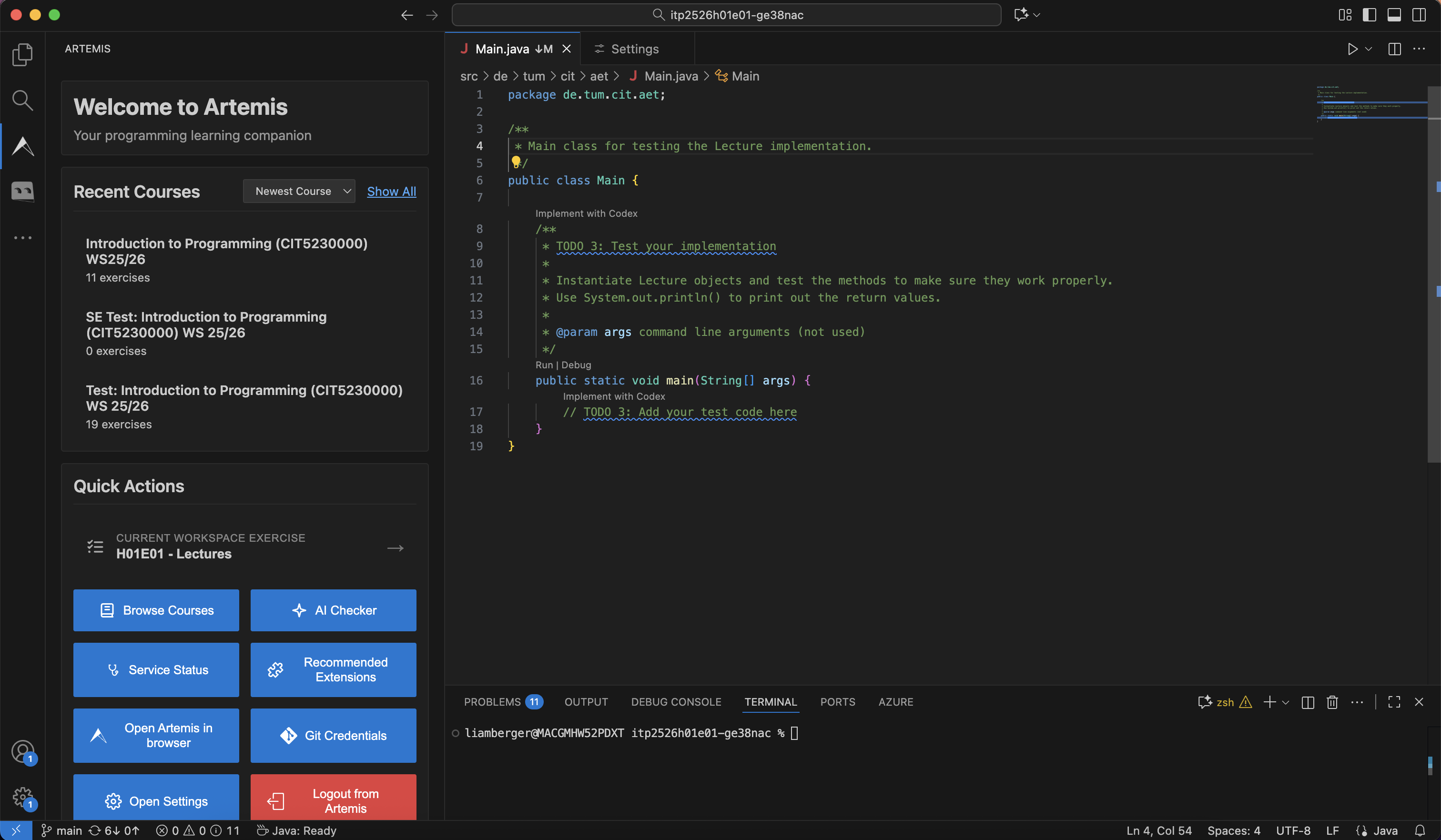 Access your courses, exercises, and get started with Iris AI tutor from the main dashboard
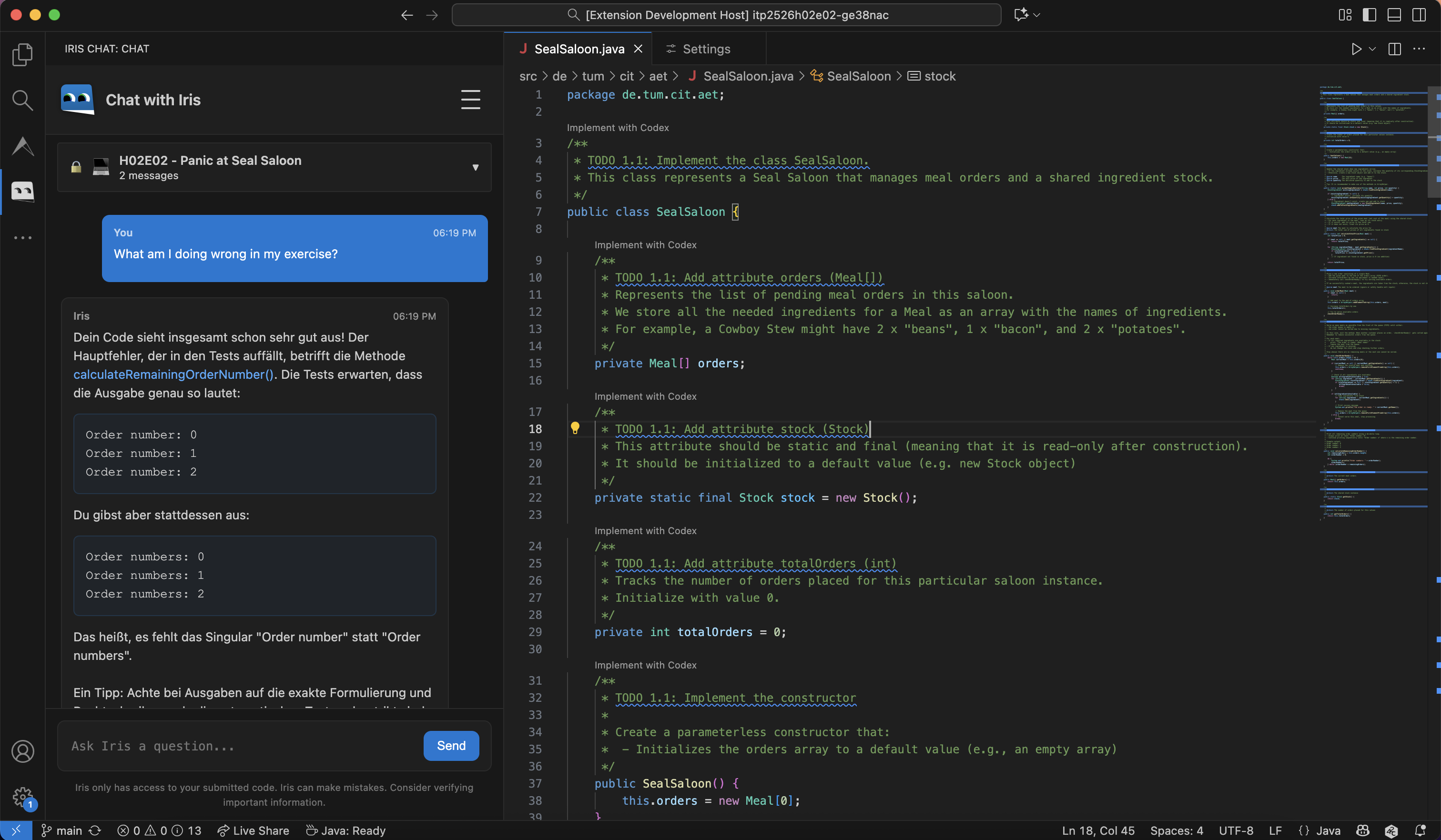 Get context-aware help from Iris AI tutor without leaving VS Code
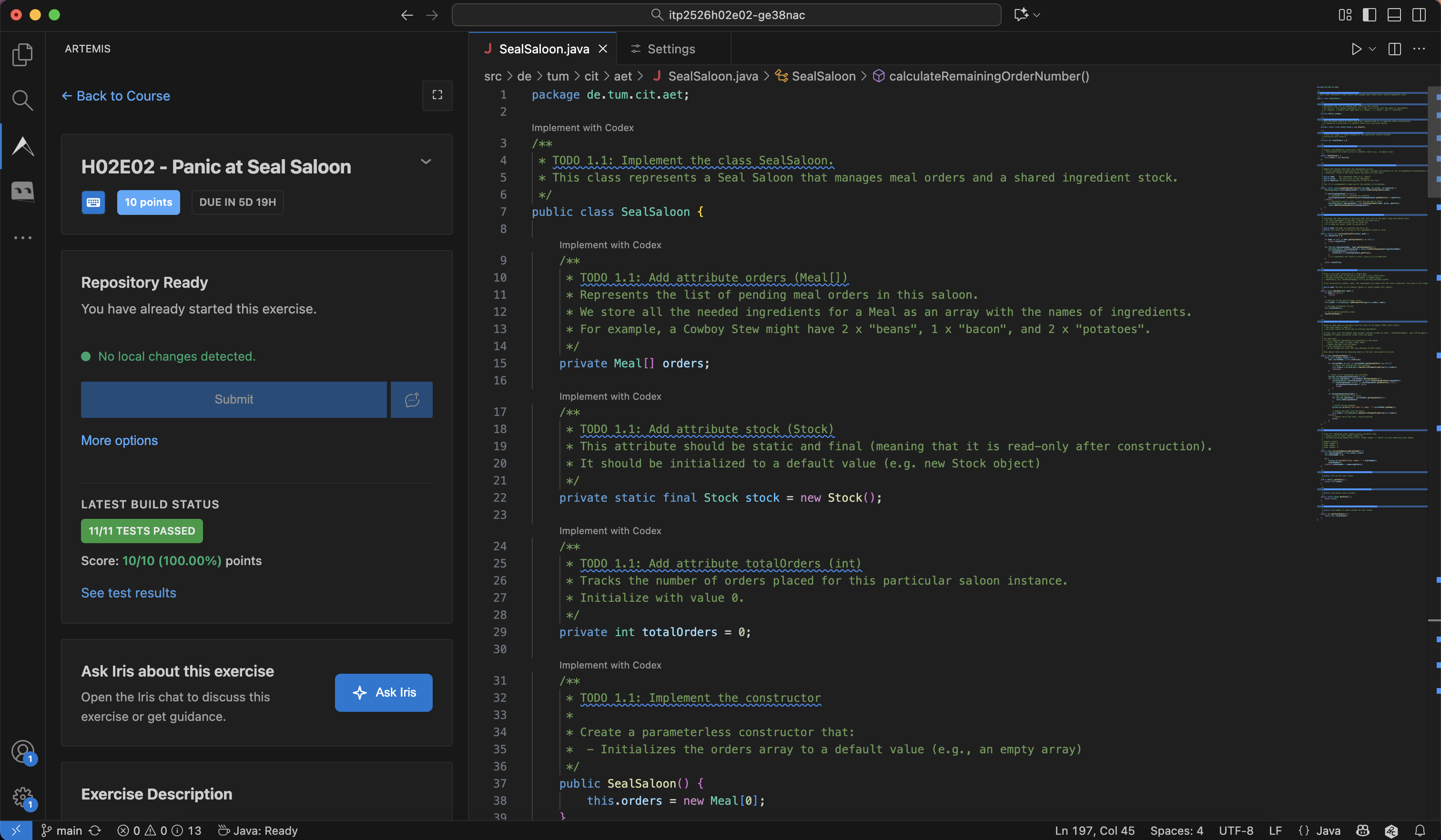 Monitor your submission results and test case performance in real-time
- Activity Bar Icons: Quick access to Artemis and the Iris AI tutor from the activity bar
- Secure Authentication: Log in directly with your Artemis credentials
- Course Browser: View your enrolled courses and exercise details
- Interactive Dashboard: Overview of exercises, deadlines, and course activities
- Exercise Management: Clone repositories, submit solutions, and track your progress
- Real-Time Updates: WebSocket integration for live build results and notifications
- Theme Support: Choose from VSCode-native, modern, or synthwave visual themes
Iris is an intelligent virtual tutor integrated into the extension, providing personalized learning support:
- Context-Aware Assistance: Get help based on your current programming exercise
- Personalized Guidance: Receive hints and explanations tailored to your work
- Exercise Q&A: Ask questions about lectures, exercises, and learning performance
- Smart Hints: Iris provides subtle guidance without giving away full solutions
- Pro-Active Support: Receive motivational messages and learning suggestions
- Rate Limit Monitoring: View your API usage and Iris availability status
- Health Status: Monitor Artemis and Iris service availability
- WebSocket Status: Check the real-time connection status
- Rate Limit Information: Track your API usage quotas
- Service Diagnostics: Troubleshoot connectivity issues
Choose your preferred visual style:
- VSCode Theme: Native styling that matches your editor
- Modern Theme: Clean, card-based design with contemporary aesthetics
- Synthwave Theme: Retro-futuristic neon aesthetic
- VS Code version 1.97.0 or higher
- Access to an Artemis server (e.g.,
artemis.tum.de) - A valid Artemis account (student or instructor)
- Install the extension from the VS Code Marketplace or Open VSX
- Click the Artemis logo in the activity bar
- Log in with your credentials
- Log in: Click the Artemis icon, then enter your server URL and credentials
- Browse courses: Navigate your enrolled courses from the dashboard
- Select an exercise: Click an exercise to view its details and instructions
- Clone the repository: Use the clone action to start working locally
- Get AI help: Click the Iris chat icon to ask questions about your exercise
- Submit your solution: Use submit & push to hand in your work
Access these via the Command Palette (Ctrl+Shift+P or Cmd+Shift+P):
Artemis: Login- Open the login interfaceArtemis: Logout- Sign out of ArtemisArtemis: Check Iris Health Status- View Iris availability and rate limitsArtemis: Check WebSocket Connection Status- Verify the real-time connectionArtemis: Connect WebSocket- Manually connect to the Artemis WebSocketArtemis: Set Server URL- Change the connected Artemis server
Configure the extension through VS Code settings (Cmd+, or Ctrl+,):
artemis.serverUrl- Artemis server URL (default:https://artemis.tum.de)artemis.iris.sendUncommittedChanges- Allow Iris to access your uncommitted file changesartemis.defaultCommitMessage- Default commit message for automatic exercise submissionsartemis.showUnsavedChangesWarning- Warn when there are unsaved changes before submittingartemis.defaultClonePath- Default folder where exercise repositories are clonedartemis.showSetDefaultClonePathPrompt- Ask to set a default clone folder on first cloneartemis.startPage- Which page to show after logging inartemis.showStartPageSuggestion- Suggest configuring the start page when an exercise is detectedartemis.showWebSocketStatusBar- Show the WebSocket connection status in the status barartemis.developerMode- Enable developer mode (debug tools and extra diagnostics)
Artemis is an interactive learning platform with instant, individual feedback on programming exercises, quizzes, modeling tasks, and more. It offers:
- Programming Exercises: Support for Java, Python, C, Swift, Kotlin, and many more languages
- Automatic Feedback: Instant feedback based on test cases and static code analysis
- Multiple Exercise Types: Programming, quiz, modeling, text, and file upload exercises
- Exam Mode: Online exams with variants and plagiarism detection
- Learning Analytics: Track competencies and progress with Atlas
- AI Assessment: Automated assessment support with Athena
Used by the Technical University of Munich (TUM), University of Stuttgart, Karlsruhe Institute of Technology (KIT), TU Wien, JKU Linz, LFU Innsbruck, and many more. Learn more at artemisapp.github.io.
This extension integrates Iris, an AI-powered virtual tutor from the EduTelligence suite, providing intelligent assistance through context-aware guidance and personalized learning support.
- Your credentials are stored securely in VS Code's secret storage
- Communication with Artemis servers uses HTTPS encryption
- Iris interactions may be logged for quality improvement (per your institution's policies)
- Artemis Documentation: docs.artemis.cit.tum.de
- Artemis Platform: artemisapp.github.io
- Issues: GitHub Issues
Contributions are welcome. See CONTRIBUTING.md for the workflow and DEVELOPER.md for build and architecture docs.
MIT License - see LICENSE for details.
Enjoy enhanced learning with Artemis in VS Code! 🚀