
Source · Documentation · Forum · Issues · Docker Images · OpenRemote Inc.
Welcome to OpenRemote; an intuitive user-friendly 100% open source IoT platform. You can build a complete IoT device management solution including: device management and auto provisioning, customisation of asset types, automation via when-then, flow, javascript and groovy rules, data analytics, connectivity via several protocol agents and manager APIs (e.g. MQTT broker, HTTP/REST, WS), Multi-tenancy (realms), Users and roles management, Edge gateway, Front-end UI web components and consoles, and an Insights dashboard builder.
As the code base is 100% open source, applications are limitless. Here's an architecture overview:
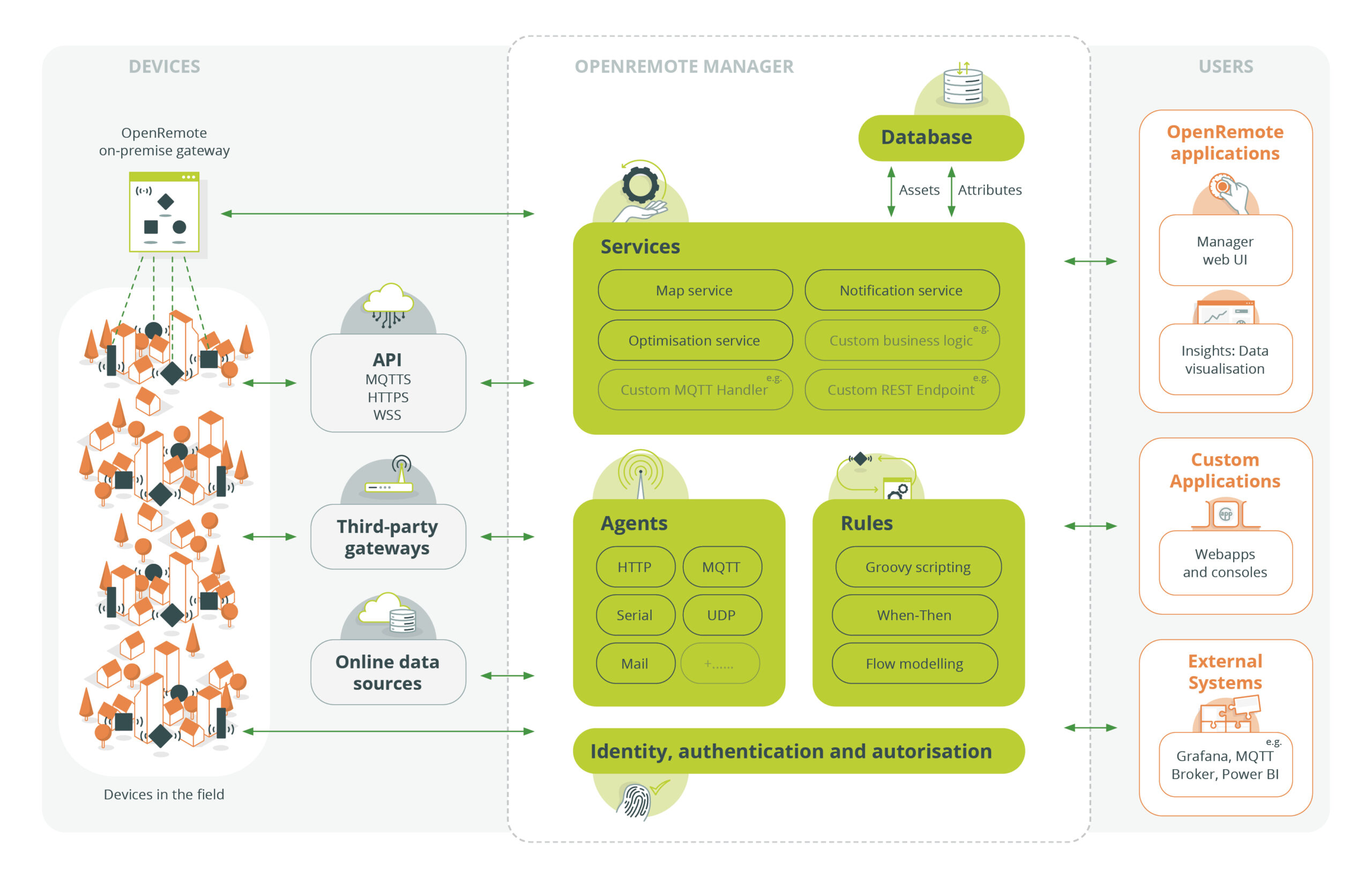
You can quickly try the online demo with restricted access, login credentials are smartcity:smartcity:
The quickest way to get your own environment with full access is to make use of our docker images (both amd64 and arm64 are supported).
- Make sure you have Docker Desktop installed (v18+).
- Download the docker compose file: OpenRemote Stack (Right click 'Save link as...')
- In a terminal
cdto where you just saved the compose file and then run:
    docker compose pull
    docker compose -p openremote up
If all goes well then you should now be able to access the OpenRemote Manager UI at https://localhost. You will need to accept the self-signed certificate, see here for details how to do this in Chrome (similar for other browsers).
Username: admin
Password: secret
The URL you use to access the system is important, the default is configured as https://localhost if you are using a VM or want to run on a different port then you will need to set the OR_HOSTNAME and OR_SSL_PORT environment variables, so if for example you will be accessing using https://192.168.1.1:8443 then use the following startup command:
BASH:
OR_HOSTNAME=192.168.1.1 OR_SSL_PORT=8443 docker compose -p openremote up -d
or
CMD:
cmd /C "set OR_HOSTNAME=192.168.1.1 && set OR_SSL_PORT=8443 && docker compose -p openremote up -d"
Try creating assets, agents, rules, users, realms, etc. using the Manager UI, please refer to the documentation for more information, some things to try:
- Manager UI Guide - Learn more about the User Interface
- Creating an HTTP Agent tutorial - Connect to an online weather service
- Custom Deployment - Style the Manager to your brand
- Setting up an IDE - Set up your development environment
- Working on the UI - Create a web application compatible with OpenRemote
- Creating a custom project - Create a project with custom protocols, asset types and setup code
Persistent data is stored in a PostgreSQL DB which is stored in the openremote_postgresql-data docker volume which is durably stored independently of the running containers (see all with docker volume ls).
Note that historical attribute data is purged daily based on value of OR_DATA_POINTS_MAX_AGE_DAYS; this value can also be overridden for individual attributes by using the dataPointsMaxAgeDays configuration item.
See the Developer Guide for details on making backups of the database.
If you have added locales (e.g. Farsi) or other UI changes and want a Docker image that includes them, use the helper script:
- Build and tag locally (defaults to repository openremote/manager):
tools/build-manager-image.sh fa-local
- Use a custom repository (e.g. GitHub Container Registry) and tag:
REPOSITORY=ghcr.io/your-org/openremote-manager tools/build-manager-image.sh 1.0.0
- Push the image after building:
REPOSITORY=ghcr.io/your-org/openremote-manager PUSH=true tools/build-manager-image.sh 1.0.0
Notes:
- The script runs the Gradle installDist tasks to assemble Manager and UI artifacts, then builds from manager/build/install/manager.
- It labels the image with the current git commit if available (build-arg GIT_COMMIT).
- To use the image with Kubernetes, override the image fields in kubernetes/manager/values.yaml as shown in kubernetes/README.md.
For information and how to set up a development environment, see the Developer Guide.
We work with Java, Groovy, TypeScript, Gradle, Docker, and a wide range of APIs and protocol implementations.
We follow the GitHub Flow workflow with tags and releases for published versions of our components; when working on the codebase create descriptive branch names (e.g. feature/cool_feature_x, hotfix/flux_capacitor, issue/123, etc.).
When your changes are complete then create a Pull Request ensuring that your branch is up-to-date with the source branch and that code changes are covered by tests and that the full test suite passes.
You can push your custom Manager image (including Farsi UI) to a public registry so your VPS can pull it without authentication. Below are examples for Docker Hub and GitHub Container Registry (GHCR).
- Docker Hub (public repo)
- Create a repository on Docker Hub (e.g. docker.io/yourname/openremote-manager) and set its visibility to Public.
- Login locally:
docker login
- Build and push using the helper script:
REPOSITORY=docker.io/yourname/openremote-manager PUSH=true \
  tools/build-manager-image.sh 1.0.0
- You will end up with docker.io/yourname/openremote-manager:1.0.0 which your VPS can pull anonymously.
- GitHub Container Registry (GHCR, public package)
- Create a public repository on GitHub (e.g. your-org/openremote-manager) or use any repo you have. Enable GHCR for your account/org.
- Create a Personal Access Token (classic) with write:packages (and optionally delete:packages, read:packages).
- Login to GHCR:
echo "<YOUR_GHCR_PAT>" | docker login ghcr.io -u <YOUR_GITHUB_USERNAME> --password-stdin
- Build and push:
REPOSITORY=ghcr.io/your-org/openremote-manager PUSH=true \
  tools/build-manager-image.sh 1.0.0
- Ensure the package (container) visibility is set to Public in GitHub Packages so your VPS can pull without auth.
Using the image on your VPS
- Plain Docker:
docker pull ghcr.io/your-org/openremote-manager:1.0.0
# Example run (adapt for your environment)
docker run -d --name manager -p 8080:8080 \
  -e OR_HOSTNAME=<your.domain> -e OR_SSL_PORT=-1 \
  ghcr.io/your-org/openremote-manager:1.0.0
- Docker Compose (override image): In your compose file or override file, set:
services:
  manager:
    image: ghcr.io/your-org/openremote-manager:1.0.0
Then:
docker compose pull && docker compose up -d
- Kubernetes (Helm chart in kubernetes/): Since it’s public, you typically don’t need imagePullSecrets. Create a values file:
image:
  repository: ghcr.io/your-org/openremote-manager
  tag: "1.0.0"
  pullPolicy: IfNotPresent
Deploy:
helm upgrade --install manager kubernetes/manager -f values.yaml
See kubernetes/README.md for more options.
Join us on the community forum.