




Temporarily pause Home Assistant automations with automatic re-enabling. Snooze an automation, it comes back on its own. No more forgotten disabled automations cluttering your setup.
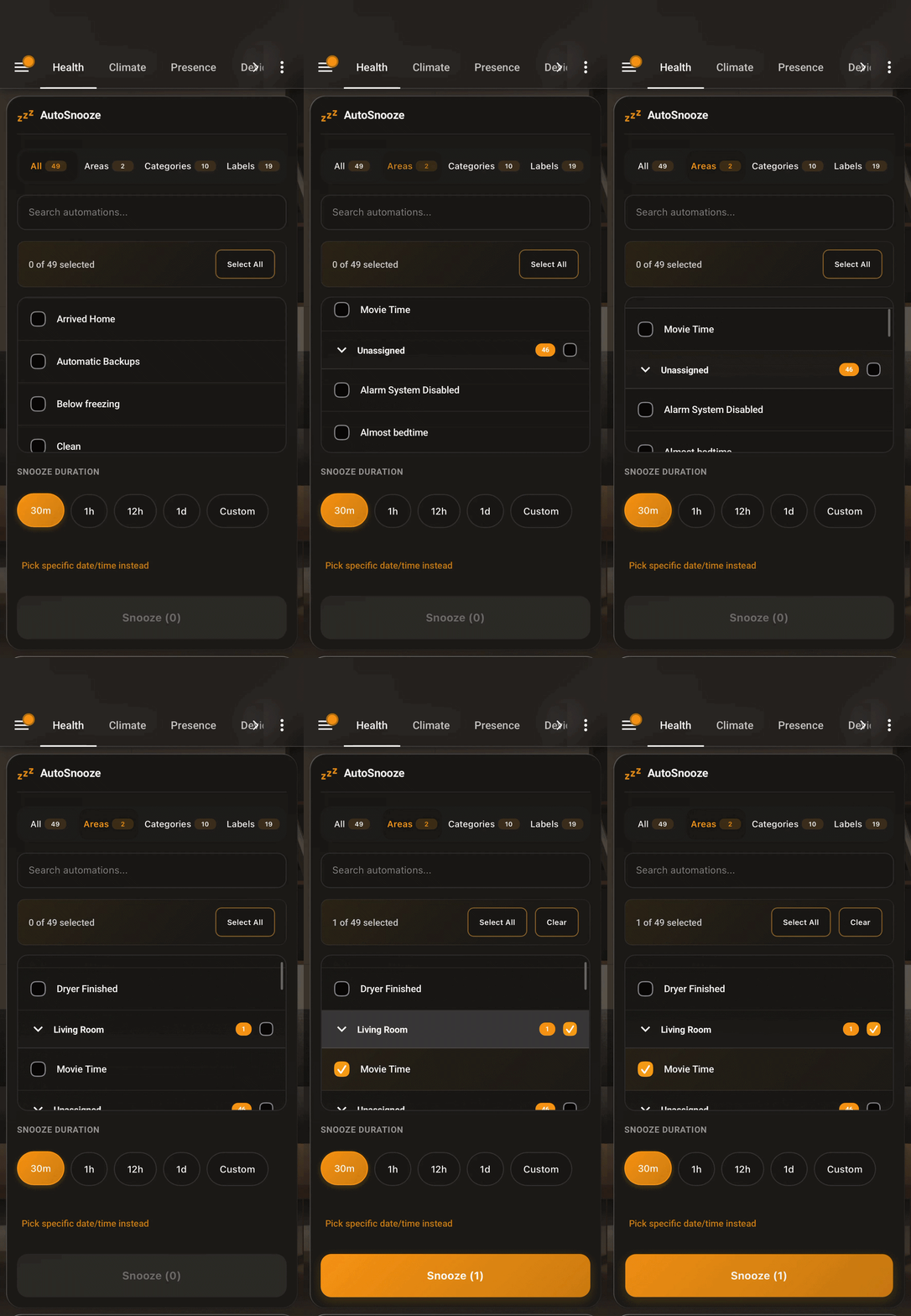
Motion lights keep turning off during dinner. Wake-up routines fire while you're on vacation. You disable something for maintenance and forget about it for three months. AutoSnooze lets you pause automations with a timer so they always come back.
- Filter by Area, Label, or name to find automations fast
- Preset durations — 30m, 1h, 4h, 1 day, or custom
- Live countdown timers on every snoozed automation
- Survives restarts — timers persist through reboots and power outages
- Wake early — cancel individual snoozes or wake everything at once
- Schedule mode — snooze until a specific date/time
- Adjust on the fly — extend or shorten active snoozes
- Critical guards — auto-detects security/safety automations and asks for confirmation
- Sensor entity —
sensor.autosnooze_snoozed_automationsfor use in other automations and dashboards
- Open HACS in Home Assistant
- Search for AutoSnooze
- Click the download button
- Restart Home Assistant
- Open HACS in Home Assistant
- Click the 3-dot menu → Custom repositories
- Add
https://github.com/mossipcams/autosnoozeas type Integration - Search for "AutoSnooze" and click Download
- Restart Home Assistant
- Go to Settings → Devices & Services → Add Integration → AutoSnooze
The dashboard card registers itself when the integration loads — just add it to your dashboard.
Add to any Lovelace dashboard:
type: custom:autosnooze-card
title: AutoSnooze
The only option is title (string, defaults to AutoSnooze).
You can control which automations show up in the card using HA labels:
autosnooze_include— Whitelist mode. If any automation has this label, only those automations appear.autosnooze_exclude— Blacklist mode. Hides automations with this label.autosnooze_confirm— Requires confirmation before snoozing.
If no automations have autosnooze_include, the card shows everything except autosnooze_exclude ones.
To set up, go to Settings → Labels, create the label, then assign it to automations.
AutoSnooze auto-detects critical automations based on keywords in their entity ID or name:
alarm, security, siren, lock, smoke, carbon monoxide, co2, leak, flood, fire, gas
These require confirmation before snoozing. You can also manually flag any automation with the autosnooze_confirm label. For service calls, pass confirm: true to acknowledge.
Pause your dining room motion lights during a dinner party:
Areas → Dining Room → Select automations → 4h → Snooze
Pause a wake-up routine for vacation:
Search "wake up" → Select → Custom → 7 days → Snooze
Pause security automations while fixing sensors:
Labels → Security → Select all → 1h → Snooze
Snooze one or more automations.
service: autosnooze.pause
data:
  entity_id:
    - automation.motion_lights
    - automation.door_notify
hours: 4| Parameter | Required | Description |
|---|---|---|
entity_id |
Yes | Automation entity ID(s) |
days |
No | Duration in days |
hours |
No | Duration in hours |
minutes |
No | Duration in minutes |
resume_at |
No | Datetime when to re-enable (overrides duration) |
disable_at |
No | Datetime when to start the snooze (for scheduling) |
confirm |
No | Set true to snooze critical/confirm-labeled automations |
Wake a snoozed automation early.
service: autosnooze.cancel
data:
entity_id: automation.motion_lightsWake all snoozed automations immediately.
service: autosnooze.cancel_allSnooze all automations in an area.
service: autosnooze.pause_by_area
data:
  area_id:
    - living_room
    - kitchen
hours: 2Snooze all automations with a label.
service: autosnooze.pause_by_label
data:
  label_id:
    - security
    - motion
hours: 1Add or subtract time from an active snooze.
service: autosnooze.adjust
data:
  entity_id: automation.motion_lights
  hours: 1
minutes: 30| Parameter | Required | Description |
|---|---|---|
entity_id |
Yes | Automation entity ID(s) |
days |
No | Days to add (negative to subtract) |
hours |
No | Hours to add (negative to subtract) |
minutes |
No | Minutes to add (negative to subtract) |
Cancel a scheduled snooze before it activates.
service: autosnooze.cancel_scheduled
data:
entity_id: automation.motion_lightssensor.autosnooze_snoozed_automations — state is the count of currently snoozed automations, attributes have the details.
Use it in conditions:
condition:
  - condition: numeric_state
    entity_id: sensor.autosnooze_snoozed_automations
    below: 1
Or as a dashboard badge:
type: entity
entity: sensor.autosnooze_snoozed_automations
name: Snoozed
icon: mdi:sleepThe card should register automatically. If it doesn't:
- Clear browser cache and hard refresh (
Ctrl+Shift+R) - Check Settings → Dashboards → Resources for the autosnooze entry
- If missing, manually add
/autosnooze-card.jsas a JavaScript module
YAML mode dashboards need the resource added manually:
lovelace:
  mode: yaml
  resources:
    - url: /autosnooze-card.js
type: module- Check Developer Tools → States for the sensor state
- Verify Home Assistant hasn't restarted during the snooze
- Check logs: Settings → System → Logs
Make sure AutoSnooze is configured in Settings → Devices & Services.
- Home Assistant 2024.1 or newer
- Areas and Labels configured (optional, for filtering)
- Fork the repo
- Create a feature branch
- Run tests (
npm test && pytest tests/) - Open a Pull Request
MIT License - see for details.