
A web interface for MQTT-based domotic systems.
You provide a json based configuration file describing your device(s) and it generates a "pretty" interface, served with an internal webserver, and lets you send mqtt commands to control the device and captures responses.
It turns this:
	{
		"id": "aria_studio",
		"label": "Aria Studio 💻",
		"kind": "Daikin A/C",
		"statusTopic": "tele/Plutone/LWT",
		"commandTopic": "cmnd/Plutone/DaikinCtrl",
		"replyTopic": "stat/Plutone/RESULT",
		"activeTopic": "tele/Plutone/SENSOR",
		"activeTopicPath": "$.active",

		"attributes": [
			{ "id": "active", "label": "Active", "desc": "bla", "type":"switch", "defaultValue":false },
			{ "id": "mode", "label":"Mode", "type":"enumeration", "defaultValue":"COOL", "possibleValues": ["FAN", "COOL", "HEAT", "DRY", "AUTO"] },
			{ "id": "fan", "label":"Fan", "type":"enumeration", "defaultValue":"1", "possibleValues": ["1", "2", "3", "4", "5", "NIGHT", "AUTO"] },
			{ "id": "temperature", "label":"Temperature", "type":"temperature", "defaultValue":21, "minValue": 18, "maxValue":30  },
			{ "id": "swingV", "label": "Swing Vert.", "type":"switch", "defaultValue": false },
			{ "id": "swingH", "label": "Swing Horiz.", "type":"switch", "defaultValue": false }
		],
		"commandTemplate": "{ 'active':{{active}}, 'mode':'{{mode}}', 'fan':'{{fan}}', 'temperature':{{temperature}}, 'swingH':false, 'swingV':false }",
		"resultOk": "*\"DaikinCtrl\":\"Done\"*"
	}
Into this:
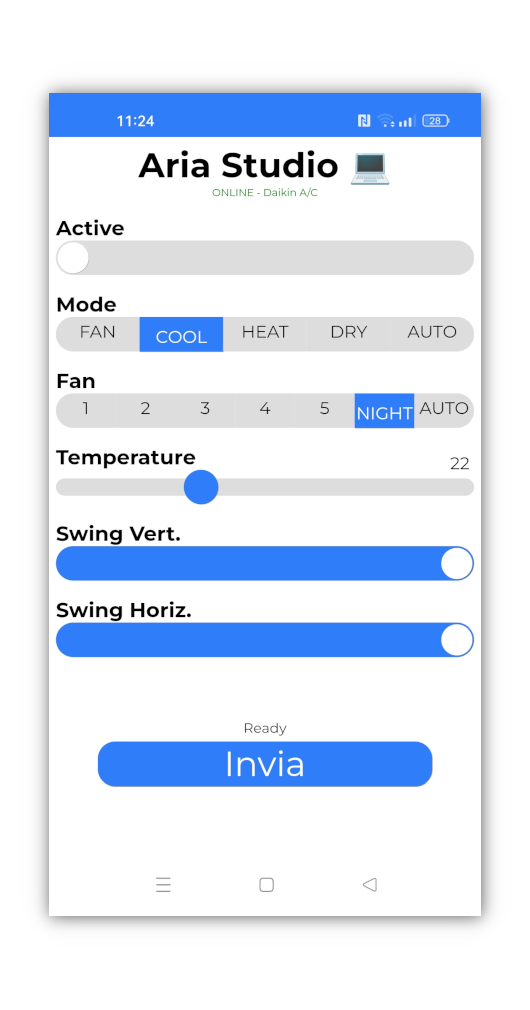
which can send messages like this:
{"mode":"DRY","swingH":false,"fan":"3","swingV":false,"temperature":21,"active":false}Also supports some rudimentary sensor reading and logging.
Build with maven: mvn install assembly:single, on target look for domoroboto-*-jar-with-dependencies.jar.
Latest build can be downloaded by clicking on the latest Action run here.
on domoroboto.conf you configure:
- your mqtt coordinates and account
- the tcp port for http requests
- user accounts (currently the password is plaintext)
on things.json you define your things. There are 4 mqtt topic involved:
statusTopic: this is the typical last will and testament, it expects ONLINE or OFFLINEcommandTopic: this is where the command is sent when the user issue a commandreplyTopic: this is where a reply is expected after a command is sent.activeTopic: this is where domoroboto check if the device is "active", that is, turned on, to show a "light up" icon (green circle).activeTopicPathlets you enter a jsonpath to extract the information. These two are optional.
attributes is an array of object defining the attributes of the device. Each time a command is issued all the attributes are available to be packed in the command. Allowed types are in defined here.
To declare how to generate the command, you can specify either:
"commandJson": true, in this case the command is generated as a json message with all attributes and their values"commandTemplate": ".."in this case the command is a handlebar template where {{attr}} is substituted with the value of attribute "attr".
To parse the reply, a resultOk pattern has to be provided, which can use unix-like wildcard (*, ? etc). If the reply received on replyTopic match the pattern, it is considered OK, otherwise the reply is shown to the user as an error.
If the thing has a single switch, an "autosend": true attribute can be used, in this case no "Send" button is generated and the switch automatically send the message (saves a click).
Sensors can be configured in sensors.json, which should be self explanatory.
Run the program with java -jar domoroboto.jar (requires java 17). You should be able to see the pages at:
http://localhost:8080/baseurl/things
http://localhost:8080/baseurl/sensors
Single things can be linked with the thing id like this: http://localhost:8080/baseurl/things/thing-id
Publishing on the internet should be done with a frontend SSH proxy.
TIP: on android, you can add the page as a shortcut in home screen to have a "native app" look and feel.