Skip to content

Conversation

@wronny
Copy link
Member

@wronny wronny commented Apr 20, 2020

as discussed in #346 I added "Move all" and "Remove all geo data" to cluster context menu at max zoom level.
Signed-off-by: wronny [email protected]

as discussed in #346 I added "Move all" and "Remove all geo data" to cluster context menu at max zoom level.
Signed-off-by: wronny <[email protected]>
@tacruc
Copy link
Collaborator

tacruc commented Apr 21, 2020

The code looks good to me, but I haven't tested. I'm not sure if I will find time before the weekend.

@wronny
Copy link
Member Author

wronny commented Apr 21, 2020

I'm not sure if I will find time before the weekend.

No worries, no hurry

@tacruc
Copy link
Collaborator

tacruc commented Apr 23, 2020

Ok tested it, works nicely. Thanks.
There is a minor thought, I'm not shure how to solve it yet.
The left click button has two behaviors:

  • more than x pictures zoom,
  • less than x pictures slideshow

The reight click botton has two different menus:

  • not max zoom level
  • max zoomlevel

I think we should synchronize them:

  1. make both depending on the number of pictures
  2. make both depinding on the zoom level
  3. make the right click menu allways the same and keep the left click action as it is.

Any thoughts on this @eneiluj @jancborchardt @wronny ?

@wronny
Copy link
Member Author

wronny commented Apr 23, 2020

thought from my point of view are:

  • currently "move" as well as "remove geo data" was only available for single photos therefore I added "move all" and "remove all geo data" for the minimum photo cluster count as possible which I was only able to identify by zoom level (at max zoom level). However this guarantee that this can only being used for photos with the same geo data.

  • due to the fact that other (outer) zoom level will combine photos from (many) different locations it don't make much sense to allow moving them all to one geo location. And in case of using it by mistake "move all" or "remove all geo data" would be a nightmare if using it form a lower zoom level if hundreds or more photos might be affected

  • I'm not sure if left and right click needs to be synchronized because from my point of view left click is some kind of fast and default behaviour and right click provide some kind of special or detailed options.

@tacruc
Copy link
Collaborator

tacruc commented Apr 23, 2020

Well, I know the details of how things are programmed and I manged to get confused by the current situation. I don't want to know, if I would be able to explain this behavior to my Grandparents.

And at least a temporally redo action would be nice anyway, or?

resolving conflict with updated master
Signed-off-by: wronny <[email protected]>
@wronny
Copy link
Member Author

wronny commented Jan 11, 2021

after a long time being offline I would like to come back to this merge request. The intend of this mr was to fill the following gap:
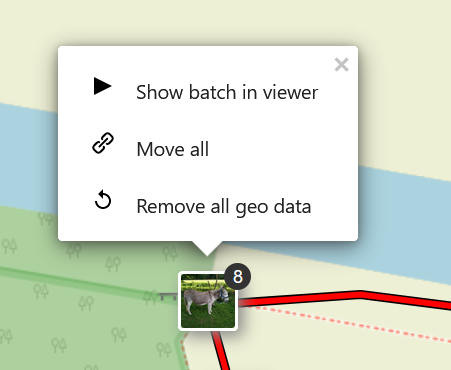
In case of having more than one photo at the same location (either because of same geo data or after placing photos on the map using a folder) there is no option available to move those batches of photos or to remove geo data for those batches of photos because the only available right-click menu items for batches of photos are "view" and "zoom in" - even at max zoom level. This has been discussed/complained in #346 as well as #416 . Therefore I added the new right-click menu items "move all" and "remove all geo data" to batches of photos at max zoom level only:
grafik
I limited this to max zoom level to have the same the behaviour as for other photos where "move" and "delete geo data" is only available for single photos. By limiting these menu items to max zoom level these menu items will be limited to the minimum size of photo batches. This also prevents from any usage by mistake at lower zoom levels.
@tacruc , @eneiluj maybe you can review and share your opinion?
thanks

@tacruc tacruc requested a review from julien-nc January 11, 2021 22:36
@aleksandrmetik
Copy link

Hello @eneiluj
Could you please help us with the review? This feature is really important for us.
Many thanks!

Copy link
Collaborator

@tacruc tacruc left a comment

Choose a reason for hiding this comment

The reason will be displayed to describe this comment to others. Learn more.

This is how I would synchronize the behaviour.

Still keep in mind #510, which might be adopted, too.

var layerId = a.layer._leaflet_id;
a.layer.unbindPopup();
var popupContent = this._map.photosController.getPhotoClusterContextmenuPopupContent(layerId);
var availZoomLevels = this._map.getMaxZoom() - this._map.getZoom();
Copy link
Collaborator

Choose a reason for hiding this comment

The reason will be displayed to describe this comment to others. Learn more.

var groupEditEnabled = a.layer.getChildCount() <= 20 || this._map.getZoom() === this._map.getMaxZoom()

},

getPhotoClusterContextmenuPopupContent: function(layerId) {
getPhotoClusterContextmenuPopupContent: function (layerId, availZoomLevels) {
Copy link
Collaborator

Choose a reason for hiding this comment

The reason will be displayed to describe this comment to others. Learn more.

getPhotoClusterContextmenuPopupContent: function (layerId, availZoomLevels, groupEditEnabled) {

' <span>' + zoomText + '</span>' +
' </button>' +
' </li>';
}else{
Copy link
Collaborator

Choose a reason for hiding this comment

The reason will be displayed to describe this comment to others. Learn more.

if (groupEditEnabled) {

@kds69
Copy link

kds69 commented Apr 12, 2022

Can someone please review, this is very annoying missing feature and fix would be great.

@tacruc
Copy link
Collaborator

tacruc commented Apr 13, 2022

Please, don't as it would there is #510 nearly finished. So this needs to be ported to #510.

@tacruc tacruc closed this Apr 13, 2022
Sign up for free to join this conversation on GitHub. Already have an account? Sign in to comment

Labels

None yet

Projects

None yet

Development

Successfully merging this pull request may close these issues.

4 participants