Skip to content

Conversation

@backportbot-nextcloud
Copy link

backport of #23606

@MorrisJobke
Copy link
Member

@rullzer @nickvergessen 20.0.1 or 20.0.2?

@MorrisJobke MorrisJobke added the 4. to release Ready to be released and/or waiting for tests to finish label Oct 21, 2020
@nickvergessen
Copy link
Member

Hmm I think it would be nice to fix, but it didn't seem to have a huge impact, just a log message generated?

@faily-bot
Copy link

faily-bot bot commented Oct 21, 2020

🤖 beep boop beep 🤖

Here are the logs for the failed build:

Status of 34418: failure

mysql8.0-php7.2

Show full log
There were 2 warnings:

1) Test\Files\ViewTest::testRenameFailDeleteTargetKeepSource
Trying to configure method "writeStream" which cannot be configured because it does not exist, has not been specified, is final, or is static

2) Test\Files\ViewTest::testCopyFailDeleteTargetKeepSource
Trying to configure method "writeStream" which cannot be configured because it does not exist, has not been specified, is final, or is static

--

There was 1 failure:

1) Test\Files\Cache\CacheTest::testBogusPaths with data set #3 ('bogus//', 'bogus')
Failed asserting that 0 is greater than 0.

/drone/src/tests/lib/Files/Cache/CacheTest.php:629

acceptance-app-files

  • tests/acceptance/features/app-files.feature:108
Show full log
  Scenario: show shares                                               # /drone/src/tests/acceptance/features/app-files.feature:108
    Given I am logged in                                              # LoginPageContext::iAmLoggedIn()
    And I share the link for "welcome.txt"                            # FilesAppSharingContext::iShareTheLinkFor()
    When I open the "Shares" section                                  # AppNavigationContext::iOpenTheSection()
    Then I see that the current section is "Shares"                   # AppNavigationContext::iSeeThatTheCurrentSectionIs()
    Then I see that the file list contains a file named "welcome.txt" # FileListContext::iSeeThatTheFileListContainsAFileNamed()
      Row for file welcome.txt in file list could not be found after 100 seconds (NoSuchElementException)

@rullzer rullzer merged commit 0b46ebe into stable20 Oct 24, 2020
@rullzer rullzer deleted the backport/23606/stable20 branch October 24, 2020 08:53
@MichaIng
Copy link
Member

Luckily I found this. Would have been good to have in 20.0.1 IMO, irritates admins and will most likely lead to more reports on forum and here. Even if it does not cause problems, a known/fixable often repeating error message in a stable release is never good, already for showing up IMO. It seems to show up once every time a user opens it's personal settings and once for every user when opening the users overview and a few other cases where storage info is gathered, as I saw a few different variations of the error, other scripts involved. This can accumulate to a huge amount of "red" lines in log, distracting from actual/important error messages and complicating debugging.

I know too late, just wanted to share my opinion at some point to give error messages themselves (regardless if those are related to actual issues) a higher priority to get fixed or muted.

@DasSkelett
Copy link

Interesting. On my system it causes 503s on every request in the settings, and thus keeps me from accessing the settings at all.

Would have been nice if this fix would have been included in 20.0.1, but well, too late.

@MichaIng
Copy link
Member

MichaIng commented Oct 27, 2020

@DasSkelett
Have you tried to apply the fix manually to your /path/to/nextcloud/lib/private/legacy/OC_Helper.php? This would also assure that it is really the same issue, while your symptoms are heavier.

@nickvergessen
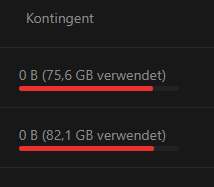
While I can confirm that the change fixes the error logs, I now see another visual bug on the users overview page:
used

Seems to be not related to this patch but shouldn't this show something different than 0 B when no quota is set? I didn't have a look at this for a long time but have a shade of a memory that I saw this issue before, so I should open a new issue about this.

@DasSkelett
Copy link

@MichaIng I applied the patch manually now, and the settings are accessible again. So it's indeed the same issue, and I found out why it resulted in 502s (not 503s, actually) for me:

I found the following in the nginx error log:

2020/10/29 16:49:41 [error] 83#83: *20792 upstream sent too big header while reading response header from upstream, client: 2001:db8::1, server: nc.example.com, request: "GET /settings/user HTTP/2.0", upstream: "fastcgi://[2001:db8:1000:1000::2]:9000", host: "nc.example.com", referrer: "https://nc.example.com/apps/dashboard/"

I guess php-fpm includes error messages / stack traces in the response headers? Which then got too big for nginx to read, so it goes 502.

After some search I've done the following change to the nginx config:

-    fastcgi_buffers 64 4K;
+    fastcgi_buffers 16 32k;
+    fastcgi_buffer_size 64k;
+    fastcgi_busy_buffers_size 64k;

Which makes the requests succeed again and "only" spams the error in the log.

Note that the fastcgi_buffers 64 4K; are taken from the example configuration of the Nextcloud docs, so maybe the config should be adjusted to avoid others facing the same problem.
If I can find more info about the nginx fastcgi buffer settings and their "ideal" values (at least in default setups) I might propose a change to the docs.

@MorrisJobke
Copy link
Member

Note that the fastcgi_buffers 64 4K; are taken from the example configuration of the Nextcloud docs, so maybe the config should be adjusted to avoid others facing the same problem.
If I can find more info about the nginx fastcgi buffer settings and their "ideal" values (at least in default setups) I might propose a change to the docs.

cc @josh4trunks

@josh4trunks
Copy link
Contributor

josh4trunks commented Oct 30, 2020

@DasSkelett
I'm not sure where the original logic for the doc's fastcgi_buffers setting comes from, but if you find a good reason to change them then a PR would be welcomed.

@MichaIng
Copy link
Member

MichaIng commented Oct 30, 2020

We're going a bid off topic here, however, to give some resource about Nginx buffer settings, which can be used as a basis for a PR: https://nginx.org/en/docs/http/ngx_http_fastcgi_module.html#fastcgi_buffer_size

If I understand it correctly:

  • fastcgi_buffer_size is the only relevant value here, as it limits the buffer size allowed for the "first part"/header of the response.
  • fastcgi_buffers can only have an effect (on this particular error) when number * size undershoots the fastcgi_buffer_size, as multiple buffers can be used for one response, so I guess also multiple buffers can be used for the "first part"/header of the response?
    Actually, since the page size could be higher than 4k, it would be great if the number of buffers could be raised without setting the size, so allowing 8k if this is the systems memory page size. But since there is no dedicated setting, not sure if this is possible.
  • At least fastcgi_busy_buffers_size definitely can span across multiple buffers. As it defaults to the size of two buffers, it does not need to be set to 64k if one buffer is set to 32k, so then better skip it.
    However, it could make sense if the amount of buffers is raised, e.g. current Nextcloud Nginx example 64 buffers compared to Nginx default 8 buffers. I don't 100% understand the effect of the this busy buffer(s) on the actual response sending, however, if much more buffers are available if seems reasonable to raise the number of possibly busy buffers as well to not have a bottleneck on that side?

@DasSkelett
Are you going to open an issue on the documentation repo as you first found out and thought about this topic? Otherwise I will. Before opening an actual PR I'd:

  • Verify that fastcgi_buffer_size (response headers size) can span across multiple buffers defined in fastcgi_buffers. If so, each buffer size could be left small while only the amount of buffers needs to be raised, to have a most efficient memory usage.
  • Check whether it's possible to set only the amount of buffers while leaving it's size fallback to the memory page size as default. AFAIK, the finally used memory is always amount * page size at minimum, so setting it to 4k while having a page size of 8k would mean half of the allocated memory is not really used. The amount of buffers in the example should then still be large enough to fully buffer most usual Nextcloud responses + error messages with 4k page size, most likely this is where the fastcgi_buffers 64 4k originally came from.
  • Discuss whether raising fastcgi_busy_buffers_size has any benefit, e.g. set it to 25% of buffer number * 4k or leave default of 2 * size.

@rullzer rullzer mentioned this pull request Nov 9, 2020
Sign up for free to join this conversation on GitHub. Already have an account? Sign in to comment

Labels

4. to release Ready to be released and/or waiting for tests to finish bug

Projects

None yet

Development

Successfully merging this pull request may close these issues.

8 participants