Basic clear #30
Basic clear #30
Conversation


Addresses nushell#28

Succeeds in providing a clear new screen for both the line editing and
reverse search mode.
Solution is conservative and prints more newlines than strictly
necessary as solutions with scrolling didn't seem to work as expected.

| stdout.queue(Print("\n"))?; | ||
| } | ||
| stdout.queue(MoveTo(0, 0))?; | ||
| stdout.flush()?; |

There was a problem hiding this comment.
You might be able to run this crossterm command for a clear in one step: https://docs.rs/crossterm/0.19.0/crossterm/terminal/enum.ClearType.html
There was a problem hiding this comment.
ClearType::All only blanks the currently visible screen, so you cannot scroll back up to the previous output as with bash et al.

|
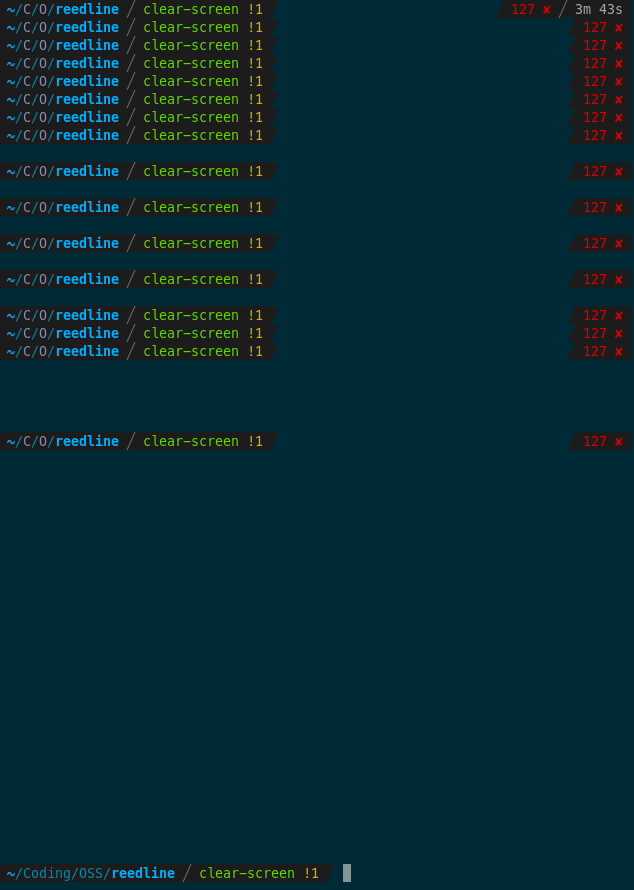
With bash or zsh under gnome-terminal the amount of whitespace used by The With my current draft you would have to scroll over one complete page of whitespace to get back to the old stuff. |

|
@sholderbach - sounds good. Once we fix the conflict fixed we can land. |
|
Merging with the fancy prompt currently has some weird interaction with my requirement to repaint the line_buffer content at the beginning of |

The prompt indicator gets drawn over when searching the history so we
need to restore it when done searching.
Resolves the issues of redrawing the prompt in combination with screen
clearing commands 'clear' and Ctrl+L
|
Combined with the fix from @jasonrhansen pulled from #31 and a slight reordering of my redraw, the prompt remains correct in all known single-line circumstances. |
|
Sounds good. Let's land, then see if we can refactor the prompt parts |


3 participants


Addresses #28
Succeeds in providing a clear new screen for both the line editing and
reverse search mode.
Solution is conservative and prints more newlines than strictly
necessary as solutions with scrolling didn't seem to work as expected and exactly computing the length of the current written space is not trivial as multiline support is not fully settled yet.