Skip to content
Merged
Show file tree
Hide file tree
Changes from all commits
Commits
File filter

Filter by extension

Filter by extension

Conversations
Failed to load comments.
Loading
Jump to
Jump to file
Failed to load files.
Loading
Diff view
Diff view
6 changes: 4 additions & 2 deletions _topic_map.yml
Original file line number Diff line number Diff line change
Expand Up @@ -171,9 +171,11 @@ Name: Updating clusters
Dir: updating
Distros: openshift-origin,openshift-enterprise
Topics:
- Name: Updating a cluster to a minor version from the web console
- Name: Updating a cluster between minor versions
File: updating-cluster-between-minor
Copy link

Choose a reason for hiding this comment

The reason will be displayed to describe this comment to others. Learn more.

i think this definition about minor version and within a minor version need to be unified.
in v4.1(https://docs.openshift.com/container-platform/4.1/updating/updating-cluster.html), minor version upgrade means 4.1.0-4.1.2,
but in this pr, seems minor version upgrade refer to 4.1-4.2.

Copy link
Contributor Author

Choose a reason for hiding this comment

The reason will be displayed to describe this comment to others. Learn more.

I'll open a separate PR to fix that language in 4.1.

Copy link
Contributor Author

Choose a reason for hiding this comment

The reason will be displayed to describe this comment to others. Learn more.

Here's the 4.1 only PR to change these titles: #17631

- Name: Updating a cluster within a minor version from the web console
File: updating-cluster
- Name: Updating a cluster to a minor version by using the CLI
- Name: Updating a cluster within a minor version by using the CLI
File: updating-cluster-cli
- Name: Updating a cluster that includes RHEL compute machines
File: updating-cluster-rhel-compute
Expand Down
15 changes: 7 additions & 8 deletions modules/understanding-upgrade-channels.adoc
Original file line number Diff line number Diff line change
@@ -1,11 +1,12 @@
// Module included in the following assemblies:
//
// updating/updating-cluster.adoc
// updating/updating-cluster-cli.adoc
// updating/updating-cluster-rhel-compute.adoc
// updating/updating-disconnected-cluster.adoc
// * updating/updating-cluster.adoc
// * updating/updating-cluster-between-minor.adoc
// * updating/updating-cluster-cli.adoc
// * updating/updating-cluster-rhel-compute.adoc
// * updating/updating-disconnected-cluster.adoc

[id="understanding_upgrade_channels_{context}"]
[id="understanding-upgrade-channels_{context}"]
Copy link
Contributor

Choose a reason for hiding this comment

The reason will be displayed to describe this comment to others. Learn more.

Not critical, just wondering whether we try to avoid changing anchor links in a version after it's been released.

Copy link
Contributor Author

Choose a reason for hiding this comment

The reason will be displayed to describe this comment to others. Learn more.

It's an error that I regret not catching during peer review. There was a lot of drama in the mod docs repo over how much using malformed anchor IDS can break automation. There are also no other links to this content in the collection.

= Understanding {product-title} upgrade channels

In {product-title} 4.1, Red Hat introduced the concept of upgrade channels for
Expand All @@ -19,6 +20,4 @@ have no impact on the version of the cluster you install; the
`openshift-install` binary for a given patch level of {product-title} always
installs that patch level.

See link:https://access.redhat.com/articles/4495171[OpenShift 4.2 Upgrades
phased roll out] for more information on the types of updates and upgrade
channels.
See link:https://access.redhat.com/articles/4495171[OpenShift 4.2 Upgrades phased roll out] for more information on the types of updates and upgrade channels.
5 changes: 5 additions & 0 deletions modules/update-service-overview.adoc
Original file line number Diff line number Diff line change
Expand Up @@ -33,6 +33,11 @@ architectures as well as other component packages. After the pipeline confirms
the suitability of a release, the {product-title} update service notifies you
that it is available.

[IMPORTANT]
====
Because the update service displays all valid updates, you must not force an update to a version that the update service does not display.
====

////
The interaction between the registry and the {product-title} update service is different during
bootstrap and continuous update modes. When you bootstrap the initial
Expand Down
2 changes: 1 addition & 1 deletion modules/update-upgrading-cli.adoc
Original file line number Diff line number Diff line change
Expand Up @@ -46,7 +46,7 @@ $ oc get clusterversion -o json|jq ".items[0].spec"
+
[IMPORTANT]
====
For production clusters, you must subscribe to the `stable-4.2` channel.
For production clusters, you must subscribe to a `stable-*` channel.
====

. View the available updates and note the version number of the update that
Expand Down
45 changes: 39 additions & 6 deletions modules/update-upgrading-web.adoc
Original file line number Diff line number Diff line change
@@ -1,14 +1,22 @@
// Module included in the following assemblies:
//
// * updating/updating-cluster.adoc
// * updating/updating-cluster-between-minor.adoc

ifeval::["{context}" == "updating-cluster"]
:within:
endif::[]
ifeval::["{context}" == "updating-cluster-between-minor"]
:between:
endif::[]

[id="update-upgrading-web_{context}"]
= Updating a cluster by using the web console

If updates are available, you can update your cluster from the web console.

You can find information about available {product-title} advisories and updates
link:https://access.redhat.com/downloads/content/290/ver=4.1/rhel---7/4.1.0/x86_64/product-errata[in the errata section]
link:https://access.redhat.com/downloads/content/290/ver=4.2/rhel---7/4.2.0/x86_64/product-errata[in the errata section]
of the Customer Portal.

.Prerequisites
Expand All @@ -19,17 +27,42 @@ of the Customer Portal.

. From the web console, click *Administration* > *Cluster Settings* and review
the contents of the *Overview* tab.
.. For production clusters, ensure that the *CHANNEL* is set to `stable-4.2`.
. For production clusters, ensure that the *CHANNEL* is set to the correct channel for
ifdef::within[]
the version that you want to update to,
endif::within[]
ifdef::between[]
your current minor version,
endif::between[]
such as `stable-{product-version}`.
+
[IMPORTANT]
====
For production clusters, you must subscribe to the `stable-4.2` channel.
For production clusters, you must subscribe to a stable-* or fast-* channel.
====
.. If the *UPDATE STATUS* is not *Updates Available*, you cannot upgrade your
** If the *UPDATE STATUS* is not *Updates Available*, you cannot upgrade your
cluster.
.. The *DESIRED VERSION* indicates the cluster version that your cluster is running
** The *DESIRED VERSION* indicates the cluster version that your cluster is running
or is updating to.

. Click *Updates Available*, select a version to update to, and click *Update*.
. Click *Updates Available*, select
ifdef::within[]
a version to update to,
endif::within[]
ifdef::between[]
the highest available version
Copy link
Member

Choose a reason for hiding this comment

The reason will be displayed to describe this comment to others. Learn more.

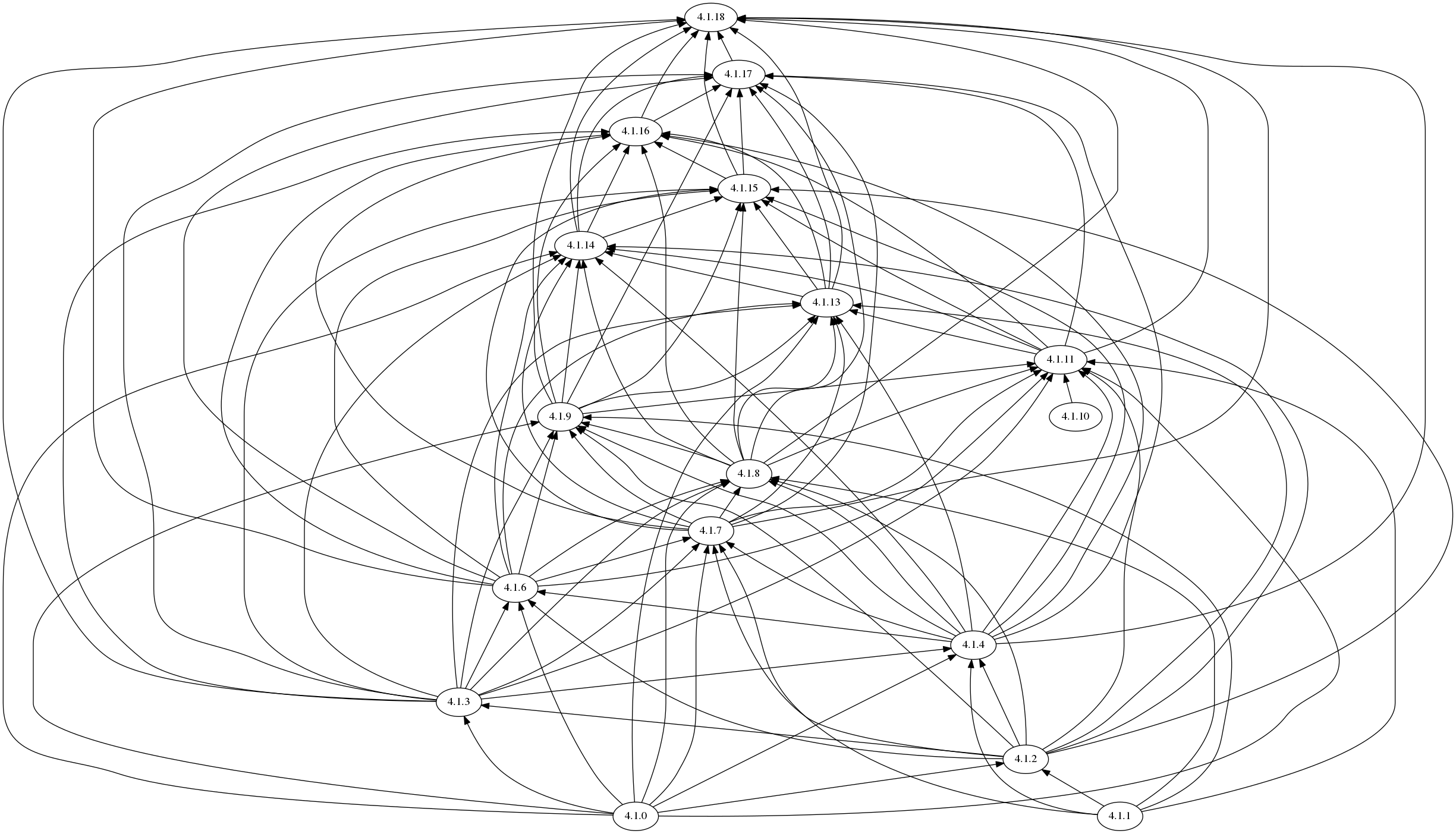
One hop does not guarantee you get to a good jumping-off point. For example, the current stable-4.1 graph is:

$ curl -sH 'Accept:application/json' 'https://api.openshift.com/api/upgrades_info/v1/graph?channel=stable-4.1' | ~/src/openshift/cincinnati/hack/graph.sh | dot -Tpng >graph.png

using graph.sh to generate:

graph

With 4.1.18 as a jumping-off point (as we're currently planning), folks on 4.2.0 would have to go 4.2.0->4.2.14->4.1.18 or similar. Anyone still running the guarded 4.1.10 would have to go 4.1.10->4.1.11->4.1.18 or similar. We probably want to say "and keep upgrading until there are no recommended upgrades left" somewhere for this use-case.

Copy link
Contributor Author

Choose a reason for hiding this comment

The reason will be displayed to describe this comment to others. Learn more.

Is there a better way to get that graph and see what updates are available? "and keep upgrading until there are no recommended upgrades left" isn't the best user experience.

Copy link
Member

Choose a reason for hiding this comment

The reason will be displayed to describe this comment to others. Learn more.

Not at the moment, but maybe in the mid-term. Eventual UX will be "turn on auto-upgrades, set your target channel, and we'll route you through the graph".

Copy link
Contributor Author

Choose a reason for hiding this comment

The reason will be displayed to describe this comment to others. Learn more.

When that's about to happen, please let me know.

endif::between[]
and click *Update*.
The *UPDATE STATUS* changes to `Updating`, and you can review the progress of
the Operator upgrades on the *Cluster Operators* tab.

ifdef::between[]
. After the update completes and the Cluster Version Operator refreshes the available updates, check if more updates are available in your current channel.
+
--
** If updates are available, continue to perform updates in the current channel until you can no longer update.
** If no updates are available, change the *CHANNEL* to the stable-* or fast-* channel for the next minor version, and update to the version that you want in that channel.
--
+
You might need to perform several intermediate updates until you reach the version that you want.
endif::between[]
24 changes: 24 additions & 0 deletions updating/updating-cluster-between-minor.adoc
Original file line number Diff line number Diff line change
@@ -0,0 +1,24 @@
[id="updating-cluster-between-minor"]
= Updating a cluster between minor versions
include::modules/common-attributes.adoc[]
:context: updating-cluster-between-minor

toc::[]

You can update, or upgrade, an {product-title} cluster between minor versions.

[NOTE]
====
Because of the difficulty of changing update channels by using `oc`, use the web console to change the update channel. It is recommended to complete the update process within the web console. You can follow the steps in xref:../updating/updating-cluster-cli.adoc#updating-cluster-cli[Updating a cluster within a minor version by using the CLI] to complete the update after you change to a {product-version} channel.
====
Copy link

Choose a reason for hiding this comment

The reason will be displayed to describe this comment to others. Learn more.

Can i understand this "user can only upgrade to a minor version through web console"? why not cli supported in minor version upgrade?
and for a 4.1.z version, how user can upgrade the cluster to 4.2? i ask this because i did not see any available update for both 4.1.18 and 4.1.20 when set channel to stable-4.2?

Copy link
Contributor Author

Choose a reason for hiding this comment

The reason will be displayed to describe this comment to others. Learn more.

I've gotten conflicting messages about whether or not it's required to use --force from the CLI. After update between 4.1 and 4.2 is working as intended, I'm happy to revisit.

There's an ongoing discussion about how the update from 4.1.z to 4.2 is supposed to work on the sbr-shift-list, and I've asked Eric to let me know when there's a plan to move forward.

Copy link
Contributor

Choose a reason for hiding this comment

The reason will be displayed to describe this comment to others. Learn more.

We don't want customers forcing upgrades, we want them using the graphs we provide.
That said we need to document to customers how to use the force option, and clearly explain that its not a recommended decision to do this.

Copy link
Contributor

Choose a reason for hiding this comment

The reason will be displayed to describe this comment to others. Learn more.

Customers can update from cli or web console, the web console (or our Cincinnati graph are the ways you know what acceptable upgrades are).

Copy link
Contributor Author

Choose a reason for hiding this comment

The reason will be displayed to describe this comment to others. Learn more.

I'm happy to add some conceptual material and warnings about the existence of the --force option and emphasize the need to use one of the supported options in the graph. We're only adding steps that we actually want users to take. (If I add steps about how to use the --force option, you know people are going to follow them.)

Copy link
Contributor Author

Choose a reason for hiding this comment

The reason will be displayed to describe this comment to others. Learn more.

Can i understand this "user can only upgrade to a minor version through web console"? why not cli supported in minor version upgrade?
and for a 4.1.z version, how user can upgrade the cluster to 4.2? i ask this because i did not see any available update for both 4.1.18 and 4.1.20 when set channel to stable-4.2?

@jiajliu, Trevor and I talked about this for awhile. It's because you need to change channel from the stable-4.1 to a 4.2 channel to upgrade, and there's not a good way to do that in the CLI. Instead of changing channel in the UI and then swapping to the CLI to finish, we're just staying in the UI.


.Prerequisites

* Access to the cluster as a user with `admin` privileges.
See xref:../authentication/using-rbac.adoc[Using RBAC to define and apply permissions].

include::modules/update-service-overview.adoc[leveloffset=+1]

include::modules/understanding-upgrade-channels.adoc[leveloffset=+1]

include::modules/update-upgrading-web.adoc[leveloffset=+1]
5 changes: 2 additions & 3 deletions updating/updating-cluster-cli.adoc
Original file line number Diff line number Diff line change
@@ -1,12 +1,11 @@
[id="updating-cluster-cli"]
= Updating a cluster to a minor version by using the CLI
= Updating a cluster within a minor version by using the CLI
include::modules/common-attributes.adoc[]
:context: updating-cluster-cli

toc::[]

You can update, or upgrade, an {product-title} cluster by using the
OpenShift CLI (`oc`).
You can update, or upgrade, an {product-title} cluster within a minor version by using the OpenShift CLI (`oc`).

include::modules/update-service-overview.adoc[leveloffset=+1]

Expand Down
5 changes: 2 additions & 3 deletions updating/updating-cluster.adoc
Original file line number Diff line number Diff line change
@@ -1,12 +1,11 @@
[id="updating-cluster"]
= Updating a cluster to a minor version from the web console
= Updating a cluster within a minor version from the web console
include::modules/common-attributes.adoc[]
:context: updating-cluster

toc::[]

You can update, or upgrade, an {product-title} cluster to a minor version by
using the web console.
You can update, or upgrade, an {product-title} cluster by using the web console.

.Prerequisites

Expand Down