What the piscine teaches you is the following:
- Vim or Visual Studio Code (depending on which one you use)
- iTerm
- GitHub
- Using an iMac well =)
- Discord
- Stack Overflow
and more below 🔻
# C Language
	The primary language learned at the 42's Piscine is C: dealing with variables,
	pointers, memory allocation, macros, as well as creating functions and programs,
	including the use and creation of libraries and Makefiles.

# Shell
	The first two days of the bootcamp are dedicated to learning basic to intermediate
	shell commands to seamlessly navigate through the terminal.

# Git
	All projects are submitted via a remote git repository, which demands students to
	be at ease with such a system.
# Self-Learning and Proactiveness
	At 42, self-learning is at the core of its peer to peer learning methodology. There
	are no teachers whatsoever; the learning process is based on googling, enquiring
	your classmates, and empirical knowledge, each student learning at their own pace.

# Teamwork
	On weekends, a 48h team project called "Rush" is proposed: a 3-5 member group randomly
	chosen by the school's system must collaboratively develop a fully running application.
	The major challenge here is to equalize the different knowledge levels while finding a
	common work methodology that allows all team members to contribute to the project.

# Time Management and Resiliency
	The school is open 24/7. Thus, the so-called "pisciners" are free to work whenever
	they want, which demands excellent time management skills and resiliency for not
	"drowning" amid the massive load of work demanded by the non-stop 28-day program.
and so many soft skills!
Feel stuck on a question?
Do either or all of the following:
- Ask anyone and everyone and show them what's happening.
- Check the Discord by either typing your problem in the right channel or searching the whole server in the top right corner of the Discord application.
- Google Search the specific problem.
- Check out specific sites like GitHub and Stack Overflow.
Recommend best setup you should have on your desktop when you are on 42 Campus:
- 1st FireFox Browser Window (42 Intra, Discord & Nuclino Tabs)
- 2nd Browser Window (To Research The Project & any GitHub Tabs)
- 1st iTerm Window (To do your C Project in)
- 2nd iTerm Window (For Normintette and Compiling the C Project)
All C projects at 42 require you to have a header on-top of your .c file.
To create this header, you can do either of the following:
- In the .c file, type in
:Stdheaderor use the keyboard commandsFN+ESC+F1
This Github Repo uses only 3 C System Standard Libraries:
1️⃣ #include <unistd.h> - for the write function.
2️⃣ #include <stdio.h> - for the printf function.
3️⃣ #include <stdlib.h> - for the NULL function.
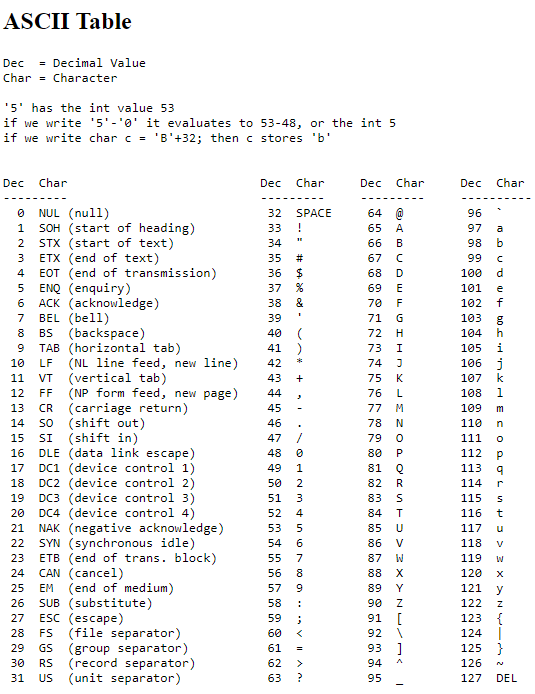
When looking for characters and symbols in C, you can use decimals to locate them in your .c program/function.
write(1, &c, 1);
Write takes the fd (file descriptor) which is either:
- 0 for stdin (standard input)
- 1 for stdout (standard output) - in the Piscine, you will always use 1.
- 2 for stderr (standard error)
The middle part of write is what it will print out.
The third part of write is how many spaces of what your printing will take up.
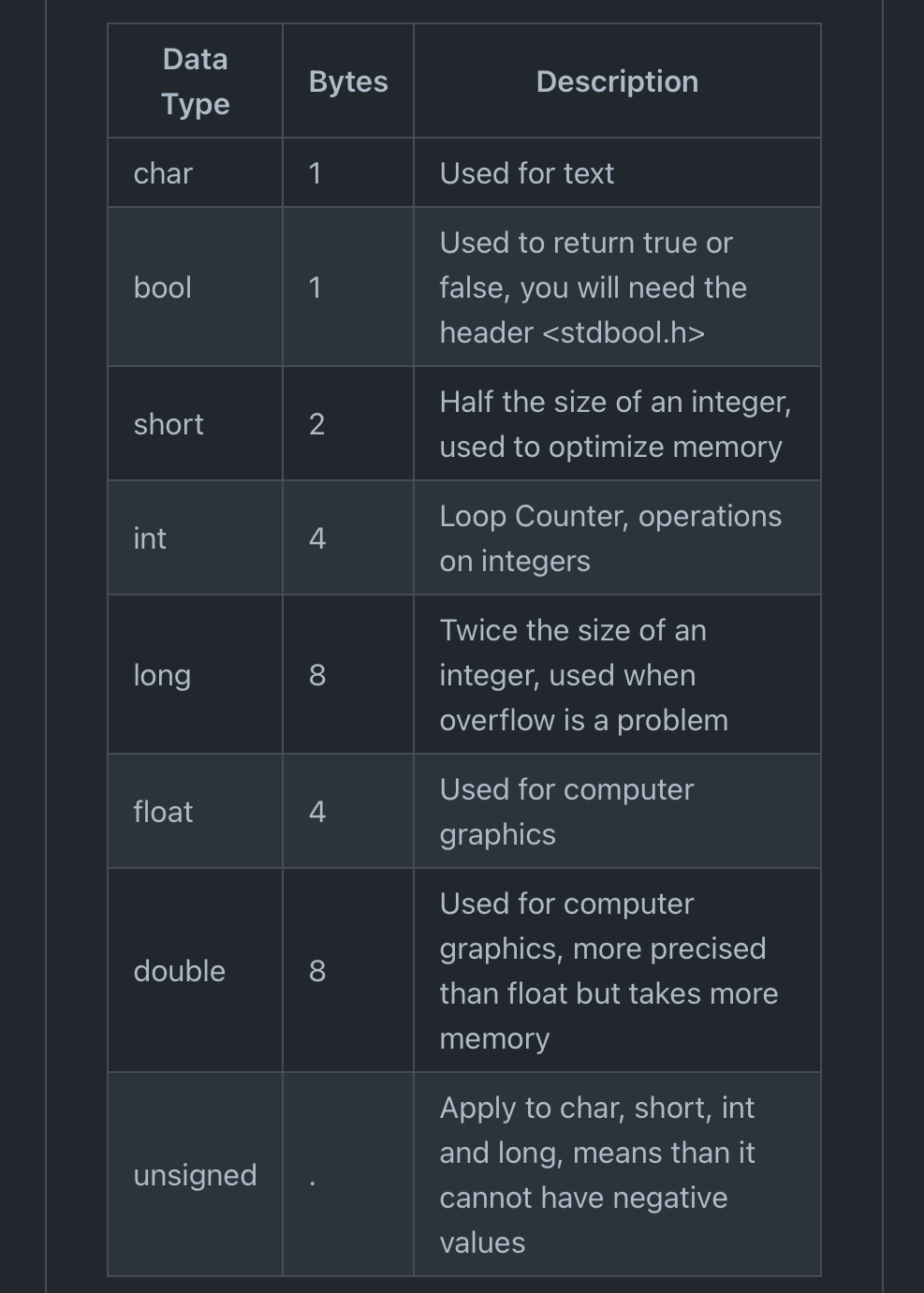
int main(void)
We use int main to compile our C projects.
We use void because we are not taking any arguments, meaning we are not writing directly in the command line, but rather printing our .c program.
In C, you can comment in your code if you want to leave any notes/information in the code. The program/function will skip over your notes and not
run it when it complies.
To comment your code, you can do either of the following:
// <your comment> - double stroke (//) is for commenting single lines.
/* <your comment> */ - (/* */) is for commenting multiple lines.
To compile your program/function, be in the folder of your program/function and type in the following:
gcc -Wall -Wextra -Werror 'filename.c'
then type the following if its a function (e.g. ft_putchar.c):
./a.out
or type the following if its a program (e.g. int main(int argc, char **argv)):
./a.out 'str1' 'str2'
- [ex00: ft_putchar] - Print a Character
- [ex01: ft_print_alphabet] - Print the Alphabet
- [ex02: ft_print_reverse_alphabet] - Print the Alphabet in Reverse
- [ex03: ft_print_numbers] - Print the Numbers 0 to 9
- [ex04: ft_is_negative] - Print the Numbers 9 to 0 in Reverse
- [ex05: ft_print_comb] - Combine Numbers into Different Double Combinations
Note
ex00 - ex05 is the mininum needed to pass C00.
- [ex00: ft_ft] - Make a Pointer to 42
- [ex01: ft_ultimate_ft] - Make a Pointer to a Pointer to a...to 42
- [ex02: ft_swap] - Swap Two Values, Using a Temporary Variable
- [ex03: ft_div_mod] - Use Div and Mod to Return a Value
- [ex04: ft_ultimate_div_mod] - Store Values, Swap Them, use Div and Mod
- [ex05: ft_putstr] - Write a String
- [ex06: ft_strlen] - Get the Length of a String
Note
ex00 - ex06 is the mininum needed to pass C01.
- [ex00: ft_strcpy] - Copy a String
- [ex01: ft_strncpy] - String Copy With an Unsigned Int
- [ex02: ft_str_is_alpha] - Conditional Statements using Arrays
- [ex03: ft_str_is_numeric] - Check a String is Numbers
- [ex04: ft_str_is_lowercase] - Check a String is Lowercase
- [ex05: ft_str_is_uppercase] - Check a String is Uppercase
- [ex06: ft_str_is_printable] - Check a String is Printable
- [ex07: ft_strupcase] - Make a String Uppercase
- [ex08: ft_strlowcase] - Make a String Lowercase
Note
ex00 - ex08 is the mininum needed to pass C02.
- [ex00: ft_strcmp] - Compare Two Strings, Returning a Value
- [ex01: ft_strncmp] - Compare Two Strings, Returning a Value, Using Unsigned Ints
- [ex02: ft_strcat] - Concatanate Two Strings
- [ex03: ft_strncat] - Concatanate Two Strings, Using Unsigned Ints
Note
ex00 - ex03 is the mininum needed to pass C03.
- [ex00: ft_strlen] - Get the Length of a String
- [ex01: ft_putstr] - Print a String
- [ex02: ft_putnbr] - Print Any Number Within The Max / Min Int
Note
ex00 - ex02 is the mininum needed to pass C04.
- [ex00: ft_iterative_factorial] - Create a Program that Generates Iterative Factorials
- [ex01: ft_recursive_factorial] - Generate Recursive Factorials
- [ex02: ft_iterative_power] - Generate Iterative Powers
- [ex03: ft_recursive_power] - Generate Recursive Powers
- [ex04: ft_fibonacci] - Generate the Fibbonnacci Sequence
- [ex05: ft_sqrt] - Find the Square Root of a Given Number
Note
ex00 - ex05 is the mininum needed to pass C05.
- [ex00: ft_print_program_name] - Print the Name of a Program
- [ex01: ft_print_params] - Print Parameters of a Program
- [ex02: ft_rev_params] - Print Parameters of a Program in Reverse
Note
ex00 - ex02 is the mininum needed to pass C06.
- [ex00: ft_strdup] - Duplicate a String
- [ex01: ft_range] - Return a Range
- [ex02: ft_ultimate_range] - Return the Length of a Range
- [ex03: ft_strjoin] - Join Two Strings Together
Note
ex00 - ex03 is the mininum needed to pass C07.
Note
The exam will start from Level 0 and with each question you answer correctly, the exam will move to the next question.
At every exam you will restart at a different question starting from Level 0.
Norminette is not in the exam.
| Piscine Exam | ||||||||||||||||||||||||||||||||||||||||||||||||||||||||||||||||||||||||||||||||||||||||||||||||
|---|---|---|---|---|---|---|---|---|---|---|---|---|---|---|---|---|---|---|---|---|---|---|---|---|---|---|---|---|---|---|---|---|---|---|---|---|---|---|---|---|---|---|---|---|---|---|---|---|---|---|---|---|---|---|---|---|---|---|---|---|---|---|---|---|---|---|---|---|---|---|---|---|---|---|---|---|---|---|---|---|---|---|---|---|---|---|---|---|---|---|---|---|---|---|---|---|
|
    login -> exam
    password -> exam
⌨️ Type examshell in terminal.
login -> your 42 intra username (eg. prossi)
pasword -> your password
In the examshell, you have only the following 3 commands:
-
status- See How Long You Have Left -
grademe- Grade Your Project -
finish- Stop Exam
Open new terminal
    You can find your exam subject in the directory subject
    Then you can see directory Rendu. It is your repository.
    You must create the directory named by the project, create .c and/or .h and start working.
When you are ready to submit, go into /rendu and push the directory by doing the following:
1. git add .
2. git commit -m "done"
3. git push
4. After the git push, type `grademe`
Tip
Practice the exam just like you would in the real exam using this tool - Exam Practice Tool
Tip
Utilise External Tools and Resources:
🫂 Talking To Your Peers
🖥️ ChatGPT
📮 Stack Overflow
💤 42 Slack
🗣️ Your Own 42 Piscine Discord Server (or any other communication tools used in the Piscine)
🧠 Check Other Github Accounts for their logic as well.
⌨️ Remember To Norminette Consistently.
# 42_piscine