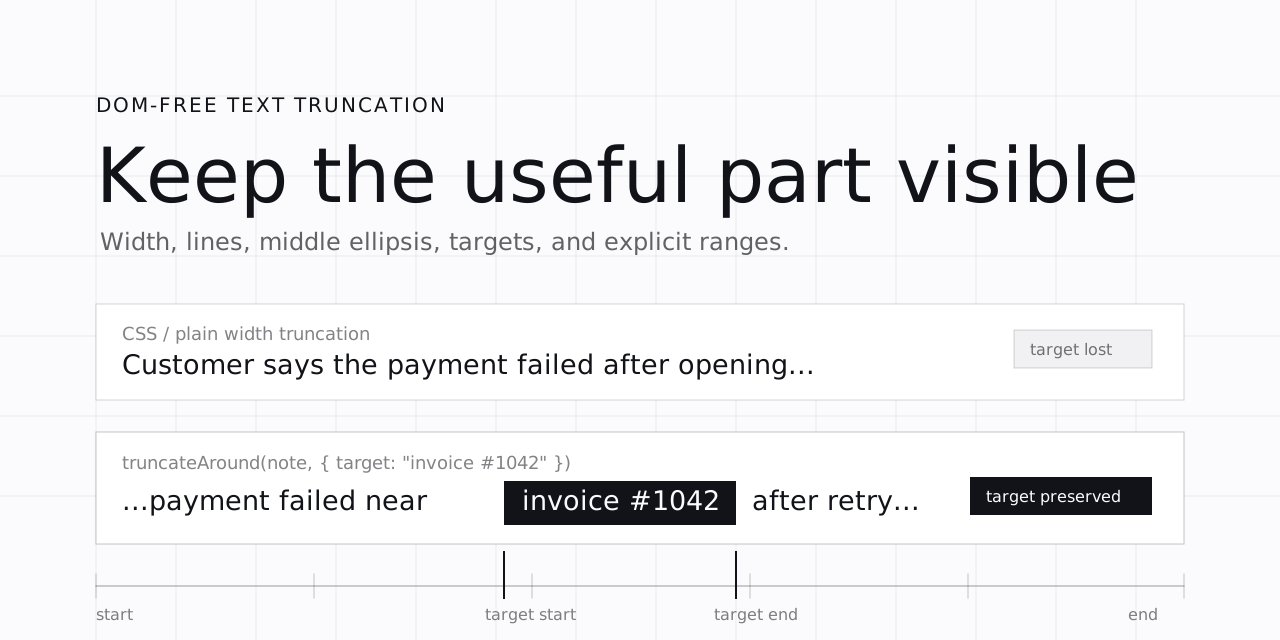


DOM-free, grapheme-safe text truncation for JavaScript and TypeScript, powered by @chenglou/pretext. Fit copy by pixel width, line count, target string, explicit range, or measured height without layout reads.
Use it when CSS ellipsis is too blunt: search snippets, support queues, command palettes, log rows, table cells, filenames, URLs, and previews where the important text can be buried in the middle.
@tonybonet/truncate is a small text truncation utility for UI code that needs predictable measured output without reading browser layout. It helps with:
- Pixel-width truncation for labels, table cells, and compact controls
- Multi-line truncation for summaries and previews
- Middle and start truncation for emails, filenames, hashes, and URLs
- Match-aware truncation that keeps a search hit, ID, or error code visible
- Range-aware truncation when a search/indexing layer already provides offsets
- Grapheme-safe truncation for emoji, accents, and joined characters
It is not a CSS replacement. Use CSS text-overflow: ellipsis when simple visual clipping is enough; use this library when the truncated string itself needs to be computed, tested, copied, indexed, or rendered outside normal DOM layout.
pnpm add @tonybonet/truncatebun add @tonybonet/truncatenpm install @tonybonet/truncateyarn add @tonybonet/truncateRuntime measurement uses Canvas2D: browser canvas, OffscreenCanvas, or a Node canvas polyfill.
The root entry exports the full API. For tighter application bundles, import the smaller subpath that matches the job:
import { truncateByWidth } from "@tonybonet/truncate/width";
import { truncateByLines, measureHeight } from "@tonybonet/truncate/lines";
import { truncateAround, truncateRange } from "@tonybonet/truncate/range";
import { createTruncator } from "@tonybonet/truncate/factory";
These subpaths keep the public API split by behavior while preserving the normal root import for convenience.
CSS ellipsis is fine when you only need overflow: hidden. Product UI usually needs more:
- Keep
invoice #1042visible inside a long support note - Preserve a matched search range from known offsets
- Truncate a filename, email, hash, or URL from the middle or start
- Fit multi-line previews without DOM measurement
- Use CSS-like widths such as
12rem,40ch, or50vw - Avoid slicing emoji, accents, and joined grapheme clusters in half
This library gives you those behaviors as plain functions. No DOM measurement loop, no layout flicker, no splitting emoji or joined graphemes in half.
Yes. Use truncateAround with a target string. The result reports metrics.rangePreserved so callers can tell whether the target fit whole.
Yes. Use truncateRange with start and end grapheme offsets. This avoids re-matching text when your search layer already knows where the relevant span is.
No DOM layout reads are required. Measurement uses Canvas2D through browser canvas, OffscreenCanvas, or a Node canvas polyfill.
import { createTruncator, truncate, truncateAround, truncateRange } from "@tonybonet/truncate";

truncate("A very long string", {
  font: "16px Inter",
  maxWidth: 100,
});
// -> width truncation

truncate(longArticle, {
  font: "16px Inter",
  maxWidth: 320,
  maxLines: 3,
});
// -> line truncation

truncateAround(longArticle, {
  font: "16px Inter",
  maxWidth: "22rem",
  target: "invoice #1042",
  context: 8,
});
// -> preserves the matched text when it can fit

truncateRange(longArticle, {
  font: "16px Inter",
  maxWidth: "40ch",
  start: 120,
  end: 132,
  before: 8,
  after: 8,
});
// -> preserves the explicit grapheme range when it can fit

const truncator = createTruncator({
  font: "16px Inter",
  lineHeight: 22,
});

truncator.truncateByLines(longArticle, { maxWidth: 320, maxLines: 3 });
truncator.measureHeight("Hello\nworld", { maxWidth: 320 });Use this for log previews, search results, moderation queues, command palettes, and table cells where the important part is in the middle.
const result = truncateAround(supportNote, {
  font: "14px Geist Mono",
  maxWidth: 240,
  target: "invoice #1042",
  context: 10,
});

result.text;
result.metrics.rangePreserved;
If the target itself is too wide, rangePreserved becomes false and the target is squeezed instead of lying to you. Buenísimo: the API tells you when the impossible thing was impossible.
If your search/indexing layer already gives offsets, skip string matching and use truncateRange.
truncateRange(article, {
  font: "16px Inter",
  maxWidth: 300,
  start: match.start,
  end: match.end,
  before: 12,
  after: 12,
});
Offsets are grapheme offsets. That matters for emoji, accents, and joined sequences.
truncateByWidth(title, { font: "16px Inter", maxWidth: "18rem" });
truncateByWidth(code, { font: "13px Geist Mono", maxWidth: "42ch" });
truncateByLines(summary, { font: "16px Inter", maxWidth: "50vw", maxLines: 2 });
Supported units: px, bare numbers, rem, em, ch, vw, vh, vmin, vmax.
Unsupported layout-relative units such as % and fr throw a descriptive TypeError.
const bodyText = createTruncator({
  font: "16px Inter",
  lineHeight: 24,
  wordBreak: "normal",
});

bodyText.truncateByWidth(title, { maxWidth: "32ch" });
bodyText.truncateByLines(summary, { maxWidth: 360, maxLines: 3 });
bodyText.truncateAround(logLine, { maxWidth: 280, target: "ERROR", context: 12 });Single entry point. Uses line truncation when maxLines or keepLines is present; otherwise uses width truncation.
truncate("Hello world", { font: "16px Inter", maxWidth: 100 });
truncate("Hello world", { font: "16px Inter", maxWidth: 100, maxLines: 3 });Single-line width truncation.
truncateByWidth("A very long string", {
  font: "16px Inter",
  maxWidth: 100,
  ellipsis: "...",
});Multi-line truncation with optional maxLines or keepLines.
truncateByLines(longArticle, {
  font: "16px Inter",
  maxWidth: 320,
  lineHeight: 22,
  maxLines: 3,
});Keeps the start and end visible.
truncateMiddle("user@example.com", {
  font: "14px Geist Mono",
  maxWidth: 100,
});Keeps the suffix visible.
truncateStart("a3f2c8b1e9d04a7f", {
  font: "13px Geist Mono",
  maxWidth: 80,
});Anchors truncation around a grapheme offset. Negative offsets resolve from the end.
truncateAtOffset(longText, {
  font: "16px Inter",
  maxWidth: 200,
  offset: -12,
});Keeps the first matching target string visible.
truncateAround(longArticle, {
  font: "16px Inter",
  maxWidth: 220,
  target: "invoice #1042",
  context: 8,
});Keeps an explicit grapheme range visible.
truncateRange(longArticle, {
  font: "16px Inter",
  maxWidth: 220,
  start: 120,
  end: 132,
  before: 8,
  after: 8,
});Measures rendered height for a width and line height.
measureHeight("Hello\nworld", {
  font: "16px Inter",
  maxWidth: 320,
  lineHeight: 22,
});Pre-binds shared options for repeated calls.
const t = createTruncator({ font: "16px Inter", lineHeight: 22 });

t.truncateByWidth("Hello", { maxWidth: 200 });
t.truncateByLines(longArticle, { maxWidth: 320, maxLines: 3 });
t.measureHeight("Hello\nworld", { maxWidth: 320 });Use explicit font for SSR, workers, and deterministic tests. In browser UI, you can detect or register reusable font shorthands.
register("body", { font: "18px Geist" });

truncateByWidth("Hello", {
  selector: "body",
  maxWidth: 160,
});| Option | Type | Default | Used by |
|---|---|---|---|
font |
string |
auto-detect in browser | measurement APIs |
selector |
string |
- | font lookup |
maxWidth |
CssWidth |
required | truncation and measurement |
ellipsis |
string |
… |
truncation |
maxLines |
number |
1 |
truncate, truncateByLines |
keepLines |
number[] |
- | truncate, truncateByLines |
lineHeight |
number |
20 for line truncation |
lines and height |
wordBreak |
"normal" | "keep-all" |
"normal" |
Pretext |
letterSpacing |
number |
- | Pretext |
whiteSpace |
"normal" | "pre-wrap" |
"normal" |
Pretext |
| Option | Type | Used by |
|---|---|---|
target |
string |
truncateAround |
offset |
number |
truncateAtOffset |
start |
number |
truncateRange |
end |
number |
truncateRange |
context |
number |
truncateAround, truncateRange |
before |
number |
truncateAround, truncateRange |
after |
number |
truncateAround, truncateRange |
type CssWidth = number | string;

type WordBreakMode = "normal" | "keep-all";
type WhiteSpaceMode = "normal" | "pre-wrap";

interface TruncateResult {
  text: string;
  original: string;
  truncated: boolean;
  metrics: {
    originalLineCount: number;
    rangePreserved?: boolean;
  };
}wordBreak,letterSpacing, andwhiteSpaceare passed to Pretext.- Empty text returns empty text with
truncated: false. maxWidth <= 0returns empty text withtruncated: true.- If an anchored target or range cannot fit whole,
rangePreservedreports that honestly.
Built on @chenglou/pretext by @chenglou, which handles the hard text measurement and line-breaking work.
MIT © 2026 Antonio Bonet