[GB Mobile] Apply OS font size changes to the editor #9509
Conversation


WordPress/src/main/java/org/wordpress/android/ui/posts/EditPostActivity.java
Outdated
Show resolved
Hide resolved
WordPress/src/main/java/org/wordpress/android/ui/posts/EditPostActivity.java
Outdated
Show resolved
Hide resolved
...r/WordPressEditor/src/main/java/org/wordpress/android/editor/GutenbergContainerFragment.java
Outdated
Show resolved
Hide resolved
...itor/WordPressEditor/src/main/java/org/wordpress/android/editor/GutenbergEditorFragment.java
Outdated
Show resolved
Hide resolved
...itor/WordPressEditor/src/main/java/org/wordpress/android/editor/GutenbergEditorFragment.java
Outdated
Show resolved
Hide resolved
…loading the editor during a configChanged event.

Basically when the fontSize is changed in Settings, and the editor is being reloaded, the user can rotate the device, and the editor will then initialized with empty editor.

|
Noticed that the flag Unfortunately, if you set your device with "don't keep activity", or put it under heavy load, and open the GB mobile editor, then switch to HTML mode, and background the app, the activity is killed, the Fragments destroyed.
|

…x a problem with the editor is re-started in Visual instead on HTML mode when the activity is killed by system.

Ref: #9509 (comment)

| android:windowSoftInputMode="stateVisible" /> | ||
| <activity | ||
| android:name=".ui.posts.EditPostActivity" | ||
| android:configChanges="fontScale" |

There was a problem hiding this comment.
I'm quite concerned when we touch the EditPostActivity at a very high level since it means we're effectively touching Aztec-standalone too and the scope if very big there.
In this case, I tried out changing the OS font size on a non-blocks post, in Aztec, and it seems that something goes wrong and all the images/videos/paragraphs are one on top of the other:
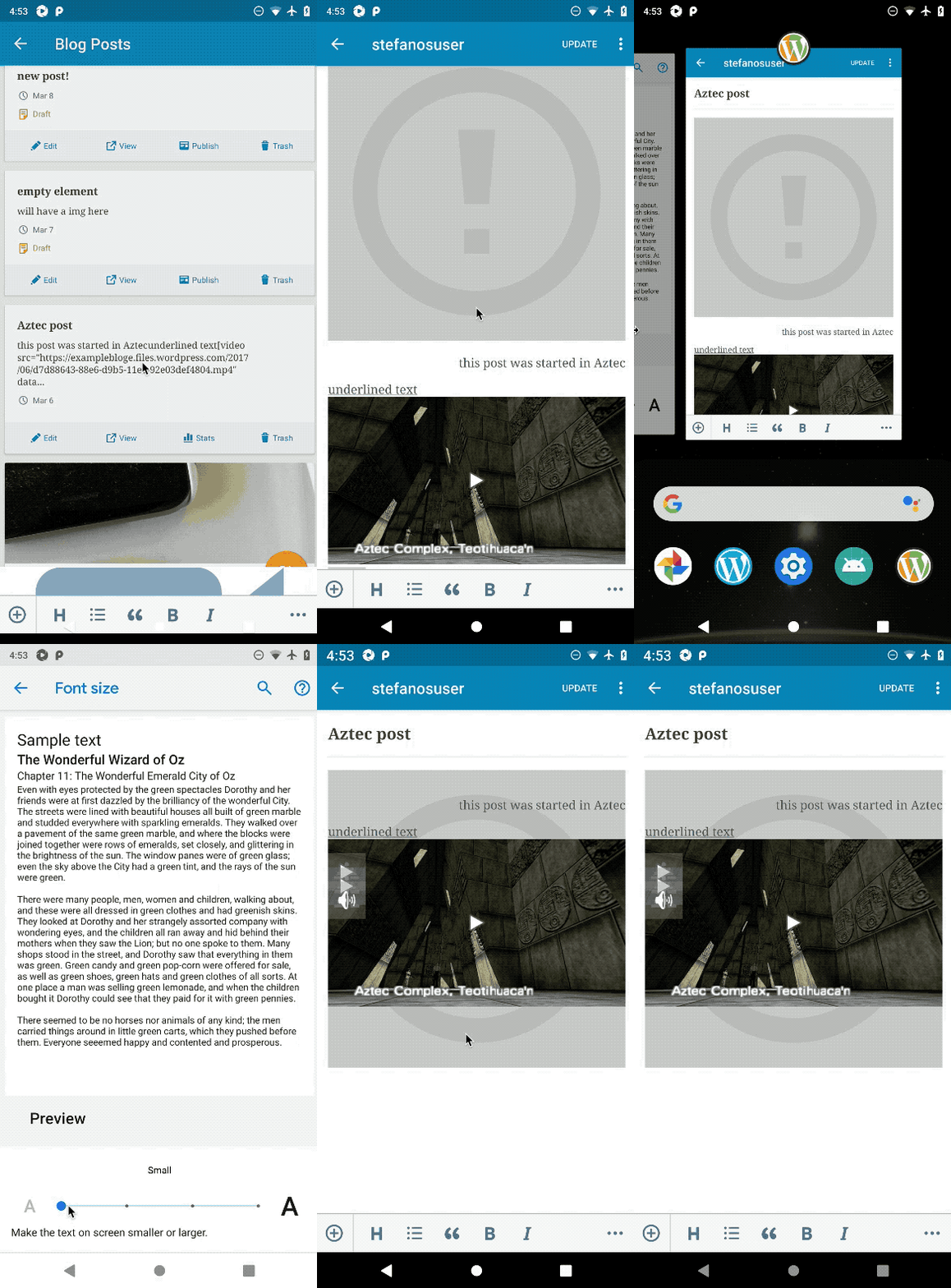
If our best solution at the moment is to adopt the fontScale config change and handle it ourselves, I might feel inclined to propose a solution like the option I mentioned in #8874 (comment), where the idea is to introduce a subclass of the EditPostActivity only to be able to specialize its manifest definition and similar.
In the meantime, can you check the issue shown in the gif @daniloercoli to see if it's fixable? Thanks!
There was a problem hiding this comment.
Yes, the issue I think is fixable without restarting Aztec but requires small changes to it. Calling RefreshText alone doesn't fix it, instead we need to reload the pictures/videos and re-layout them on configChanges. It alone is a rather small change, and we can try it and see the result.
Should we invest time on this?
Otherwise, for the reasons you've mentioned above, I think that's best to exclude Aztec from the config changes code altogether, and introduce another Activity...it could be a big PR though. Wondering if we should following this path for an event (font size change in settings) that is going to happen rarely.
There was a problem hiding this comment.
instead we need to reload the pictures/videos and re-layout them on configChanges. It alone is a rather small change, and we can try it and see the result.
Should we invest time on this?
I think this might be a rabbit hole. Plus, I don't think we know which other code or flow breaks in Aztec if we lift the assumption of the activity re-creation.
OTOH, going the new-Activity way for this particular issue (the font-size change) that's not critical is a bit much. Let's leave this PR unmerged and we give it some more thought?
There was a problem hiding this comment.
going the new-Activity way for this particular issue (the font-size change) that's not critical is a bit much.
Yes, 100% agree with you on the points mentioned above. The only way to be sure to not break Aztec is to duplicate the Activity, but it feels way to much for a very rare writing flow (user needs to change the font size when the editor is open on the screen. If they change the font size and then open the editor the new font size is respected).

Generated by 🚫 dangerJS |

|
Just a friendly reminder to please make sure to manually merge |
|
As agreed in Slack convo, i'm closing this PR since not actively working on it, and it's a kind of hacks on the top of other hacks we've introduce to keep RN state upon activity restart. We will revise it in the short future, hoping to find a better approach to the root problem. |
 jkmassel
deleted the
issue/605-Ensure-that-OS-level-font-size-settings-are-honored-in-editor
branch
jkmassel
deleted the
issue/605-Ensure-that-OS-level-font-size-settings-are-honored-in-editor
branch


Fixes #605 by reloading the RN context on system fontSize changes.
Description
We can't rely on the Android and RN font scaling system, since we're using GB mobile in a retained fragment, and the configuration changed code is not called automatically.
setRetainInstance(true)was set here in order to fix a couple of issues: history, scroll position, focused block, and caret position lost, on activity restart.In this PR we're manually recreating the RN context when fontSize configurationChanged event is received in the app.
NOTE: History, focused block, and caret/scroll position, are all lost after the config changed event. Since fontSize changes when the app is open on the editor is a kind of rare event, we're ok with not having the history for now.
To test
GB Mobile side PR available here: wordpress-mobile/gutenberg-mobile#808
Update release notes:
RELEASE-NOTES.txt.