Add avatar list at the top right corner #3529
Conversation


|
@luka-nextcloud Avatar display should work again after #3531 is merged |

loleaflet/html/loleaflet.html.m4
Outdated
| <input id="selectbackground" type="file" accept="image/*" style="position: fixed; top: -100em"> | ||
|
|
||
| <div id="closebuttonwrapper"> | ||
| <div class="userInfo"> |

There was a problem hiding this comment.
This should rather be moved out of the closebuttonwrapper
| $('#listActiveUser').append('<div class="user-item-wrapper" id="user-wrapper-' + viewId + '"><p class="user-item" id="user-' + viewId | ||
| + '" style="background-image:url(\'' + extraInfo.avatar + '\');border-color:' + color + '"></p><span> '+ userName +'</span></div>'); | ||
|
|
||
| $('.userInfo').append('<p class="user-top ' + ownerClass + '" id="user-top-' + viewId + '" style="background-image:url(\'' + extraInfo.avatar + '\');border-color:' + color + ';"></p>'); |
There was a problem hiding this comment.
Would be great if we could move the rendering of the header avatars to a separate method, ideally also just making use of plain javascript for the dom manipulation instead of jquery, so this doesn't have the external dependency on the library.
There was a problem hiding this comment.
A few other points to consider:
- The avatar might not be available
- For uniquely identifying the element you could use a data-view-id="" attribute
- Maintain the option to follow the current editor or a user
loleaflet/css/toolbar.css
Outdated
| } | ||
|
|
||
| .guess { | ||
| opacity: 0.5; |
There was a problem hiding this comment.
I'd say we don't need a separation between the display of the current user or guest like that. Also opacity may look a bit odd when other avatars are shining through
| var content = L.DomUtil.create('tr', 'useritem'); | ||
| content.id = 'user-' + viewId; | ||
| $(document).on('click', '#' + content.id, this.onUseritemClicked.bind(this)); | ||
| var ownerClass = userName == 'You' ? 'onwer' : 'guess'; |
There was a problem hiding this comment.
@pedropintosilva Maybe something for you to decide if we should actually show the avatar of the current user view or just hide it.
 luka-nextcloud
force-pushed
the
update-avatar-list
branch
2 times, most recently
from
luka-nextcloud
force-pushed
the
update-avatar-list
branch
2 times, most recently
from
06232e8 to
eefc4a8
Compare
|
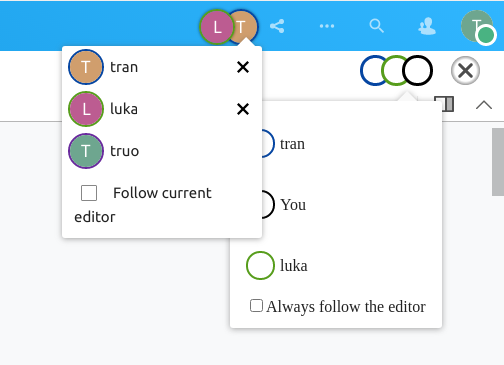
Here's a screenshot: |
|
|
||
| updateUserListCount: function() { | ||
| renderUserAvatars: function(viewId, userName, extraInfo, color) { | ||
| if (extraInfo !== undefined && extraInfo.avatar !== undefined) { |
There was a problem hiding this comment.
This check is duplicate with the one in https://github.com/CollaboraOnline/online/pull/3529/files#diff-41de9cb6f19860d72e4fe0ba9bae4682ea79c3312a3ca4ad3c1219cf43f0d8efR88
| renderUserAvatars: function(viewId, userName, extraInfo, color) { | ||
| if (extraInfo !== undefined && extraInfo.avatar !== undefined) { | ||
| var avatarElement = '<div class="user-item-wrapper" id="user-wrapper-' + viewId + '"><p class="user-item" id="user-' + viewId | ||
| + '" style="background-image:url(\'' + extraInfo.avatar + '\');border-color:' + color + '"></p><span> '+ userName +'</span></div>'; |
There was a problem hiding this comment.
| + '" style="background-image:url(\'' + extraInfo.avatar + '\');border-color:' + color + '"></p><span> '+ userName +'</span></div>'; | |
| + '" style="background-image:url(\'' + extraInfo.avatar + '\');border-color:' + color + '"></p><span> '+ this.escapeHtml(userName) +'</span></div>'; |
| align-items: center; | ||
| } | ||
|
|
||
| .user-item { |
There was a problem hiding this comment.
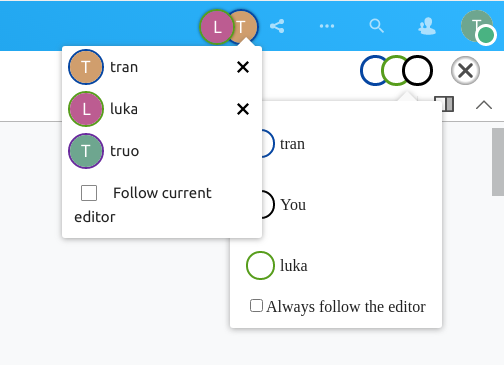
Please add somea dditional styling to make the spacing fit the existing popover entries and the font also match the default font-family: var(--loleaflet-font);
See screenshot for comparison:
loleaflet/html/loleaflet.html.m4
Outdated
| <div class="userInfo"> | ||
| <div class="userInfo-content" id="listActiveUser"> | ||
| </div> | ||
| </div> |
This comment was marked as resolved.
This comment was marked as resolved.
Sorry, something went wrong.
| var avatarElement = '<div class="user-item-wrapper" id="user-wrapper-' + viewId + '"><p class="user-item" id="user-' + viewId | ||
| + '" style="background-image:url(\'' + extraInfo.avatar + '\');border-color:' + color + '"></p><span> '+ userName +'</span></div>'; | ||
| if ($('#follow-editor').length == 0) { | ||
| $('#listActiveUser').append(avatarElement); |
This comment was marked as resolved.
This comment was marked as resolved.
Sorry, something went wrong.
luka-nextcloud
force-pushed
the
update-avatar-list
branch
from
eefc4a8 to
11f5fbf
Compare
 luka-nextcloud
force-pushed
the
update-avatar-list
branch
from
luka-nextcloud
force-pushed
the
update-avatar-list
branch
from
11f5fbf to
ff5667a
Compare
|
@luka-nextcloud This would be the open points I can think of right now, most likely best tackled in the order mentioned 😉
|
luka-nextcloud
force-pushed
the
update-avatar-list
branch
from
ff5667a to
b9c03f4
Compare

|
@luka-nextcloud it seems there are some problems in the following lines: browser/src/control/Control.UserList.js
88:1 error Expected indentation of 2 tabs but found 4 spaces indent
90:1 error Expected indentation of 2 tabs but found 4 spaces indentCould you please fix that? Note: make sure your text editor/IDE is using the proper JS linter with the appropriated configuration within online project:
|
|
Sure, let me check! |
luka-nextcloud
force-pushed
the
update-avatar-list
branch
from
b9c03f4 to
05638f9
Compare
|
This is still not passing the tests because
Maybe removing the default margin top and bottom from the child ( |
|
Probably the parent's position should also be tweaked after that, so maybe something like this : + #userListSummary p {
+ margin-top: 0;
+ margin-bottom: 0;
+ }
#userListHeader {
- top: 5px;
+ top: 2px;
} |
luka-nextcloud
force-pushed
the
update-avatar-list
branch
from
05638f9 to
cc1de4c
Compare
Signed-off-by: Luka Trovic <[email protected]>
Change-Id: I058de8da8e4f3fbd0994c3e50efa7c1deb5be8ac
luka-nextcloud
force-pushed
the
update-avatar-list
branch
from
cc1de4c to
47e6b07
Compare
|
@luka-nextcloud Lets continue over at #3677 as discussed 😉 |
|
this has been moved to #3677 |

3 participants


Signed-off-by: Luka Trovic [email protected]
Change-Id: I39f567c67a727a23fdef3d98a147fa30a13b36a4
Summary
TODO
Checklist
make checkmake runand manually verified that everything looks okay